


 ממיר וידאו אולטימטיבי
 מקליט מסך
 תיקון וידאו
Fotor הסר תכונות רקע וסקירת שיפור
כאשר עוסקים בעריכת תמונות, הסרה של רקע ומשפרי תמונה הם דבר מקובל בתחום, והם יכולים להעלות את איכות התוצר שלך ולהבליט אותו. כך נכנסו לתמונה כלים כמו Fotor בעולם עריכת התמונות, עם דגש על הסרת רקע ושיפור תמונות. שאלות נפוצות כמו „האם Fotor בטוח לשימוש?” עולות לא פעם. בסקירה זו נבחן לעומק את מגוון התכונות של Fotor ונחשוף את היכולות שלו. במקביל, נצא למסע למציאת אלטרנטיבה בולטת נוספת שכדאי לך לשקול לנסות. המשך לקרוא את סקירת Fotor כדי לגלות את היכולות של Fotor בהסרת רקע ושיפור תמונות, ולהחליט אם זה אכן הכלי המתאים לצרכים שלך.

חלק 1. סקירת Fotor - מסיר רקע ומשפר תמונות
גישה לכלי עריכה רב-תכליתיים ועוצמתיים היא חיונית בעולם הדינמי של צילום דיגיטלי ועיצוב יצירתי. Fotor, תוכנית עריכת תמונות מקיפה, מצטיינת במתן הכלים הדרושים למשתמשים כדי לנווט בתחום המתפתח כל הזמן. חקור את היכולות שלו, במיוחד את התכונות הבולטות כמו מסיר הרקע ומשפר תמונות, כדי לשפר את המסע היצירתי שלך היום!
צילום
Fotor, כלי עריכת תמונות רב־תכליתי, ידוע בממשק הידידותי שלו למשתמש ובתכונות המרשימות לשיפור תמונות ולהסרת רקע. כלי ה–Background Remover שלו מאפשר למשתמשים להסיר רקעים ולהעלות את רמת התמונות שלהם בקלות. שילוב עם המשפר תמונות שלהם יספק לך את התוצאה האיכותית והמושלמת שאתה מחפש. הכלי הזה לא מיועד רק לעריכת תמונות, אלא גם מציע המון תבניות למי שאינם מקצוענים כדי להתחיל לעבוד על הפרויקטים שלהם. אם אתה מחפש תוכנה שמכילה כמעט את כל הבסיסים יחד עם תכונות להסרת רקע ושיפור התמונות שלך, ייתכן שתרצה לשקול את Fotor כאחת מהאפשרויות שלך.
הכי טוב בשביל
Fotor אידיאלי עבור אנשים ועסקים המחפשים פלטפורמה אינטואיטיבית לשיפור התמונות שלהם, במיוחד כאשר הסרת רקע מדויקת חיונית לתוצאה סופית מלוטשת. להלן חלק ממה שיש ל-Fotor למעשה יכולות ומשמשות בצורה הטובה ביותר:
◆ יחידים ועסקים. התוכנה הידידותית הזו מיועדת גם לאנשי מקצוע וגם למתחילים, והיא מהווה פתרון מושלם שמאפשר ליחידים או לעסקים ליצור ולשפר פרויקטים בקלות בזכות הממשק והתכונות הפשוטים שלה.
◆ כלים לשיפור תמונה. Fotor עמוס בתבניות ופילטרים כדי לגרום לתמונות שלך להיראות באיכות הטובה ביותר האפשרית. בנוסף, Fotor מטשטש ומחליק פגמים באמצעות תכונות שיפור התמונות שלו, מה שהופך אותו לכלי אידיאלי כשמתמודדים עם בעיות איכות בתמונות.
◆ מסיר רקע. הדיוק של Fotor בהסרת רקע בהחלט ראוי לשבח, משום שהוא מספק תוצאות מדויקות בהשוואה לתוכנות אחרות באינטרנט.
◆ עריכת תמונות. הוא כולל את הכלים הנחוצים להתמודדות עם עריכת תמונות וכדומה. כתוצאה מכך, Fotor הופך לתוכנה שאליה פונים כאשר נדרש לבצע משימות רבות בעריכת תמונות.
תמחור
מודל תמחור: Basic ו–Pro
Fotor Basic: חינם
Fotor Pro: $8.99/לחודש
◆ עיבוד תמונה אצווה.
◆ עורך תמונות ומשפר.
◆ זמינות במספר מכשירים.
◆ תבניות מובנות מראש.
◆ מסיר רקע.
◆ כלי קולאז' תמונות.
◆ ממיר קבצי RAW.
◆ מתקדם מסננים ואפקטים.
◆ יצרנית עיצוב.
שלבים לשימוש ב-Fotor Photo Enhancer
שלב 1. עבור לאתר Fotor Photo Enhancer והעלה את התמונה שברצונך לשפר בשדה Enhance Photo Now.
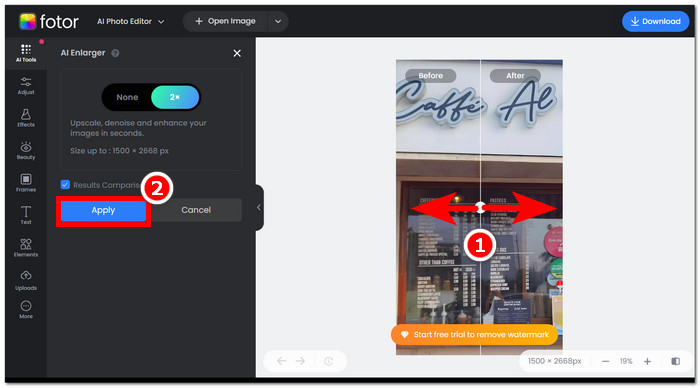
שלב 2. Fotor יעבד את התמונה שלך באופן אוטומטי. כל שנותר לך הוא להשוות בין התצוגה לפני ואחרי על ידי גרירת סמן החץ משמאל לימין.
שלב 3. כשתהיה מרוצה, לחץ על Apply כדי לשמור את ההתקדמות שביצעת בתמונה.
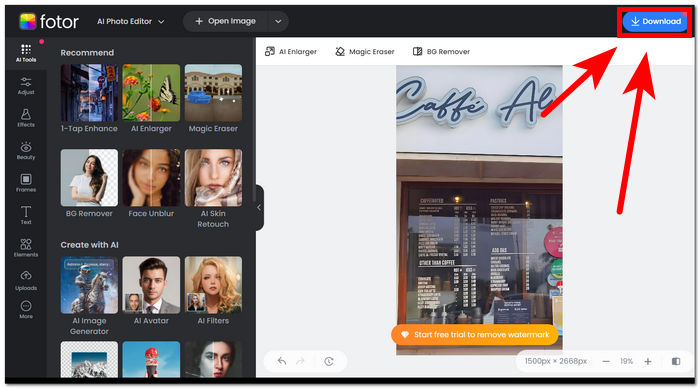
שלב 4. בעת שמירת התמונה המשופרת, לחץ על Download, הממוקם בפינה הימנית־עליונה של המסך.,
שלבים לשימוש במסיר רקע של Fotor
שלב 1. עבור לאתר Fotor Background Remover והעלה את התמונה שממנה ברצונך להסיר את הרקע בשדה Upload Image.
שלב 2. לאחר שהתמונה תיטען בתוכנה, היא תסיר באופן אוטומטי את הרקע של התמונה שהעלית.
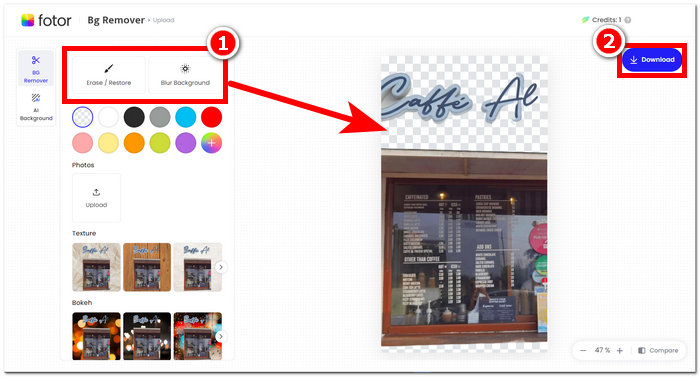
שלב 3. באפשרותך למחוק/לשחזר את הרקע ידנית על ידי ניסוי בכלי Erase/Restore לפי רצונך, הממוקם בניווט העליון־השמאלי.
שלב 4. כשתהיה מרוצה מהתוצאה, לחץ על Download, הממוקם בפינה הימנית־עליונה של המסך, כדי לשמור אותה במחשב שלך.
אם לסכם את הסקירה ב- Fotor, התכונות שלה גדולות באופן משמעותי מדי בתחום עריכת התמונות. לפיכך, זה יאפשר לך ליצור פרויקטים נפלאים בקלות. מלבד היותו מורכב מכל הכלים הבסיסיים כאשר עוסקים במניפולציה של תמונות, הדגש על שיפור התמונות ומסיר רקע הוא חלק, שכן קל לנווט בממשק שלו בקלות. עם זאת, מתוך כל התכונות שלו שהובאו לשולחן, אתה יכול ליהנות באופן מלא מהתכונות והפונקציונליות של Fotor רק כשאתה מנוי לתוכנית החודשית שלו.
חלק 2. Fotor אלטרנטיבה להסרת רקע ותמונות יוקרתיות
FVC התרחבה ופיתחה כלים ותוכנות המותאמים לצורכיהם של יוצרים בתעשיית העריכה הוויזואלית. שניים מהכלים הללו הם FVC Free Background Remover ו–FVC Free Image Upscaler; לשני אלה יש דומיין מבוסס־אינטרנט נפרד כדי להפריד ביניהם ולא לבלבל משתמשים לגבי מטרתם. בניגוד לכך, כלים מבוססי תוכנה מרכזים כל כלי למשימה שונה בתוך תוכנה אחת, מה שהופך את המשימה לממושכת יותר עד שמתרגלים אליה. בנוסף, כלים אלה של FVC מסייעים ליוצרים להשתמש בתכונותיהם בחופשיות ועם פחות טרחה בתהליך ההורדה וההתקנה. להלן רשימת השלבים לשימוש בכלי הסרת הרקע ומגדיל התמונות (Upscaler) של FVC.
שלבים לשימוש ב–FVC Free Background Remover:
שלב 1. בקר באתר FVC Free Background Remover והעלה את התמונה שממנה ברצונך להסיר את הרקע.
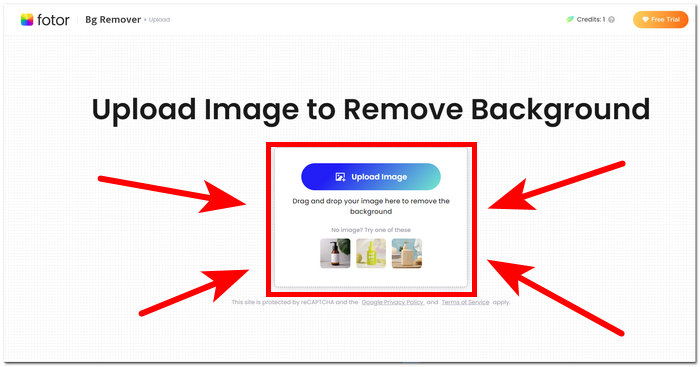
שלב 2. ה–AI של FVC מאתר באופן אוטומטי ומסיר את הרקע מהתמונה שלך.
שלב 3. לאחר סיום התהליך, תוכל כעת להוריד (Download) את התמונה שלך.
שלבים לשימוש בתכונות של FVC Free Image Upscaler:
שלב 1. העלה את התמונה שלך לאתר FVC Image Upscaler.
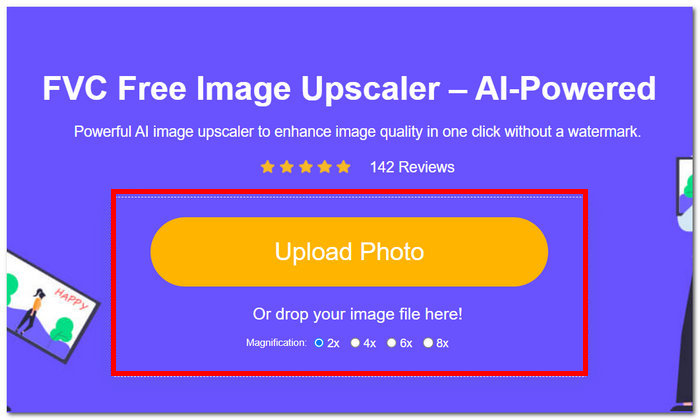
שלב 2. בחר את רמת ההגדלה (Magnification) הרצויה ופשוט לחץ עליה.
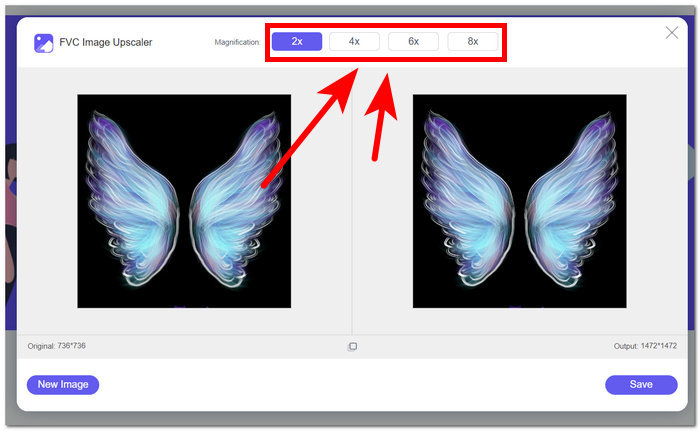
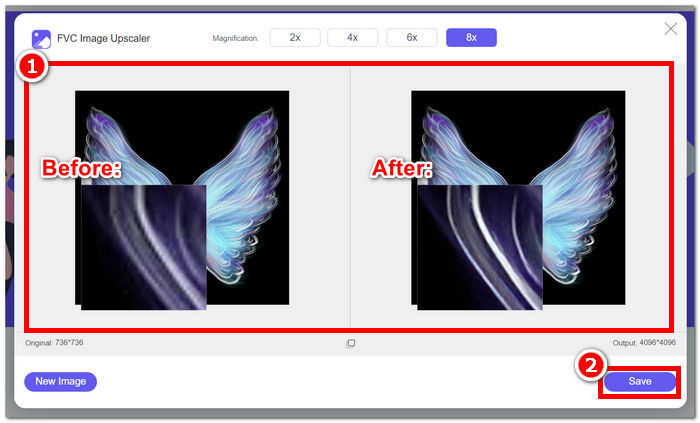
שלב 3. הכלי יעבד את התמונה באופן אוטומטי, ותוכל לראות את ההבדל בהתאם לרמת ההגדלה שבחרת.
שלב 4. התמונה המוגדלת שלך כעת מוכנה לשמירה. פשוט לחץ על Download.
כלי Fotor ו-FVC עשויים להניב את אותן תוצאות איכות ודיוק בכל הנוגע לטיפול בהסרת רקע ושידרג תמונה. עם זאת, הם שונים בזמינותם כאשר כלי FVC חופשיים לשימוש בכל דפדפן מקומי, בעוד של-Fotor עשויות להיות תכונות חינמיות בסיסיות אך מוגבלות. הקפד לבדוק תחילה את הפונקציונליות והנוחות שהם מביאים עבורך ואפשר לעצמך להיות שקוע בשימוש בכלים מקוונים מהירים, יעילים ובטוחים. ל-FVC יש את הגב כדי לחסוך זמן ולחזור לסיים את הפרויקטים הממתינים שלך בזמן.
חלק 3. שאלות נפוצות אודות Fotor
האם ניתן להשתמש ב-Fotor בחינם?
כן, Fotor מציעה גרסה חינמית של פלטפורמת עריכת התמונות שלה, המעניקה למשתמשים גישה לכלים בסיסיים ללא עלות. זה מאפשר לאנשים להשתמש בתכונות חיוניות מבלי להיגרם לחיובים כלשהם.
כמה עולה Fotor לחודש?
Fotor מספקת תוכניות תמחור מגוונות, הכוללות מנויים חודשיים ושנתיים כאחד, עם וריאציות בעלות בהתאם לתכונות הכלולות. כדי לראות מידע תמחור עדכני ומדויק, מומלץ למשתמשים לפנות לאתר הרשמי של Fotor לקבלת פרטים על ההצעות הנוכחיות שלהם.
כמה זמן תקופת הניסיון בחינם של Fotor?
Fotor עשויה לספק ניסיון חינם עבור תכונות הפרימיום שלה, אם כי משך הניסיון נתון לשינויים. לקבלת המידע העדכני ביותר על משך הניסיון בחינם, מומלץ לבדוק באתר הרשמי של Fotor.
הצילום לא עובד?
אם אתה נתקל בבעיות כאשר Fotor לא עובד, שקול לבדוק את חיבור האינטרנט שלך, לנקות את מטמון הדפדפן שלך או לעדכן את האפליקציה אם אתה משתמש בגרסת שולחן עבודה. אם הבעיות נמשכות, מומלץ לפנות לתמיכת הלקוחות של Fotor לקבלת סיוע. הם יכולים להדריך אותך בפתרון בעיות טכניות או להציע תובנות לגבי כל עדכוני מערכת אפשריים.
האם Fotor היא תוכנית טובה?
כן, Fotor נחשבת לתוכנית טובה לעריכת תמונות, המציעה ממשק ידידותי למשתמש המתאים הן למתחילים והן למשתמשים מנוסים יותר. התכונות המגוונות שלו, כולל מסיר הרקע, הופכות אותו למגוון לצרכי עריכה שונים. עם זאת, ההתאמה של Fotor תלויה בהעדפות אישיות ובדרישות ספציפיות לשיפור התמונות.
סיכום
Fotor ניצב כמתמודד ראוי לציון, במיוחד בזכות תכונות הסרת הרקע ושיפור התמונה שלו. הוא הפך לאחד הכלים הסטנדרטיים בעריכת תמונות בזכות מגוון התכונות והממשק שלו, הכוללים כמעט את כל הכלים הבסיסיים הנחוצים בתחום. עם זאת, מתוך הכרה בצרכים המגוונים של המשתמשים, בחינת חלופות כמו FVC מציעה נקודת מבט רחבה יותר. בין אם תבחר ב–Fotor או באחת מהחלופות שלו, העיקר הוא להעצים את המסע היצירתי שלך באמצעות כלים שמתיישרים עם החזון שלך. הקפד לנסות ולמצות את היכולות של כל כלי כדי למצוא את הכלי הטוב ביותר לפרויקטים שלך בהסרת רקע ושיפור תמונות.
-
 כיצד להסיר רקע מתמונה באמצעות GIMP
 התחל ב-GIMP ובתהליך שלב אחר שלב של הסרת רקעים מתמונות. גלה דרכים יעילות ליצור תמונות שקופות באמצעות GIMP היום!
-
 כיצד להגדיל את גודל התמונה באופן מקוון ולא מקוון
 גלה את הדרך הקלה ביותר להגדיל את גודל התמונה מבלי לאבד איכות. ראה את הכלים והתוכנה שלנו לשינוי גודל כדי להבטיח איכות אופטימלית לתמונות שלך.
-
 כיצד לשנות גודל תמונה בפוטושופ: מדריך חובה לדעת
 למד את התהליך שלב אחר שלב כיצד לשנות גודל תמונה בפוטושופ. עקוב אחר המדריך הזה כדי לשנות ביעילות את גודל התמונות שלך בקלות ובאיכות!
