


 ממיר וידאו אולטימטיבי
 מקליט מסך
 תיקון וידאו
 הורדה מאובטחת
4 שיטות יעילות: כיצד להקטין את גודל קובץ התמונות באייפון
בדרך כלל, עם ה‑iPhone שלנו, אנחנו צריכים להעלות תמונות ישירות לאתרים מסוימים או לשלוח אותן בדוא״ל או בפלטפורמות אחרות. עם זאת, התמונות שצולמו ב‑iPhone בדרך כלל מגיעות בקבצים גדולים בגלל האיכות הגבוהה של התמונות שמצלמות המצלמות המתקדמות שלו. כדי להקטין את גודל קובץ התמונות ב‑iPhone שלך מבלי לפגוע יותר מדי באיכות, הנה ארבע שיטות יעילות שכדאי לך להכיר. המשך לקרוא כדי ללמוד את כולן!

חלק 1. הפחת את גודל קובץ התמונות באייפון בהגדרות המצלמה
הדרך הפשוטה והמהירה ביותר להקטין את גודל קובץ התמונה ב‑iPhone היא דרך אפליקציית ההגדרות. בשיטה זו אתה יכול לבחור את הפורמט עבור כל התמונות שאתה מצלם במצלמת ה‑iPhone שלך. העניין עם iPhone הוא שהוא בדרך כלל מוגדר לפורמט הכי תואם, מה שגורם לכך שהתמונות נשמרות בקבצים גדולים. עם זאת, אם ברצונך לחסוך מקום אחסון, עליך לשנות את הגדרות פורמט המצלמה ליעילות גבוהה ול־כבות את פורמט HEIC. הגדרת מצלמה כזו לא תפחית את איכות התמונות, אך תחסוך לך הרבה מקום ב‑iPhone שלך.
כך תוכל להקטין את גודל הקובץ בהגדרות המצלמה:
שלב 1. ב‑iPhone שלך, עבור אל ״הגדרות״, חפש ״מצלמה״ ובחר ״פורמטים״ (Formats).
שלב 2. בראש המסך, בחר High Efficiency. פורמט זה מאפשר לקבל את גודל הקובץ הקטן ביותר ללא הורדת איכות.
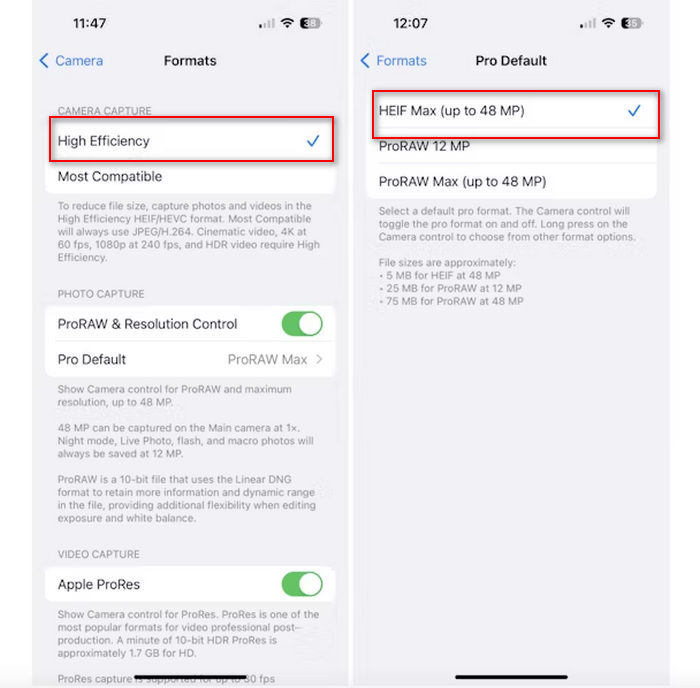
שלב 3. כדי להקטין עוד יותר את גודל קובצי התמונה שלך, הקש על Pro Default ובחר HEIF Max up to 48 MP. כך גודל התמונה שלך יוגבל לכ‑5MB.
הקטנת גודל הקובץ באייפון על ידי שינוי הגדרות המצלמה שלו עשויה להיות דרך טובה לדחוס תמונות. עם זאת, זה ייקח קצת זמן כאשר אתה רוצה לשנות את הגדרת המצלמה כאשר אתה רוצה גם לצלם תמונות באיכות גבוהה שעשויות להיות בגודל קובץ גדול.
חלק 2. דחוס תמונות באייפון על ידי חיתוך
חיתוך היא שיטה יעילה להקטנת גודל התמונה באייפון מכיוון שהיא מסירה חלקים מיותרים מהתמונה, ובכך מקטינה את גודל הקובץ הכולל. כאשר אתה חותך תמונה, אתה בעצם חותך חלקים מהתמונה שאינך צריך, מה שלא רק מתמקד במרכיבים החשובים של התמונה אלא גם מפחית את כמות הנתונים שהקובץ מכיל. זה יכול להיות שימושי במיוחד לחיסכון בשטח אחסון באייפון שלך ולהקל על שיתוף תמונות בפלטפורמות שונות.
כך תוכל לדחוס תמונות באייפון שלך על ידי חיתוך שלהן:
שלב 1. פתח את התמונה באפליקציית תמונות (Photos) שברצונך להקטין את גודל הקובץ שלה והקש על עריכה (Edit).
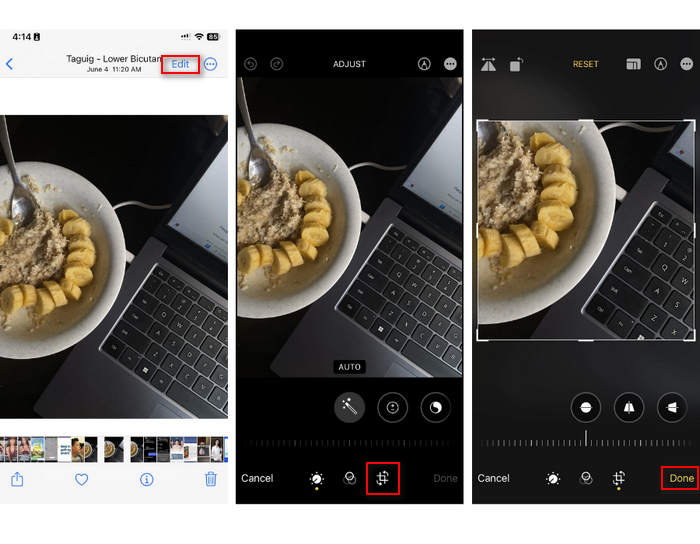
שלב 2. כעת הקש על כפתור חיתוך (Crop) בתחתית וחַתֵּךְ את החלקים הלא רצויים מהתמונה.
שלב 3. התאם את החיתוך לפי רצונך ולאחר מכן הקש על סיום (Done).
למרות שזה עשוי להקטין את גודל קובץ התמונות באייפון, שיטה זו לא תמיד תהיה ישימה בכל עת, לכן מומלץ להשתמש בכלים אחרים כדי לדחוס תמונות באייפון מלבד זאת.
חלק 3. הקטנת גודל קובץ התמונות באייפון באמצעות אפליקציית מדיה חברתית
WhatsApp מאפשרת למשתמשים להקטין את גודל קובצי התמונות ב‑iPhone. היא מציעה אפשרות לדחוס את התמונה לגודל קטן יותר לפני השליחה, מה שעוזר לחסוך מקום אחסון ומקל על שיתוף התמונות.
כך תוכל לדחוס תמונות באייפון שלך באמצעות WhatsApp:
שלב 1. ב‑WhatsApp שלך, פתח שיחת הודעות.
שלב 2. לאחר מכן הקש על סמל התמונה ובחר את התמונה שברצונך לשלוח.
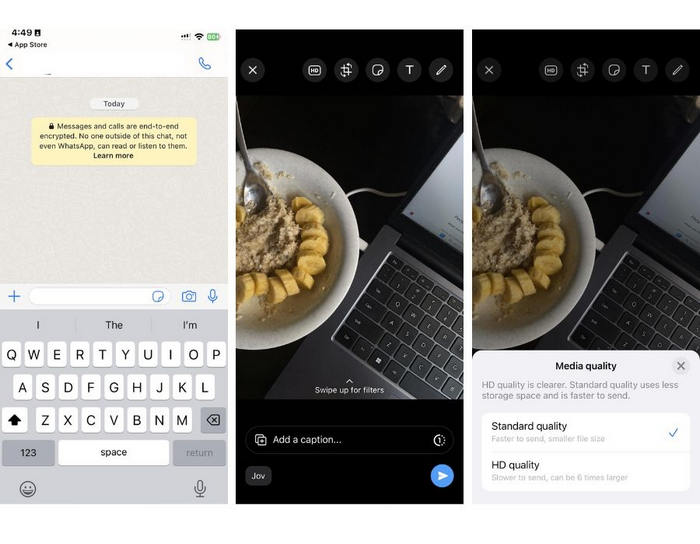
שלב 3. לאחר מכן, הקש על HD כדי להתאים את גודל הקובץ על‑ידי בחירה בשליחת התמונה באיכות רגילה (Standard).
שלב 4. הקש על החץ כדי לשלוח את ההודעה ולהוריד אותה.
שיטה זו מומלצת מאוד למי שמותקן בווטסאפ באייפון. למרות שזו דרך מצוינת להקטין את גודל קובץ התמונות באייפון, היא תשפיע באופן משמעותי על איכות התמונה.
חלק 4. דחוס תמונות באייפון עם כלי מקוון
אם בינתיים אתה מחפש דרך ישירה וקלה במיוחד להקטין את גודל קובץ התמונה ב‑iPhone, הכלי הטוב ביותר שבו תוכל להשתמש הוא FVC Free Image Compressor. כל מה שעליך לעשות הוא להיכנס לכלי הזה אונליין, להעלות את התמונה שברצונך לדחוס – וזהו. נוסף על כך, עם הכלי הזה תוכל לדחוס כמה תמונות בבת אחת ישירות מה‑iPhone שלך, ולדחוס אותן באופן משמעותי מבלי לאבד הרבה מהאיכות שלהן בהשוואה לשיטות האחרות שהוזכרו למעלה.
כך תוכל לדחוס תמונות באייפון שלך באמצעות FVC Free Image Compressor:
שלב 1. ב‑Safari שלך, חפש FVC Free Image Compressor.
שלב 2. הקש על הכפתור Upload Images כדי לייבא את התמונות שעבורן ברצונך להקטין את גודל הקובץ.
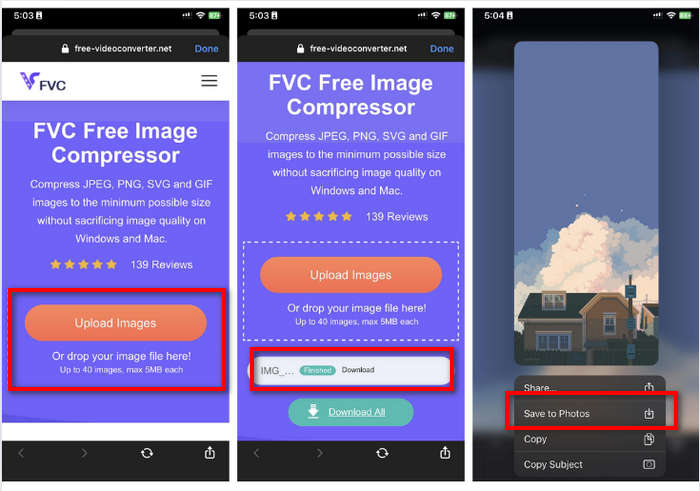
שלב 3. לאחר מכן, התמונות שלך יידחסו אוטומטית. הקש על כפתור Download, לחץ לחיצה ארוכה על התמונה הדחוסה ובחר באפשרות Save to Photos.
עם FVC Free Image Compressor, הפחתת גודל קובץ התמונות באייפון יכולה להיעשות כל כך מהר מבלי לאבד הרבה מאיכותו. יתר על כן, הנגישות והממשק הידידותי שלו הופכים אותו לכלי בחירה עבור משתמשי אייפון לדחיסת התמונות שלהם.
חלק 5. שאלות נפוצות לגבי הקטנת גודל קובץ התמונות באייפון
כיצד אוכל להקטין את גודל הקובץ של JPEG מבלי לאבד רזולוציה?
על מנת להקטין את הגודל של JPEG מבלי לאבד רזולוציה, אתה יכול להשתמש ב-FVC Free Image Compressor. כלי מקוון זה מאפשר לך לדחוס את התמונות שלך תוך שמירה על איכותן. כל שעליך לעשות הוא להעלות או לייבא את קובץ התמונה לכלי, והוא ידחוס אותו עבורך באופן אוטומטי. לאחר מכן תוכל להוריד את התמונה הדחוסה בחזרה לאייפון שלך.
איך אני רואה את גודל הקובץ של תמונות באייפון?
אתה יכול לראות את גודל הקובץ של התמונות שלך באפליקציית הקבצים של האייפון שלך. אם התמונה שלך לא נמצאת באפליקציית הקבצים, עליך להעלות אותה תחילה ל-iCloud שלך. לאחר שהתמונה נמצאת ב-iCloud, תוכל להציג את גודל הקובץ שלה על ידי גישה אליו דרך אפליקציית הקבצים.
איזה סוג תמונה מצלמים באייפון?
מכשירי iPhone בדרך כלל שומרים תמונות ב-HEIC או בפורמט קידוד תמונה ביעילות גבוהה כברירת מחדל. HEIC מציע דחיסה טובה יותר מאשר JPEG תוך שמירה על איכות גבוהה. אתה יכול לשנות הגדרה זו בחלק המצלמה של אפליקציית ההגדרות תחת פורמטים.
סיכום
מכיוון שה‑iPhone יוצר קבצים גדולים בעת צילום תמונות, שיתוף והעלאה יכולים להיות מאתגרים. לכן, ללמוד איך להקטין את גודל קובץ התמונות ב‑iPhone הוא צעד מצוין כאשר אתה רוצה לייעל את התמונות שלך לשימוש חלק ונוח. עכשיו הבחירה בידיך באיזו שיטה להשתמש כדי לדחוס את התמונות. אז למה לחכות? דחוס את התמונות שלך ב‑iPhone כבר עכשיו!
-
 כיצד לשנות את גודל התמונה - Adobe שינוי גודל תמונה [מקוון ולא מקוון]
 אם אתה מחפש את גודל התמונה של Adobe, אז יש לנו את הפתרון בשבילך. עיין בפוסט זה ביסודיות כדי ללמוד כיצד לשנות את גודל התמונות באמצעות Adobe במחשב האישי שלך.
-
 כלי תוכנית לשינוי גודל של Creative GIF זמינים בנוחות
 שינוי גודל קובצי GIF יכול להיות משימה כואבת. השתמש בתוכניות הנכונות כדי לשנות את גודל קובצי ה-GIF שלך ולבצע את עבודתך ללא רבב. עיין במאמר זה למידע נוסף.
-
 3 דרכים לשנות את גודל התמונה עבור טוויטר מבלי לאבד איכות
 כדי לשנות את גודל התמונה עבור טוויטר, יהיה עליך להצטייד ב-Resizer לתמונות ביד. אין לך כזה? לאחר מכן בחר ברשימה.
