


 ממיר וידאו אולטימטיבי
 מקליט מסך
 תיקון וידאו
 הורדה מאובטחת
מדריך קל להסרת סימן מים של DeviantArt עם הכלים האולטימטיביים
DeviantArt ידועה כגלריית האמנות המקוונת והקהילה הגדולה ביותר. יש לו תמונות מלאי שאתה יכול לגשת אליהן באינטרנט. אתה יכול לחקור למעלה מ-350 מיליון יצירות אמנות ודימויים שנוצרו על ידי אמנים וחובבי אמנות בכל רחבי העולם. בנוסף, הוא כולל יצירות אמנות רבות, צילום ווידאו. מטרתו העיקרית היא לקדם, להציג ולשתף את יצירותיהם של האמנים. DeviantArt הוא גם מדיום לחיבור בין אמנים ברחבי העולם, שבו הם יכולים לחלוק את תחומי העניין שלהם, ליצור קשרים זה עם זה ולדבר על האמנויות שלהם.
עם זאת, כאשר אתה מוריד תמונות מ‑DeviantArt ואינך רשום, הן מכילות סימן מים. לכן, הדרך הטובה ביותר עבורך היא להסיר את סימן המים באמצעות אפליקציות צד שלישי. למרבה המזל, מצאנו כלים מקוונים שמאפשרים לך להסיר כל סימן מים מהתמונה שלך מ‑DeviantArt. קרא מאמר זה בעיון כדי להכיר את מסירי סימני המים הטובים ביותר ל‑DeviantArt, ולמד כיצד להסיר את סימן המים של DeviantArt בעזרת הכלים החזקים ביותר.

חלק 1. מדוע DeviantArt מציבה סימן מים על תמונות
רבים משתמשים בסימני מים כדי למנוע העתקת עבודתם, בין אם מדובר בתמונה או בסרטון. ברגע שאתה מעלה או משתף תמונה ממדיה חברתית, היא נוטה להיות מועתקת. לכן, אם אתה רוצה לקבל קרדיט על העבודה שלך, הדבר הטוב ביותר לעשות הוא להוסיף סימן מים על התמונה או הסרטון שלך.
DeviantArt גם עושה את אותו הדבר. הם מטמיעים סימני מים או לוגו על התמונות שלהם, כך שהם לא יועתקו אפילו בלי לרכוש את התמונה. DeviantArt גם מציבה סימן מים על התמונות שלה כדי שהחברה תהיה ידועה בעבודות התמונה שהיא מייצרת. יתרה מזאת, סימן המים של DeviantArt מבטיח שלא יעשה שימוש חוזר או שינוי בתמונות ללא רשות הבעלים.
לכן, אם יש לך סימן מים של DeviantArt על התמונה שאתה מוריד, הדבר הטוב ביותר עבורך לעשות הוא להסיר את סימן המים הזה. כדי לעשות זאת, קרא את החלק הבא.
חלק 2. כיצד להסיר סימן מים של DeviantArt באינטרנט
אם אתה רוצה להסיר את תמונת סימן המים של DeviantArt, תחילה עליך למצוא מסיר סימן מים. למרבה המזל, יישומי תוכנה רבים יעזרו לך להסיר את סימן המים של DeviantArt. ואם אתה רוצה להסיר את סימן המים בצורה נוחה, מומלץ להשתמש בכלי מקוון כי אתה לא צריך להוריד שום דבר במכשיר שלך. לכן, קרא את החלק הזה באופן כולל כדי לדעת את הכלי המדהים ביותר לשימוש וללמוד כיצד להסיר את סימן המים של DeviantArt מהתמונות שלך.
מסיר סימני מים חינם FVC
FVC Free Watermark Remover הוא אחד ממסירי סימני המים המקוונים המפורסמים ביותר, שניתן לגשת אליהם מכל דפדפן אינטרנט. בנוסף, הוא תומך ברוב פורמטי התמונה הסטנדרטיים, כמו PNG, JPEG, JPG ו‑BMP. הוא גם קל לשימוש, ולכן משתמשים מתחילים רבים מעדיפים להשתמש בכלי הזה. מעבר לכך, בעזרת כלי המחיקה (Polygonal, Lasso ו‑Brush) שבאפליקציה תוכל להסיר ידנית את סימן המים של DeviantArt מהתמונה שלך. כמו כן, אין צורך להיכנס עם שום חשבון והוא חינמי. ואין צורך לדאוג לגבי פורמט הפלט של התמונה שלך, מפני שהוא מייצא את התמונה בפורמט המקורי שלה.
כיצד להסיר סימן מים של DeviantArt על התמונה שלך באמצעות מסיר סימני מים בחינם של FVC:
שלב 1. פתח את הדפדפן שלך וחפש FVC Free Watermark Remover. לחילופין, תוכל ללחוץ על הקישור שסופק כדי לעבור ישירות לעמוד שלהם.
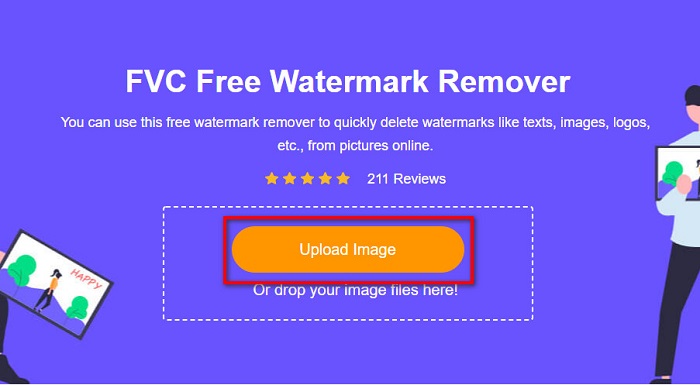
שלב 2. לאחר מכן, לחץ על כפתור Upload Image כדי להעלות את תמונת ה‑DeviantArt שלך לממשק הראשי של התוכנה.
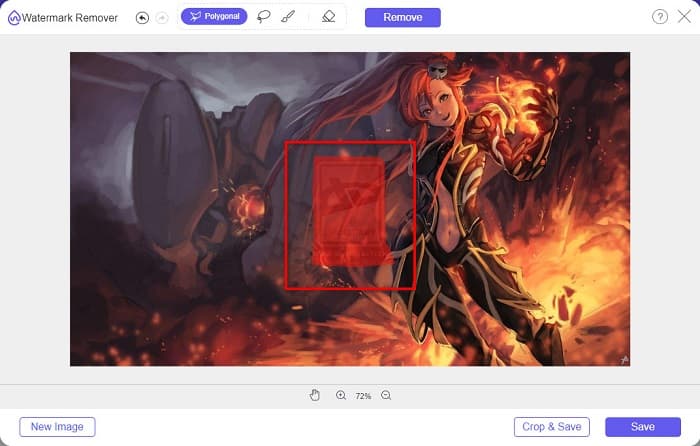
שלב 3. ואז, בחר את כלי המחיקה המועדף עליך. הפעם נשתמש ב‑Polygonal Tool. לאחר מכן, סמן את האזור שבו נמצא סימן המים בתמונה.
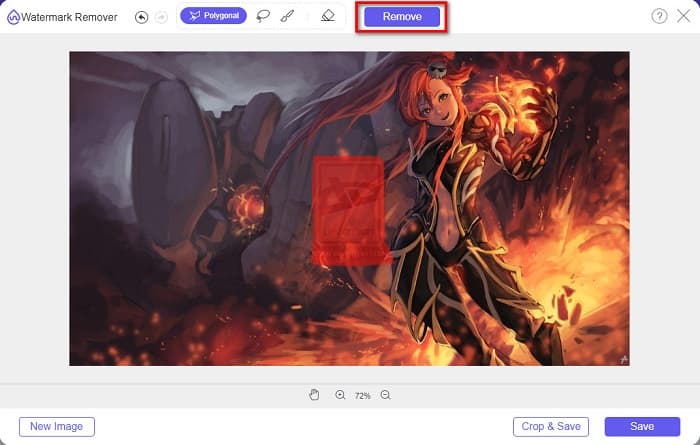
שלב 4. לחץ על כפתור Remove כדי להסיר את סימן המים מתמונת ה‑DeviantArt שלך.
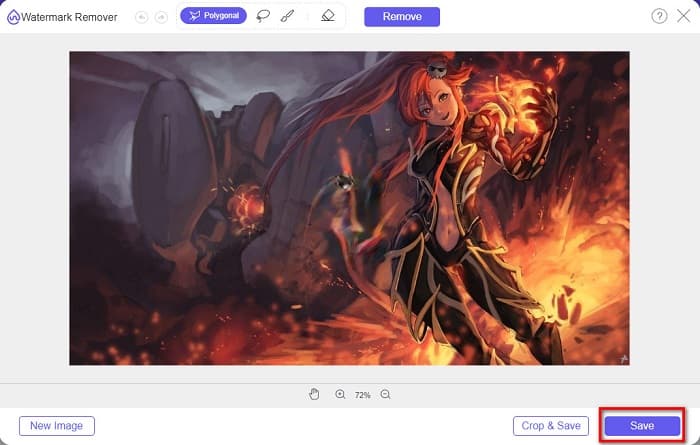
שלב 5. לבסוף, לחץ על כפתור Save כדי לשמור את התמונה במכשיר שלך. וזהו! באותה דרך אתה יכול גם להסיר את סימן המים של Lumion.
כמסיר סימני מים חינמי לחלוטין של Deviantart, מסיר סימני מים FVC מאפשר לך לבחור את האזור הלא רצוי באמצעות כלי פוליגונל, לאסו ומברשת, מה שמבטיח בחירה מדויקת. בלחיצה אחת, זה יכול להסיר בקלות את סימן המים של Deviantart באינטרנט בחינם. למרות שהתהליך פשוט יחסית, התוצאה בהחלט לא תכשיל אותך. אני מעדיף את הכלי הזה בעיקר.
Watermark Remover.io
Watermark Remover.io הוא כלי פופולרי המשמש להסרת כל סוג של סימן מים. זהו כלי ידידותי למשתמש משום שממשק התוכנה שלו קל לשימוש. בנוסף, הוא תומך בפורמטי התמונה הנפוצים ביותר, כמו PNG, JPEG, JPG, WEBP ואחרים. מה שמרשים במיוחד הוא שהוא משתמש בתהליך הסרה מבוסס בינה מלאכותית, שבו הוא מסיר את סימן המים באופן אוטומטי לאחר העלאת התמונה. נוסף על כך, הוא נגיש כמעט בכל דפדפני האינטרנט, כמו Chrome ו‑Firefox.
שלבים להסרת סימן המים של DevianArt על התמונה שלך:
שלב 1. עבור לדפדפן שלך וחפש Watermark Remover.io. לאחר מכן לחץ על דף האינטרנט שמוביל לכלי.
שלב 2. תבחין בכפתור Upload Image בממשק הראשי ולחץ עליו.
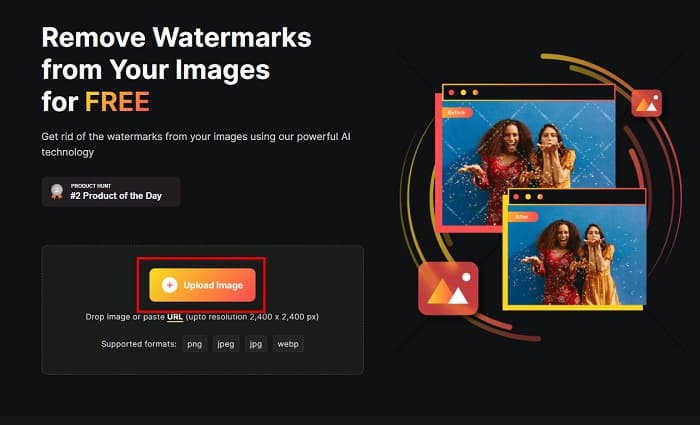
שלב 3. לאחר העלאת התמונה, הוא יסיר אוטומטית את סימן המים המשובץ. וזה הכול! כך תוכל להסיר את סימן המים של DeviantArt מהתמונה שלך בפשטות רבה.
כלי זה גם טוב לשימוש עם פורמטים רחבים נתמכים של תמונה כמו PNG, JPEG, WEBP וכו'. הוא גם מאפשר לך להדביק כתובות אתרים של תמונות ישירות לעיבוד. עם זאת, בהשוואה למסיר סימני מים חינם FVC, כלי זה אינו לגמרי בחינם. אתה צריך לרכוש את הקרדיטים כדי להשתמש במסיר סימן מים זה של Deviantart באינטרנט ללא הגבלה.
PhotoFunny
כלי מקוון נוסף להסרת סימני מים שכדאי לך לנסות הוא PhotoFunny. זהו כלי מקוון ידידותי למתחילים, כלומר יש לו ממשק פשוט. הוא מאפשר לך להסיר לוגואים, טקסטים או סימני מים גרפיים מהתמונה שלך. עם זאת, הפעולה העיקרית שהוא מבצע היא טשטוש האזורים, כך שהם לא יהיו בולטים לעין. ובכל זאת, זהו כלי טוב להסרת סימן המים של DeviantArt מהתמונה שלך.
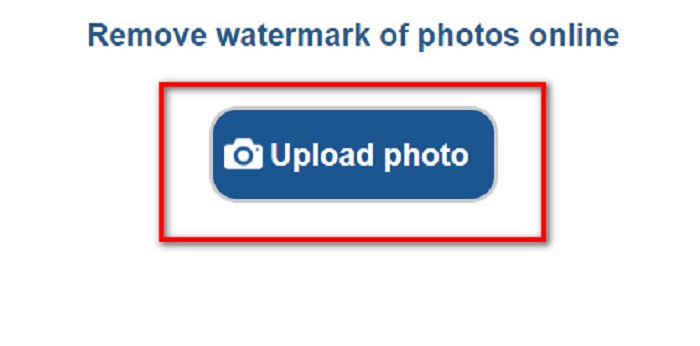
שלב 1. בדפדפן שבו אתה משתמש, חפש PhotoFunny. לאחר מכן לחץ על כפתור Upload Photo בממשק הראשי של התוכנה כדי להעלות את תמונת ה‑DeviantArt שלך.
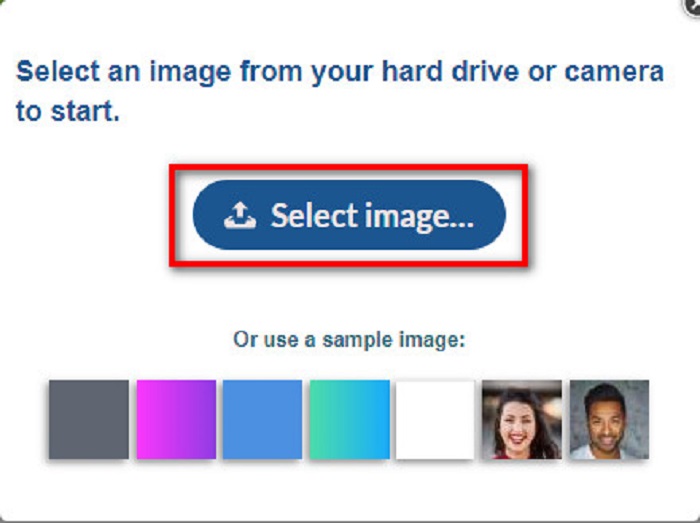
שלב 2. לאחר מכן תופיע תיבת תיאור, ובה תלחץ על כפתור Select Image כדי להעלות את התמונה שלך.
שלב 3. לבסוף, הזז את תיבת ההסרה אל אזור סימן המים, לחץ על כפתור Remove Watermark ותראה שסימן המים של DeviantArt בתמונה שלך כבר לא בולט. לחץ כאן כדי ללמוד כיצד להסיר סימני מים של Movavi.
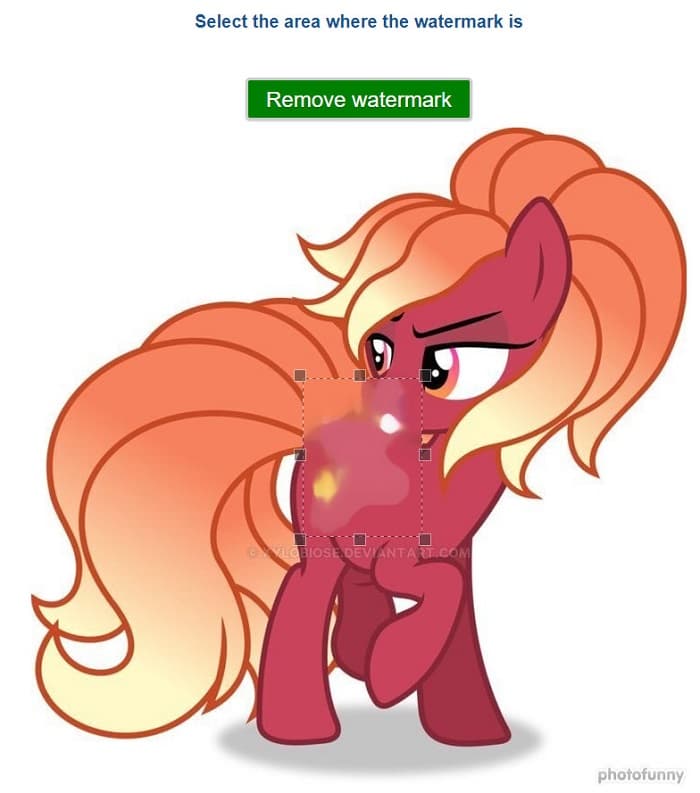
בנוסף למחיקת סימן המים של Deviantart, Photofunny הוא גם עורך תמונות בולט, המאפשר לך להוסיף מסגרות, אפקטים, קולאז'ים ועוד לתמונות שלך. לאתר זה יש המון פונקציות שתוכלו לגלות, אבל עבור משתמשים שרוצים להסיר רק את סימן המים, הניווט אינו ברור, כך שייתכן שיידרש מאמץ רב כדי למצוא את הכלי הזה ולהשתמש בו.
צילום
כדי למחוק את סימן המים של DeviantArt, תוכל גם לנסות את Fotor. זהו כלי מקוון שעוזר לך למחוק טקסטים, לוגואים או סימנים לא רצויים (כלומר סימני מים) מהתמונות שלך. הוא חלק מחבילת כלי העריכה של Fotor, ונודע בכך שהוא ידידותי למתחילים ונגיש מאוד – בלי צורך בכישורי עריכה מתקדמים.
שלבים כיצד להסיר את סימן המים של Deviantart עם Fotor:
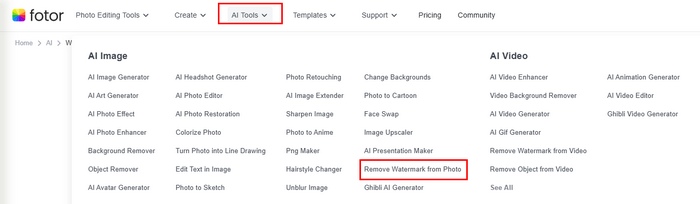
שלב 1. עבור לאתר הרשמי של Fotor ובחר Remove Watermark from Photo תחת לשונית AI Tools.
שלב 2. לחץ על כפתור Try AI Watermark Remover כדי להעלות את תמונת ה‑DeviantArt שלך.
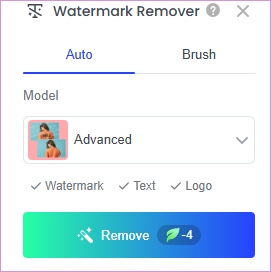
שלב 3. תוכל לבחור Auto וללחוץ על Remove כדי לנקות את סימן המים באופן אוטומטי. לחלופין, אם אתה מעוניין להסיר את סימן המים ידנית, אפשר להשתמש ב‑Brush כדי לסמן את סימני המים הלא רצויים.
שלב 4. לבסוף, לחץ על Download כדי לשמור את התוצאה במחשב.
לכלי זה יש גם אפקט הסרה טוב. אבל לכלי הזה יש סימן מים מובנה אם לא תשדרגו להיות אחד מחברי ה-VIP שלו. ואתה צריך לשדרג לפני הורדת התוצאה.
Media.io
Media.io Watermark Remover היא פלטפורמה מקוונת המשתמשת בטכנולוגיית AI כדי לעזור למשתמשים להסיר אלמנטים לא רצויים כגון סימני מים, לוגו, טקסט, או אפילו אנשים מהתמונות והסרטונים שלהם. הוא נועד להיות ידידותי למשתמש ונגיש במכשירים שונים כל עוד אתה יכול לגשת לדפדפן אינטרנט. אתה יכול גם להוריד אותו על שולחן העבודה אם אתה משתמש Windows.
שלבים להסרת סימני מים של Deviantart באמצעות Media.io:
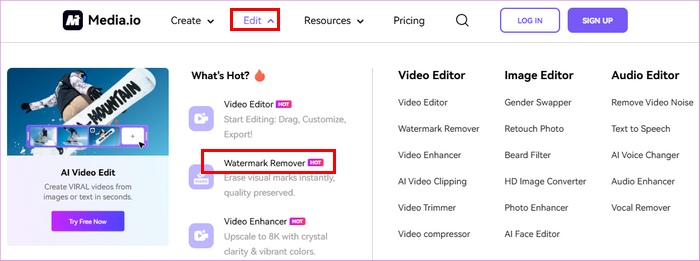
שלב 1. עבור לאתר הרשמי של Media.io ובחר Watermark Remover מתפריט Edit.
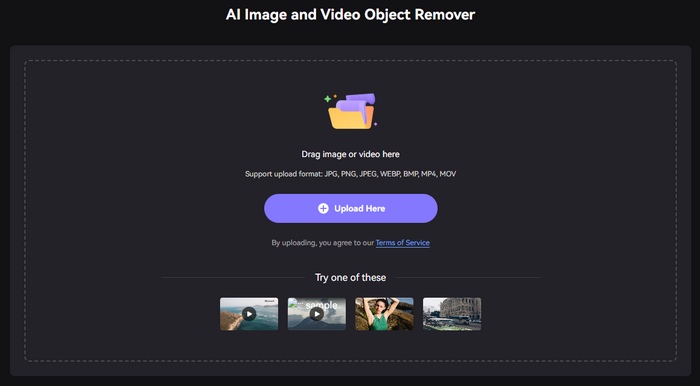
שלב 2. לחץ על Upload Here כדי להוסיף את תמונת ה‑DeviantArt שלך.
שלב 3. כעת, תוכל להתאים את גודל המברשת ולמרוח אותה על האזור שבו ממוקם סימן המים. לאחר מכן לחץ על Remove objects now.
לכלי זה יש ממשק ברור ומה שמייחד אותו הוא שהוא תומך גם בהסרת סימני מים של וידאו. עם זאת, עליך להתחבר לפני השימוש במסיר סימני מים של Media.io Deviantart באינטרנט. יתר על כן, כלי זה זהה ל-Fotor, עליך לרכוש את גרסת ה-Pro שלו כדי להוריד את התוצאה ללא סימן מים.
חלק 3. שאלות נפוצות לגבי הסרת סימן מים של DeviantArt
האם אתה יכול להסיר את סימן המים של DeviantArt ולשמור אותו באותו פורמט?
כן. ישנם מסירי סימני מים המאפשרים לך להסיר כל סימן מים מבלי לשנות את פורמט הקובץ של התמונה שלך.
האם אתה יכול להסיר את סימן המים במצב לא מקוון?
יש המון יישומי תוכנה שאתה יכול להוריד כדי להסיר סימני מים. אחת האפליקציות הפופולריות ביותר להסרת סימני מים היא FVC Video Converter Ultimate.
האם סימן מים נחשב כזכויות יוצרים?
סימן מים משמש כבעלות על העבודה של האדם. זוהי שיטה בה משתמשים בעלים כדי למנוע הפרת עבודה.
כיצד להוריד תמונות בכמות גדולה מ-Deviantart?
Deviantart אינה תומכת בהורדת תמונות בכמות גדולה באופן רשמי כדי להגן על עבודתם של אמנים. עם זאת, אם אתה עדיין רוצה לעשות זאת, אתה יכול לנסות כלים אחרים להורדת תמונות מקוונים של צד שלישי.
סיכום
כעת, לאחר שאתה יודע כיצד להסיר את סימן המים של DeviantArt, הבחירה באיזה כלי להשתמש נתונה בידיך. אם אתה רוצה לקשט את התמונה שלך תוך כדי הסרת סימן המים, תוכל לנסות את PhotoFunny. אם אתה מעוניין בכלי מקיף יותר לעריכת תמונות, ייתכן ש‑Fotor יתאים לך במיוחד. אם אתה מעדיף פתרון חינמי עם אפקט טוב של הסרת סימני מים, FVC Free Watermark Remover יכול להיות בחירה טובה. פשוט נסה אותם בהתאם לצרכים שלך!
-
 הסר בקלות סימן מים מ-PDF בעזרת שלבים פשוטים
 הסר סימן מים מ-PDF על ידי ביצוע שלבים פשוטים אלה. למד כיצד להסיר בקלות סימני מים מקובץ ה-PDF שלך באמצעות הכלים המדהימים האלה.
-
 כיצד להסיר סימן מים של Coub עם שלבים פשוטים
 למד כיצד להסיר סימן מים של coub בסרטונים שלך באמצעות מסירי סימני מים פופולריים אלה. קרא את המאמר הזה כדי להכיר את הכלים המדהימים האלה וכיצד להשתמש בהם.
-
 דרכים קלות להסיר סימן מים מתמונות סיום הלימודים
 רוצה לדעת מהן הדרכים הטובות ביותר להסיר סימני מים מתמונות סיום הלימודים? על ידי קריאת מאמר זה, תוכל לדעת כיצד להסיר סימני מים בתמונות גראד בקלות.
