


 ממיר וידאו אולטימטיבי
 מקליט מסך
 תיקון וידאו
 הורדה מאובטחת
כיצד להסיר בקלות סימן מים מתמונות סיום הלימודים
סימני מים הם כאב עיניים בכל פעם שאתה רואה אותם בכל תמונה, והם הורסים את איכות התמונה. תראה סימני מים על תמונות בכל פעם שהיוצר לא רוצה שיצירותיו ייגנבו. ואם אתה סטודנט, סביר להניח שתראה סימני מים על תמונת הסיום שלך, המציינים את שם הסטודיו או הצלם שצילם אותה.
אם ברצונך להסיר את סימן המים מתמונת הסיום שלך, עליך להשתמש בכלים שיעזרו לך להסיר ממנו את סימן המים. במאמר זה מנהנו את שלושת מסירי סימני המים הנפוצים ביותר, ותלמד גם את השלבים כיצד להסיר סימני מים מתמונות סיום.

חלק 1. כיצד להסיר סימן מים מתמונות סיום לימודים מקוונות
ישנם כלים רבים להסרת סימני מים שתראה באינטרנט. עם זאת, לא כולם בחינם וקלים לשימוש. כמו כן, בחלק זה תדעו להסיר סימני מים בצורה נוחה ויעילה.
FVC Free Watermark Remover הוא מסיר סימני מים מקוון שמאפשר לך להסיר בקלות סימני מים מתמונות הסיום שלך. כלי אונליין זה פופולרי משום שאין צורך להוריד או להתקין דבר לפני השימוש בו. בנוסף, הוא תומך בפורמטי תמונה נפוצים, כגון PNG, JPG, JPEG, BMP ועוד. וגם לאחר הסרת סימן המים מהתמונה, כשתוריד אותה היא תישמר באותו פורמט תמונה שהיה קודם.
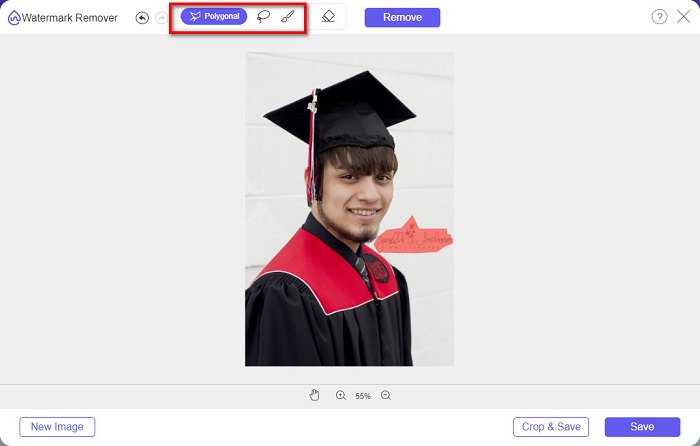
באמצעות מסיר סימן מים זה, אתה יכול לבחור מבין ההגדרות המוגדרות מראש של מסיר בבחירת אזור סימן המים. אתה יכול לבחור בין מצולע, לאסו או מברשת. יתר על כן, אתה יכול להשתמש בכלי זה כדי למחוק דברים מיותרים אחרים בתמונה שלך.
יתרונות
- יש לו ממשק תוכנה הפעלה מהיר.
- זה בטוח לשימוש.
- זה 100% חינם לשימוש.
- זמין בכל דפדפני האינטרנט, כולל גוגל, פיירפוקס וספארי.
חסרונות
- זה תלוי באינטרנט.
כיצד להיפטר מסימן מים בתמונות סיום לימודים באמצעות מסיר סימני מים חינם של FVC:
שלב 1. בדפדפן שבו אתה משתמש, חפש FVC Free Watermark Remover. תוכל ללחוץ על קישור זה כדי לעבור ישירות לדף האינטרנט שלהם.
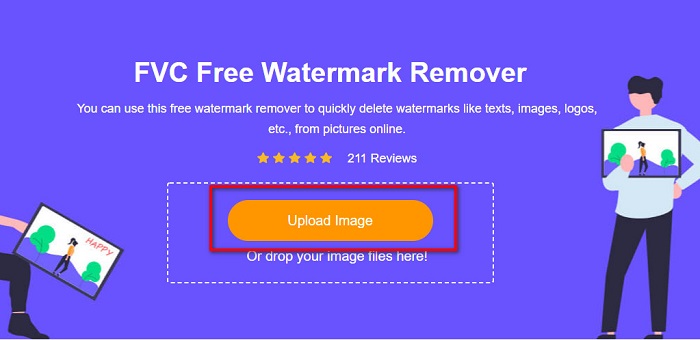
שלב 2. בממשק הראשי של התוכנה, לחץ על הכפתור Upload Image. תיקיות המחשב שלך ייפתחו, ושם תבחר ותעלה את תמונת הסיום.
שלב 3. לאחר מכן, בחר את כלי ההסרה שבו ברצונך להשתמש כדי להסיר את סימן המים. בחר בין Polygonal, Lasso או Brush. ואז סמן את אזור סימן המים שברצונך להסיר.
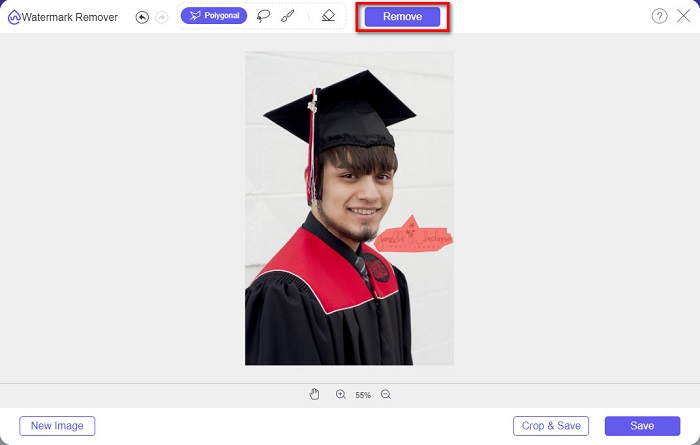
שלב 4. לאחר שסימנת את אזור סימן המים, לחץ על כפתור Remove כדי למחוק את סימן המים.
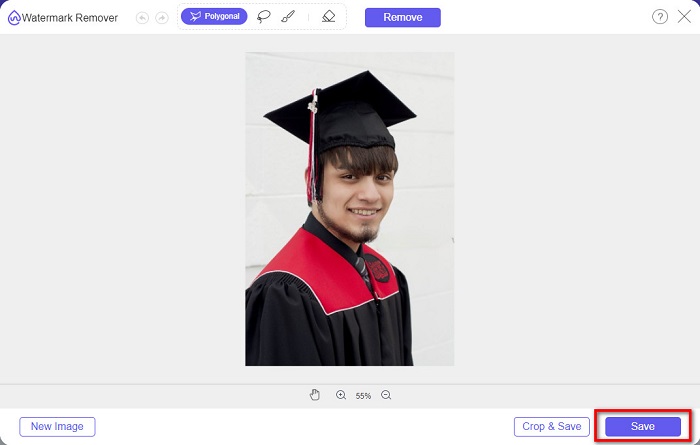
שלב 5. תראה שסימן המים הוסר. לחץ על כפתור Save כדי להוריד את התמונה למכשיר שלך. נוסף על כך, כלי הסרת סימני המים המקוון הזה משמש גם כמסיר סימני מים ל‑Photobucket.
חלק 2. כיצד להסיר סימן מים מתמונות סיום הלימודים באמצעות Inpaint
לפעמים אנשים משחזרים את סימן המים כדי לקבל את המראה המקורי של התמונה. אבל איך הם עושים את זה? אנשי מקצוע משתמשים בעורך תמונות וצובעים את התווית פיקסל אחר פיקסל, מה שמוביל לכמה שעות עבודה. עם זאת, יש כלי נוסף שיעזור לך להקל על חייך. בחלק זה תלמדו כיצד להשתמש ב-Inpaint ויתרונותיו.
Inpaint הוא מסיר סימני מים מקוון שיסייע לך גם להסיר סימני מים מתמונת הסיום שלך. ליישום האינטרנט הזה יש גם גרסה להורדה ל‑Windows ול‑Mac. נוסף על כך, הוא מאפשר לך להסיר מהתמונה דברים לא רצויים, כמו לוגואים, טקסטים, אובייקטים ועוד. מה שעוד מפתיע הוא שיש בו פונקציה לשיקום תמונות ישנות והחזרתן לאיכותן המקורית. כמו כן, הוא כולל כלי הסרה שונים שבעזרתם תוכל לבחור את אזור סימן המים שברצונך להסיר.
יתרונות
- יש לו ממשק תוכנה קל לשימוש.
- זה מאפשר לך לבצע ריטוש פנים דיגיטלי.
- זה מאפשר לך למלא את האזורים השחורים של Panoramas.
- נגיש כמעט בכל דפדפני האינטרנט, כמו גוגל ופיירפוקס.
חסרונות
- זה תלוי באינטרנט.
כיצד להסיר סימן מים מתמונת הסיום באמצעות Inpaint:
שלב 1. חפש Inpaint בדפדפן שלך, ואז עבור לדף האינטרנט שלהם. לאחר מכן, בממשק הראשי של התוכנה, לחץ על הכפתור Upload Image כדי להעלות את תמונת הסיום שלך.
שלב 2. לאחר מכן, בחר את כלי ההסרה שבו תרצה להשתמש כדי לבחור את אזור סימן המים. בחר בין marker tool, lasso tool ו‑polygonal lasso tool.
שלב 3. כעת, בעזרת הכלי שבחרת, סמן את אזור סימן המים שברצונך להסיר.

שלב 4. בסיום, לחץ על כפתור Erase כדי להסיר את סימן המים מתמונת הסיום שלך. לאחר מכן לחץ על הכפתור Download כדי להוריד את התמונה.
חלק 3. כיצד להסיר סימן מים מתמונת סיום הלימודים באמצעות פוטושופ
Adobe Photoshop היא תוכנת העריכה המפורסמת ביותר שאנשי מקצוע רבים משתמשים בה. אבל מה שמשתמשים רבים לא יודעים הוא שזו לא רק תוכנת עריכה; זה יכול גם להסיר סימני מים לא רצויים על התמונה שלך. כדי ללמוד כיצד להסיר את סימן המים מהתמונה שלך, קרא חלק זה באופן מקיף.
Adobe Photoshop היא תוכנת עריכת התמונות הפופולרית ביותר, ובה מגוון רחב של אפשרויות עריכה. רבים מהמקצוענים משתמשים ביישום עריכה זה משום שהוא מאפשר לערוך את התמונה שלך ברמה מקצועית מאוד. הוא מכיל כלים שמאפשרים לך לערוך את התמונה בפרטי פרטים. נוסף על כך, הוא מפיק תוצאות באיכות גבוהה שניתן לשתף בכל פלטפורמת מדיה חברתית.
יתרונות
- יש לו תכונות עריכה מתקדמות רבות לשימוש.
- הוא מכיל כלים רבים לשימוש לעריכה.
- זה מייצר תפוקות באיכות גבוהה.
- זה מאפשר לך לערוך וליצור תמונות הן להדפסה והן לאינטרנט.
חסרונות
- יש לו ממשק תוכנה קשה לשימוש.
- עליך לרכוש את האפליקציה כדי להוריד אותה.
כיצד להסיר סימני מים מהתמונה שלך באמצעות Adobe Photoshop:
שלב 1. הורד את Adobe Photoshop למכשיר שלך והפעל את האפליקציה. בממשק המשתמש הראשי, פתח את התמונה בפוטושופ.
שלב 2. בחר את אזור סימן המים. באפשרותך להשתמש ב‑Pen tool, ב‑Quick Selection tool או ב‑Magic Wand tool.
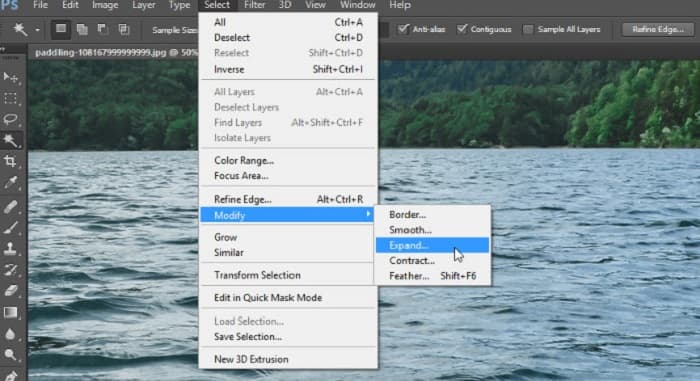
שלב 3. עבור אל Select > Modify > Expand כדי לכלול את פיקסלי הרקע.
שלב 4. עבור אל Edit > Fill, ואז בחר ב‑Content-Aware בסעיף Contents.
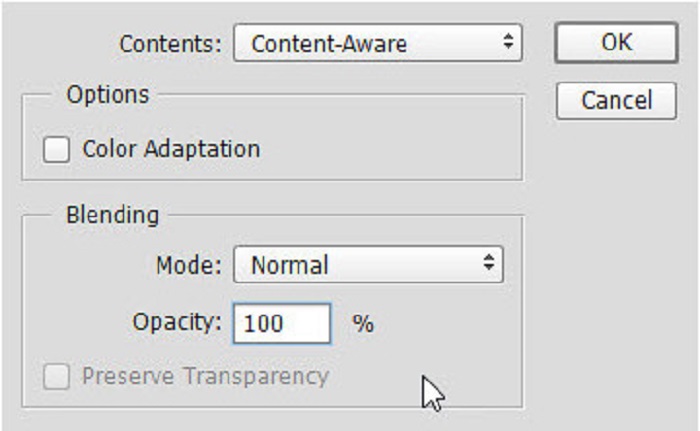
שלב 5. לאחר מכן לחץ על CTRL+D. תראה שסימן המים הוחלף ברקע. לאחר מכן, כדי להסיר את קווי המתאר של סימן המים, השתמש ב‑Clone Stamp Tool.
שלב 6. החזק את מקש Alt לחוץ ועקוב עם הכלי לאורך קווי המתאר של סימן המים. כשתסיים להסיר את כל השאריות, תבחין שסימן המים הוסר.
חלק 4. שאלות נפוצות לגבי הסרת סימן מים מתמונת סיום הלימודים
האם הסרת סימני מים מתמונות סיום הלימודים הורסת את האיכות?
הסרת סימן המים מתמונות הסיום לא בהכרח תהרוס את האיכות. עם זאת, כאשר אתה מסיר את סימן המים, חלק מהכלים עדיין משאירים סימנים.
האם אתה יכול להסיר סימני מים ב-Canva?
כן. ל-Canva יש תכונה שבה אתה יכול להסיר סימני מים בחינם. פשוט לחץ על הלחצן הסר סימני מים כדי לעשות זאת.
האם אתה יכול להסיר את סימני המים ב-PDF?
באמצעות הכלים שהוצגו לעיל תוכל להסיר כל סימן מים מקובץ ה‑PDF שלך.
סיכום
כעת, לאחר שלמדת כיצד להסיר סימני מים מתמונות סיום, תוכל לעשות זאת בעצמך ולנסות את הכלים שהוצגו לעיל. הסרת סימן המים נעשית קלה יותר בעזרת מסיר סימני מים. עם זאת, רבים ממליצים להשתמש ב‑FVC Free Watermark Remover משום שהוא נוח וקל לשימוש.
-
 כיצד להסיר את סימן המים של Lumion ב-Windows ו-Mac בקלות
 צריך להסיר את סימן המים של לומיון לצורך הצגתו בצורה מקצועית? ובכן, ישנם כלים שתוכלו להשתמש בהם כדי לעזור לכם להיפטר מסימן המים שהוא משאיר.
-
 כיצד להסיר את סימן המים של Weibo בסרטונים ותמונות בקלות
 מתקשה להסיר סימן מים של Weibo בווידאו ובתמונה מיוצאים? במקרה כזה, אתה חייב מסיר סימן מים שמפורט למטה שיכול לעזור לך.
-
 למד כיצד להסיר סימן מים של Movavi בחינם $91; חובה! $93;
 ייצוא סרטון או תמונה ב-Movavi ישאיר סימן מים, אך האם ניתן להסיר אותו? כדי ללמד כיצד להסיר את סימן המים בחינם קרא את זה.
