


 ממיר וידאו אולטימטיבי
 מקליט מסך
 תיקון וידאו
 הורדה מאובטחת
שנה את גודל התמונה מבלי לאבד איכות: דחיסה ללא אובדן
אחד החששות הגדולים ביותר בעת שינוי גודל של תמונה הוא אובדן האיכות שלה. התשובה לכך משתנה בהתאם לאופן שבו שונה גודל התמונה, לאיזה כלי השתמשו, ולגורמים נוספים. למרבה המזל, אמת שאינה מוערכת דיה היא שאפשר לשנות גודל תמונה בלי לאבד איכות כאשר עושים זאת בצורה נכונה. על‑ידי הקפדה על שיטות עבודה מומלצות, הבנת הניואנסים של שינוי גודל תמונה ובחירת הכלי המתאים, אפשר בהחלט לשמור על חדות ובהירות התמונות, ללא קשר לשינויים שתבצעו בגודל.
במדריך זה נעמיק בשלוש שיטות יעילות לשינוי גודל תמונות תוך שמירה על שלמותן הוויזואלית והבטחת האיכות כמעט זהה.

חלק 1. הדרך המהירה ביותר לשנות את גודל התמונה מבלי לאבד איכות [נתמכת אצווה]
מכווץ התמונות החינמי FVC הוא כלי מקוון חינמי לדחיסת תמונות, המתאים למשתמשים המחפשים דרך מהירה יותר לשנות גודל תמונות בלי לאבד איכות. בלחיצה אחת בלבד, התמונות שלכם יותאמו אוטומטית לגודל חדש, והאיכות שלהן תישמר כמעט כפי שהיא. בנוסף, הכלי ידידותי במיוחד למשתמש, וכל רמת משתמש יכולה לעבוד איתו בלי להרגיש אבודה בתהליך. לבסוף, כאשר יש לכם אוסף גדול של קובצי תמונה לשינוי גודל, הכלי מאפשר לדחוס עד 40 קובצי תמונה בו‑זמנית.
כך תשנו גודל תמונה בלי לאבד איכות באמצעות מכווץ התמונות החינמי FVC
שלב 1. היכנסו לדפדפן שלכם והקלידו Free Image Compressor בשורת החיפוש.
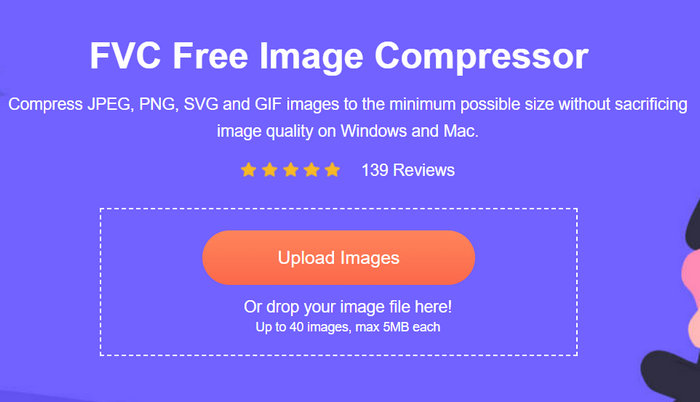
שלב 2. לאחר שנכנסתם לאתר, לחצו על Upload Images כדי לייבא את התמונות שברצונכם לשנות את גודלן. הכלי ידחוס באופן אוטומטי את כל התמונות שהעליתם.
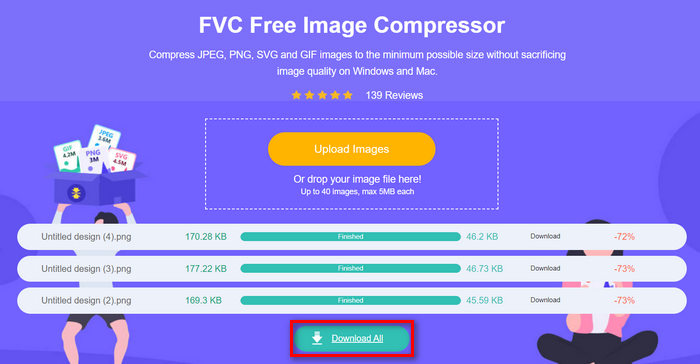
שלב 3. המתינו לסיום תהליך הדחיסה. לאחר סיום התהליך, תופיע שורת מצב שתציין שהפעולה הושלמה, לצד מידע על גודל הקובץ לפני ואחרי הדחיסה. לאחר מכן, לחצו על Download All כדי לשמור את התמונות שלכם.
עם מדחס התמונה החופשי FVC, שינוי גודל תמונה לא יגבה מחיר מהמאמץ שלך. כמו כן, הכלי הזה חינמי לחלוטין וסופר נגיש, כך שהוא אכן כלי דחיסה בדרכים לכולם.
חלק 2. כיצד להקטין תמונה בפוטושופ מבלי לאבד איכות
בינתיים, כאשר מותקן פוטושופ במכשיר שלך, אתה יכול להשתמש בזה כדי להקטין את קובצי התמונה שלך. כלי זה הוא תוכנת עריכת תמונות ידועה בגלל חבילת התכונות והיכולות המעולה שלה. עם Photoshop, אתה לא רק יכול לערוך ולשפר תמונות בדיוק אלא גם לייעל אותן למטרות שונות, כולל הקטנת גודל הקובץ. להלן שתי השיטות שאתה יכול לנסות לשנות את גודל התמונה מבלי לאבד איכות.
שינוי גודל התמונה לפי פיקסלים
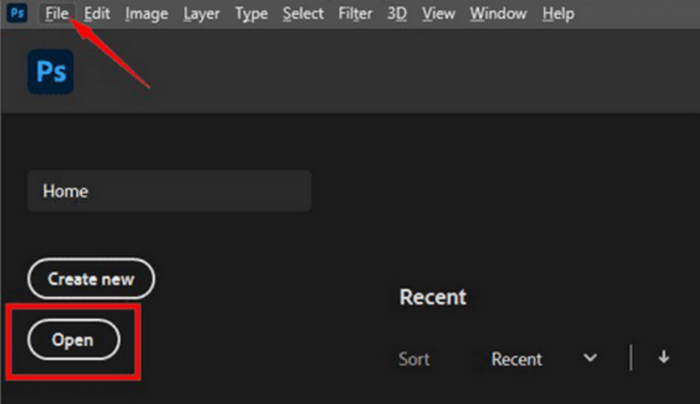
שלב 1. פתחו את התמונה שלכם בפוטושופ על‑ידי לחיצה על Open או גשו אל File ובחרו את התמונה שברצונכם לשנות את גודלה.
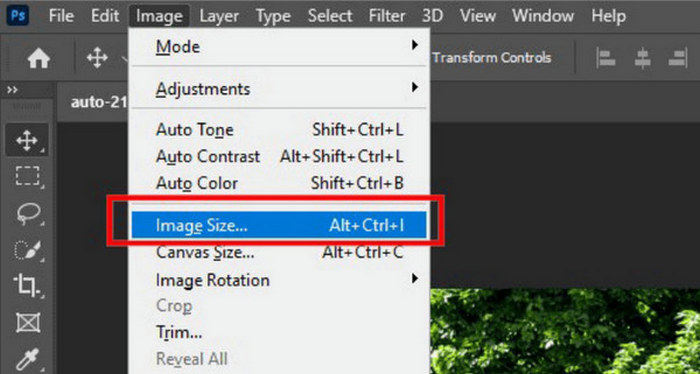
שלב 2. כעת, עברו ללשונית Image ובחרו Image Size מהתפריט.
שלב 3. בתיבת הדו־שיח Image Size בחר Pixels מתפריט הבחירה. כדי להגדיר מידות ספציפיות, הזן ערכים בשדות הרוחב והגובה ולחץ על OK כדי לשנות את גודל התמונה.
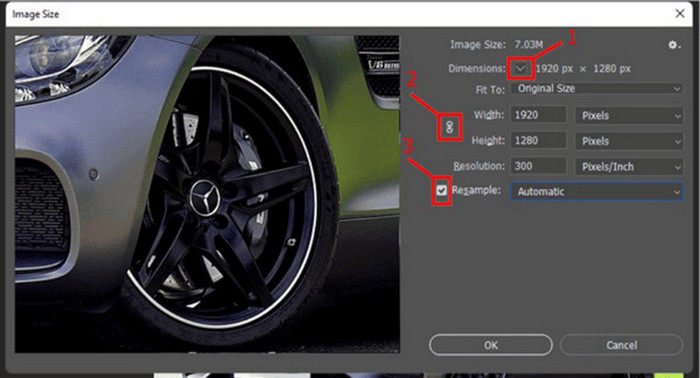
שלב 4. לבסוף, שמרו את קובץ התמונה שלכם על‑ידי לחיצה על הכפתור Save As תחת לשונית File.
שמור את קובץ ה-PSD בפורמט JPEG לפני שמירתו.
שינוי גודל התמונה לפי אינצ'ים
שלב 1. פתח את התמונה שלך בפוטושופ על‑ידי לחיצה על Open או עבור אל File ובחר את התמונה שלך.
שלב 2. כעת עבור ללשונית Image ובחר Image Size.
שלב 3. בתיבת הדו־שיח Image Size בחר Inches מתפריט הבחירה. כדי להגדיר מידות ספציפיות, הזן ערכים בשדות הרוחב והגובה ולחץ על OK כדי לשנות את גודל התמונה.
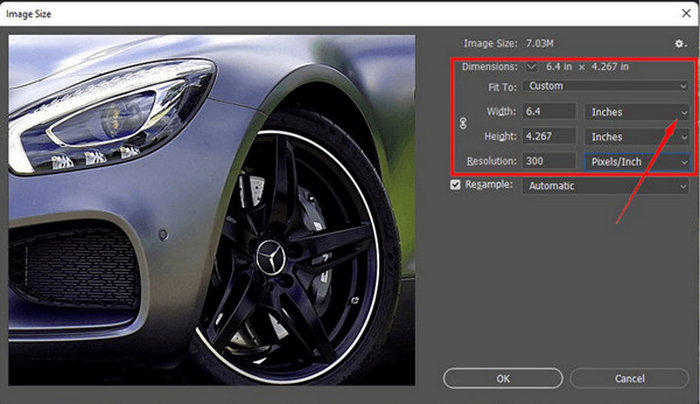
שלב 4. לבסוף, לחץ על כפתור Save As תחת לשונית File כדי לשמור את התמונה הסופית.
פוטושופ הוא כלי רב תכליתי וחזק המאפשר למשתמשים לערוך תמונות ולשנות את גודלן מבלי לאבד איכות. יתרה מכך, משתמשים יכולים לנצל את האלגוריתמים האיכותיים של Photoshop כדי להבטיח שהתמונות שלהם יישארו חדות וברורות גם לאחר התאמות משמעותיות בגודל. עם זאת, חיסרון אחד של השימוש בכלי זה הוא שהוא יכול להיות מורכב למדי, מה שיקשה על מתחילים לנווט בתכונות שלו.
חלק 3. שנה את גודל התמונה מבלי לאבד איכות על ידי העלאת קנה מידה בינה מלאכותית
מגדיל התמונות החינמי FVC הוא כלי מבוסס בינה מלאכותית, המיועד לשינוי גודל תמונות בלי לאבד איכות. הוא משתמש בטכנולוגיית סופר‑רזולוציה מבוססת AI, שאומנה על מיליוני דוגמאות, כדי לזהות ולשפר באופן אוטומטי חלקים מטושטשים בתמונה. כלי זה יכול לתקן פיקסלים שאבדו, צבעים, טקסטורות ופרטים אחרים, וכך להבטיח שהתמונה תותאם לגודל חדש בלי לאבד מאיכותה.
שלב 1. קודם כול, גש לאתר הרשמי שלהם.
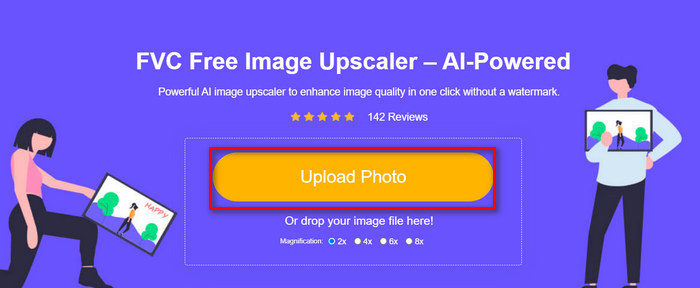
שלב 2. לאחר שהגעתם אליהם, ייבאו את קובץ התמונה שברצונכם לשנות את גודלו על‑ידי לחיצה על כפתור Upload Photo.
שלב 3. כעת בחרו כיצד תרצו להגדיל את התמונה. ניתן לבחור להגדיל את התמונה פי 2 ועד פי 8. כך תוכלו לשנות את גודל התמונה בלי לאבד איכות.
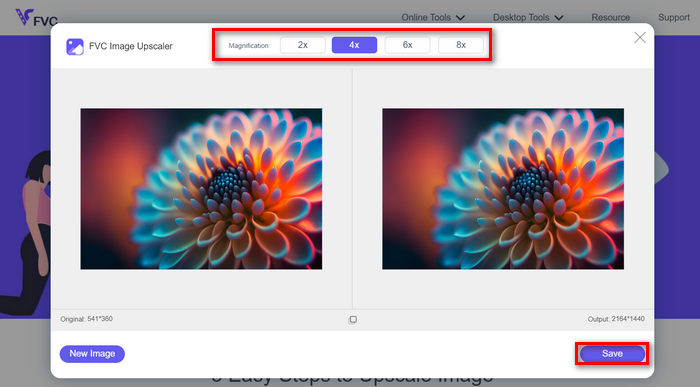
שלב 4. לאחר סיום, לחצו על כפתור Save, והקובץ החדש בגודל המעודכן יורד אוטומטית למחשב שלכם.
מגדיל התמונות מבוסס הבינה המלאכותית הזה הוא כלי מצוין לשינוי גודל תמונות בלי לאבד איכות. הפונקציה הזו לא רק משנה את גודל התמונה, אלא גם מגדילה או משפרת אותה.
חלק 4. השוואה בין 3 שיטות לשינוי גודל תמונה מבלי לאבד איכות
| כלי שינוי גודל התמונה | דחיסת אצווה | מְהִירוּת | מבצע קלות |
| מדחס תמונה חופשי FVC | כן, עד 40 תמונות | מָהִיר | ידידותית במיוחד למשתמש |
| פוטושופ | לא | מְמוּצָע | די פשוט לתפעול |
| FVC Free Image Upscaler | לא | מָהִיר | ידידותית במיוחד למשתמש |
חלק 5. שאלות נפוצות לגבי שינוי גודל תמונה מבלי לאבד איכות
האם תמונות מאבדות מאיכות כשהן מתכווצות?
חלקית, לא. תמונות בדרך כלל אינן מאבדות איכות כשהן מתכווצות. כיווץ תמונה או הקטנת גודלה שומר על הפרטים והחדות המקוריים של התמונה מכיוון שאינך מאבד מידע פיקסל. עם זאת, תפיסת האיכות עשויה להשתנות בהתאם לשיטת הדחיסה שבה נעשה שימוש והיכולת של התוכנה להתמודד עם תהליך הורדת קנה המידה ביעילות.
כיצד לשנות גודל תמונה ב-Paint מבלי לאבד איכות?
כדי לשנות גודל תמונה ב-Paint מבלי לאבד איכות, פתח את Paint וטען את התמונה שלך. לאחר מכן, לחץ על כפתור שינוי הגודל בלשונית הבית. בתיבת הדו-שיח שינוי גודל והטיה, בחר באפשרות האחוז או הפיקסלים. ודא שתיבת הסימון לשמור על יחס גובה-רוחב מסומנת כדי לשמור על הפרופורציות של התמונה. משם, הזן כיצד ברצונך לשנות את גודל התמונה שלך ולחץ על אישור.
מהו הכלי הטוב ביותר לשנות את גודל התמונות מבלי לאבד איכות?
ישנם כלים מצוינים רבים לשינוי גודל תמונות בלי לאבד איכות. עם זאת, כשמדובר בדרך המהירה ביותר הכוללת אפשרות לדחיסה באצווה, מכווץ התמונות החינמי FVC הוא האפשרות הטובה ביותר. הוא מאפשר לשנות גודל של עד 40 תמונות בו‑זמנית תוך שמירה על תוצאות באיכות גבוהה, מה שהופך אותו ליעיל במיוחד וידידותי למשתמש בכל הרמות.
סיכום
באמצעות השיטות והכלים המתאימים, תוכלו לשנות גודל תמונות בלי לאבד איכות. לכן, בין אם תבחרו באחד מהכלים הללו ובין אם לאו, המטרה העיקרית היא למצוא את הכלי המתאים לכם. מוכנים לשפר את התמונות שלכם בלי מאמץ? נסו את הכלים האלה היום וראו את ההבדל במו עיניכם!
-
 מפחיתי גודל תמונה מובילים בשולחן העבודה ובמכשירים ניידים
 עיין באפליקציות הרשומות ביותר במאמר זה לקבלת מפחית גודל התמונות הטוב ביותר במכשיר המועדף עליך. למד את אופטימיזציית הגודל הטובה ביותר עבור תמונות עכשיו!
-
 5 השיטות הטובות ביותר להקטנת גודל התמונה בכל מכשיר
 למד את השיטות היעילות לשינוי גודל או דחיסה של גודל תמונה על ידי לחיצה על פוסט זה. גלה מכשירי שינוי צילום יוצאי דופן ואת ההוראות המפורטות שלהם.
-
 הסר אנשים מתמונות: עריכת תמונות מהירה ופשוטה
 האם אתה רוצה להיפטר מאנשים מהתמונה שלך? קרא את המאמר הזה כאשר אנו מראים לך את השיטות הטובות והקלות ביותר להסיר אנשים מתמונות באמצעות אפליקציות.
