


 ממיר וידאו אולטימטיבי
 מקליט מסך
 תיקון וידאו
 הורדה מאובטחת
שלבים פשוטים כיצד לשנות את גודל התמונה עבור פייסבוק
פייסבוק היא פלטפורמת המדיה החברתית הפופולרית ביותר שבה משתמשים רבים מה־millennials ומבוגרים. פייסבוק היא אפליקציה שבה אפשר להעלות תמונות ולשתף אותן או לשלוח אותן לחברים. ורבים רוצים תמונה באיכות גבוהה כדי להעלות לפייסבוק. אם גם אתה רוצה להעלות תמונות ברזולוציה ובאיכות גבוהות, יש לנו את הכלי שיעזור לך. למרבה המזל, מצאנו אפליקציות ל־iPhone, לאנדרואיד ובאינטרנט שיכולות לשנות גודל של תמונות במהירות וביעילות. אז התחגרו בכיסאות, כי בפוסט הזה תלמד/י במהירות איך לשנות גודל תמונות לפייסבוק.

חלק 1. כיצד לשנות את גודל התמונה באייפון לפייסבוק
אם אתה משתמש במכשיר iPhone, ניתן להוריד אפליקציות ב-AppStore שלך כדי לעזור לך לשנות את גודל התמונה שלך. בנוסף, ישנן אפליקציות חינמיות בהן תוכלו להשתמש במכשיר האייפון שלכם. עם זאת, לא כל האפליקציות מייצרות תפוקות באיכות גבוהה. זו הסיבה שחיפשנו את האפליקציה הטובה ביותר לשינוי גודל תמונות באופן מיידי.
Remini היא אפליקציית שינוי גודל התמונות הפופולרית ביותר שניתן להוריד ל־iPhone. לאפליקציה זו ממשק ידידותי למשתמש משום שהפונקציות שלה אינטואיטיביות. בנוסף, Remini יכולה לשפר את התמונה שלך באמצעות משפר ה־AI (בינה מלאכותית) שלה, שמגדיל אוטומטית את גודל התמונה ומשפר אותה לאיכות המרבית. ולא רק זה – בעזרת האפליקציה הזו ניתן גם לשפר סרטונים באמצעות פונקציית שיפור הווידאו. מעבר לכך, היא תומכת בכל פורמטי התמונה הנפוצים, כמו JPEG, JPG ו־PNG. מה שעוד נהדר באפליקציה הזו הוא שאפשר להוריד אותה בחינם מ־App Store. אז אם ברצונך להשתמש באפליקציה הזו כדי לשנות גודל תמונה ל־Facebook Cover, עקוב/י אחר ההוראות שלהלן.
כיצד לשנות גודל תמונה באמצעות אפליקציית Remini:
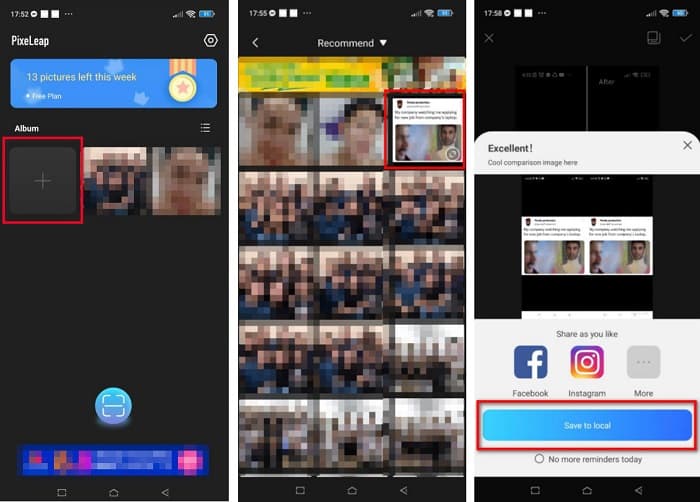
שלב 1. פתח/י את ה־App Store, חפש/י את האפליקציה Remini והורד/י אותה למכשיר. לאחר התקנת האפליקציה, פתח/י אותה.
שלב 2. לאחר פתיחת האפליקציה, תראה/י את התמונות שלך ובחר/י את התמונה שברצונך לשפר. לאחר מכן הקש/י על כפתור Enhance כדי לעבור לממשק הבא.
שלב 3. לפני המעבר לממשק הבא, עליך לצפות קודם בפרסומת. לאחר מכן תראה/י את ה“לפני ואחרי” של התמונה שלך. הקש/י על סמל ההורדה בצד הימני‑עליון של המסך.
חלק 2. כיצד לשנות את גודל התמונה באנדרואיד לפייסבוק
האם אתה משתמש באנדרואיד? אל תדאג; נציג גם אפליקציה שתוכל להשתמש בה כדי לשנות את גודל התמונה. למרות שישנן אפליקציות רבות שתוכלו להוריד מה-PlayStore, בחרנו את הטובות מביניהם להציג בפניכם. קרא למטה כדי ללמוד כיצד לשנות את גודל התמונות עבור פייסבוק באנדרואיד.
AI Photo Enhancer & PixelLeap היא אפליקציה מצוינת נוספת שתעזור לך לשנות את גודל התמונה לאיכות טובה יותר. אפליקציית שינוי הגודל הזו זמינה להורדה בחינם בחנות Play Store ובטוחה לשימוש. בנוסף, אם ברצונך לשפר או לשחזר תמונה ישנה, אפשר להשתמש ב־AI Photo Enhancer & PixelLeap. ובעזרת טכנולוגיית ה־AI שלה, כל מה שצריך הוא להעלות את התמונה שברצונך לשנות את גודלה, והאפליקציה תשפר אותה אוטומטית. נוסף על כך, יש לה ממשק משתמש פשוט, מה שהופך אותה לאפליקציה מצוינת למתחילים. כמו כן, יש בה פונקציות עריכה נוספות שניתן להשתמש בהן, כגון תיקון, צביעת שחור‑לבן, הנפשה, הבעת רגשות והבהרת התמונה. עם זאת, החיסרון באפליקציה הוא שהיא מכילה פרסומות רבות שלוקח זמן לסיים ומשאירה סימן מים על התוצאה. אף על פי כן, האפליקציה הזו היא פתרון טוב אם ברצונך לשנות גודל תמונה לפייסבוק בלי חיתוך.
כיצד לשנות גודל תמונה באמצעות AI Photo Enhancer ו- PixelLeap:
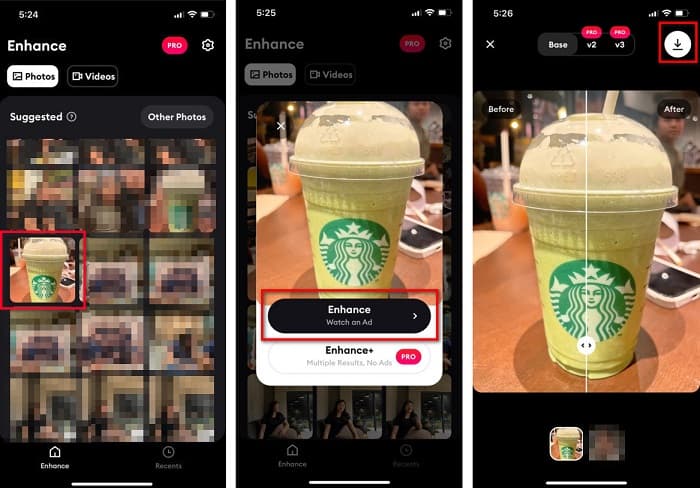
שלב 1. התקן/י את AI Photo Enhancer & PixelLeap במכשיר האנדרואיד שלך.
שלב 2. לאחר מכן, במסך הראשי של האפליקציה, הקש/י על תיבת הסימן + כדי להעלות את התמונה שברצונך לשנות את גודלה. לאחר מכן האפליקציה תאפשר לך לצפות בפרסומת לפני המעבר לממשק הבא.
שלב 3. דפדף/י לתמונה שברצונך לשנות את גודלה ואז הקש/י עליה. לאחר בחירת התמונה, הקש/י על האפשרות Enhance. לאחר מכן האפליקציה תשפר את התמונה שלך אוטומטית. הקש/י על Save ל־local כדי להוריד את התוצאה.
חלק 3. כיצד לשנות את גודל התמונה באינטרנט עבור פייסבוק
היתרון בשימוש באפליקציה מקוונת הוא בכך שהיא מאפשרת לך לחסוך במקום במכשיר שלך. בנוסף לכך, יש הרבה אפליקציות אינטרנט לגישה חופשית שתוכל להשתמש בהן בדפדפן שלך. לכן, אם אתה רוצה להשתמש באפליקציה מקוונת כדי לשנות את גודל התמונה להעלאה בפייסבוק, אנו נראה לך כיצד לשנות את גודל התמונה עבור פייסבוק.
FVC Free Image Upscaler הוא ממיר התמונות המקוון הטוב ביותר שמאפשר לך להגדיל את התמונה עד פי 2, 4, 6 ו־8. הודות לממשק הפשוט שלו, מתחילים יכולים לשנות גודל תמונה בקלות. נוסף על כך, הוא תומך בכל פורמטי התמונה, כולל JPEG, JPG, PNG ו־BMP. מה שעוד יותר מרשים באפליקציה זו הוא שהיא משתמשת בטכנולוגיית AI שמזהה אוטומטית את החלקים ברזולוציה נמוכה בתמונה ואז משפרת אותם. בנוסף, היא יכולה לתקן פיקסלים שאבדו, מרקמי צבע ועוד פרטים – באופן מלא ומדויק. כמו כן, היא נגישה בכל הדפדפנים, כולל Chrome, Firefox ו־Safari. לכן, אם ברצונך להשתמש ב־FVC Free Image Upscaler כדי לשנות גודל או לשפר את התמונה שלך, עקוב/י אחר השלבים הפשוטים שלהלן.
כיצד לשנות גודל תמונה עבור פייסבוק באמצעות FVC Free Image Upscaler:
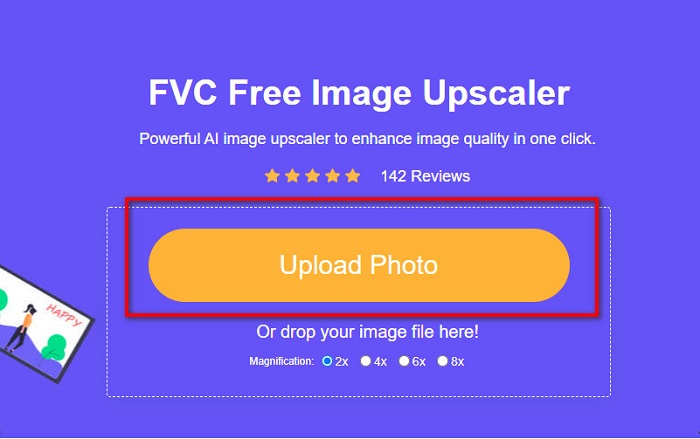
שלב 1. פתח/י את הדפדפן והקלד/י FVC Free Image Upscaler בתיבת החיפוש. ניתן ללחוץ על הקישור שסופק כדי לעבור ישירות לאתר. לחץ/י על Upload Photo כדי להפעיל את האפליקציה.
שלב 2. במסך הראשי של התוכנה, לחץ/י על Upload Photo כדי לייבא את התמונה שברצונך לשנות את גודלה.
שלב 3. בממשק הבא, בחר/י את הגדרת ההגדלה הרצויה לתוצאת התמונה שלך. ניתן לבחור בין פי 2, פי 4, פי 6 ופי 8 הגדלה. לאחר מכן המשך/י לשלב הבא.
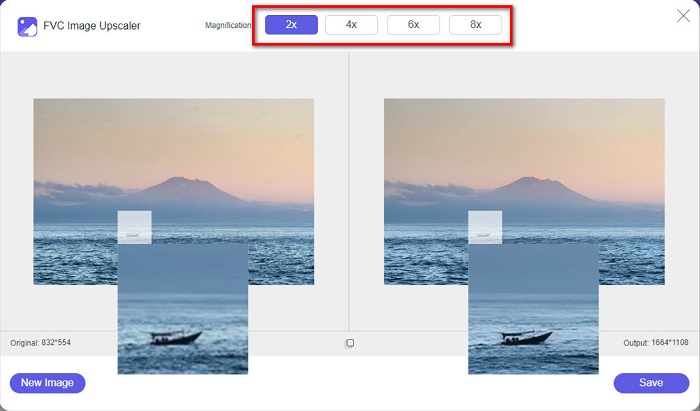
שלב 4. לבסוף, סמנ/י את כפתור Save כדי לשמור את התוצאה במחשב. תוכל/י לראות את ההבדל בין הקובץ המקורי לבין התמונה המוגדלת. בתוך שנייה אחת בלבד התמונה שלך תישמר.
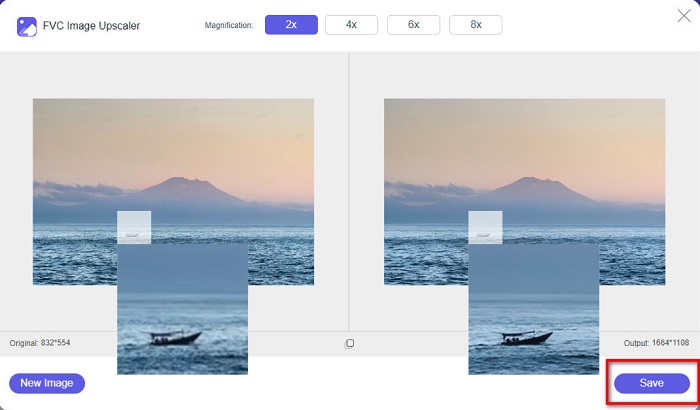
וזה הכל! קל כמו ABC, התמונה שלך משופרת וגודלה שונה.
קשור אל:
כיצד לחדד תמונה אונליין ואופליין ב־4 דרכים פשוטות
כיצד לשנות גודל תמונה – Adobe Resize Image [אונליין ואופליין]
חלק 4. שאלות נפוצות לגבי איך לשנות את גודל התמונה עבור פייסבוק
מהו יחס הצילום הטוב ביותר לפייסבוק?
לגבי יחס צילום, השימוש בתמונה אנכית עם יחס רוחב-גובה של 4:5 ו-1200 x 1500 פיקסלים הוא הטוב ביותר. ואם אתה רוצה תמונה מרובעת, הרזולוציה חייבת להיות 1080 x 1080 פיקסלים.
מה הגודל של פוסט בפייסבוק?
גודל התמונה המומלץ לפוסט בפייסבוק הוא 1200 x 630 פיקסלים כדי למנוע פיקסלים וזמן טעינה מהיר יותר.
מהו פורמט התמונה הטוב ביותר להעלות בפייסבוק?
פורמט התמונה הטוב והמומלץ להעלות בפייסבוק הוא פורמט JPG. עדיף להעלות פורמט JPG עם צבע RGB של פחות מ-15MB.
סיכום
ברשותנו הפתרונות שלעיל אם ברצונך לשנות גודל תמונה לפייסבוק. מקריאה מעמיקה של מאמר זה, אנו מקווים שלמדת את כל הדברים הדרושים שעליך לעשות. בהחלט תוכל/י לשנות את גודל כל תמונה שתרצה באמצעות אפליקציות ל־iPhone, לאנדרואיד או אונליין. אך לתוצאות טובות יותר, השתמש/י ב־FVC Free Image Upscaler, שיאפשר לך גם לחסוך מקום במכשיר.
-
 אפליקציית Photo Resizer הטובה ביותר באינטרנט, לא מקוון, אנדרואיד ואייפון
 מהן האפליקציות הטובות ביותר לשינוי גודל התמונות? לחץ על הדף כדי ללמוד את חמשת האפליקציות העוצמתיות ביותר לשינוי גודל התמונות שבהן תוכל להשתמש כדי לשפר או לשנות את גודל הקובץ שלך.
-
 כיצד לשנות את גודל התמונה - Adobe שינוי גודל תמונה [מקוון ולא מקוון]
 אם אתה מחפש את גודל התמונה של Adobe, אז יש לנו את הפתרון בשבילך. עיין בפוסט זה ביסודיות כדי ללמוד כיצד לשנות את גודל התמונות באמצעות Adobe במחשב האישי שלך.
-
 4 מגדילי GIF לא מקוונים ומקוונים שאסור לפספס
 פוסט זה נועד עבורך אם אתה מחפש את מגדילי ה-GIF הטובים ביותר. פירטנו את הביצועים הטובים ביותר של מגדילי GIF מקוונים ולא מקוונים עבור המחשב שלך.
