


 ממיר וידאו אולטימטיבי
 מקליט מסך
 תיקון וידאו
 הורדה מאובטחת
הסר באופן מקצועי סימן מים חסין ירי עם הכלים המדהימים האלה
Shootproof הוא גלריית תמונות ללקוחות וגם אתר פורטפוליו. אם תחפש תמונות נהדרות באינטרנט, Shootproof עשוי לעזור לך בכך. האתר מציע המון תמונות יפות שמוכרים יוצרים. Shootproof הוא עסק מוכר לשיתוף גלריות עבור צלמים. בנוסף, הוא מאפשר לצלמים ליצור חנות מקוונת עבור התמונות שלהם. אך רבים מהמוכרים מוסיפים סימני מים לתמונות כדי שאחרים לא יוכלו להחזיק בתמונה בקלות. לכן, אם אתה אחד מהמשתמשים שמחפשים איך להסיר את סימן המים של Shootproof, המשך לקרוא את הפוסט הזה.

חלק 1. 2 שיטות כיצד להסיר סימן מים חסין ירי ללא מאמץ
הסרת סימן המים חסין הירי אינה קשה אם יש לך מסיר סימן מים מתאים. וכדי לעזור לך לבחור את מסיר סימני המים הטוב ביותר, חיפשנו את מסיר סימני המים הנפוצים ביותר באינטרנט. כדי להכיר את הכלי הזה, קרא את החלק הזה באופן כולל.
מסיר סימני מים חינם FVC
FVC Free Watermark Remover הוא אחד ממסירי סימני המים המקוונים המוכרים. היישום המקוון הזה חינמי ובטוח לשימוש. בנוסף, הוא נגיש בכל דפדפני האינטרנט, כמו Google, Firefox ו‑Safari. הוא תומך בפורמטים סטנדרטיים של תמונות, כולל PNG, JPEG, JPG, BMP ועוד. ובפונקציית הסרת סימני המים שלו, אפשר לבחור בין כלי בחירה שונים כדי להסיר את סימן המים מהתמונה שלך.
יתר על כן, מתחילים רבים יכולים להשתמש במסיר סימן מים זה מכיוון שהוא קל לשימוש. כמו כן, כאשר אתה מייצא את התמונה שלך, יהיה לה את פורמט הקובץ המקורי. כלי זה גם אינו מחייב אותך להיכנס או להירשם.
כיצד להסיר סימן מים חסין ירי באמצעות מסיר סימני מים חינם FVC:
שלב 1. תחילה, פתח את הדפדפן שלך וחפש את FVC Free Watermark Remover בתיבת החיפוש.
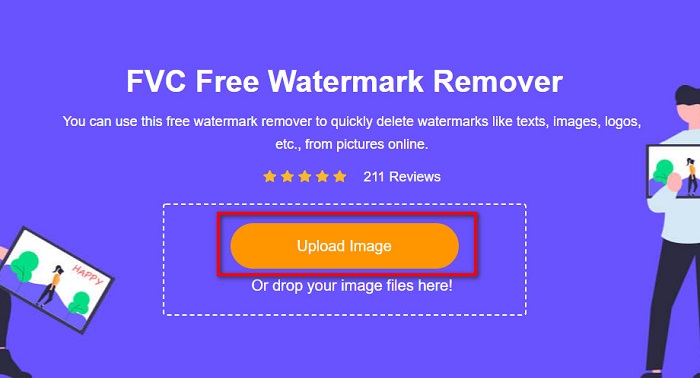
שלב 2. לאחר מכן, לחץ על כפתור Upload Image בממשק המשתמש הראשי כדי להעלות את התמונה שממנה ברצונך להסיר את סימן המים.
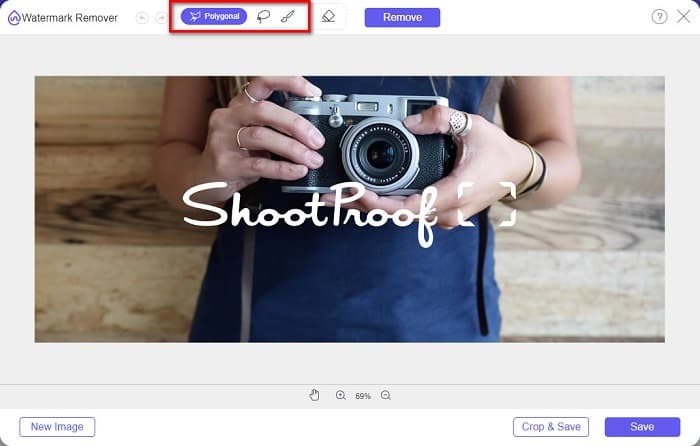
שלב 3. לאחר מכן, בחר את כלי הבחירה שבו תרצה להשתמש כדי להסיר את סימן המים מהתמונה שלך. באפשרותך לבחור בין Polygonal, Lasso ו‑Brush.
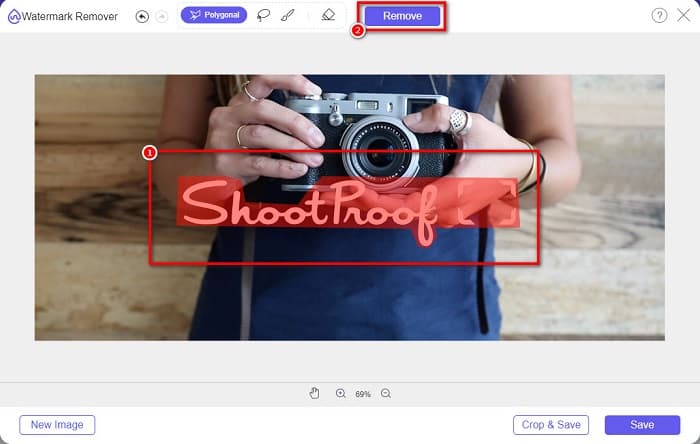
שלב 4. ואז, תּחום את האזור שבו נמצא סימן המים בתמונה שלך. לאחר שהוא נבחר, לחץ על כפתור Remove. תראה שסימן המים נעלם כעת.
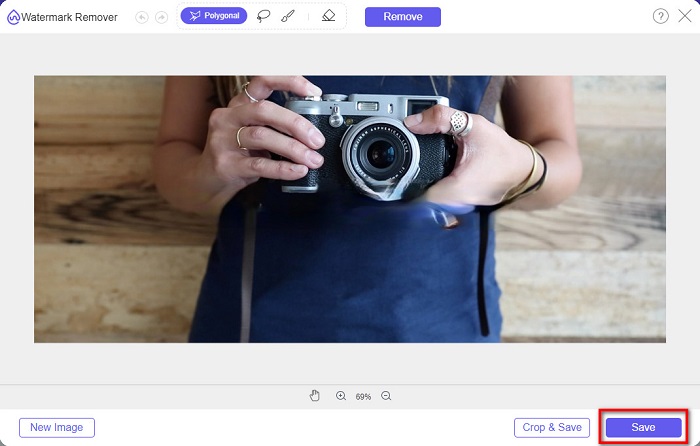
שלב 5. לבסוף, לחץ על כפתור Save כדי לשמור את הפלט במכשיר שלך. וזה הכול! בעזרת השלבים הפשוטים האלה תוכל לקבל תמונה מ‑Shootproof ללא סימן מים.
מסיר סימני מים מקוון של Apowersoft
Apowersoft Online Watermark Remover הוא יישום מקוון מוכר להסרת כל סימן מים מתמונה. זהו יישום מקוון ידידותי למשתמש מפני שיש לו ממשק משתמש אינטואיטיבי. בנוסף, הוא תומך ברוב פורמטי התמונות הסטנדרטיים, כמו PNG ו‑JPG. אינך צריך להיות מודאג לגבי בטיחות הקבצים שלך, משום שהכלי המקוון הזה בטוח לשימוש. יש לו גם פונקציה שבאמצעותה אפשר להסיר סימני מים מסרטונים. עם זאת, כאשר חיבור האינטרנט שלך איטי, ייתכן שתחווה תהליכי העלאה וייצוא איטיים.
כיצד להסיר סימן מים חסין ירי באמצעות Apowersoft Online Watermark Remover:
שלב 1. חפש Apowersoft Online Watermark Remover בדפדפן שלך, ואז עבור לדף הראשי שלהם. בממשק הראשי לחץ על האפשרות Remove Watermark From Image.
שלב 2. לאחר מכן, בממשק הבא, תראה תיבה להסרת סימן מים והעבר אותה אל האזור שבו נמצא סימן המים.

שלב 3. כדי להסיר את סימן המים מהתמונה שלך, לחץ על כפתור Erase.
חלק 2. טיפים לגבי שימוש בתכונת סימן מים חסין ירי
באמצעות תכונת סימן המים של Shootproof, אתה יכול להוסיף ולהסיר סימני מים על התמונה שלך. אם אתה רוצה למנוע ממשתמשים אחרים להחזיק בתמונה שלך, אתה יכול להוסיף טקסט על התמונה שלך המשמש כסימן מים.
כיצד להוסיף סימן מים על Shootproof:
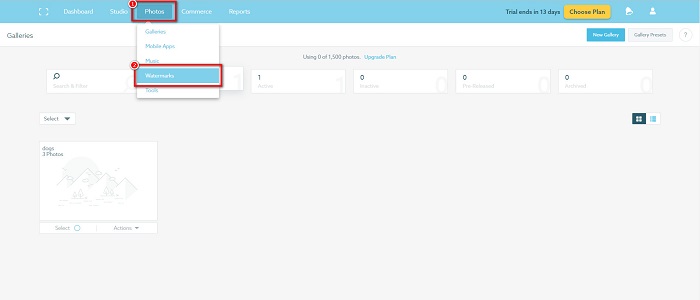
שלב 1. עבור אל Photos, ואז לחץ על האפשרות Watermarks.
שלב 2. לאחר מכן, בחר בין סימן מים של טקסט או תמונה.
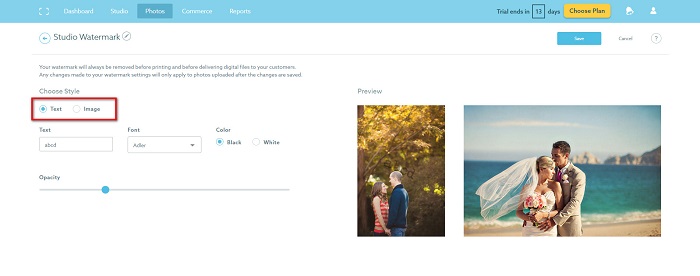
אם ברצונכם להשתמש בסימן המים של התמונה, מומלץ להעלות קובץ PNG ברזולוציה גבוהה עם רקע שקוף. אתה יכול גם להשתמש בקבצי JPG.
שלב 3. לאחר מכן, התאם את Watermark Settings. בהגדרות סימן המים ניתן לבחור את המיקום של סימן המים על התמונה. אפשר גם להתאים את הגודל והאטימות של סימן המים.
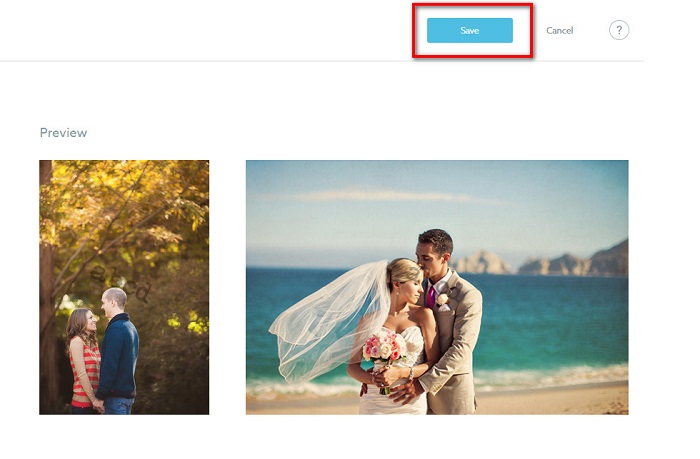
שלב 4. לבסוף, לחץ על כפתור Save כדי לשמור את ההגדרות שביצעת.
החל סימן מים על התמונות שאתה מעלה.
בדף סימן מים, אתה יכול לבחור סימן מים ברירת מחדל. אתה יכול גם להפעיל סימני מים עבור כל ההעלאות העתידיות שלך. אתה יכול לשנות זאת לפני העלאת תמונות חדשות.
וכאשר אתה מעלה תמונות חדשות לגלריה שלך דרך מעלה מבוסס האינטרנט או מעלה שולחן העבודה, אתה יכול לבחור את סימן המים שבו תרצה להשתמש במסך ההעלאה.
כיצד להסיר סימן מים ב-Shootproof
זכור תמיד שעריכה או הוספת סימן מים קיים ישפיעו רק על ההעלאות העתידיות שלך. השינויים שביצעת לא ישפיעו על התמונות שכבר נמצאות בגלריה שלך. אבל אם אתה רוצה לשנות את סימן המים או להסיר את סימן המים Shootproof, אתה יכול לרענן את סימן המים כדי לעדכן אותו בגלריה שלך. כך תוכל להסיר או לשנות את סימן המים Shootproof.
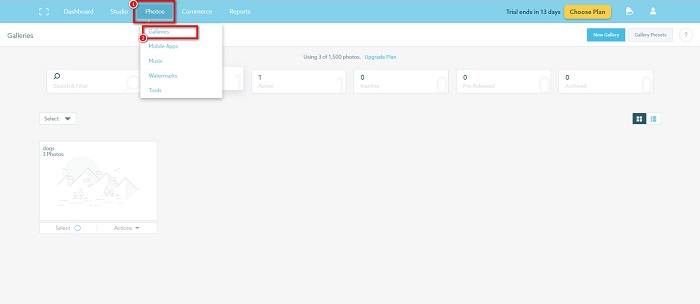
שלב 1. עבור אל Photos > Galleries, ואז לחץ על הגלריה שלך.
שלב 2. בגלריה, לחץ על כפתור More Actions בפינה הימנית העליונה של הממשק.
שלב 3. לאחר מכן, בחר Refresh Watermark כדי להסיר את סימני המים מכל תמונה שאתה מעלה.
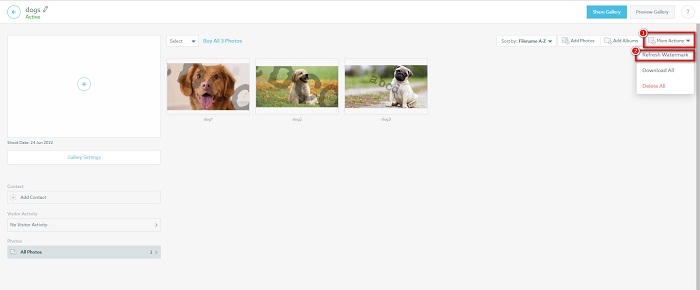
שלב 4. כדי להסיר את סימן המים, כבה את פס המחוון. ואם ברצונך רק לשנות את סימן המים, בחר New Watermark.
שלב 5. לבסוף, לחץ על Apply Change כדי לשמור את השינויים שביצעת.
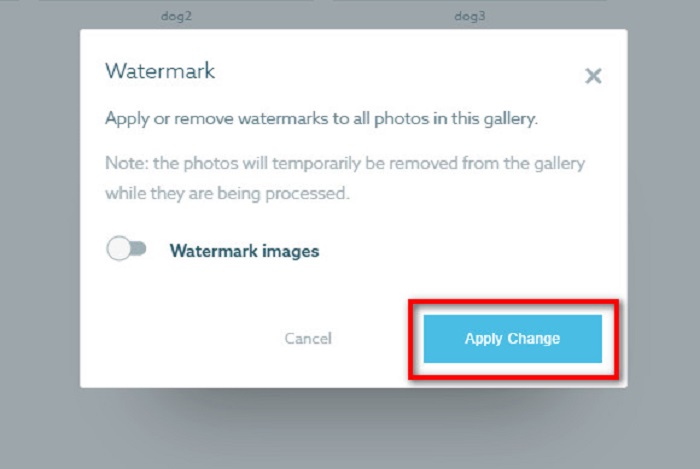
תראה שהתמונות יוצגו אוטומטית כעיבוד. לאחר החלת השינויים, תראה שהתמונות יחזרו לגלריה שלך.
קשור אל:
מסירי סימני המים הבולטים ל‑Arnold Maya שאסור לפספס
מסירי סימני המים של 123rf – סקירה מקיפה של הכלים האולטימטיביים
חלק 3. שאלות נפוצות על Shootproof Remove Mark Water
האם אתה יכול להסיר סימני מים דיגיטליים?
הסרת סימני מים דיגיטליים בלתי נראים היא קשה. לדוגמה, קשה להסיר את אלה המוטמעים על ידי תוסף Digimarc Photoshop. חיתוך, שינוי גודל, הוספת רעש וטשטוש מתון עשויים שלא לעבוד עם סימני מים דיגיטליים.
האם אתה יכול להסיר סימן מים לוגו מסרטון?
כן. אפשר להסיר סימן מים לוגו מהסרטון שלך. מסירי סימני מים רבים מאפשרים לך להסיר סמלי לוגו מהסרטונים שלך. אם אתה רוצה להסיר לוגו מהסרטון שלך, השתמש ב-Video Converter Ultimate.
האם Shootproof מופיע אם אתה מצלם צילום מסך?
Shootproof נוקט במספר אמצעים כדי להגן על התמונות של המוכר. עם זאת, Shootproof לא יכול למנוע מאנשים לצלם צילומי מסך של התמונה שלך בגלריה שלך.
סיכום
וזה הכול! על‑ידי ביצוע השיטות שהוזכרו לעיל, תוכל כעת להסיר את סימן המים של Shootproof מהתמונה שלך. למרות שהסרת סימן המים ב‑Shootproof היא בחינם, תהליך הביצוע עשוי להיות די מורכב. לכן, אם ברצונך להסיר בקלות את סימן המים של Shootproof מהתמונה שלך, השתמש ב‑FVC Free Watermark Remover.
-
 מסיר סימני מים מצטיין של Photobucket באופן מקוון ולא מקוון
 למד כיצד להסיר את סימן המים של Photobucket מהתמונות שלך באמצעות מסיר סימני מים מדהים של Photobucket. קרא מאמר זה כדי ללמוד את הדרכים.
-
 הסר בקלות סימן מים מ-PDF בעזרת שלבים פשוטים
 הסר סימן מים מ-PDF על ידי ביצוע שלבים פשוטים אלה. למד כיצד להסיר בקלות סימני מים מקובץ ה-PDF שלך באמצעות הכלים המדהימים האלה.
-
 דרכים קלות להסיר סימן מים מתמונות סיום הלימודים
 רוצה לדעת מהן הדרכים הטובות ביותר להסיר סימני מים מתמונות סיום הלימודים? על ידי קריאת מאמר זה, תוכל לדעת כיצד להסיר סימני מים בתמונות גראד בקלות.
