


 ממיר וידאו אולטימטיבי
 מקליט מסך
 תיקון וידאו
 הורדה מאובטחת
סקירה מלאה של Waifu2x והחלופות הטובות ביותר שאתה חייב להשתמש בו היום
כשאתה צריך כלי להפחתת רעשי תמונה ולהגדלת גודל (רזולוציה) בו‑זמנית, ייתכן שכבר נתקלת בWaifu2x. בעזרתו אפשר לפתור את הבעיה הנפוצה ביותר שאתה פוגש בדרך‑כלל בתמונות שלך, מבלי לגרום להן לפיקסלציה או לטשטוש. ובכל זאת, ישנם מספר כלים שמציעים את אותן יכולות כמו Waifu2x. ייתכן שאתה תוהה אם כדאי להשתמש בו כדי להגדיל ולצמצם רעשים בתמונה. בפוסט הזה נסקור עבורך את האפליקציה ואת החלופה שעליה אנו מדברים, שיכולה לעשות את מה ש‑Waifu2x מציע לך.

חלק 1. סקירת Waifu2x שאתה צריך לדעת וללמוד כיצד להשתמש בה
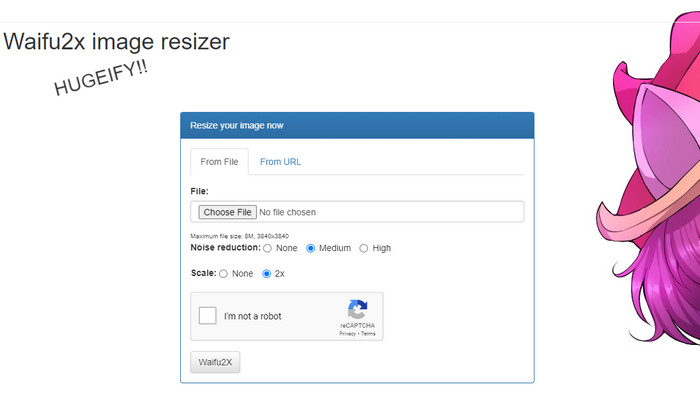
Waifu2x הוא פתרון צילום מקוון שניתן לגשת אליו דרך האינטרנט כדי להגדיל תמונות ולהפחית רעשי תמונה. בעזרת הכלי הזה ניתן להכפיל פי שניים את הרזולוציה של כל תמונה שאתה מעלה לכאן. למרות שעל פי שמו אולי לא נראה שהתוכנה מסוגלת גם להגדיל רזולוציה וגם להפחית רעשים, היא אכן מוכנה לעזור לך בכך. כשאתה מחפש את השם שלו, תראה תוצאות רבות, אך כולן עושות את אותו הדבר, בין אם הן מקוונות ובין אם לאו.
"טריוויה: השם בא מהמונח היפני waifu, שפירושו אישה. בדרך כלל זה נתפס או משמש כהערה כאשר אישה מושכת; קוראים לה waifu."
יתרונות
- אתה יכול לחוות את כל הפונקציונליות של כלי אינטרנט זה בחינם ברגע שאתה ניגש אליו בדפדפן האינטרנט שלך.
- אין צורך להוריד או להתקין את התוכנה לפני שתוכל להשתמש בה.
- הוא תומך בפורמטים פופולריים כגון PNG ו-JPG.
- אתה יכול לשדרג את התמונות עד פי 2.
- אתה יכול להפחית את הרעש בתמונה שלך על ידי הגדרתו כבינוני או גבוה.
חסרונות
- זה לא תומך במגוון רחב של פורמטים להעלאה.
- יש reCAPTCHA בכל תהליך.
- מבחר ותכונות מוגבלות.
שלבים כיצד להשתמש ב-Waifu2x:
לאחר שבחרנו באיזה אתר אנחנו צריכים להשתמש עבור השלבים, הנה הגרסה שבחרנו להשתמש ב-waifu2x.booru כדוגמה. אז, אם אתה רוצה להתחיל להשתמש ב-Waifu2x שינוי גודל התמונה, אתה יכול לעקוב אחר המדריך שאנו מוסיפים למטה כדי להכיר אותו טוב יותר.
שלב 1. באמצעות דפדפן האינטרנט שלך, העתק את הקישור שסיפקנו כדי להיכנס לכלי המקוון.
שלב 2. לחץ על Choose File כדי להעלות את קובץ ה‑PNG או ה‑JPG שאתה רוצה להגדיל או להפחית בו רעש.
שלב 3. תוכל לבחור אחת משלוש אפשרויות להפחתת רעשים: ללא, בינונית או גבוהה.
לאחר שבחרת, תוכל להתחיל להגדיל את התמונה בו‑זמנית על‑ידי לחיצה על 2x. סמן את תיבת ה‑captcha והמשך לשלב האחרון.
שלב 4. לחץ על Waifu2x כדי לשפר את התמונה בהתאם להגדרות שביצעת קודם.
חלק 2. החלופה הטובה ביותר ל-Waifu2x שתוכל להשתמש בה בחינם [שירות אינטרנט]
הבחירה שלנו כחלופה ל‑Waifu2x היא FVC Free Image Upscaler, משום שיש לו את אותה פונקציונליות כמו הכלי שסקרנו; עם זאת, כלי זה מגדיל את התמונה עד פי 8 יותר מהראשון. הכלי המקוון הזה פופולרי מפני שהוא יעיל בהגדלת התמונות על‑פי האלגוריתם שה‑AI מזהה. למרות שאין בו אפשרות ייעודית להפעלת הסרת רעשים, הפעולה הזו מתבצעת בו אוטומטית בעת עיבוד התמונה.
בנוסף לכך, כלי זה תומך ביותר פורמטים מאשר Waifu2x; אתה יכול להעלות כאן PNG, JPG, GIF, BMP, SVG ועוד, הכל בו-זמנית כדי לשדרג אותם. כמו כן, יש לו אתר צבע תוסס יותר מהאתר הראשון, שמושך אליו משתמשים. לכן, אם אתה רוצה לנסות להשתמש במוצר היוקרתי הזה, אתה יכול לעקוב אחר ההדרכה המפורטת שאנו כוללים הבא.
שלב 1. ניתן ללחוץ על הקישור הזה כדי לפתוח את האתר הרשמי של ממגדיל התמונות, שנחשב לחלופה המוכרת לכלי הראשון.
שלב 2. לחץ על Upload button כדי להוסיף את התמונה שאתה רוצה שה‑AI יגדיל, ישנה את גודלה, יפחית בה רעש ויערוך אותה.
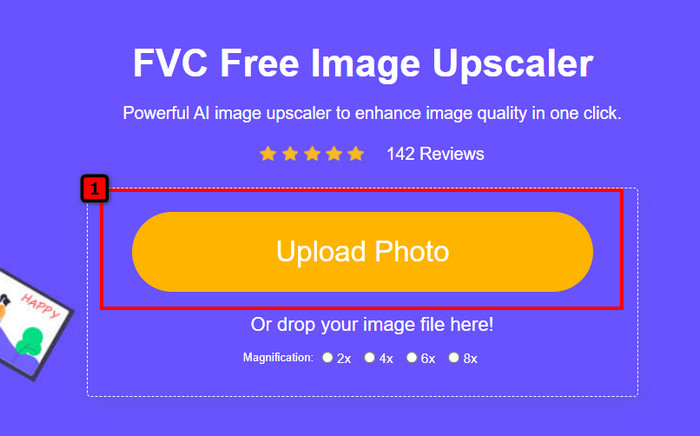
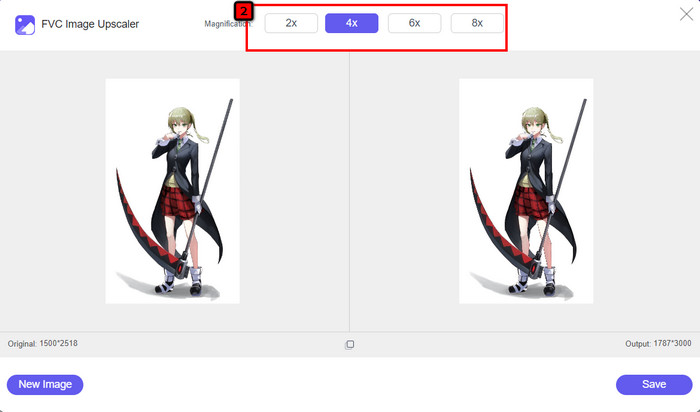
שלב 3. לאחר שהעלית את התמונה, לחץ על דרגת ההגדלה (Magnification) שברצונך ליישם על התמונה שהוספת. באפשרותך לנסות את כולן כדי לראות איזו מהן מתאימה ביותר לתמונה שלך.
שלב 4. לבסוף, לאחר שבחרת את ההגדרות לתמונה שאתה רוצה לערוך, לחץ על Save, ותהליך ההורדה יתחיל אוטומטית.
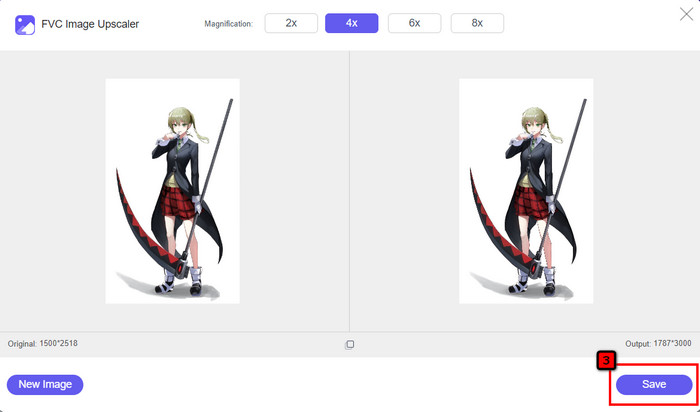
כמו כל עורך תמונות אחר שפועל ברשת ותומך בטכנולוגיית AI, גם כלי שיפור הפיקסלים הזה יכול לתקן פיקסלים חסרים בתמונה, כך שהפרטים יהיו מפותחים וברורים יותר מן הרגיל. קל לומר שזו החלופה המושלמת ל‑Waifu2x, המספקת תוצאות באיכות גבוהה בתוך שניות ספורות.
חלק 3. שאלות נפוצות על סקירת Waifu2x
האם לגישה בטוחה ל-Waifu2x?
האתר שאנו בודקים למעלה, waifu2x.booru, בטוח לגישה ואין לו מודעות בממשק האינטרנט. אנו יכולים להבטיח לך שיהיה לך תהליך חלק של הגדלה או הפחתת הרעש עם עורך זה. עם זאת, ישנם אתרים אחרים, waifu2x, עם הרחבות שונות, חלקם אינם מאובטחים לגישה, אז עדיף שלא תשתמש בהם כדי למנוע בעיות.
האם אוכל להפוך את התמונה ליצירה ב-Waifu2x?
כן, Waifu2x מסוגלת להפוך את הצילום ליצירת אמנות בקלות. עם זאת, אתר האינטרנט שלו שיכול להפוך צילום ליצירות אמנות אינו בטוח לגישה. לכן, אנו ממליצים לא לעבד כאן אף קובץ תמונה מכיוון שרוב התמונות מכילות מטא נתונים שהאתר עלול לגנוב ממך. אבל אם אתה רוצה לנסות להשתמש בו, כדאי להשתמש בו על אחריותך בלבד.
האם אוכל להוריד את ה-Waifu2x למחשב שלי?
ל-Waifu2x יש גרסה לא מקוונת שתוכל להוריד למחשב שלך אם אתה משתמש ב-Windows, אבל אם לא, עצוב שהיא לא מציעה גרסה אחרת. אם אתה רוצה להשתמש בעורך תמונות זה במכשיר שלך, נסה להשתמש בגרסה המקוונת, מכיוון שהיא נגישה בדפדפני אינטרנט שונים.
סיכום
הגיע הזמן לשדרג ולהפחית את רעשי התמונה; אז, אתה לא יכול להשתבש עם בחירת Waifu2x, כי זה הפתרון הטוב ביותר. מהמידע שאנו כוללים, אנו יכולים לומר שהתוכנה הזו אמינה ושווה את האמון של משתמשים שונים שרוצים לערוך עריכה מהירה בתמונה שלהם. עם זאת, קנה המידה הוא פי 2 בלבד; מה אם אתה רוצה להגיע גבוה יותר, אז מה אתה צריך לעשות? במקרה זה, מוטב שתבחר את החלופה שאנו מוסיפים לאפליקציה זו כדי לבצע את השינוי המדרגי הגבוה ביותר שתוכל לקבל בחינם.
עקוב אחר המדריך שאנו מוסיפים לצידו כדי שתוכל לשפר את התמונה שלך בקלות וביעילות יותר מכל עורך תמונות שאתה יכול להשתמש בו.
-
 כיצד לחדד תמונה באופן מקוון ולא מקוון עם 4 דרכים קלות
 ישנן שיטות רבות שאתה יכול לעשות אם אתה רוצה לחדד תמונה. נדון בהמשך הדרכים הטובות והקלות ביותר לחדד תמונות באופן מקוון ולא מקוון.
-
 כיצד לשנות את גודל התמונה - Adobe שינוי גודל תמונה [מקוון ולא מקוון]
 אם אתה מחפש את גודל התמונה של Adobe, אז יש לנו את הפתרון בשבילך. עיין בפוסט זה ביסודיות כדי ללמוד כיצד לשנות את גודל התמונות באמצעות Adobe במחשב האישי שלך.
-
 כיצד לשנות את גודל התמונה עבור פייסבוק [צעדים מהירים וקלים]
 אם אתה מתקשה להעלות תמונה בגודל גדול לפייסבוק, יש לנו פתרון בשבילך. סיים מאמר זה כדי ללמוד כיצד לשנות את גודל התמונות עבור פייסבוק.
