


 ממיר וידאו אולטימטיבי
 מקליט מסך
 תיקון וידאו
 הורדה מאובטחת
כיצד להמיר בקלות F4V ל-MP4 באמצעות כלים לא מקוונים ומקוונים
פורמט הקובץ FLV הוא אחד מהפורמטים הסטנדרטיים שבהם משתמש Adobe Flash, אך אם ברצונך להפעיל וידאו באיכות גבוהה יותר, עליך להמיר את קובץ ה‑F4V שלך לפורמטים אחרים כמו MP4. ניתן להפעיל פורמט MP4 כמעט בכל המכשירים, כגון אייפון, אייפד, מכשירי אנדרואיד ומחשבים. לכן, אם אתה מעדיף וידאו באיכות גבוהה, נספק לך את השיטות היעילות ביותר להמרת F4V ל‑MP4 בעזרת כלים מקוונים ולא מקוונים.

חלק 1: שיטה בסיסית להמרת F4V ל-MP4 ב-Mac וב-Windows
אם אתה משתמש Mac ואוהב להמיר קובצי וידאו, אז תוכל להשתמש ב‑Video Converter Ultimate. ממיר לא מקוון זה מצוין בהמרת F4V ל‑MP4 ב‑Mac וב‑Windows, מה שהופך אותו לנוח לכל המשתמשים. בנוסף, הוא יכול להמיר כמעט כל קובץ וידאו משום שהוא תומך ב‑AVI, MP4, MOV, FLV, VOB, MTS, SWF, MKV, WMV ועוד. יתרה מזאת, המרת קובצי F4V ביישום זה היא קלה משום שיש לו ממשק פשוט להבנה עם שיטות המרה בסיסיות. כך, תוכל לוודא שהוא מתאים לשימוש, במיוחד עבור מתחילים. בנוסף, מבחינת מהירות ההמרה, תמיד תהיה מרוצה. Video Converter Ultimate מציע תהליך המרה במהירות־על, שהוא מהיר פי 30 מממירים אחרים. תוכל גם להמיר מספר קובצי וידאו בו־זמנית, משום שהוא מאפשר המרה באצווה. נוסף על כך, ניתן לעשות יותר ביישום זה מעבר להמרת וידאו. תוכל גם ליצור קליפ מוזיקלי באמצעות כלי זה אם תרצה בכך. היישום מציע יוצר קליפים מוזיקליים (Music Video creator) ומספק מגוון ערכות נושא, כמו פשוט, שמח, לילה מושלג, נקי ועוד. בנוסף, לממיר וידאו זה יש פונקציית יצירת קולאז' (Collage maker), שבאמצעותה תוכל ליצור קולאז' עם תבניות ומסננים שונים. תוכל לחוות עוד תכונות מצוינות בעת השימוש ב‑FVC Video Converter Ultimate.
תכונות
◆ המר 100+ פורמטים של קבצי וידאו, כגון MP4, F4V, MOV, AVI, MKV, WMV, VOB וכו'.
◆ צור קולאז' עם תבניות ומסננים בחינם.
◆ צור סרטון מוזיקה פנטסטי עם נושאים שונים.
◆ דחוס סרטון לגודל הקובץ הרצוי.
◆ כוונן את מהירות הסרטון מ-0.125x עד פי 8 מהר יותר ממהירות הווידאו הממוצעת.
◆ הוסף והסר את סימן המים מסרטון.
◆ המר פורמטים של קבצי תמונה, כגון BMP, PNG, JPG, TIF וכו'.
עקוב אחר השיטות הפשוטות שלהלן כדי להמיר במהירות F4V ל-MP4 באמצעות FVC Video Converter Ultimate.
שלב 1: הורד את Video Converter Ultimate לשולחן העבודה שלך על‑ידי לחיצה על כפתור Download למטה. לאחר מכן המשך לתהליך ההתקנה והפעל את היישום.
הורדה חינמיתל-Windows 7 ומעלההורדה מאובטחת
הורדה חינמיתל-MacOS 10.7 ומעלההורדה מאובטחת
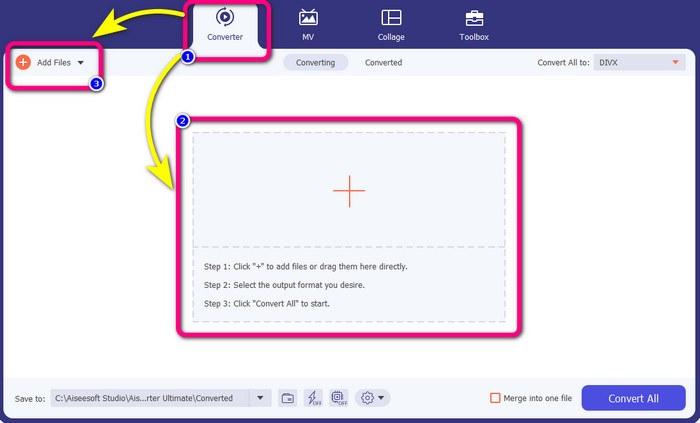
שלב 2: כדי להמיר את סרטון ה‑F4V שלך, עבור לאפשרות Converter ובחר בסמל ה‑Plus או בכפתור Add File כדי להוסיף את הסרטון שלך בפורמט הקובץ F4V.
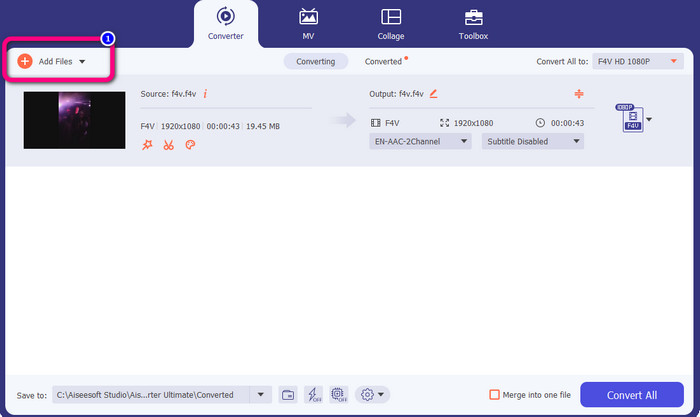
שלב 3: אם ברצונך להמיר יותר קובצי F4V בו־זמנית, לחץ על כפתור Add Files והוסף קובץ F4V נוסף.
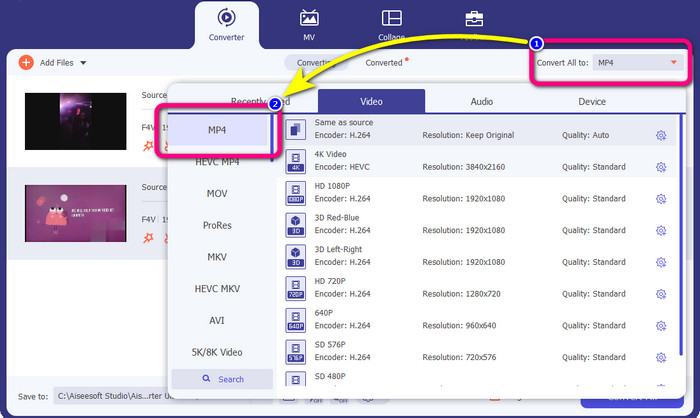
שלב 4: עבור לכפתור Convert All to כדי לשנות את פורמט הפלט. תראה את אפשרויות הפורמט ובחר בפורמט MP4. תוכל גם לבחור את איכות הווידאו המועדפת עליך.
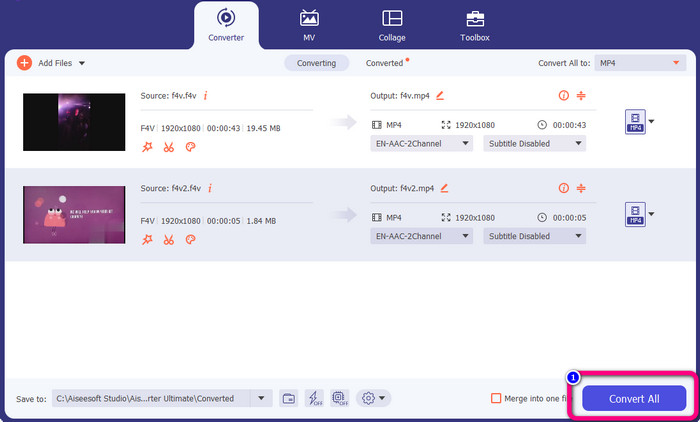
שלב 5: אם סיימת לשנות את פורמט הפלט שלהם, באפשרותך להמיר את הקבצים על‑ידי לחיצה על כפתור Convert All. תהליך ההמרה יתחיל, וסרטון ה‑F4V שלך יהפוך לקובץ MP4 בתוך כמה שניות בלבד.
חלק 2: שלבים פשוטים להמרת F4V ל-MP4 באמצעות VLC
בחלק זה, תלמד כיצד להמיר F4V ל-MP4 באמצעות נגן המדיה VLC. כן! קראת נכון! מלבד הפעלת סרטונים, VLC הוא כלי נוסף שבו אתה יכול להשתמש כדי להמיר קבצים. כמו כן, הוא תומך בפורמטים שונים של קבצים, כגון MP4, WEBM, OGG, TS, ASF ועוד. עם זאת, אתה צריך לדעת מספיק על הכלי הזה כי יש לו ממשק מבלבל. צפה במדריכים או בקש ממשתמשים מתקדמים לקבל מושג לגבי המרת קבצים באמצעות VLC. כמו כן, זה גוזל זמן להוריד את הממיר הזה. בצע את ההליכים שלהלן כדי להמיר F4V ל-MP4 באמצעות VLC Media Player.
שלב 1: הורד את VLC Media Player למחשב שלך. הפעל את היישום לאחר תהליך ההתקנה.
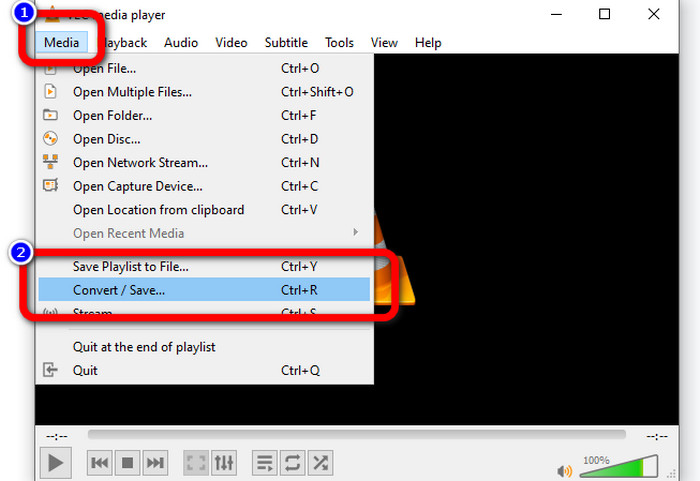
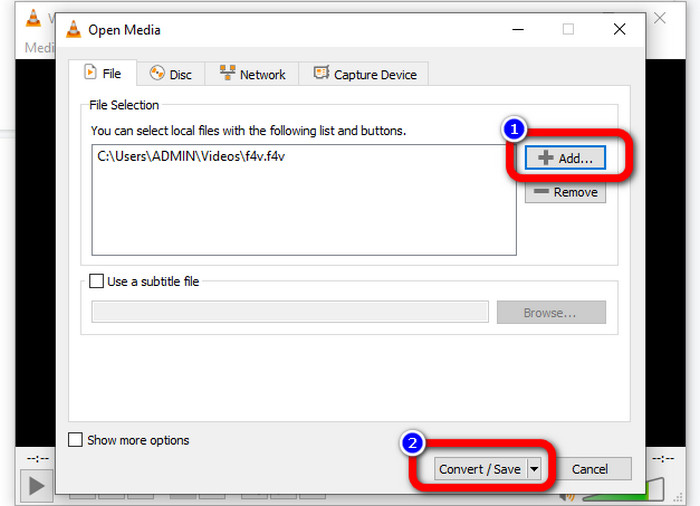
שלב 2: עבור אל כפתור Media > Convert/Save. לאחר מכן לחץ על כפתור Add כדי לצרף את סרטון ה‑F4V שלך.
שלב 3: לאחר הוספת סרטון ה‑F4V, לחץ שוב על כפתור Convert/Save בחלק התחתון של הממשק.
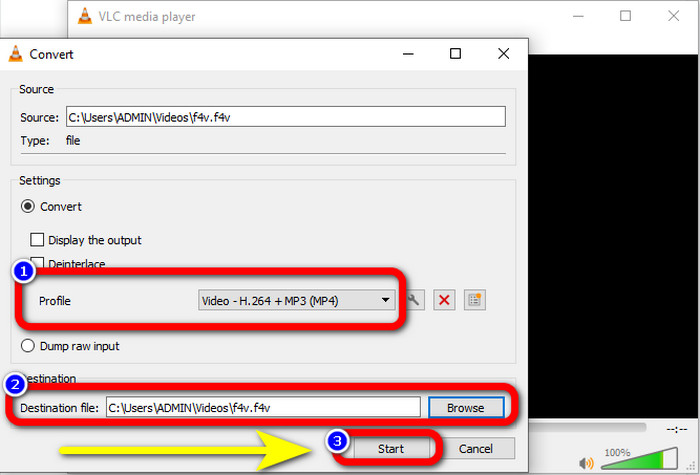
שלב 4: עבור לפרופיל ובחר בפורמט הקובץ MP4. לאחר מכן עבור ל‑Browse כדי להגדיר מיקום קובץ שבו תרצה לשמור את הסרטון שלך. לחץ על כפתור Start כדי להמשיך בתהליך ההמרה.
חלק 3: דרך קלה להמיר F4V ל-MP4 באמצעות בלם יד
אם אתה עדיין מחפש ממיר נוסף מ‑F4V ל‑MP4 ב‑Windows, תוכל להשתמש ב‑Handbrake. זהו כלי לא מקוון שתומך בכמה פורמטי וידאו, כגון MP4, MKV, WEBM ועוד. עם זאת, כלי זה מורכב, משום שיש בו אפשרויות רבות שעלולות לבלבל. השתמש בשלבים שלהלן כדי להמיר את קובץ ה‑F4V שלך לפורמט MP4.
שלב 1: הורד את Handbrake למחשב ה‑Windows שלך. לאחר מכן הפעל את היישום כשסיימת להתקין אותו.
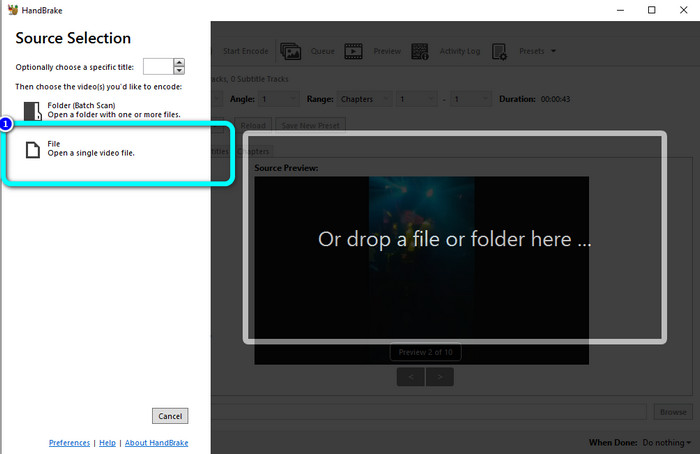
שלב 2: לחץ על כפתור File כדי להוסיף את קובץ ה‑F4V שלך.
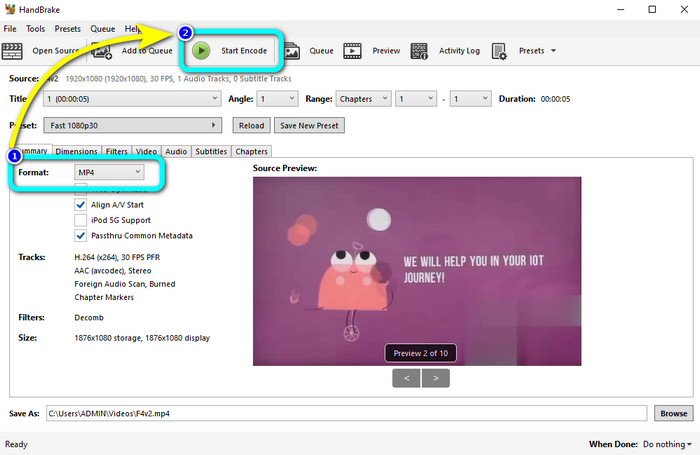
שלב 3: עבור לאפשרויות הפורמט ובחר בפורמט הקובץ MP4. לאחר מכן לחץ על כפתור Start Encode. המתן לתהליך ההמרה ושמור את סרטון הווידאו הסופי שלך.
חלק 4: שלבים מפורטים להמרת F4V ל-MP4 חינם באינטרנט
האם ברצונך להשתמש ביישום מקוון כדי להמיר F4V ל‑MP4 בחינם? השתמש ב‑FVC Free Video Converter Online. תוכל להמיר את קובץ ה‑F4V שלך מבלי להוציא אפילו אגורה. בנוסף, לממיר זה יש ממשק פשוט ביותר, המתאים למשתמשים לא מקצועיים. הוא תומך בפורמטי וידאו שונים, כגון FLV, WMA, MOV, AVI, WMV ועוד. החלק הטוב ביותר הוא שאתה יכול להמיר קובצי וידאו מבלי לאבד מאיכותם. עקוב אחר השלבים המפורטים למטה כדי להמיר F4V ל‑MP4 בקלות.
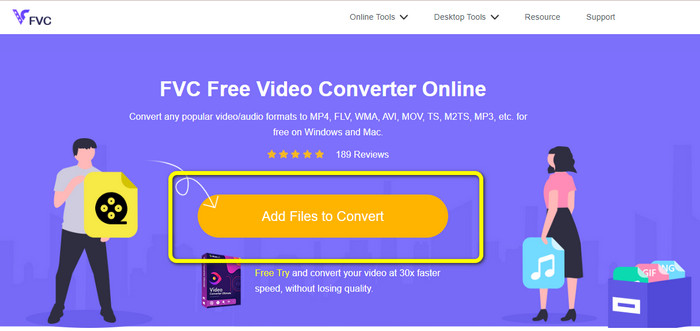
שלב 1: בקר באתר של FVC Free Video Converter Online. לחץ על כפתור Add Files to Convert כדי להעלות את קובץ הווידאו F4V שלך.
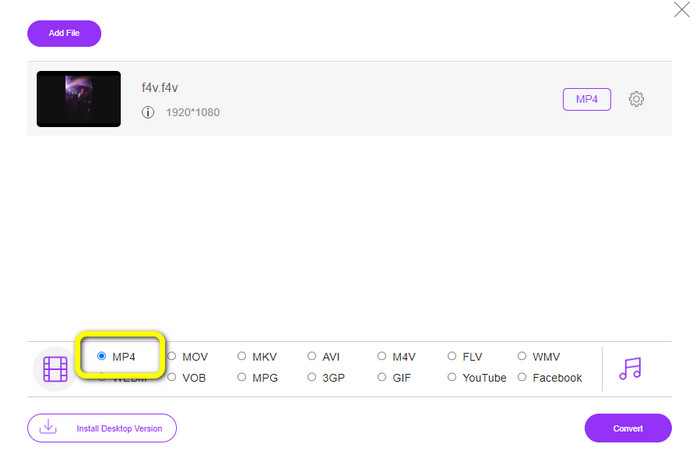
שלב 2: לאחר העלאת הסרטון, עבור לחלק התחתון של הממשק ולחץ על פורמט הקובץ MP4.
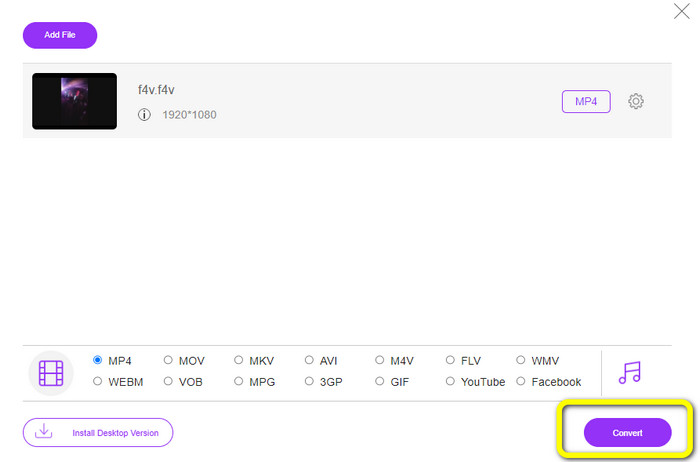
שלב 3: לבסוף, לחץ על כפתור Convert. המתן לתהליך ההמרה ושמור את הקובץ שלך במיקום הרצוי לך.
חלק 5: F4V לעומת MP4
עיין במידע הנוסף להלן לגבי שני פורמטים אלה של קבצים.
| F4V | MP4 | |
| סיומת קובץ | .f4v | .mp4 |
| פותח על ידי | תפוח עץ | קבוצת מומחי סרטים נעים |
| תיאור | זהו פורמט קובץ הפלאש המקורי. הוא מבוסס גם על פורמט קובץ המדיה הבסיסי של ISO התומך ב-Flash Player 9. כמו כן, לא ניתן להפעיל קבצי F4V במכשירי iOS, אך בדפדפנים התומכים ב-Flash, ניתן להפעיל אותם. | זהו קובץ מולטימדיה. המיכל יכול לאחסן נתוני כתוביות, אודיו ווידאו. כמו כן, כמו פורמטים אחרים של מיכל, MP4 מאפשר סטרימינג באינטרנט. |
| תוכניות משויכות | נגן מדיה XVLC וידאו LAN נגן המדיה של Windows FFDShow Microsoft Windows מציג גלריית תמונות | Apple QuickTime Player וידאו LAN נגן מדיה VLC אפל iTunes Microsoft Windows Media Player |
לקריאה נוספת:
2 מממירי הווידאו המועדפים להמרת F4V ל‑WMV [2023]
2 מהדרכים המהירות ביותר להמרת F4V ל‑FLV [מקוון ולא מקוון]
חלק 6: שאלות נפוצות על המרת F4V ל-MP4
1. האם אני יכול להמיר MP4 ל-F4V?
כן אתה יכול! אתה יכול להשתמש ב-Video Converter Ultimate. יישום זה יכול להמיר באופן מיידי את קובץ ה-MP4 שלך לפורמט F4V.
2. מה ההבדל בין F4V ל-FLV?
ההבחנה העיקרית בין שני הפורמטים הללו היא שה-F4V תומך בסרטונים באיכות גבוהה המקודדים על ידי H.264, אך פורמט FLV משתמש בדרך כלל ב-H.263.
3. כיצד להשתמש ב-FFmpeg כדי להמיר F4V ל-MP4?
הורד את ה-FFmpeg למחשב שלך. פתח את שורת הפקודה. הקלד Desktop כדי להחליף את שורת הפקודה. פקודת ההמרה מתחילה ב-FFmpeg-i, ולאחר מכן הקלד את שם הסרטון ופורמט הקובץ שלו. כמו כן, סוג קובץ הפלט. לחץ על Enter והמתן לתהליך ההמרה. לאחר מכן, תוכל לראות את הקובץ שלך על שולחן העבודה שלך
סיכום
מדריך זה מציג הוראות מפורטות להמרת F4V ל‑MP4 אונליין ואופליין. משתמשים מעדיפים דרך פשוטה ומהירה יותר להמרת וידאו. לכן, תוכל להשתמש ב‑Video Converter Ultimate כדי להמיר את קובצי הווידאו שלך מיידית, משום שהוא מציע מהירות המרה הגבוהה פי 30 מממירים אחרים. באפשרותך גם להשתמש ב‑FVC Free Video Converter Online כדי להמיר וידאו בצורה פשוטה, שדורשת רק כמה לחיצות בלבד.
-
 4 הממירים המקוונים והלא מקוונים החדשים ביותר להמרת F4V לפורמט AVI
 אין לך מושג באיזה ממיר אתה צריך להשתמש כדי להמיר F4V ל-AVI או כל פורמט וידאו אחר? לאחר מכן קרא את המאמר הזה כשאנחנו לומדים כיצד להמיר עם הכלי הזמין.
-
 כיצד להמיר F4V ל-MOV מבלי לאבד איכות [נפתר]
 אם אתה מתקשה להכיר בכמה פורמטי וידאו כמו F4V. קרא מאמר זה כדי ללמוד עוד על פורמט וידאו F4V ו-MOV וללמוד כיצד להמיר F4V ל-MOV בשיטות שונות.
-
 שיטות מוצלחות להמרת DIVX ל-MP4 מיד
 כיצד אוכל להמיר DIVX ל-MP4? אם אתם מחפשים את הפתרון הטוב ביותר, אתם במאמר הנכון. אנו נראה לך כיצד להמיר DIVX ל-MP4 בקלות
