


 ממיר וידאו אולטימטיבי
 מקליט מסך
 תיקון וידאו
 הורדה מאובטחת
3 שיטות יעילות להמרת MP4 ל- AMV ב- Windows וב- Mac שלך בקלות
כאשר אתה רוצה לשלוח כמה קטעי וידאו MP4 גדולים לטלפון החכם שלך, כגון סרט גדול, ייתכן שלא יהיה מספיק מקום אחסון. כדי להמיר MP4 לקובץ AMV, אתה יכול להשתמש באלגוריתם הדחיסה המתקדם כדי לקבל סרטון קטן בהרבה. בין אם עליכם להמיר את הסרטונים באופן מקוון, או לשנות ולערוך את הסרטונים בגודל מסוים, תוכלו ללמוד עוד על 3 הממירים היעילים ביותר ל- MP4 ל- AMV מהמאמר.

חלק 1: כיצד להמיר MP4 ל- AMV מקוון
אם אתה רק צריך להמיר קובץ MP4 פשוט ל‑AMV בקלות, FVC Free Online Video Converter הוא ממיר וידאו מקוון רב‑תכליתי, שתואם ל‑MP4, AMV, AVI ועוד פורמטים אחרים. הוא גם מאפשר לכוונן את הגדרות הווידאו והשמע, ואף מאפשר לך להמיר את הקבצים ללא סימן מים או מגבלות אחרות.
- 1. המרת MP4 ל- AMV, אבי, MKV ועוד סרטונים אחרים באיכות מקורית.
- 2. כוונן את קצב הפריימים, איכות הווידיאו, codec הווידאו, איכות השמע ועוד.
- 3. ספק ממשק משתמש קל להמרת קבצי ה- AMV בתוך 3 שלבים בלבד.
- 4. זו שיטה בטוחה ויציבה להמיר את הקבצים ללא סימן מים.
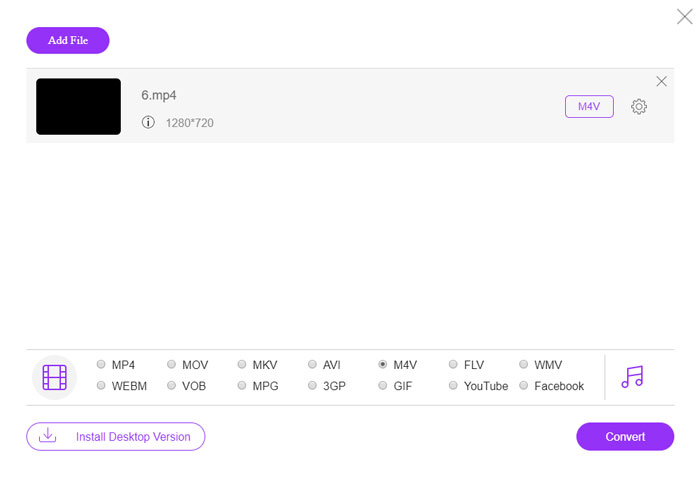
שלב 1. עבור לממיר המקוון מ‑MP4 ל‑AMV בכל דפדפן, באפשרותך ללחוץ על הכפתור Add File to Convert כדי להתקין את ממיר הווידאו בפעם הראשונה. ניתן גם לטעון את קובצי ה‑MP4 לתוך התכנית.

שלב 2. בחר ב‑AMV כפורמט הפלט בתחתית. כמובן, באפשרותך גם לכוונן את הגדרות הווידאו והשמע, כגון מקודד וידאו, רזולוציית וידאו, קצב סיביות של וידאו, קצב פריימים ועוד, כדי לקבל וידאו בהתאם לצרכים שלך.

שלב 3. לאחר מכן ניתן ללחוץ על הכפתור Convert כדי להתחיל להמיר MP4 ל‑AMV בהתאם. ההמרה נמשכת מספר שניות עד לקבלת הקובץ הרצוי, ואז ניתן להעביר את הווידאו לטלפון החכם שלך בהתאם.
חלק 2: כיצד להמיר MP4 ל- AMV עם נגן המדיה VLC
נגן המדיה VLC הוא אחד מממירי ה- MP4 ל- AMV הפופולריים ביותר. זה גם מספק כמה תכונות בסיסיות להמרת ועריכת וידאו. יתר על כן, אתה יכול גם להציג תצוגה מקדימה של וידאו AMV פלט לאחר ההמרה. פשוט בדוק את התהליך המפורט להלן.
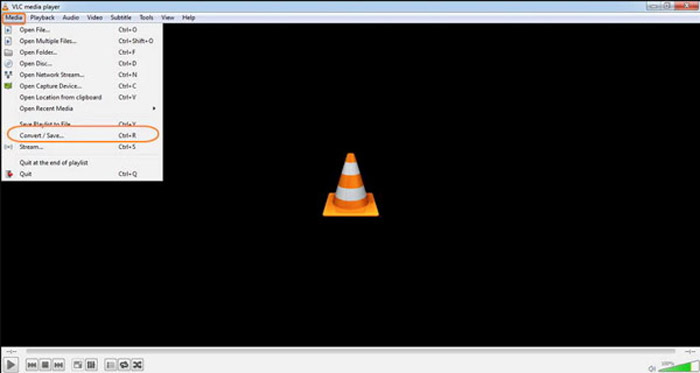
שלב 1. פתח את VLC Media Player במחשב, עבור לתפריט Media ובחר באפשרות Convert/Save. לחץ על האפשרות Add מימין לרשימת File Selection בלשונית File ועיין בקובצי ה‑MP4.
שלב 2. לחץ על הכפתור Convert/Save כדי להמשיך. בחלון Convert באפשרותך לבחור ב‑AMV כפורמט הפלט. לחץ על הכפתור Edit Selected Profile כדי לכוונן את הגדרות הווידאו והשמע.
שלב 3. לחץ על האפשרות Browse ובחר מיקום ושם קובץ עבור קובץ הפלט. לאחר מכן תוכל ללחוץ על הכפתור Start כדי להמיר בהתאם קובצי MP4 ל‑AMV במחשב שלך.
חלק 3: השיטה הטובה ביותר להמיר MP4 ל- AMV בקלות
FVC Video Converter Ultimate הוא ממיר MP4 ל‑AMV הכול‑באחד גם ל‑Windows וגם ל‑Mac. הוא לא רק ממיר פורמטי וידאו, אלא גם מאפשר לך לכוונן פרמטרים שונים של וידאו ושמע, להוסיף כתוביות/רצועות שמע, ואפילו לערוך את קובצי הווידאו שהומרו בקלות.
- 1. המרת MP4 ל- AMV ועוד פורמטי וידאו אחרים באיכות מקורית.
- 2. כוונן את קצב המסגרות, איכות הווידיאו, קצב הסיביות, codec הווידאו ועוד.
- 3. ספק תכונות עריכת וידאו מרובות לסיבוב, קליפ, התאמת מסננים וכו '.
- 4. האצת חומרה מתקדמת להמרת הסרטון במהירות גבוהה פי 70.
הורדה חינמיתל-Windows 7 ומעלההורדה מאובטחת
הורדה חינמיתל-MacOS 10.7 ומעלההורדה מאובטחת
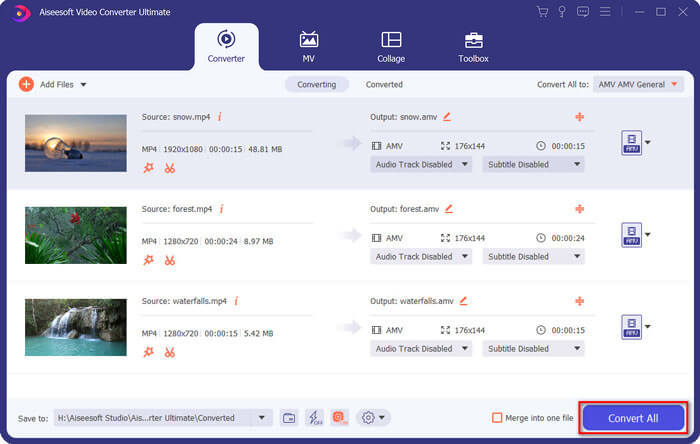
שלב 1. הורד והתקן את ממיר MP4 ל‑AMV, והפעל את התכנית במחשב שלך. בחר בכפתור Convert ולחץ על האפשרות Add File כדי לטעון את קובצי ה‑MP4, או גרור ישירות מספר קובצי MP4 אל התכנית.

שלב 2. לחץ על סמל הפורמט בצד הימני של קובץ הווידאו ובחר ב‑AMV כפורמט הפלט. ניתן גם ללחוץ על סמל הGear כדי לכוונן את הגדרות הווידאו והשמע, או אפילו לערוך את הווידאו/להתאים מסננים בקלות.

שלב 3. לאחר שאתה מרוצה מקובץ ה‑AMV הסופי, למשל מגודל הווידאו, תוכל ללחוץ על הכפתור Convert All כדי להתחיל בהמרה מ‑MP4 ל‑AMV. לאחר מכן ניתן להעביר את קובצי ה‑AMV למכשיר אחר.
חלק 4: שאלות נפוצות בנושא המרת קבצי MP4 לקבצי AMV
1. מהו פורמט הקובץ AMV?
קובץ ה- AMV ידוע כקובץ Anime Music Video. זה בדרך כלל משמש מכשירי מדיה ניידים המנגנים מסין ובסין. פורמט הווידיאו AMV מוצג ברזולוציה נמוכה, אשר ברזולוציית הווידאו שבין 94x64 ל -160 x 120. כאשר אתה ממיר MP4 ל- AMV, אתה יכול לשלוח קטעי וידאו נוספים לסמארטפון שלך בקלות.
2. כיצד מנגנים קבצי AMV בסמארטפון ובמחשב?
כאשר אתה ממיר MP4 לקבצי AMV, איך מנגנים את קבצי הווידאו בסמארטפון או במחשב שלך? למעשה, אתה יכול פשוט לקחת את AMV כגרסה של פורמט AVI, שניתן לעבוד ברוב נגני המדיה. אם אתה צריך להשמיע את קבצי ה- AMV במכשירי ה- iOS שלך, אתה יכול להשתמש ב- VLC Media Player או בנגן מדיה אחר במקום זאת.
3. מהם ההבדלים בין AMV ל- MP4?
MP4 הוא אחד מתבניות הווידאו הנפוצות ביותר שניתן להשתמש בהם לשירות הזרמה מקוון ומכשיר. AMV הוא גרסה של Motion JPEG, עם טבלאות כימות קבועות ולא משתנות. כאשר אתה ממיר MP4 ל- AMV, אתה יכול לדחוס את הווידאו ולחסוך יותר שטח אחסון, במיוחד להעברת הסרטונים למכשירים.
סיכום
מהי הבחירה הטובה ביותר להמיר MP4 ל- AMV? פשוט למד פרטים נוספים על השיטות הטובות ביותר מתוך המאמר. אם אתה צריך להמיר ולדחוס את הסרטונים באופן מקוון ללא תוכנה נוספת, ממיר וידאו מקוון חינם של FVC הוא הפתרון האולטימטיבי שתוכל לקחת בחשבון.
-
 AVI VS MP4 - מה עדיף (איכות / דחיסה / גודל קובץ ...)
 מהו פורמט וידאו טוב יותר, AVI או MP4? אם אתה רוצה לקבל את ההשוואה המפורטת, אתה יכול לבדוק מאמר זה של AVI VS MP4. אתה יכול לדעת את ההבדלים והדמיון בין AVI ל- MP4 בהיבטים רבים.
-
 10 תוכנות נגן MP4 המובילות עבור Windows ו- Mac (חינם ומשולם)
 קרא וקבל את נגן ה- MP4 הטוב ביותר שלך מההמלצות של 10 תוכנות נגן הווידאו MP4 האחרונות. אתה יכול לנגן קבצי וידאו MP4 ב- Windows ו- Mac בצורה חלקה ללא השהיה.
-
 כיצד להמיר MP4 ל- WMV עבור Mac / Windows
 פוסט זה משתף כיצד להמיר וידאו MP4 לפורמט WMV ב- Mac או Windows. אנו מציעים לך גם מספר אפשרויות, כולל תוכנות שולחן עבודה וגם ממירים מקוונים מבוססי אינטרנט. מוכנים לדעת את הכלים הטובים ביותר להמרת MP4 ל WMV?
