


 ממיר וידאו אולטימטיבי
 מקליט מסך
 תיקון וידאו
 הורדה מאובטחת
המרת MP4 ל-GIF בחינם ובאינטרנט [מדריך שלב אחר שלב]
מדריך זה מתמקד בהמרת קובצי וידאו MP4 לקובצי GIF מונפשים. פורמט הקובץ GIF משמש לאחסון תמונות מונפשות, שלרוב מורכבות מכעשרים פריימים כדי להעביר סיפור או לצורך בידור. כיום, אינספור קובצי GIF נוצרים ומשותפים ברשתות החברתיות. למעשה, אין צורך לקנא באחרים – תוכל ללמוד כמה דרכים לחילוץ מספר פריימים מקובץ וידאו MP4 ולשמור אותם כ‑GIF מונפש.

חלק 1. המרת קבצי MP4 ל-GIF באופן קבוצתי תוך שמירה על איכות גבוהה
כיצד להמיר MP4 ל- GIF בשולחן העבודה
האם ברצונך להפוך קליפ MP4 אהוב עליך ל‑GIF מונפש בלולאה? בין אם אתה רוצה ליצור ממים, לשתף ריאקציה או להפוך תוכן למושך יותר, המרת MP4 ל‑GIF היא קלה בעזרת FVC Video Converter Ultimate. ארגז כלים וידאו הכול באחד זה מאפשר לך להמיר, לדחוס ולערוך וידאו ללא אובדן איכות – ויצירת GIF דורשת רק כמה קליקים.
• המרת MP4, MOV, AVI, MKV ועוד ל-GIF ופורמטי מדיה אחרים.
• חתוך, חתוך והצג תצוגה מקדימה של הסרטון שלך לפני הפיכתו לקובץ GIF.
• מופעל על ידי האצת חומרה להמרת קבצים תוך שניות.
• התאם את קצב הפריימים, הרזולוציה ואפשרויות הלולאה לקבלת פלט מושלם.
• המר מספר סרטונים לקבצי GIF בו זמנית כדי לחסוך זמן.
הורדה חינמיתעבור Windows 7 או גרסה מאוחרת יותרהורדה מאובטחת
הורדה חינמיתעבור MacOS 10.7 או גרסה מאוחרת יותרהורדה מאובטחת
כך ניתן להמיר MP4 ל-GIF בעזרת FVC Video Converter Ultimate:
שלב 1: הורד, התקן והפעל את FVC Video Converter Ultimate במחשב שלך.
שלב 2: לחץ על Add Files או גרור ושחרר את סרטון ה‑MP4 לחלון הראשי.
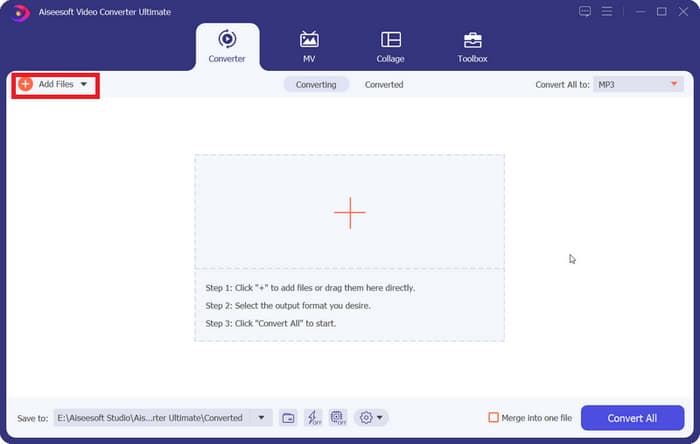
שלב 3: בחר ב‑GIF כפורמט הפלט ולחץ על Convert All כדי להמיר MP4 ל‑GIF מונפש.
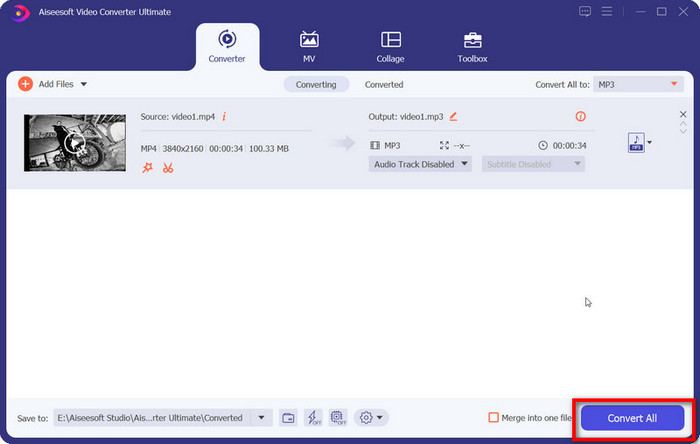
FVC Video Converter Ultimate הופך את ההמרה מ-MP4 ל-GIF לפשוטה, מהירה וגמישה. בין אם אתם יוצרי תוכן או סתם רוצים ליצור אנימציות מהנות, כלי זה מספק את כל מה שאתם צריכים.
חלק 2. המרת MP4 ל-GIF מונפש בחינם בקלות
כיצד להמיר MP4 ל-GIF באמצעות FVC Free Video to GIF Maker
כיצד צריך להיראות ממיר MP4 ל‑GIF הטוב ביותר? קודם כול, עליו להיות קל לשימוש גם למתחילים וגם למשתמשים מנוסים. נוסף על כך, עליו להגן על איכות התמונה. לכן אנו ממליצים על FVC Free Video to GIF Maker.
FVC וידאו חינם ל- GIF Maker
122,446+ הורדות- המרת MP4 ל- GIF מונפש בחינם ללא כל מגבלה.
- חלץ מסגרות ספציפיות להכנת קובץ GIF חדש.
- מציעים כלי עריכה נרחבים לתמונות GIF.
- אצווה לעבד מספר קבצי וידאו MP4 במהירות.
הורדה בחינםל‑Windows 7 ומעלההורדה מאובטחת
הורדה בחינםל‑MacOS 10.7 ומעלההורדה מאובטחת
בקצרה, זוהי האפשרות הטובה ביותר להמיר MP4 ל- GIF מבלי לאבד את האיכות.
כיצד להמיר MP4 ל- GIF בשולחן העבודה
שלב 1: ייבא קבצי MP4
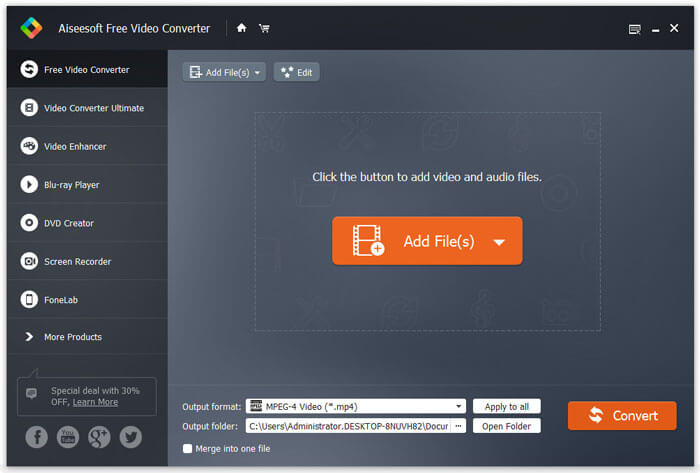
הפעל את ממיר ה‑MP4 ל‑GIF החינמי והטוב ביותר לאחר שהתקנת אותו במחשב. לאחר מכן לחץ על הכפתור הגדול Add Files כדי לייבא את כל סרטוני ה‑MP4 שברצונך להמיר. לחלופין, גרור ושחרר את קובצי ה‑MP4 לתוך התיבה המסומנת בקו מקווקו כדי לייבא אותם ישירות.
שלב 2: חתוך וערוך סרטונים
אחרי הטעינה, לחץ על התפריט Edit ברצועת הכלים העליונה כדי לפתוח את חלון עריכת הווידאו. הסר פריימים לא רצויים בעזרת כלי החיתוך. באפשרותך לאפס נקודות התחלה וסיום. לאחר מכן חתוך גם את קובצי ה‑MP4 האחרים.
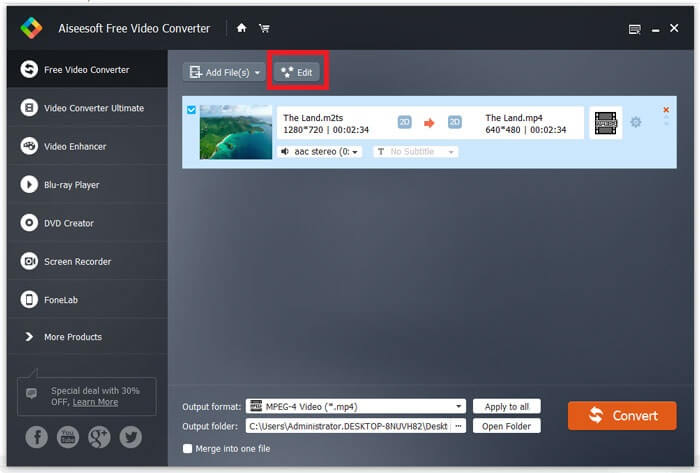
שלב 3: המרת MP4 ל- GIF
כשתחזור לממשק הראשי, לחץ ופתח את רשימת הבחירה של Output format, חפש GIF ובחר את האפשרות המתאימה. לחץ על הכפתור Open Folder והגדר תיקייה ספציפית לשמירת הפלט. לבסוף, לחץ על הכפתור Convert כדי להתחיל להמיר MP4 ל‑GIF במצב אצווה.
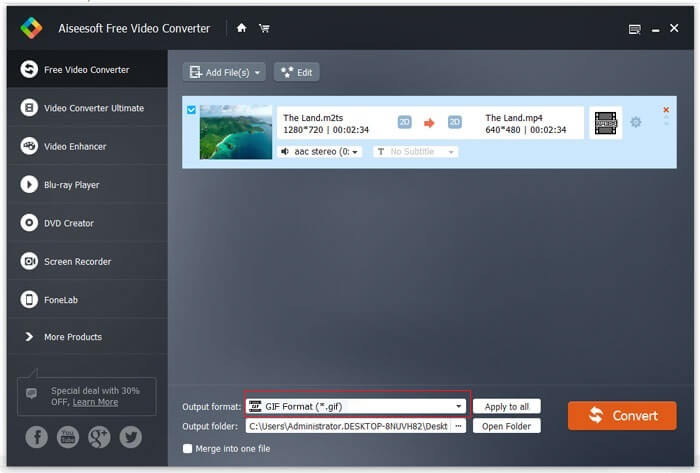
זהו פתרון חינמי להמרת MP4 ל-GIF. אבל לכלי זה חסרים כלי עריכת וידאו מתקדמים כמו הוספת שכבות טקסט, פילטרים או אפקטים בהשוואה ל-FVC Video Converter Ultimate. לכן אני עדיין ממליץ להוריד ולנסות את הכלי האולטימטיבי.
הורדה חינמיתעבור Windows 7 או גרסה מאוחרת יותרהורדה מאובטחת
הורדה חינמיתעבור MacOS 10.7 או גרסה מאוחרת יותרהורדה מאובטחת
חלק 3. כיצד להמיר MP4 ל-GIF עם אדובי פוטושופ
הפיכת MP4 ל-GIF בעזרת פוטושופ
פוטושופ הוא עורך תמונות פופולרי ברחבי העולם. גם לאנשים ממוצעים וגם לצלמים מקצועיים יש את זה במכונות שלהם. אתה יכול לתהות אם Photoshop יכול להמיר MP4 ל- GIF. התשובה חיובית ונשתף את השלבים הבאים.
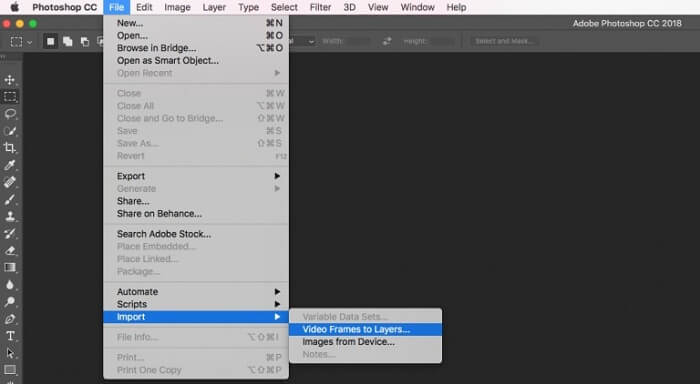
שלב 1: הפעל את Photoshop, עבור לתפריט File שברצועה העליונה, בחר Import ולאחר מכן Video Frames to Layers. כעת מצא ופתח את סרטון ה‑MP4 המקורי מהכונן שלך.
אם Photoshop אינו יכול לפתוח את הסרטון שלך, תחילה עליך להמיר אותו לקודקים נתמכים.
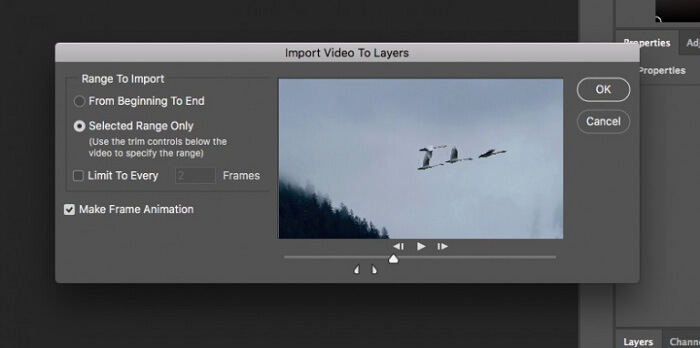
שלב 2: כאשר מופיע החלון המתאים, סמן את התיבה ליד Make Frame Animation. אם קובץ הווידאו שלך ארוך מאוד, חתוך אותו בעזרת המחוונים בציר הזמן. לאחר מכן לחץ על OK כדי לאשר.
שלב 3: כעת Photoshop ייבא כל פריים מקליפ הווידאו כתמונה נפרדת. באפשרותך לערוך כל תמונה או להשאיר אותן כברירת מחדל.
שלב 4: עבור לתפריט File, בחר Export ואז Save for Web. תיבת הדו־שיח של שמירה לאינטרנט תופיע. התאם את האפשרויות בלוח הימני, כגון Image Size, Quality ועוד. כדי ליצור GIF בלולאה, בחר את האפשרות המתאימה מרשימת הבחירה Looping Options.
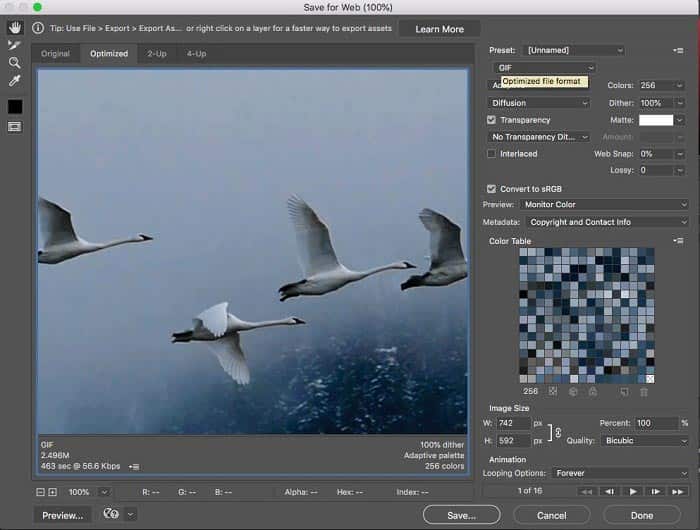
שלב 5: לחץ על סמל הPlay בפינה הימנית התחתונה כדי להציג תצוגה מקדימה של האפקט. אם הכול נראה תקין, לחץ על הכפתור Save ופעל לפי ההוראות שעל המסך כדי להמיר MP4 ל‑GIF ב‑Photoshop.
אם רכשתם בעבר את Photoshop, ייתכן שזוהי אפשרות טובה. אבל אם לא, עדיף שתשתמשו בממיר MP4 ל-GIF מקצועי כמו FVC Video Converter Ultimate. בסך הכל, השימוש ב-Photoshop להמרת MP4 ל-GIF יכול להיות יקר בגלל דמי המנוי, והממשק המורכב שלו הופך אותו לפחות ידידותי למתחילים. תהליך הייצוא מביא לעתים קרובות לגדלים גדולים של קבצים עם אופטימיזציה מוגבלת.
חלק 4. כיצד להמיר MP4 ל-GIF באינטרנט
המרת MP4 ל-GIF בעזרת ממיר וידאו מקוון חינמי FVC
אם ברצונך לשמור MP4 כתמונת GIF בעזרת Windows Movie Maker, עדיין תזדקק לכלי המרה מקוון. למען האמת, קל יותר להמיר MP4 ל‑GIF ישירות אונליין אם אתה משתמש בכלי המתאים, כגון FVC Free Online Video Converter. זהו ממיר MP4 ל‑GIF חינמי מבוסס דפדפן.
שלב 1: נווט אל הדף הרשמי של FVC Free Online Video Converter בדפדפן שלך כדי לפתוח את הכלי החינמי מיד.
הורד את גרסת הדסקטופ כדי להמיר קבצים במצב אצווה.

שלב 2: לחץ על הכפתור Add Files to Convert כדי להתקין את המשגר ולייבא קובץ MP4 מהמחשב שלך.
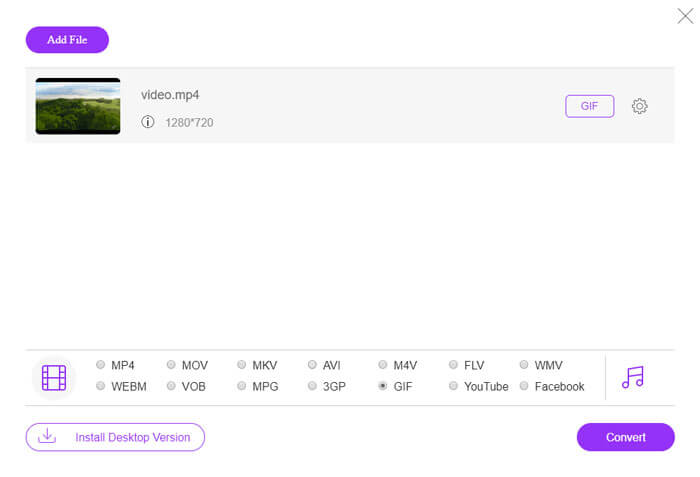
שלב 3: כעת בחר GIF כפורמט פלט. התאם אפשרויות נוספות, כמו Encoder, Frame rate, Resolution, Bitrate ופרמטרים נוספים.

שלב 4: לחץ על הכפתור Convert כדי להתחיל להמיר MP4 ל‑GIF אונליין. כאשר ההמרה תושלם, תיקיית הפלט תיפתח מיד.
האפליקציה המקוונת תדחס את התמונות שלכם באופן אוטומטי בזמן ההמרה, כך שאיכות הפלט לא טובה במיוחד.
כיצד להשתמש ב-Ezgif כדי להמיר MP4 ל-GIF
Ezgif הוא כלי מקוון חינמי ופופולרי המאפשר לך להמיר בקלות סרטוני MP4 לקבצי GIF מבלי להוריד תוכנה כלשהי. הוא תומך בתכונות עריכה שונות כגון חיתוך, שינוי גודל ואופטימיזציה של ה-GIF שלך לאיכות טובה יותר וגודל קובץ קטן יותר.
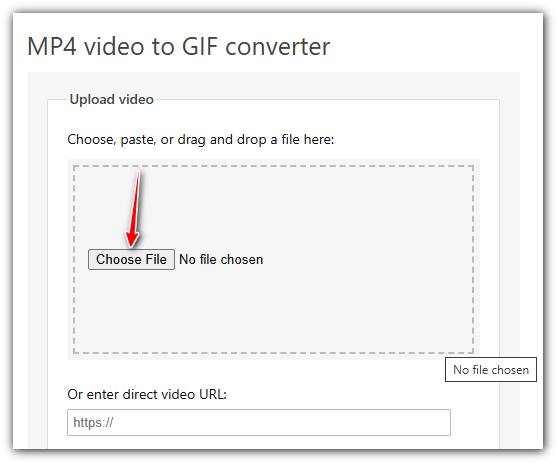
שלב 1. עבור לאתר Ezgif ובחר בכלי ההמרה מווידאו ל‑GIF. לחץ על Choose File כדי לבחור את סרטון ה‑MP4 מהמכשיר שלך, ולאחר מכן לחץ על Upload video כדי להעלות אותו.
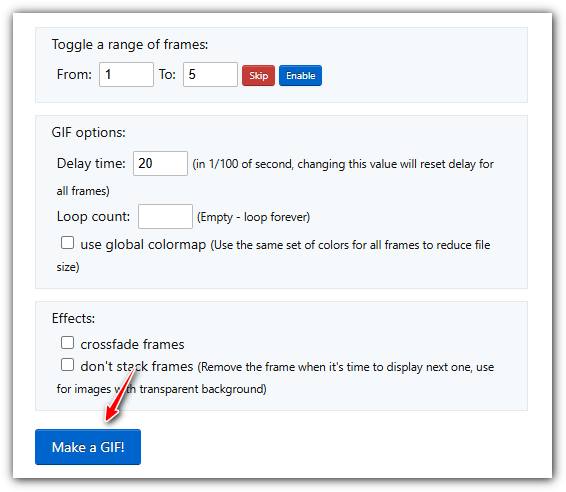
שלב 2. לאחר ההעלאה תוכל לחתוך את הווידאו על ידי הגדרת זמני התחלה וסיום, לשנות את הגודל או להתאים את קצב הפריימים כדי לשלוט באיכות ובגודל ה‑GIF.
שלב 3. לאחר שקבעת את ההעדפות שלך, לחץ על Make a GIF! כדי לעבד את הווידאו וליצור את ה‑GIF.
MP4 לעומת GIF
פורמט MP4 שוחרר על ידי Moving Picture Experts Group (MPEG) בשנת 2001, ופורמט MP4 יכול לעזור לך לשמור נתוני וידאו, אודיו, כתוביות ותמונה ברצועות נפרדות. זה קיצור של MPEG-4 Part 14. בנוסף, זהו אחד הפורמטים הפופולריים ביותר המשמשים להזרמת ושיתוף סרטונים.
GIF הוא פורמט תמונה נפוץ עבור גרפיקת אינטרנט. מלבד שמירת תמונות קטנות ותמונות המכילות טקסט, GIF יכול גם להכיל ולהציג אנימציות בסיסיות באתרי אינטרנט. זהו פורמט ללא אובדן, ודחיסת ה-GIF אינה פוגעת בבהירות התמונה.
ממיר הווידאו המקוון החינמי FVC הוא כלי חינמי וקל לשימוש להמרת סרטונים במהירות לפורמטים פופולריים כמו MP4, AVI ו-MOV מבלי להתקין תוכנה. הוא אינו דורש רישום ויש לו ממשק פשוט. עם זאת, הוא תלוי במהירות האינטרנט, מגביל את גודל הקובץ וחסר תכונות מתקדמות. זוהי בחירה מצוינת להמרת וידאו מהירה וקלילה.
חלק 5: שאלות נפוצות של המרת MP4 ל- GIF
איך להפוך GIF ל-MP4 בחינם בעזרת FFmpeg?
פתח את www.7-zip.org ולחץ על release builds כדי להוריד את ffmpeg-release-full.7z. לאחר חילוץ קובץ ה‑zip הזה, תוכל לפתוח את Command Prompt ולהזין את שורת הפקודה ffmpeg -f gif -i file.gif -c:v libx264 outfile.mp4. לאחר מכן לחץ על Enter כדי לאשר את הפקודה.
כיצד אוכל להציג קבצי GIF?
GIF הוא פורמט תמונה ייחודי. זה יותר כמו סרטון אבל לא תמונה עדיין. עם זאת, רוב תוכנות נגן המדיה אינן יכולות לפתוח קובצי GIF. בנוסף, רק כמה יישומי מנהל תמונות יכולים לנגן תמונות מונפשות. למרבה המזל, אתה יכול להציג קבצי GIF בדפדפני אינטרנט גדולים, כמו IE, Chrome, Firefox ועוד.
האם זה חוקי להמיר MP4 ל- GIF?
ברוב המקרים, זה בסדר להמיר MP4 ל- GIF בשביל הכיף. עם זאת, רוב סרטי MP4 וקבצי הווידאו האישיים מוגנים בזכויות יוצרים. אם תרצה לשנות סרטון פרטי, מוטב שתקבל את הסכמת המחבר.
סיכום
מאמר זה שיתף ארבע דרכים להמיר MP4 לפורמט GIF. Photoshop הוא עורך תמונות מקצועי והוא יכול לחלץ מספר מסגרות מ- MP4 לשמירה כ- GIF. עם זאת, זה די יקר. Windows Movie Maker צריך לעבוד עם ממירים נוספים כדי לסיים את העבודה. ממיר MP4 ל- GIF מקוון הוא דרך נוחה להשיג את מה שאתה רוצה אם לא אכפת לך מאובדן איכות. FVC Video Free to GIF Maker, לעומת זאת, היא הדרך הקלה ביותר לענות על הצורך שלך. עוד שאלות? אנא השאר את הודעתך למטה.
-
 3 הדרכים המובילות בחינם להמיר MTS ל- MOV
 לא מצליחים להפעיל את קובץ MTS במחשב או בטלפון iPhone / Android? מהו קובץ MTS ואיך מנגנים אותו? מהו ממיר הווידאו MTS הטוב ביותר? פוסט זה משתף 3 דרכים פשוטות וחינמיות שיעזרו לך להמיר MTS ל- MOV להפעלה טובה יותר.
-
 6 מקליטי ה- WAV הטובים ביותר שאסור לך לפספס בשולחן העבודה ובאינטרנט
 לתוכנות ההקלטה הטובות ביותר ב- WAV שאנו חולקים במאמר זה יש מגוון תכונות שימושיות המסייעות לך לתפוס אודיו וקול כמו אנשי מקצוע.
-
 מה ההבדל בין MTS ל- M2TS
 מהו קובץ MTS או M2TS? מה ההבדל בין M2TS ל- MTS? כיצד אוכל לצפות בקובץ MTS או M2TS שהוקלט במצלמת הווידאו? מצא את כל התשובות בפוסט זה.

