


 ממיר וידאו אולטימטיבי
 מקליט מסך
 תיקון וידאו
 הורדה מאובטחת
כיצד להמיר MP4 ל- M4A ב- Windows / Mac (חינם ומקוון)
MP4 הוא פורמט קבצים רחב הנמצא בשימוש עם מספר תחנות ונגני וידאו. קבצי MP4 יכולים לאחסן תוכן וידאו, שמע ותוכן אחר. כעת, אנשים רבים מעדיפים להאזין לרצועת האודיו של וידאו MP4. לשמירה על האיכות, המרת MP4 ל- M4A היא רעיון נהדר. M4A מייצג MPEG 4 Audio. ברוב התוכניות ניתן להפעיל קבצי M4A, כולל iTunes, QuickTime, Windows Media Player ועוד.

ייתכן שתתהה כיצד לחלץ את רצועת האודיו מקובץ MP4. יש דרכים רבות להפוך קובץ MP4 לקובץ M4A. עיין בפוסט הזה כדי להבין כיצד להמיר MP4 ל‑M4A להאזנה עתידית במכשירים הניידים שלך.
חלק 1. הדרך המקוונת החינמית הטובה ביותר להמיר MP4 ל- M4A ללא אובדן איכות
FVC Free Online Video Converter הוא ממיר קבצים חינמי מ‑MP4 ל‑M4A, שיכול להמיר פורמט MP4 לא רק ל‑M4A אלא גם לפורמטים אחרים כמו MP3, WAV, M4R, WMA, AIFF, AC3 ועוד. הוא מאפשר לבצע המרה באצווה, כך שתוכל להמיר מספר סרטוני MP4 ל‑M4A בבת אחת. בנוסף, הכלי המקוון החינמי הזה מאפשר לך גם להמיר וידאו MP4 ל‑MOV, AVI, FLV ופורמטי וידאו נוספים.
שלב 1. פתח את https://www.free-videoconverter.net/free-online-video-converter/ בדפדפן שלך. לחץ על הכפתור Add Files to Convert ואז עליך להוריד ולהתקין את המשגר שלו.

שלב 2. העלה את סרטון ה‑MP4 שאותו אתה רוצה להמיר, ואז לחץ על Open כדי להמשיך.
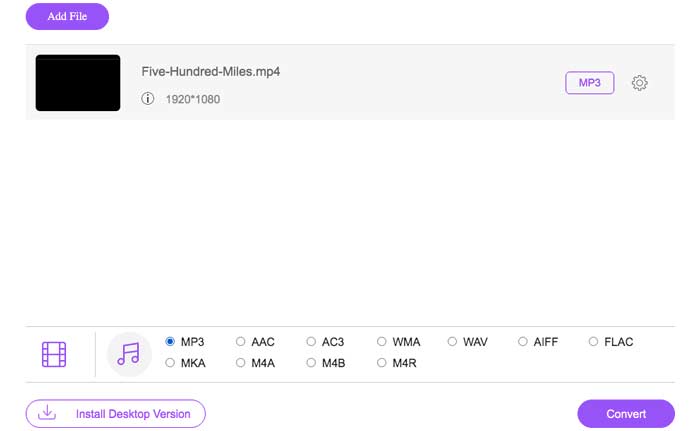
שלב 3. לאחר העלאת קובצי הווידאו שלך ליישום הזה, לחץ על סמל Audio ובחר את פורמט M4A כפורמט הפלט.
שלב 4. לבסוף, לחץ על כפתור Convert בפינה הימנית התחתונה. המתן מעט ותקבל את אודיו ה‑M4A שלך מקובץ ה‑MP4.
חלק 2. כיצד להמיר MP4 ל- M4A עם ממיר שמע בחינם
ממיר האודיו החופשי FVC הוא תוכנה חופשית המאפשרת לך להמיר קבצי MP4 ל- M4A ללא מאמץ. הוא מסוגל לשנות כל קובץ וידאו או אודיו ל- M4A, MP3, WAV וכו '. תוכל להוריד ולהתקין אותו במחשב Windows שלך כדי להתחיל בהמרה.
הורדה חינמיתל‑Windows 7 ומעלההורדה מאובטחת
הורדה חינמיתל‑MacOS 10.7 ומעלההורדה מאובטחת
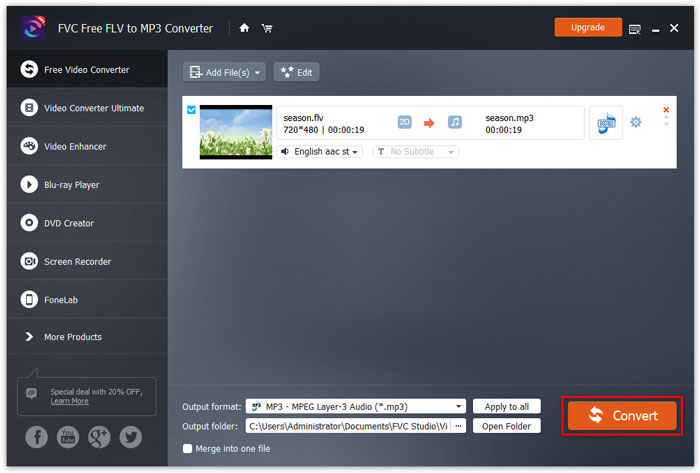
שלב 1. הפעל את ממיר האודיו הזה במחשב שלך. לחץ על הכפתור Add File(s) כדי להעלות את קובצי ה‑MP4 לתוכנית הזו.

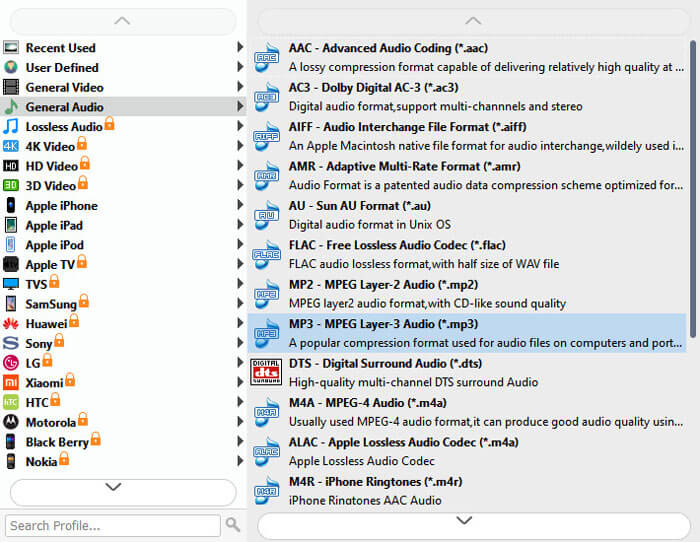
שלב 2. אתר את אפשרות Output formats ובחר ב‑M4A כפורמט הפלט מהרשימה הנגללת.
שלב 3. לחץ על כפתור Convert כדי להתחיל להמיר קובצי MP4 ל‑M4A.
מלבד M4A, ניתן להשתמש בו כדי להמיר MP4 ל‑MP3, AAC או פורמטי אודיו אחרים.
חלק 3. כיצד להמיר MP4 ל- M4A באמצעות iTunes
כדי להמיר MP4 ל- M4A עם iTunes עבור Windows או Mac, עליך לשנות את הגדרות הייבוא של iTunes ואז להשתמש באפשרות התפריט המר כדי ליצור עותק M4A.
שלב 1. פתח את iTunes במחשב Windows או ב‑Mac.
שלב 2. בחר Edit, ואז לחץ על Preferences בסרגל התפריטים. לאחר מכן עבור ללשונית General ולחץ על Import Settings.
שלב 3. מצא ולחץ על התפריט שליד Import Using, ואז בחר את פורמט הקידוד שאליו אתה רוצה להמיר את הווידאו. לאחר מכן לחץ על OK.
שלב 4. בחר את השירים בספרייה שלך שברצונך להמיר. לאחר מכן בחר File, לחץ על Create New Version, ואז צור גרסת M4A.
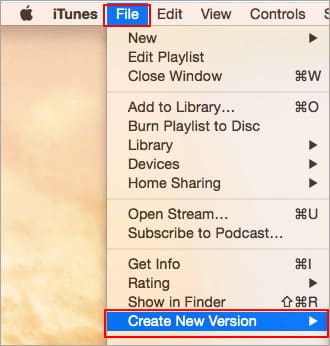
קבצי השמע שהומרו יופיעו בספרייה שלך לצד הקבצים המקוריים.
חלק 4. שאלות נפוצות על המרת MP4 ל- M4A
1. מהו קובץ M4A?
קובץ עם סיומת הקובץ M4A הוא קובץ שמע MPEG-4. M4A ניתן למצוא לעתים קרובות בחנות iTunes של אפל כפורמט של הורדות שירים.
2. כיצד לפתוח קבצי M4A?
תוכניות הפותחות קבצי M4A כוללות iTunes, QuickTime, Windows Media Player וכו '. טאבלטים וטלפונים של Android, iPhone, iPad ו- iPod touch תומכים גם בהפעלת קבצי M4A.
3. כיצד למזג קבצי MP4 באופן מקוון?
FVC Free Online Video Merger יכול לעזור לך למזג או לחבר מגוון קובצי MP4 או פורמטי וידאו אחרים כמו MOV, AVI, FLV ועוד, באופן מקוון.
4. האם Windows Media Player יכול להמיר MP4 ל- M4A?
לא. נגן המדיה של Windows תומך בהמרת קבצי וידאו רק ל- MP3 או WAV.
סיכום
שלוש הדרכים שלעיל יכולות לעזור לך להפוך את MP4 ל- M4A בחינם ללא מאמץ רב. אם אתה מעדיף לבצע את ההמרה באופן מקוון, ממיר וידאו מקוון חינם של FVC אמור להיות בחירה מצוינת. אם קבצי MP4 שלך גדולים בגודלם, ממיר שמע Free FVC או iTunes יהיו אמינים יותר להמרת קבצי MP4 ל- M4A.
-
 כיצד להמיר MP4 ל- WMV עבור Mac / Windows
 פוסט זה משתף כיצד להמיר וידאו MP4 לפורמט WMV ב- Mac או Windows. אנו מציעים לך גם מספר אפשרויות, כולל תוכנות שולחן עבודה וגם ממירים מקוונים מבוססי אינטרנט. מוכנים לדעת את הכלים הטובים ביותר להמרת MP4 ל WMV?
-
 כיצד להמיר WMV ל- MP3 בשולחן העבודה ובאינטרנט
 אתה יכול למצוא כל תוכנת ממיר וידאו בחינם מאולפן FVC. כל פורמט וידאו / אודיו נתמך, כולל MP4, MOV, TS, AVI, WMV, FLAC, MP3 וכו '.
-
 כיצד להמיר AVCHD לווידיאו MP4 בחינם ב- Windows / Mac / Online
 ישנן 5 דרכים קלות להמיר AVCHD לסרטוני MP4 במחשב שלך. אתה יכול אצווה להמיר קטעי וידאו AVCHD ל MP4 מבלי לאבד איכות עם כל ממיר כאן.
