


 ממיר וידאו אולטימטיבי
 מקליט מסך
 תיקון וידאו
 הורדה מאובטחת
המרת MP4 ל-MPG: החלף בקלות פורמטים של וידאו עם הממירים הטובים ביותר
קרה לכם פעם שאתם נתקעים כשסרטוני ה‑MP4 הנהדרים שלכם לא מתנגנים על מכשירים מסוימים? אנחנו מבינים אתכם! אבל אין מה להילחץ, כי יש לנו פתרון נחמד: המרה מ‑MP4 ל‑MPG. כן, זו המפתח לפתיחת אפשרות ניגון אוניברסלית עבור הסרטונים היקרים שלכם. תארו לעצמכם את הסיטואציה הבאה: אתם רוצים להשוויץ בהרפתקאות הטיול שלכם על הטלוויזיה הישנה של הדודה בערב משפחתי. אבל אבוי, הטלוויזיה תומכת רק בקבצי MPG, ומשאירה אתכם מאוכזבים. כאן נכנסת לפעולה הקסומה ההמרה מ־MP4 ל‑MPG!
עכשיו, הנה החלק הכי טוב. אנחנו הולכים להדריך אותך בכמה תוכניות מהשורה הראשונה שעושות את העבודה כמו קסם.

חלק 1. MPG לעומת MP4
בסדר, בואו נדבר על פורמטי וידאו - MP4 ו-MPG! לשניהם יש את ההטבות שלהם, אבל לפעמים ייתכן שיהיה עליך לבצע החלפת פורמטים קטנה. הנה טבלה לעיון שלך:
| MP4 | MPG | |
| איכות וידאו | וידאו באיכות גבוהה עם דחיסה יעילה | איכות וידאו טובה, אבל גדלי קבצים גדולים יותר |
| תְאִימוּת | תמיכה רחבה על ידי מכשירים ואפליקציות מודרניות | תואם מאוד למכשירים ישנים יותר |
| גודל הקובץ | גדלי קבצים קטנים יותר לשיתוף קל באינטרנט | גדלי קבצים גדולים יותר, עשויים לדרוש יותר אחסון |
| הזרמת אינטרנט | מצוין לסטרימינג ושיתוף באינטרנט | תמיכה מוגבלת בסטרימינג מקוון |
| תמיכה במכשיר | ייתכן שלא יפעל בחלק מהמכשירים הישנים | עובד היטב על רוב המכשירים, כולל ישנים |
| עֲרִיכָה | מאפשר עריכה עם אובדן איכות מינימלי | עריכה עלולה לגרום לאובדן איכות מסוים |
| נוֹהָג | אידיאלי עבור תוכן מקוון ומדיה חברתית | מתאים לתקליטורי DVD, מכשירים מדור קודם והשמעת טלוויזיה |
חלק 2. המר MP4 ל-MPG באיכות גבוהה
יש לנו בשבילכם ממש פנינה – ממיר ה‑MP4 ל‑MPEG האולטימטיבי: Video Converter Ultimate! אם נמאס לכם להיתקל בחסימות כשקובצי ה‑MP4 שלכם מסרבים להתנגן במכשירים מסוימים, הכלי הזה הוא המושיע שלכם. זהו קוסם המרות שהופך בקלות את קובצי ה‑MP4 שלכם לפורמט MPG, כדי להבטיח ניגון חלק על כל גאדג׳ט, חדש או ישן.
תחנת הכוח הקטנה הזו היא לא רק פוני בטריק אחד. יחד עם קסם MP4 ל-MPG, הוא מציג מערך של טריקים אחרים בשרוול. צריך להמיר בין פורמטי וידאו שונים? אין בעיה. רוצה לחלץ אודיו מסרטון? קלי קלות. והיי, זה אפילו מאפשר לך לבצע עריכת וידאו בסיסית עבור המגע האישי הזה. החלק הטוב ביותר? זה עוצב מתוך מחשבה על פשטות. בלי כאבי ראש טכנולוגיים או ז'רגון מסובך. פשוט מדהים שכל אחד יכול להתמודד איתו.
כעת, הנה השלבים הקלים ליצירת קסם הווידאו שלך.
שלב 1. הורדה והתקנה
גשו לאתר הרשמי או לחנות האפליקציות המועדפת עליכם כדי להוריד את Video Converter Ultimate. לנוחותכם, צירפנו את קישורי ההורדה למטה. פשוט לחצו על כפתור Free Download. לאחר ההורדה, עקבו אחר הוראות ההתקנה הפשוטות – אתם כבר מכירים את התהליך. בתוך רגע יהיה לכם את הכלי מוכן לשימוש במכשיר שלכם.
הורדה חינמיתעבור Windows 7 או גרסה מאוחרת יותרהורדה מאובטחת
הורדה חינמיתל‑MacOS 10.7 ומעלההורדה מאובטחת
שלב 2. הוספת קובצי MP4
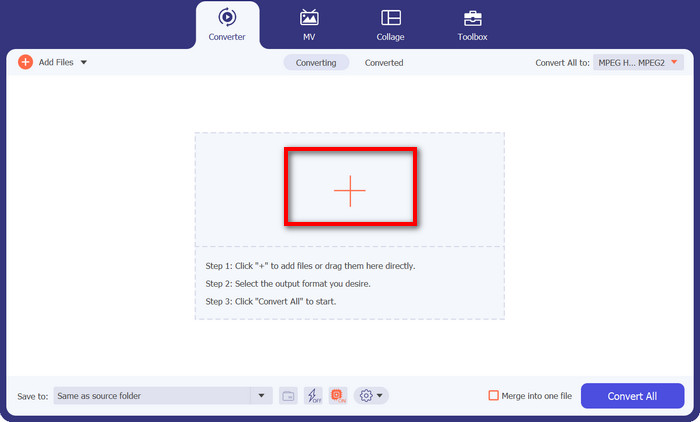
הפעילו את התוכנה, ותראו ממשק נקי וידידותי למשתמש. בלי ז׳רגון מסובך שמפחיד אתכם! עכשיו לחצו על כפתור סימן הפלוס. אתם יכולים לבחור קובץ MP4 אחד או כמה קבצים – מה שמתאים לכם.
שלב 3. בחירת MPG כפלט
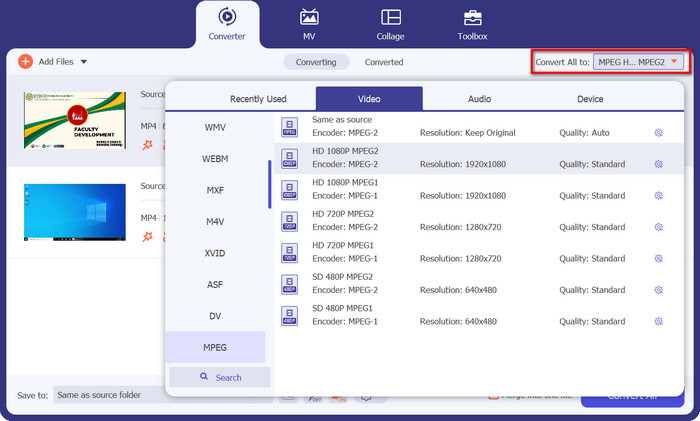
הגיע הזמן לבחור את פורמט הפלט הרצוי. עברו לחלק Convert All to ומצאו את MPEG בתפריט הנפתח. תראו שם את MPG, וזהו הכרטיס הקסום שלכם להתאמה מלאה למכשירים.
שלב 4: לחצו על Convert, וזהו!
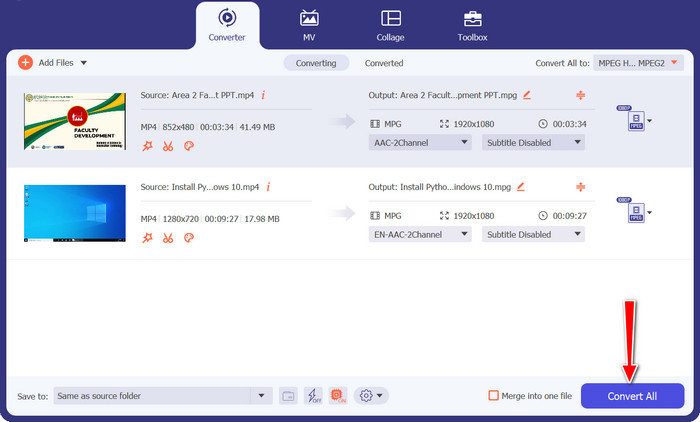
מוכנים לראות את הקסם קורה? מצוין! פשוט לחצו על כפתור Convert All הגדול והידידותי, וצפו כיצד Video Converter Ultimate עושה את שלו. שבו בנחת, ותוך זמן קצר סרטוני ה‑MP4 שלכם יומרו באופן קסום לפורמט MPG.
חלק 3. המר MP4 ל-MPG חינם באינטרנט
היכונו לחוויית המרת וידאו חלקה לחלוטין – בלי צורך בהורדת תוכנה ובלי הגדרות מסובכות. הממיר המקוון העוצמתי הזה תוכנן עם דגש על פשטות, כך שקל מאוד להמיר את סרטוני ה‑MP4 שלכם לפורמט MPG ומעבר לכך. בין אם אתם על מחשב Windows, מק, או אפילו על מכשיר נייד, Free MP4 Converter Online זמין מכל דפדפן. המירו MP4 ל‑MPG אונליין, בכל זמן ומכל מקום.
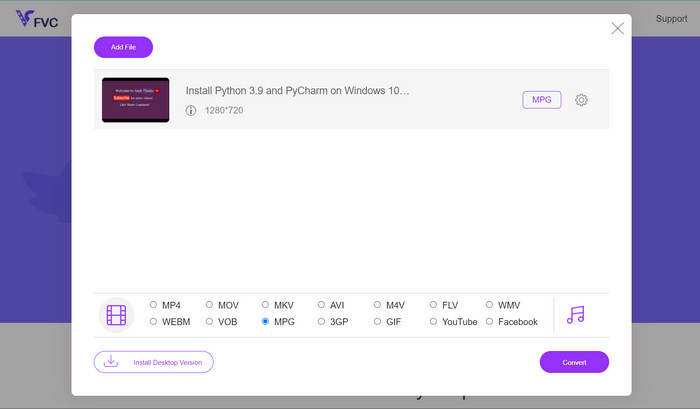
שלב 1. קודם כול, היכנסו לאתר Free MP4 Converter Online באמצעות הדפדפן המהימן שלכם. כשתגיעו לשם, תבחינו בכפתור הידידותי Add Files to Convert.
שלב 2. אחרי שקובץ ה‑MP4 שלכם מוכן, הגיע הזמן לבחור את פורמט הפלט הרצוי. חפשו את MPG מתוך רשימת הפורמטים הזמינים ולחצו עליו בלב שלם.
שלב 3. מוכנים לנגיעת הקסם האחרונה? פשוט לחצו על כפתור Convert, ותנו לממיר המקוון לעשות את העבודה. תוך זמן קצר, סרטון ה‑MP4 שלכם יוסב לפורמט MPG.
חלק 4. המר MP4 ל-MPG עם בלם יד
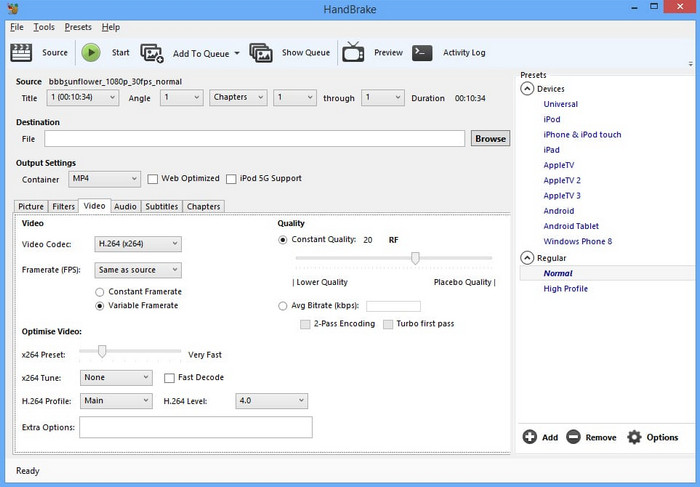
מודאג לגבי תאימות? אל תהיה! בלם יד תומך במגוון רחב של פורמטי פלט, מה שהופך אותו לבן לוויה רב-תכליתי לכל צרכי הווידאו שלך. המר MP4 ל-MPG עם תוכנה חופשית, או אפילו הפוך. לממיר הזה יש את הגמישות להתמודד עם הכל.
שלב 1. הפעילו את Handbrake ותתקבלו בממשק פשוט וענייני. לחצו על כפתור Open Source ובחרו במחשב שלכם את קובץ ה‑MP4 שברצונכם להמיר.
שלב 2. חפשו את MPG בכרטיסיית Summary תחת Format. אם צריך לכוונן הגדרות נוספות, תוכלו לעשות זאת כאן.
שלב 3. לבסוף, לחצו על כפתור Start Encode, ו‑Handbrake יעשה את הקסם שלו! סרטון ה‑MP4 שלכם יומר לפורמט MPG במהירות.
חלק 5. המר MP4 ל-MPG ב-VLC
אין צורך להיות גורו טכנולוגי כאן. VLC מתגאה בממשק פשוט ופשוט שלא ישאיר אותך מגרד בראש. הוא תוכנן מתוך מחשבה על ידידותיות למשתמש, כך שתוכל לצלול ישירות לתוך המרת וידאו ללא כל טרחה. סיפקנו לך מדריך מהיר וקל תוך רגע עם תוכנית זו להמרת MP4 ל-MPG בחינם.
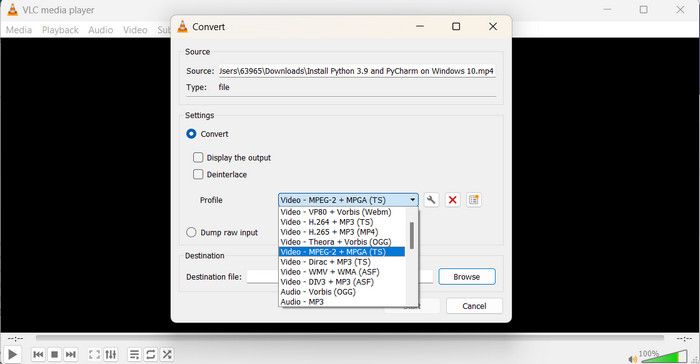
שלב 1. לאחר שהתקנתם את VLC, הפעילו את הנגן. כעת לחצו על Media בתפריט העליון ובחרו Convert/Save. בחלון Open Media לחצו על כפתור Add ובחרו את סרטון ה‑MP4 שברצונכם להמיר.
שלב 2. בחלון Convert לחצו על התפריט הנפתח Profile, ובחרו Video - MPEG-1 כפורמט הפלט, לפי ההעדפה שלכם. לבסוף, בחרו את תיקיית היעד לקובץ המומר ולחצו על Start.
לקריאה נוספת:
7 ממירי ה‑MP4 הבלתי מנוצחים המובילים ל‑MOV (מחשב/אונליין/נייד)
FLV ל‑MPG – איך להמיר FLV ל‑MPG במק, במחשב ובאונליין בחינם
חלק 6. שאלות נפוצות לגבי MP4 ל-MPG
למה משמש פורמט MPG?
פורמט MPG (MPEG) משמש בדרך כלל להפעלת וידאו במכשירים ישנים יותר כמו נגני DVD וטלוויזיות.
האם אני יכול להמיר סרטונים מבלי לאבד איכות?
כמה ממירי וידאו מציעים אפשרויות המרה ללא אובדן, אבל רוב ההמרות כרוכות באובדן איכות מסוים.
האם ממירי וידאו מקוונים בטוחים לשימוש?
רוב ממירי הווידאו המקוונים המכובדים בטוחים לשימוש, אך חיוני להשתמש באתרים מהימנים ולנהוג בזהירות בזמן העלאת קבצים.
מה ההבדל בין פורמט קונטיינר לקודק?
פורמט מכיל (למשל, MP4) מכיל וידאו, אודיו ונתונים אחרים, בעוד ש-codec (למשל, H.264) דוחס ומשחרר את נתוני הווידאו והשמע.
האם אני יכול להמיר סרטונים לרזולוציית 4K?
ממירי וידאו מסוימים תומכים בהמרת סרטונים לרזולוציית 4K, אך איכות הפלט עשויה להשתנות בהתאם לסרטון המקור.
סיכום
זהו, חברים, הגענו לסיום! למדנו הכול על המרת וידאו ואיך היא עוזרת לנו לגרום לסרטונים שלנו לעבוד יפה על כל מכשיר. מהמרה של MP4 ל‑MPG ועד לחקירת פורמטים וכלים שונים – כיסינו את הכול.
-
 4 נגני MPG/MPEG הטובים ביותר עבור Windows/Mac/Android/iPhone [2023]
 אם אתה רוצה לנגן בצורה חלקה את קובץ ה- MPG או ה- MPEG המועדף עליך, תוכל ללמוד עוד על 4 נגני ה- MPG / MPEG המובילים למחשבים וטלפונים ניידים ממאמר זה.
-
 AVI VS MP4 - הבדלים ודמיון בין פורמטים AVI ו- MP4
 מהו פורמט וידאו טוב יותר, AVI או MP4? אם אתה רוצה לקבל את ההשוואה המפורטת, אתה יכול לבדוק מאמר זה של AVI VS MP4. אתה יכול לדעת את ההבדלים והדמיון בין AVI ל- MP4 בהיבטים רבים.
-
 כיצד להמיר MOV ל-MPG בקלות (לא מקוון ומקוון)
 בהדרכה זו, אתה עומד לגלות את הדרך המהירה ביותר להמיר MOV ל-MPG. יצרנו עבורך את הפתרונות הטובים ביותר במצב לא מקוון ומקוון.
