


 ממיר וידאו אולטימטיבי
 מקליט מסך
 תיקון וידאו
 הורדה מאובטחת
ממיר WTV ל- MP4: כיצד להמיר WTV ל- MP4
WTV, כיורשת לפורמט DVR-MS, פותחה על ידי מיקרוסופט לאחסון תכני טלוויזיה שהוקלטו על ידי Windows Media Center. מקודד עם התקן MPEG-2 ו- MPEG-4 ו- MPEG-1 Layer II או Dolby Digital AC-3, WTV נתמך על ידי תוכנות מעטות כמו FFMPEG, Windows Media Center, CyberLink PowerDVD 12, Nero 12, HandBrake, CCextractor וכו '.

אם ברצונך לצפות בקובצי WTV או לשתף אותם בנוחות, עדיף לך להמיר WTV ל‑MP4, הפורמט הפופולרי ביותר המתאים כמעט לכל מכשיר.
חיפשנו ברחבי האינטרנט ממיר WTV ל‑MP4 ומצאנו את שני הממירים החינמיים הטובים ביותר מ‑WTV ל‑MP4 כדי להפוך WTV ל‑MP4.
חלק 1. ממיר וידאו בחינם - המרת WTV ל- MP4 באופן מקוון
להמיר WTV ל‑MP4 זה ממש פשוט. הדרך הקלה ביותר לשנות WTV ל‑MP4 היא לעשות זאת באופן מקוון. Free Online Video Converter הוא תוכנה חינמית להמרת WTV ל‑MP4 ולפורמטי וידאו ואודיו נפוצים נוספים. הכלי המקוון החינמי הזה תואם ל‑Windows 10/8/7 ול‑Mac OS X 10.7 ומעלה, ותוכל לקודד מחדש WTV ל‑MP4 בקלות בכמה שלבים.
כדי לייעל את התהליך, תוכלו לעקוב אחר המדריך:
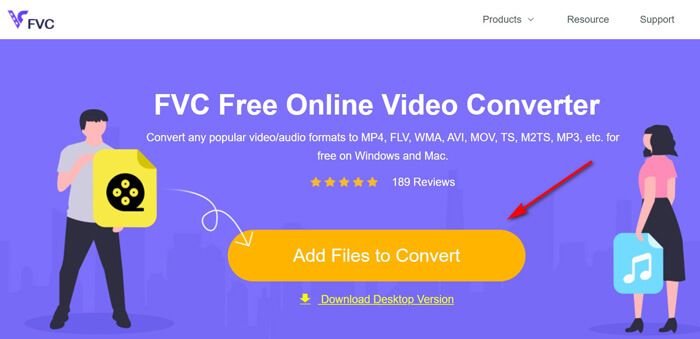
1. לחץ על הכפתור Add Files to Convert כדי להעלות קובצי WTV מהמחשב.
2. בחר MP4 בתיבת הסימון.
3. לחץ על Convert כדי להמיר ולהוריד את קובצי ה‑WTV באופן אוטומטי.
עכשיו, אנחנו כאן כדי להדריך אותך כיצד להמיר WTV ל- MP4 בפרטים.
שלב 1. הוספת קובצי WTV
פתח את ממיר ה‑WTV ל‑MP4 המקוון החינמי הזה דרך הדפדפן שלך. לחץ על הכפתור Add Files to Convert, וחלון קופץ יופיע ויבקש ממך להוריד ולהתקין את המשגר. פשוט הורד אותו ולאחר התקנה מוצלחת יופיע חלון הקוד הפתוח. לאחר מכן תוכל לבחור את הקלטות ה‑WTV במחשב שלך להעלאה. התוכנה החינמית הזו תומכת בהמרה בקבוצות, ותוכל להוסיף יותר מקובץ WTV אחד באופן מקוון.
שלב 2. בחירת MP4
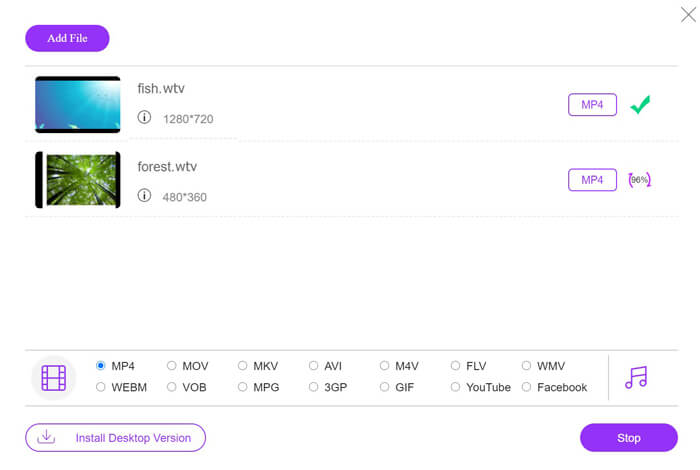
סמן את תיבת הסימון של MP4 בתחתית, שם תוכל למצוא אפשרויות פלט שונות כמו MKV, AVI, M4V, FLV, VOB, GIF, YouTube, Facebook, MP3, AAC, WMA, WAV, FLAC ועוד.
בנוסף, תוכל ללחוץ על סמל הSettings שליד חלונית פלט ה‑MP4 כדי לכוונן את המקודד, קצב הפריימים, הרזולוציה, קצבי הסיביות ופרמטרים נוספים.

שלב 3. המרת WTV ל‑MP4
לאחר שהכול מוכן, לחץ על הכפתור Convert וחלון יופיע ויבקש ממך לבחור את היעד שבו יישמרו קובצי ה‑MP4 שהומרו. בחר את היעד וחזור לממיר המקוון החינמי הזה, לחץ שוב על Convert כדי להתחיל להמיר ולהוריד את קובצי ה‑MP4 באופן אוטומטי. תוכל לראות ישירות את אחוז התקדמות ההמרה.
חלק 2. בלם יד - המרת WTV ל- MP4 במחשב / מק
דרך חינמית נוספת להמיר WTV ל- MP4 היא שימוש בבלם יד. בלם יד הוא התוכנה המעטה שיכולה לקרוא קבצי WTV. חוץ מזה, הוא יכול גם להמיר WTV ל- MP4 / MKV במחשב Windows ו- Mac שלך.
HandBrake היא תוכנת קוד פתוח למחשבים שולחניים, לכן עליך להוריד ממיר זה בחינם תחילה במחשב שלך.
שוב, השלבים הפשוטים של המרת WTV ל MP4 בבלם יד הם כדלקמן:
1. הוסף את קבצי ה- WTF או את כל התיקייה לבלם היד.
2. פרופיל MP4 מותאם אישית בבלם יד.
2. תצוגה מקדימה והמירה של WTV ל- MP4.
להלן המדריך המקיף לשינוי WTV ל- MP4 בבלם היד.
שלב 1. הוספת קובצי WTV ל‑HandBrake
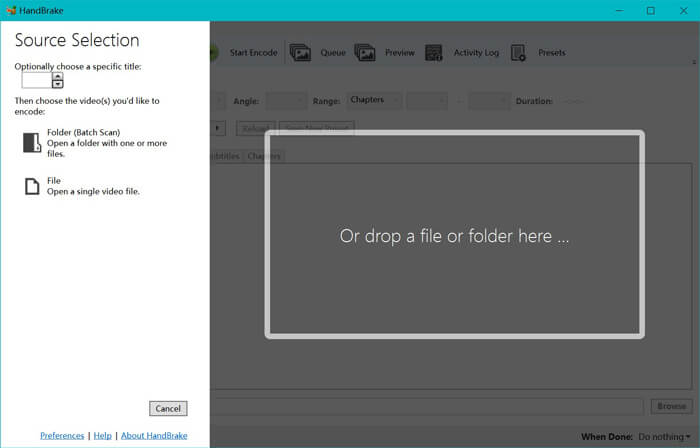
לאחר שהתקנת את HandBrake במחשב שלך, HandBrake תציג כברירת מחדל את חלון פתיחת המקור. כאן תוכל ללחוץ על Folder או File כדי לבחור את קובצי או תיקיית ה‑WTV לחלון הראשי. לחלופין, תוכל גם לגרור ולשחרר את קובצי ה‑WTV אל תוך התוכנה.
שלב 2. בחירת פורמט MP4
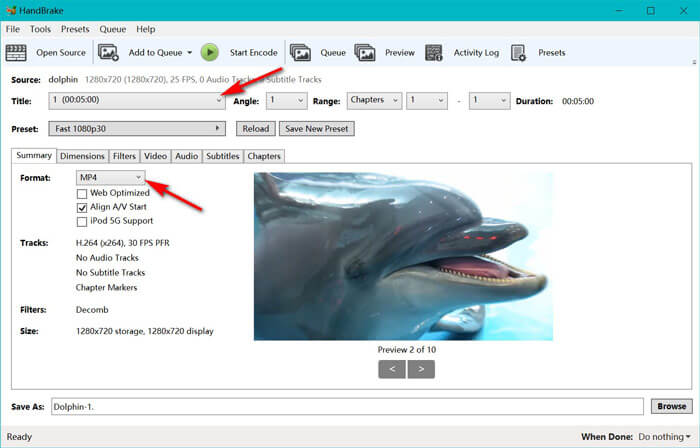
לאחר שטעינת את קובצי ה‑WTV, תוכל לבחור את קובץ ה‑WTV המדויק מתוך תפריט הTitle. לאחר מכן בחר MP4 בלשונית Summary כפלט עבור קובץ ה‑WTV שנבחר. בנוסף, HandBrake מאפשרת לך לכוונן את הממדים, המסננים, קודק/איכות הווידאו, רצועת האודיו ועוד. לא רק MP4 – היא יכולה גם להמיר פורמטים אחרים כמו AVI, MOV, M2TS ועוד ל‑MKV.
שלב 3. תצוגה מקדימה והמרת WTV ל‑MP4
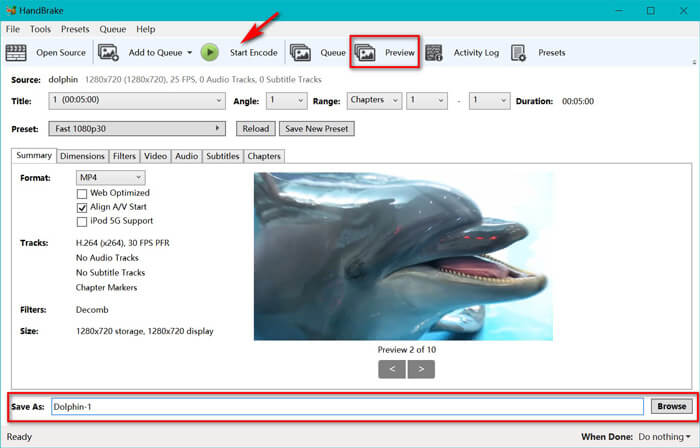
פונקציית התצוגה המקדימה Preview בסרגל הכלים של HandBrake מאפשרת לך לראות כיצד ייראה וידאו ה‑MP4 החדש שלך לפני הקידוד. לאחר שכל ההגדרות שלך מתאימות, הקצה שם לקובצי ה‑MP4 שהומרו ובחר את המיקום לקובצי הווידאו החדשים שלך על ידי לחיצה על כפתור Browse בתחתית. לבסוף, פשוט לחץ על הכפתור Start Encode בסרגל הכלים כדי להמיר WTV ל‑MP4.
חלק 3. שאלות נפוצות של WTV ל- MP4
מדוע בלם יד שומר MP4 כ- M4V?
עבור קבצי MP4, HandBrake יקבץ את קבצי ה- MP4 באופן אוטומטי באמצעות סיומת M4V, כאשר תבחרו AC3 שמע וכתוביות SRT או שיהיו לכם סמני פרקים להתאמה אישית של קובץ MP4. אבל אתה יכול לשנות את הסיומת .m4v ל- .mp4 ישירות.
האם נגן VLC יכול להשמיע קבצי WTV?
VLC אינו יכול להשמיע קבצי WTV ישירות. עליך להתקין את חבילת הקוד K-Lite כדי להתקין את חבילת הקוד של WTV ואז להפעיל קבצי WTV ב- VLC.
האם אוכל להמיר קבצי WTV מוגנים?
כן אתה יכול. עם זאת, רק MCEBuddy תומך בעריכה ובהמרה של קבצי WTF מסחריים מוגנים. עליכם להשתמש בתוכנה זו כדי להעתיק ולהמיר את קבצי ה- WTV המוגנים.
סיכום
כדי להשתמש בקבצי WTV מוקלטים ב- Windows Media Center בצורה נוחה, עליך להמיר WTV ל- MP4 ראשית. הודעה זו חולקת שתי דרכים חינם להמרת WTV ל- MP4 באופן מקוון באמצעות ממיר וידאו מקוון חינם ובלם יד. ממיר וידאו מקוון חינם מאפשר לך להמיר WTV ל- MP4 ולפורמטים פופולריים אחרים, ואילו בלם היד נותן לך יותר בקרות עריכה עם אפשרויות פורמט מוגבלות לפלט.
איזו דרך היא המועדפת עליך?
או אולי יש לך ממיר WTV ל- MP4 טוב יותר?
כך או כך, אני רוצה לשמוע ממך. אז, המשך והשאיר תגובה למטה.
-
 כיצד להמיר MXF ל MP4 באמצעות ממיר חינם
 פוסט זה הוא המדריך המפורט להמרת MXF ל MP4 במחשב. אתה יכול לקבל 4 ממירי MXF ל- MP4 בחינם כדי להמיר מצלמת וידאו MXF ל- MP4 בשלבים פשוטים.
-
 3 הדרכים המובילות להמיר MP4 בחינם ל- MOV
 כיצד להמיר MP4 ל- MOV ב- Mac? האם יש דרך חופשית להמיר MP4 ל- MOV ללא אובדן איכות? פוסט זה משתף 3 דרכים פשוטות שיעזרו לך לבצע את המרת הווידאו מ MP4 ל- MOV ב- Mac, Windows PC ומקוון.
-
 כיצד להמיר M2TS ל- WMV ב- Windows / Mac / Online (לגמרי בחינם לשימוש)
 להלן 3 דרכים קלות להמיר M2TS לסרטוני WMV. אתה יכול לשנות את פורמט הווידאו מ M2TS ל- WMV בחינם ב- Windows, Mac ובאינטרנט במהירות. המרת האצווה נתמכת.
