


 ממיר וידאו אולטימטיבי
 מקליט מסך
 תיקון וידאו
 הורדה מאובטחת
כיצד לדחוס קבצי PDF עבור דואר אלקטרוני 3 דרכים יעילות לבחירה
אכן, שליחת קבצים גדולים בדוא״ל עלולה להיות מטרד. למעשה, היא עשויה לגרום לך לבעיות, או שהקובץ לא יישלח כלל. בנוסף, ספקי דוא״ל רבים מגבילים קבצים מצורפים לגודל מסוים, שקל מאוד לעבור אותו עם קובץ PDF מורכב. הדבר נכון במיוחד לגבי קובצי PDF עם הרבה תמונות או מסמכים ארוכים. כדי להתמודד עם זה, רוב האנשים במצב כזה פונים לשירותי שיתוף קבצים כמו Dropbox או Google Drive. עם זאת, רבים כמעט שוכחים טריק שימושי – דחיסת קבצים. ישנם כלים מקוונים חינמיים רבים שיכולים לעשות זאת, וחלקם אף פופולריים למדי. אבל איך לדחוס PDF עבור דוא״ל בצורה יעילה? זה בדיוק מה שאתה עומד ללמוד כאשר תמשיך לקרוא את התוכן המלא שלמטה.

חלק 1. מהו גודל ה-PDF הטוב ביותר עבור דואר אלקטרוני
הנה עובדה: אין מספר קסם לגודל PDF האידיאלי עבור מיילים. הדבר שצריך להיזהר ממנו הוא מגבלת הקבצים המצורפים של פלטפורמת הדוא"ל שלך. שירותים פופולריים מגבילים קבצים מצורפים בסביבות 20MB, אשר יכול להיות קל להגיע באופן מפתיע, במיוחד עם קובצי PDF המכילים הרבה תמונות או מסמכים ארוכים מאוד. לפיכך, אם ה-PDF שלך גדול מהמגבלה האמורה של 20MB, הדוא"ל שלך כנראה לא יישלח, ותקבל הודעת שגיאה. עם זאת, במקום לכוון לגודל מסוים או לגודל ה-PDF הטוב ביותר עבור דואר אלקטרוני, עדיף לשחק בו בטוח ולשמור אותו מתחת ל-20MB. כך, אתה יכול להיות בטוח שהוא יצורף וישלח בהצלחה.
חלק 2. לחיצה אחת כדי לדחוס קבצי PDF עבור דואר אלקטרוני
הנה דרך מצוינת ומהירה לדחיסת קבצים לדוא״ל. התכונן להכיר את הכלי החינמי הנקרא FVC Free PDF Compressor, שיכול להקטין משמעותית את קובצי ה‑PDF הכבדים שלך בלי להרוס אותם. כעת, מאחר שרוב שירותי הדוא״ל מאפשרים לצרף קבצים בגודל של כ‑20MB בלבד, קובצי PDF עם תמונות או הרבה טקסט יכולים בקלות להגיע למגבלה הזו. מדחס זה יכול להקטין את ה‑PDF שלך הרבה מעבר לכך, ואפילו לפחות מ‑100 קילובייט! אינך צריך לדאוג מכך שהוא מצמצם את קובצי ה‑PDF לדוא״ל בצורה דרמטית, משום שהוא עדיין שומר על איכות הקבצים. למעשה, סביר להניח שלא תבחין כמעט בהבדל בין המקור לגרסה הדחוסה.
יתר על כן, הכלי המדהים הזה הוא סופר קל לשימוש, וכל אחד עם כל רמת מומחיות יכול להשתמש בו. כל מה שאתה צריך לעשות הוא לגרור ולשחרר את קובץ ה-PDF לתוך התוכנית, והוא מכווץ אותו אוטומטית. לאחר מכן, בלחיצה אחת, תוכל לשמור את ה-PDF הקטן יותר במחשב שלך. בדרך זו, אתה יכול לדחוס במהירות PDF לגודל דוא"ל מקוון לגודל המושלם עבור שליחת דואר אלקטרוני או העלאת הכל ללא סימני מים על המסמך הסופי. כדי לקבל הבנה טובה יותר של התהליך שלו, עיין בהנחיות המפורטות להלן.
שלב 1. בממשק הראשי שלו, לחץ על הלשונית הוסף קובץ PDF ובחר את קובץ ה‑PDF שאתה צריך לדחוס.
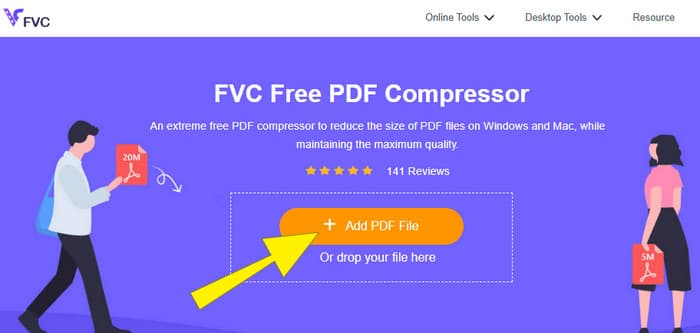
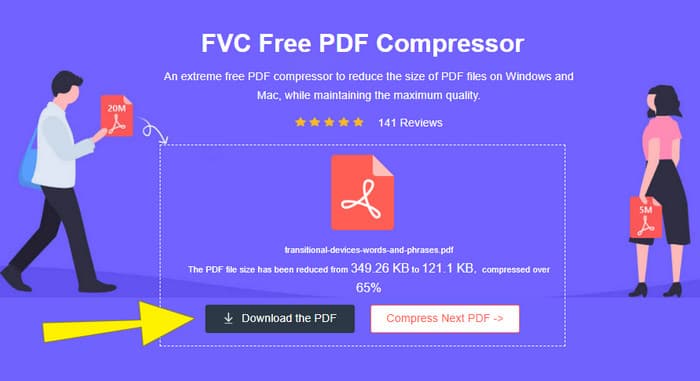
שלב 2. בזמן שקובץ ה‑PDF נטען, הכלי גם עובד על דחיסתו.
שלב 3. לאחר הסיום, לחץ על הכפתור הורד את ה‑PDF.
חלק 3. דחוס קבצי PDF עבור דואר אלקטרוני עם תכונות עריכה
אם אתה מעדיף כלי שמגיע עם יכולות עריכה, אז Adobe Acrobat הוא מה שאתה צריך למשימה זו. Adobe Acrobat הוא תוכנה המוכרת ליצירה, עריכה וניהול של קובצי PDF. הוא כמו ארגז כלים חזק המיועד במיוחד לעבודה עם PDF. אחת התכונות השימושיות שלו היא דחיסת PDF, שאפשר להשתמש בה כאשר יש לך קובץ PDF מגושם שלא נכנס לדוא״ל בגלל מגבלות גודל. Adobe Acrobat, שמגיע בגרסה מקוונת ובגרסת שולחן עבודה, יכול לעזור לך לדחוס קובצי PDF גדולים לדוא״ל מבלי לפגוע יותר מדי באיכות. הוא עושה זאת בכמה דרכים, למשל על‑ידי הקטנת גודל התמונות שבקובץ ה‑PDF או הסרת פונטים מיותרים. עם זאת, כשמדובר ב‑Adobe ובחבילות שלה, אל תתפלא אם תגלה שעקומת הלמידה שלו תלולה. לכן, הנה השלבים שיקלו עליך את התהליך.
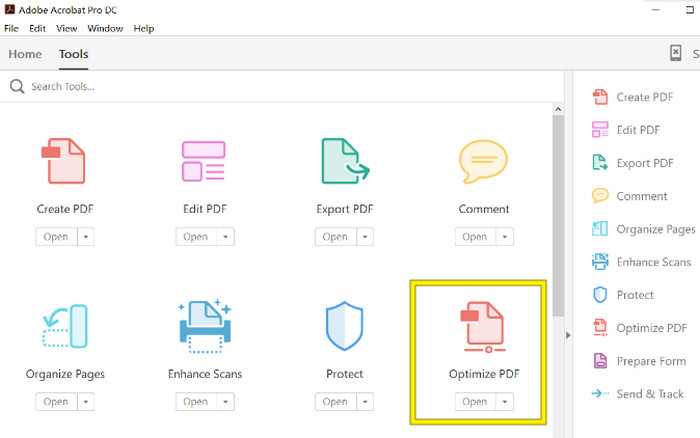
שלב 1. הפעל את Acrobat ופתח את קובץ ה‑PDF שעליו אתה צריך לעבוד. כדי לעשות זאת, עבור אל כלים–אופטימיזציית PDF–פתח.
שלב 2. לאחר שפתחת את קובץ ה‑PDF, לחץ על האפשרות צמצם גודל קובץ מתוך סרגל הניווט החדש שמופיע. לאחר מכן, קבע או השתמש באפשרויות העריכה הנתונות כדי להגיע לרמת הדחיסה והאופטימיזציה הרצויה.
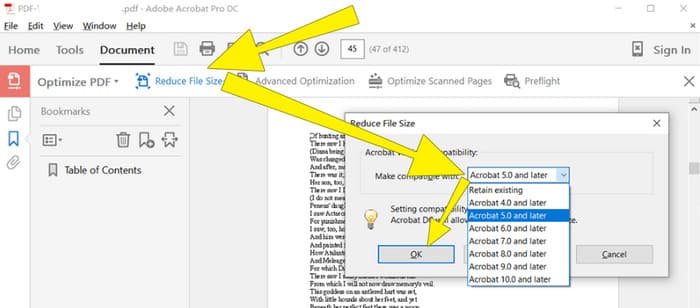
שלב 3. לאחר מכן, שמור את קובץ ה‑PDF הדחוס.
חלק 4. דחוס קבצי PDF עבור דואר אלקטרוני על ידי המרה
רוצה ללמוד טריק חדש על איך לדחוס PDF כדי לשלוח אותו בדוא״ל? בוא נהפוך את הקובץ ל‑JPG. את טריק ההמרה הזה ניתן לבצע בצורה מצוינת באמצעות PowerPoint. PowerPoint היא תוכנה שבדרך כלל משתמשים בה ליצירת מצגות. דמיין מצגת שקופיות עם טקסט, תמונות, ואולי אפילו סרטונים. PowerPoint מאפשרת לבנות מצגות כאלה משקופיות נפרדות שאתה מתקדם ביניהן כדי להציג לקהל שלך. זהו כלי פופולרי עבור מורים, תלמידים, אנשי עסקים וכל מי שרוצה להעביר מידע בצורה חזותית.
כעת, הוספת PDF למצגת PowerPoint שלך יכולה להיות שימושית, אבל ייתכן שזה לא התהליך האינטואיטיבי ביותר. אבל ברגע שתעשה זאת, הפקת קובץ JPG תהיה קלה. אל תדאג, אבל! אנחנו יכולים להדריך אותך שלב אחר שלב, שעליך לעקוב אחריהם כדי להטביע את ה-PDF שלך תוך זמן קצר.
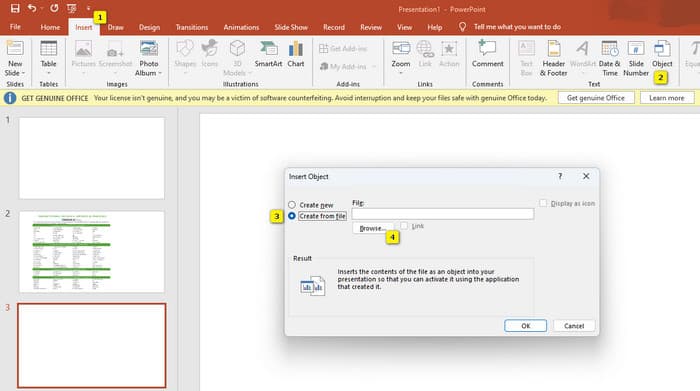
שלב 1. הפעל את PowerPoint במחשב שלך ובחר את השקופית המתאימה שבה תוכל לפתוח את קובץ ה‑PDF.
שלב 2. כעת, נווט ללשונית הכנסה וחפש את האפשרות אובייקט מתוך קבוצת הטקסט. לחץ על האפשרות, וחלון חדש יקפוץ. בחלון זה, סמן את האפשרות יצירה מקובץ, הממוקמת בצד שמאל של הממשק. לאחר מכן, לחץ על כפתור עיון, שיאפשר לך לייבא את קובץ ה‑PDF אל תוך השקופית.
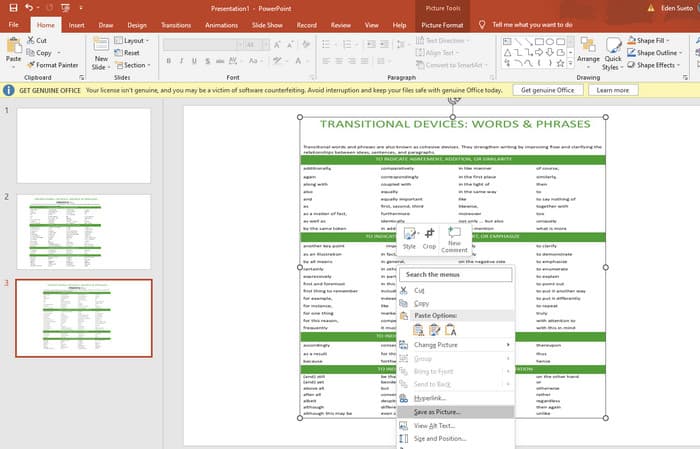
שלב 3. לאחר שקובץ ה‑PDF הועלה, תוכל להמיר אותו ל‑JPG. כדי לעשות זאת, לחץ באמצעות לחצן ימני על ה‑PDF שבשקופית, בחר שמירה בשם תמונה, ושמור אותו כ‑JPEG.
חלק 5. שאלות נפוצות לגבי PDF ודחיסה
באיזה גודל אתה יכול לשלוח קובץ PDF מצורף בדוא"ל?
זה תלוי בספק הדוא"ל שלך, אבל רובם מגבילים קבצים מצורפים לסביבות 20MB.
מהו מדחס ה-PDF החינמי הטוב ביותר?
ישנם מדחסי PDF בחינם זמינים, אבל הטוב ביותר תמיד תלוי בהעדפות המשתמשים. עד כה, FVC Free PDF Compressor הוא הכלי המקוון החינמי המומלץ ביותר.
כיצד לדחוס קבצי PDF למייל?
למעשה, zipping עובד עבור קובצי PDF מכיוון שהם כבר קבצים דחוסים.
סיכום
מאמר זה עוסק בדרכים הטובות ביותר כיצד לדחוס קובצי PDF עבור דוא״ל. כעת תוכל להבטיח דרך חלקה ויעילה יותר לשלוח את קובצי ה‑PDF שלך בדוא״ל, כל עוד תצמצם אותם כראוי כדי לעמוד במגבלת הגודל.
-
 3 הפתרונות הטובים ביותר כיצד להסיר סימן מים מסרטונים בקלות
 רוצה להסיר את סימן המים המעצבן בסרטון? עם הבלוג הזה, אתה יכול ללמוד את הרעיונות השונים להסרת סימן המים בסרטון.
-
 4 הדרכים הטובות ביותר כיצד להוסיף סימן מים לסרטוני וידאו במהירות
 בואו ללמוד כיצד להוסיף סימן מים לכל סרטוני וידאו ב-Windows, Mac, Online, iOS ו-Android עם שלבים מפורטים אם תקרא מאמר זה.
-
 3 הדרכים הקלות ביותר להוסיף סימן מים ל-GIF באופן מקוון ולא מקוון
 הוספת סימן מים ל-GIF יכולה להיות קלה כמו 1-2-3 אם אתה משתמש נכון בכלי הנכון. הכלים בשוק רחבים מדי, אך נציג את שלושת הכלים בהם ניתן לסמוך.
