


 ממיר וידאו אולטימטיבי
 מקליט מסך
 תיקון וידאו
 הורדה מאובטחת
3 דרכים יעילות לצמצום PDF מבלי לאבד איכות
הדרך הטובה והפשוטה ביותר להעלות, לפתוח ולשתף קובצי PDF גדולי־נפח היא על‑ידי דחיסה שלהם. דחיסה פירושה הקטנת הגודל שלהם, אולי משום שהקובץ מכיל כמות גדולה של תמונות, פונטים יצירתיים ועיצובים גרפיים כמו קובצי PNG מונפשים ועוד אלמנטים משובצים. עם זאת, יש מקרים שבהם דחיסה גורמת לאובדן ניכר באיכות, מה שהופך את המסמכים לפחות קריאים או פחות מקצועיים. כדי להימנע מנסיבות מצערות כאלה, ריכזנו 3 שיטות אמינות שיעזרו לך לדחוס קובצי PDF בלי לאבד איכות.
המשך לקרוא כדי לגלות את הטכניקות היעילות הללו ולהבטיח שקובצי ה-PDF שלך יישארו ברורים ואיכותיים תוך כדי ניהול יותר בגודלם. בואו נתחיל!
חלק 1: הדרך הטובה ביותר לדחוס PDF מבלי לאבד איכות [קל ומאובטח]
יש כלים רבים ברשימה כשמדברים על כלי דחיסת ה‑PDF הטוב ביותר, אבל הדרך היעילה ביותר לדחוס קובצי PDF בלי לאבד איכות היא להשתמש ב־FVC Free PDF Compressor. הכלי הזה תוכנן בצורה מושלמת לפתור בעיות של קובצי PDF גדולים והוא מתאים לכל סוגי המשתמשים בזכות הממשק הידידותי והמאובטח שלו. בנוסף, כלי הדחיסה המקוון הזה מאפשר למשתמשים להקטין את גודל קובצי ה‑PDF מבלי להתפשר על איכותם, משום שהוא שומר על שלמות התוכן המקורי במהלך תהליך הדחיסה.
שלבים לדחיסת PDF בלי לאבד איכות באמצעות FVC Free PDF Compressor:
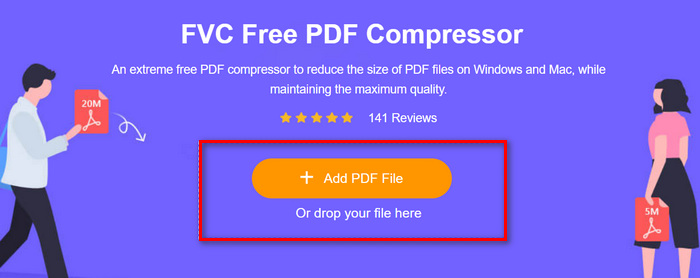
שלב 1. תחילה, בממשק הראשי של הכלי המקוון, לחץ על הכפתור Add PDF File כדי לייבא את קובץ ה‑PDF שברצונך לדחוס.
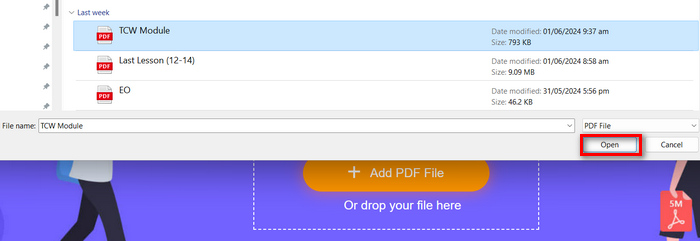
שלב 2. לאחר מכן, בחר את קובץ ה‑PDF שברצונך לדחוס ולחץ על Open. תהליך ההמרה יתחיל מיד.
שלב 3. לאחר סיום, הצג בתצוגה מקדימה את קובץ ה‑PDF הדחוס ולאחר מכן לחץ על הכפתור Download the PDF כדי לשמור אותו.
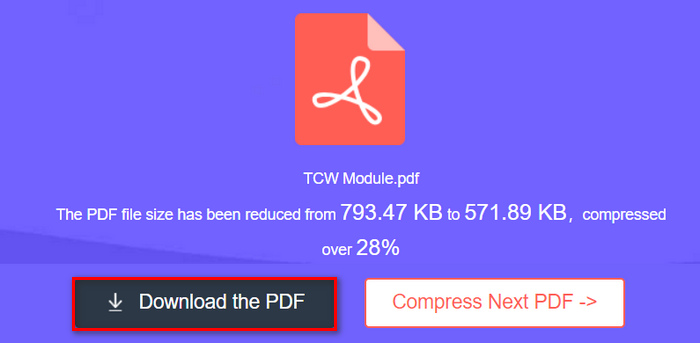
הנה לך! אם אתה מישהו שזקוק לדרך מהירה, קלה ובטוחה לדחוס קובצי PDF מבלי לדאוג לגבי הגדרות מורכבות או תכונות מתקדמות, שיטה זו היא המתאימה ביותר עבורך.
חלק 2: דחוס PDF מבלי לאבד איכות [עם אפשרויות מותאמות אישית]
בינתיים, אם אתה מעדיף לדחוס PDF מבלי לאבד איכות ולהתאים אישית את רמת הדחיסה של ה-PDF שלך, אתה יכול להשתמש ב-Adobe Acrobat Online PDF Compressor. מדחס PDF מקוון זה מספק רמות דחיסה מרובות, המאפשר למשתמשים להתאים אישית את הגדרות הדחיסה בהתאם לצרכיהם תוך שמירה על האיכות המקורית של קובץ ה-PDF. יתרה מכך, עם התאימות שלו בין מכשירים ומערכות הפעלה שונות, אתה יכול לגשת בקלות לכלי הדחיסה החזק הזה ולהשתמש בו מכל מקום, תוך הבטחת פרודוקטיביות חלקה ללא קשר למיקום שלך או להעדפות המכשיר שלך.
שלבים כיצד לדחוס PDF באמצעות Adobe Acrobat Online PDF Compressor בלי לאבד איכות:
שלב 1. קודם כול, ייבא את קובץ ה‑PDF שברצונך לדחוס על‑ידי לחיצה על הכפתור Select a File.
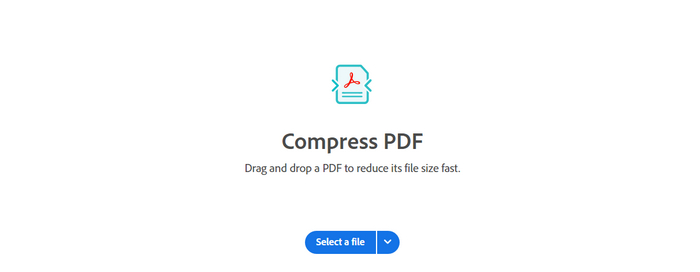
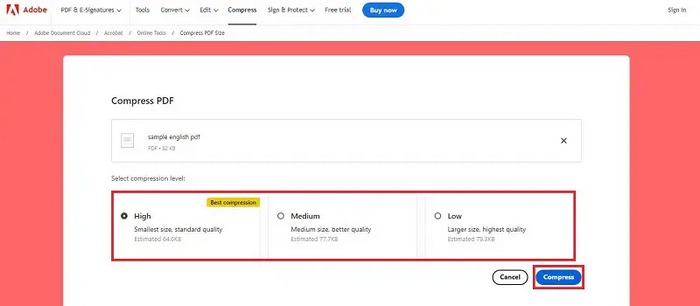
שלב 2. לאחר מכן, בחר בסייר הקבצים את הקובץ שברצונך לדחוס. לאחר זאת, בחר את רמת הדחיסה הרצויה.
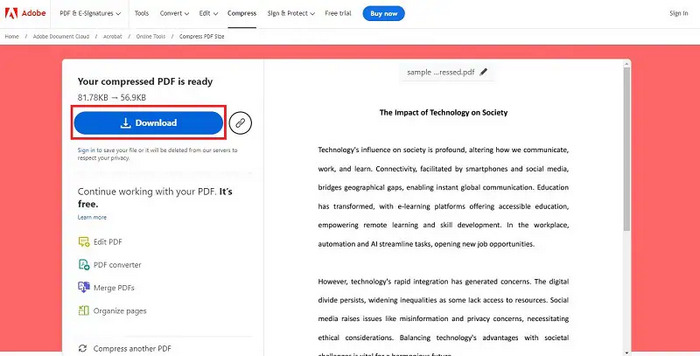
שלב 3. לבסוף, כדי לשמור את קובץ ה‑PDF הדחוס, לחץ על הכפתור Download.
שיטה זו מושלמת למשתמשים הזקוקים לשליטה רבה יותר בתהליך הדחיסה, ומציעה אפשרויות מותאמות אישית לאיזון גודל ואיכות קובץ.
חלק 3: הקטנת גודל קובץ PDF מבלי לאבד איכות ב-MAC/PC [מתאים למקצוענים]
כשמדובר בדחיסת PDF, שבה משתמשים מחפשים שיטה מקצועית לדחיסת PDF ב‑Mac/מחשב ללא פגיעה באיכות, Adobe Acrobat בולט כפתרון המוביל. כלי ניהול ה‑PDF המקיף הזה מספק יכולות מתקדמות לדחיסת קובצי PDF. כך הוא מבטיח דחיסה באיכות גבוהה, מה שהופך אותו לבחירה מושלמת עבור משתמשים הזקוקים לשליטה מדויקת במסמכי ה‑PDF שלהם וחייבים לשמור על הסטנדרטים הגבוהים ביותר של איכות.
שלבים לדחיסת PDF בלי לאבד איכות באמצעות Adobe Acrobat:
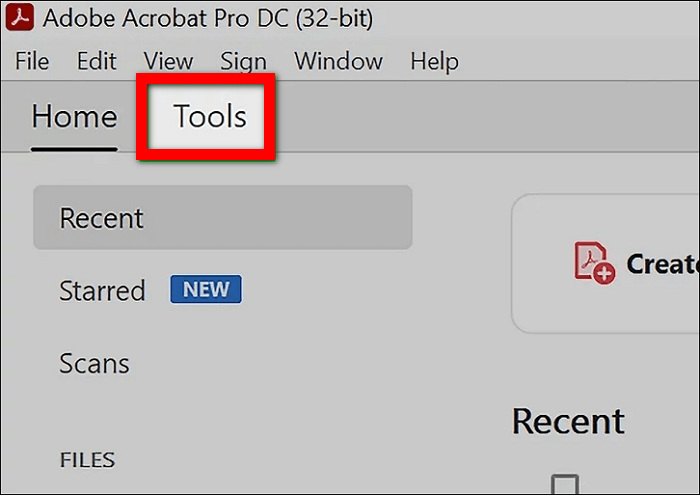
שלב 1. ראשית, פתח את Adobe Acrobat במכשיר שלך. מסרגל הכלים העליון בחר באפשרות Tools.
שלב 2. כעת נווט אל Protect & Standardize ולאחר מכן בחר Optimize PDF בקטגוריית Tools.
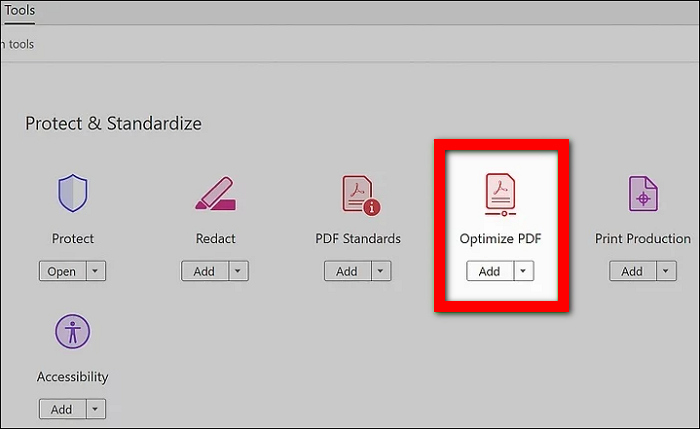
שלב 3. לאחר מכן, בחר את קובץ ה‑PDF שברצונך לדחוס מספריית הקבצים במחשב שלך.
שלב 4. בסרגל הכלים של ה‑PDF, מצא ולחץ על Reduce File Size.
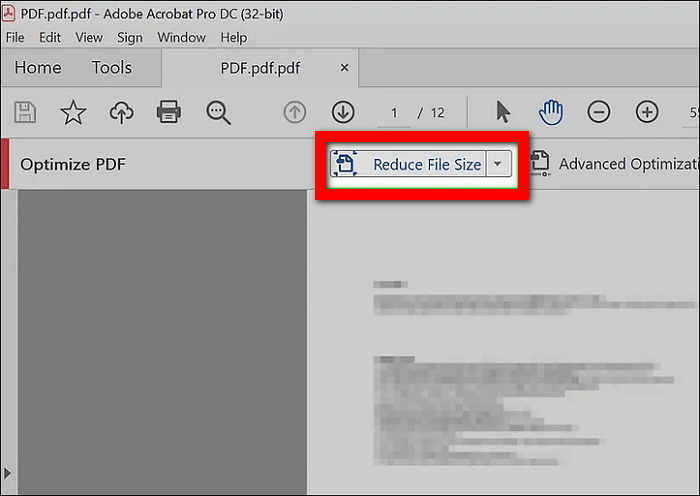
שלב 5. לבסוף, בחר היכן ברצונך לשמור את קובץ ה‑PDF הדחוס ולחץ על Save.
Adobe Acrobat אכן מציעה אפשרויות מקיפות כדי להבטיח את הפלט האיכותי ביותר של ה-PDF הדחוס תוך הקטנה משמעותית של גודלו. עם זאת, שיטה זו מתאימה ביותר למקצוענים ולמשתמשים מתקדמים הזקוקים לכלי חזק ועשיר בתכונות לניהול ולדחיסת קובצי PDF.
חלק 4: שאלות נפוצות על דחיסת PDF מבלי לאבד איכות
האם דחיסת PDF מפחיתה את האיכות?
כאשר נעשה כהלכה, דחיסת PDF לא אמורה להפחית את איכותו. כלים כמו FVC Free PDF Compressor, Adobe Acrobat Online PDF Compressor ו-Acrobat Pro נועדו לשמור על האיכות המקורית של המסמך תוך הקטנת גודלו.
האם אני יכול להקטין באופן דרסטי את גודל קובץ PDF?
כֵּן. ניתן להקטין באופן דרסטי את גודלו של קובץ PDF באמצעות כלים מתקדמים כמו Acrobat Pro, המציעה הגדרות דחיסה שונות להשגת גודל הקובץ הרצוי מבלי לפגוע באיכות.
כיצד אוכל לדחוס קובץ PDF ב-Windows 11?
כדי לדחוס קובץ PDF ב-Windows 11, אתה יכול להשתמש בכלי מקוון כמו FVC Free PDF Compressor. כלי זה מציע פתרון נוח ונגיש ישירות מדפדפן האינטרנט שלך. זה לא דורש שום התקנת תוכנה, מה שהופך אותו מתאים למשתמשים שרוצים פשטות ויעילות.
האם דחיסת PDF תשפיע על העיצוב או הפריסה שלו?
בעת שימוש בכלי דחיסת PDF מכובדים כמו FVC Free PDF Compressor או Acrobat Pro, דחיסה לא אמורה להשפיע על העיצוב או הפריסה של המסמך שלך. כלים אלה נועדו לשמור או לשמור על המבנה והמראה המקורי של ה-PDF תוך הקטנת גודל הקובץ שלו. עם זאת, תמיד מומלץ לצפות בתצוגה מקדימה של ה-PDF הדחוס כדי להבטיח שהכל יופיע כמצופה לפני שיתוף או הדפסתו.
כיצד משפיעה דחיסת PDF על רזולוציית התמונות בתוך המסמך?
ההשפעה של דחיסת PDF על רזולוציית התמונה משתנה בהתאם לשיטת הדחיסה שבה נעשה שימוש. עם FVC Free PDF Compressor, התוכנה נועדה להקטין את גודל הקובץ תוך שמירה על בהירות וחדות התמונה ביעילות. לכן, משתמשים יכולים לסמוך על FVC Free PDF Compressor כדי לדחוס ביעילות PDF מבלי לאבד איכות, במיוחד עם התמונות המוטבעות בקובץ.
סיכום
הצורך לדעת כיצד לדחוס קובצי PDF בלי לאבד איכות בצורה יעילה וקלה הוא חיוני לניהול ושיתוף מסמכים באופן מיטבי. בין אם אתה זקוק לפתרון מהיר ופשוט כמו FVC Free PDF Compressor, לכלי מקוון מותאם אישית כמו Acrobat Online PDF Compressor, או ליישום מקצועי ברמת פרו כמו Acrobat Pro – קיימת שיטה שמתאימה לצרכים שלך. בחר את האפשרות שהכי מתאימה לך ותיהנה מקובצי PDF אופטימליים ובאיכות גבוהה. מוכן להתחיל? נסה אחד מהכלים האלה עוד היום וחווה דחיסת PDF קלה וללא מאמץ!
-
 Adobe Compress PDF: 3 שיטות לצמצום בקלות קבצי PDF
 תוהה לגבי Adobe Compress PDF לדחיסת גדלי PDF גדולים? במאמר זה, למד כיצד תוכל למנף אותם בכיווץ קבצי ה-PDF שלך בקלות.
-
 4 הדרכים הטובות ביותר כיצד להוסיף סימן מים לסרטוני וידאו במהירות
 בואו ללמוד כיצד להוסיף סימן מים לכל סרטוני וידאו ב-Windows, Mac, Online, iOS ו-Android עם שלבים מפורטים אם תקרא מאמר זה.
-
 3 הדרכים הקלות ביותר להוסיף סימן מים ל-GIF באופן מקוון ולא מקוון
 הוספת סימן מים ל-GIF יכולה להיות קלה כמו 1-2-3 אם אתה משתמש נכון בכלי הנכון. הכלים בשוק רחבים מדי, אך נציג את שלושת הכלים בהם ניתן לסמוך.
