


 ממיר וידאו אולטימטיבי
 מקליט מסך
 תיקון וידאו
 הורדה מאובטחת
3 דרכים להפעלת תקליטורי DVD במחשב Windows 10/8/7
מדוע ה‑DVD שלי לא מופעל ב‑Windows Media Player?
אם אתה משתמש ב‑Windows 7 או Windows 8, תוכל לצפות בקלות בסרטי DVD באמצעות הנגן המובנה, Windows Media Player. עם זאת, מיקרוסופט 'סירסה' את WMP ב‑Windows 10. לכן אינך יכול עוד לפתוח ישירות דיסק DVD ב‑Windows Media Player.

פוסט זה יראה לך כיצד להפעיל DVD ב‑Windows Media Player. בין אם אתה משתמש במחשב עם Windows 10, Windows 8, Windows 7 או גרסה מוקדמת יותר, תוכל לקבל 3 נגני DVD כדי לצפות ב‑DVD‑ים בקלות.
חלק 1. כיצד לנגן DVD ב- Windows Media Player
Windows Media Player מותקן מראש וזמין במחשבים מבוססי Windows. הוא משמש בעיקר לניגון וידאו, שמע וצפייה בתמונות במערכת Windows. בנוסף, הוא תומך בהשמעת תקליטורי שמע (Audio CD), תקליטורי נתונים (Data CD), VCD ו‑DVD ב‑Windows 7 וב‑Windows 8. בחלק זה מוסבר כיצד להפעיל DVD‑ים ב‑Windows Media Player.
שלב 1. תחילה, עליך לפתוח את Windows Media Player במחשב. ניתן ללחוץ על מקש Windows כדי לפתוח את תיבת החיפוש, להקליד WMP או Windows Media Player כדי לאתר את הנגן. Windows Media Player יופיע כאפשרות הראשונה. כאן תוכל ללחוץ על מקש Enter או ללחוץ פעמיים על האפשרות כדי לפתוח אותו.
שלב 2. הכנס את דיסק ה‑DVD לכונן הדיסקים של המחשב. מאחר שרוב המחשבים הניידים המודרניים אינם כוללים כונן DVD, ייתכן שתצטרך לחבר כונן חיצוני.
שלב 3. סרט ה‑DVD יתחיל להתנגן באופן אוטומטי. אם לא, באפשרותך לעבור אל Windows Media Player, לבחור את דיסק ה‑DVD תחת Player Library. כאן תוכל לבחור כותר (Title) או שם פרק (Chapter) ב‑DVD. לאחר מכן הנגן יעבור אוטומטית למצב Now Playing.
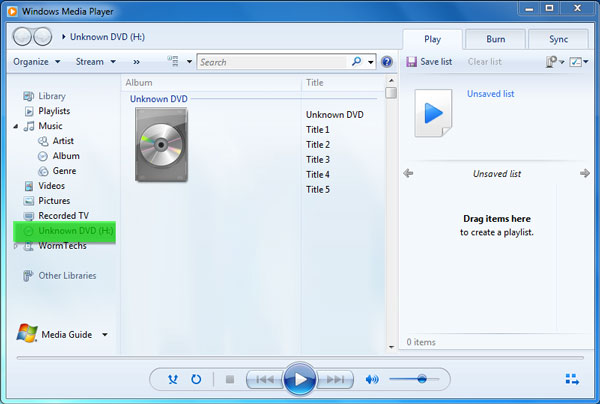
כדי לנגן DVD ב‑Windows Media Player, אתה צריך כונן DVD ומפענח DVD (DVD Decoder) תואם. אם מופיעה הודעת שגיאה, תוכל לעבור אל Web Help כדי לברר כיצד להשיג מפענח. שים לב ש‑Windows Media Player יכול לנגן DVD‑ים רק במחשבי Windows 7 ו‑Windows 8.
חלק 2. דרך טובה יותר לנגן תקליטורי DVD במחשב Windows 10/8/7
כפי שהוזכר לעיל, אינך יכול עוד לנגן DVD‑ים ב‑Windows 10 באמצעות Windows Media Player. במקום זאת, עליך לקנות אפליקציית Windows DVD Player שעולה $15 עבור השמעת DVD. כמובן שסביר להניח שתעדיף דרך חינמית לנגן DVD במחשב שלך.
FVC Free DVD Player הוא כלי חינמי לחלוטין לניגון DVD המאפשר לך לצפות בכל דיסקי DVD, תיקיות DVD וקבצי ISO במחשבי Windows 10/8/7 וב‑Mac. למעשה מדובר בנגן DVD מקוון. באפשרותך להשתמש בו ישירות בכל דפדפן אינטרנט, כמו IE, Chrome, Firefox ו‑Safari. בעזרת תמיכת טכנולוגיית קידוד הווידאו המתקדמת, הוא יכול לנגן סרטי DVD בצורה חלקה ובאיכות גבוהה. בנוסף, הוא תומך ב‑DTS‑HD וב‑Dolby TrueHD כדי להעניק לך צליל חסר אובדן.

שלב 1. פתח את הדפדפן ועבור אל אתר נגן ה‑DVD החינמי. לחץ על כפתור Play Now כדי להתקין במהירות קובץ משגר קטן לניגון ה‑DVD. לאחר מכן חלון הניגון הראשי של ה‑DVD יופיע על המסך.
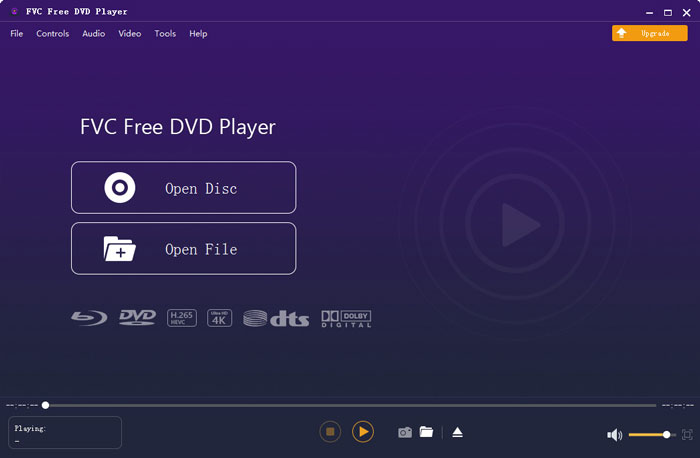
שלב 2. הכנס את דיסק ה‑DVD שלך לכונן הדיסקים של המחשב. לאחר מכן לחץ על כפתור Open Disc כדי לאתר ולהפעיל את סרט ה‑DVD שלך. כל בקרי ההפעלה נמצאים בידיך. לדוגמה, תוכל לנגן, להשהות, להריץ אחורה, להריץ קדימה, להתאים את עוצמת הקול ואת חלון הניגון כרצונך.
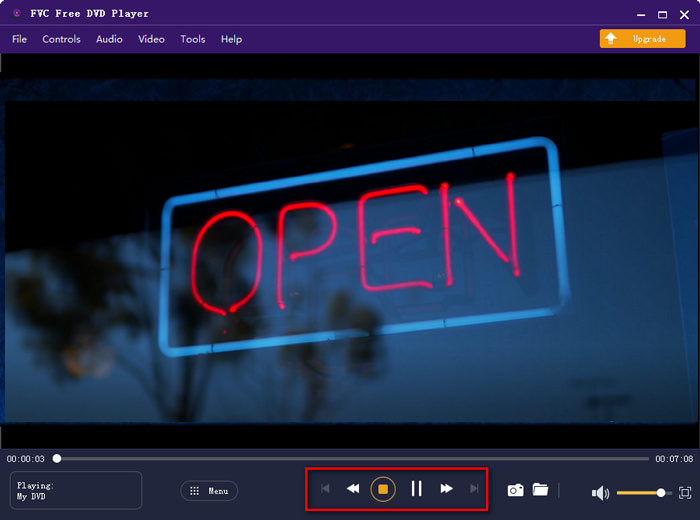
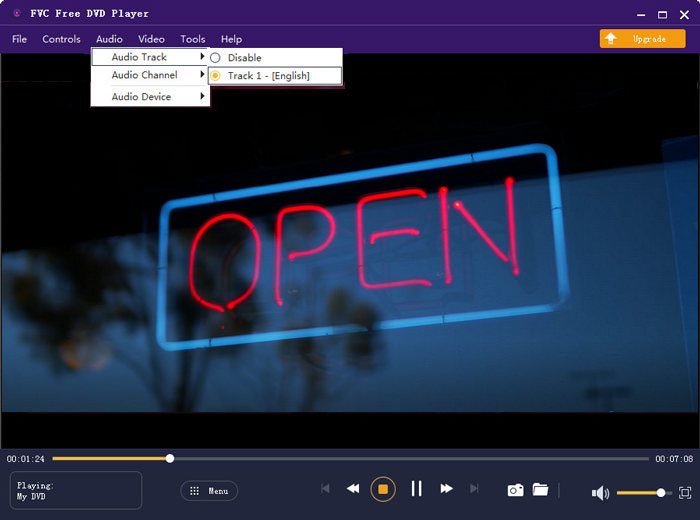
שלב 3. מעבר לפונקציית הניגון הבסיסית, נגן DVD חינמי זה מאפשר לך להוסיף ולשנות כתוביות ורצועת שמע. נוסף על כך, באפשרותך לצלם צילום מסך בכל רגע במהלך ניגון ה‑DVD.
חלק 3. כיצד לצפות ב- DVD במחשב Windows 10/8/7 עם נגן המדיה VLC
VLC media player הוא אחד מנגני הווידאו הפופולריים ביותר, שגם תומך בניגון DVD. כנגן מולטימדיה חוצה‑פלטפורמות, VLC מאפשר לך להפעיל DVD במחשבי Windows 10/8/7, macOS ו‑Linux. יש לו יכולת לנגן DVD‑ים, VCD‑ים ותקליטורי שמע (Audio CD). עבור ניגון וידאו מ‑DVD, VLC יכול לגשת בקלות לתפריט ה‑DVD, לפרקים ולתכנים נוספים הקשורים לדיסק. מעבר ל‑DVD‑ים, VLC תומך גם בדיסקי Blu‑ray.
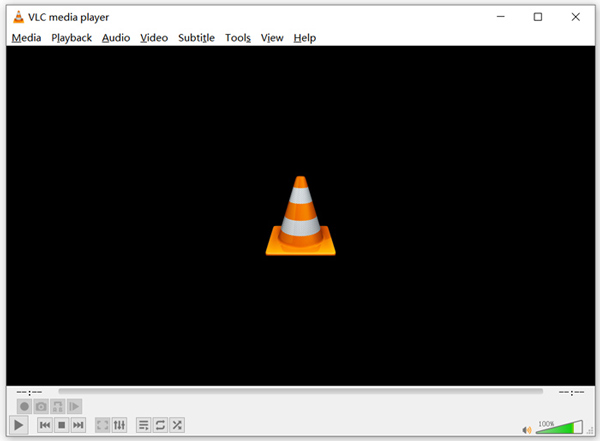
שלב 1. תחילה, עליך להוריד בחינם את הגרסה המתאימה של VLC למחשבך. הכנס את דיסק ה‑DVD לכונן הדיסקים במחשב הנייד שלך.
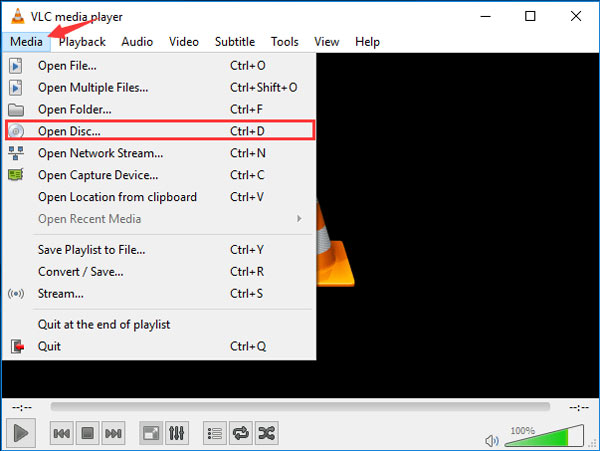
שלב 2. פתח את VLC media player ולאחר מכן לחץ על Media בסרגל התפריטים העליון. מהרשימה הנפתחת בחר באפשרות Open Disc.
שלב 3. בחלון Open Media החדש, לחץ על הלשונית Disc, סמן את האפשרות DVD ולאחר מכן לחץ על כפתור Browse כדי לבחור ולטעון את סרט ה‑DVD שברצונך לנגן.
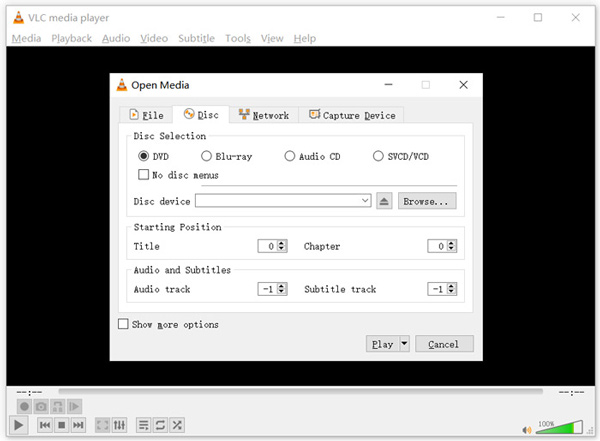
לאחר פעולות אלה, תוכלו לצפות בסרט DVD בצורה נוחה במחשב Windows 10/8/7 או Mac עם נגן המדיה VLC.
חלק 4. שאלות נפוצות על אופן הפעלת DVD בנגן המדיה של Windows
שאלה 1. איך קורעים תקליטור בנגן המדיה של Windows?
כדי לקרוע תקליטור בנגן המדיה של Windows, עליך להכניס את התקליטור לכונן הדיסקים של המחשב. פתח את Windows Media Player ובחר תקליטור ברשימת התיקיות. עכשיו אתה יכול לבחור לקרוע את התקליטור עם הגדרות ברירת המחדל. כאן תוכל גם להתאים אישית את הגדרות Rip בהתאם לצורך שלך.
שאלה 2. מדוע איני יכול להפעיל תקליטורי DVD ב- Windows 10?
מיקרוסופט הסירה את התמיכה המובנית בהפעלת DVD ב- Windows 10. לכן, אינך יכול לפתוח ישירות סרטי DVD במחשב Windows 10.
שאלה 3. כיצד לקרוע DVD ל- MP4?
כדי להמיר DVD לווידאו דיגיטלי כמו MP4, MOV או AVI, תוכל להוריד ממיר DVD כדי לבצע Ripping ל‑DVD ללא אובדן איכות.
סיכום
מדוע DVD לא מתנגן ב‑Windows Media Player? אם אתה משתמש במחשב עם Windows 10, תוכל להסתמך על Free DVD Player המומלץ או על VLC כדי לצפות בסרטי DVD. עבור משתמשי Windows 8 או Windows 7, ניתן לקבל ישירות ניגון DVD ב‑Windows Media Player. אם עדיין יש לך שאלות לגבי ניגון DVD ב‑Windows 10/8/7, תוכל להשאיר לנו הודעה.
-
 10 נגני ה-MP3 החינמיים הטובים ביותר לשנת 2025
 מהו נגן ה- MP3 הטוב ביותר? כיצד ניתן לשים מוסיקה בנגן MP3? כיצד ניתן להוריד את נגן המוזיקה MP3? פוסט זה נותן לך סקירה מפורטת של 10 נגני MP3 הטובים ביותר בחינם עבור Windows PC ו- Mac.
-
 7 נגני Xvid הטובים ביותר עבור Windows ו- Mac
 קבל FVC נגן וידאו בחינם - נגן ה- Xvid הטוב ביותר לכל הפלטפורמות. כאן הזכרנו גם את נגן Xvid האחר 6 עבור Windows ו- Mac.
-
 5 נגני VOB הטובים ביותר עבור Windows 10/8/7 PC ו-Mac 2025
 כיצד מנגנים קבצי VOB ב- Windows 10? מהו נגן ה- VOB הטוב ביותר? פוסט זה מבצע סקירה של 5 נגני ה- VOB הטובים ביותר למחשבי Windows 10 ו- Mac.
