


 ממיר וידאו אולטימטיבי
 מקליט מסך
 תיקון וידאו
 הורדה מאובטחת
האם ניתן לשחק קבצי MKV ב-PS3? הנה הדרך הטובה ביותר לנגן קבצי MKV ב-PS3
פלייסטיישן 3 היא לא רק קונסולת משחקי וידאו, היא יכולה לשמש גם כנגן מדיה לצפייה בקובצי וידאו על Sony PS3 מכונן USB. אם צברת אוסף גדול של סרטי MKV ואתה רוצה לנגן אותם על ה‑PS3 שלך, תוכל לקרוא מאמר זה כדי ללמוד איך לנגן קובצי MKV על PS3.

חלק 1. כיצד להמיר ולשחק קבצי MKV ב-PS3
מכיוון ש‑PS3 לא תומכת בפורמט MKV, עליך להמיר MKV לפורמטים תואמים ל‑PS3 אם ברצונך לנגן קובצי MKV על PS3 בחופשיות. כדי להמיר סרטוני MKV לקובצי וידאו הנתמכים על ידי PS3, מומלץ מאוד להשתמש ב‑Video Converter Ultimate. זהו ממיר וידאו מקצועי שנועד לאפשר למשתמשים להמיר בין פורמטי וידאו ואודיו שונים, כגון MKV ל‑MP4, MOV ל‑MP4, WMV ל‑PS3 ועוד. הוא מספק פרופילי וידאו מותאמים ל‑PS3. באפשרותך להמיר כל פורמט וידאו לפורמטים הנתמכים על ידי PS3 בכמה קליקים בלבד.
מלבד זאת, התוכנה מחזיקה גם בתכונות עריכת וידאו, המאפשרות לך לחתוך את גודל המסגרת, להוסיף סימן מים, להחיל אפקטים של וידאו, לטעון כתוביות, למזג מספר סרטונים לקובץ אחד בודד, לחתוך חלקים לא רצויים של הסרטון ועוד. פשוט הורד והתקן את התוכנה במחשב שלך ונסה אותה.
הורדה חינמיתל-Windows 7 ומעלההורדה מאובטחת
הורדה חינמיתל-MacOS 10.7 ומעלההורדה מאובטחת
שלב 1. הוסף קבצי MKV
התקן והפעל את ממיר MKV ל-PS3 ולחץ על כפתור הוסף קבצים כדי לטעון קבצי .mkv מהמחשב שלך. כדי לחסוך את הזמן שלך, אתה יכול להוסיף קבצי MKV מרובים בכל פעם ולהמיר אותם בו זמנית.

שלב 2. בחר PS3 כפורמט הפלט
לאחר טעינת קובצי ה‑MKV שלך, פתח את תפריט Convert All to, בחר בקטגוריית Device, וגלול מטה כדי למצוא את פורמט הפלט PS3 תחת לשונית Game.
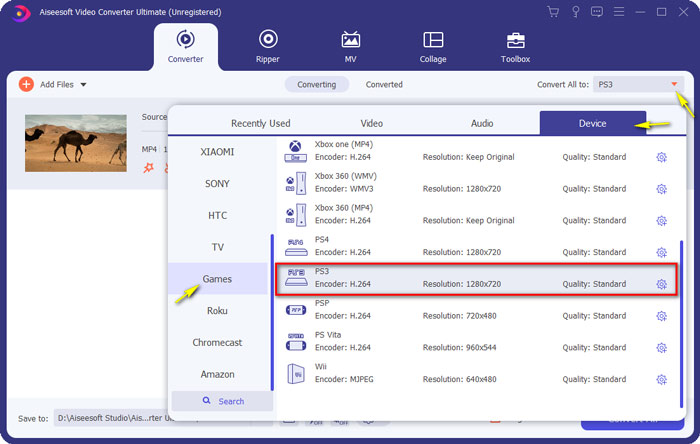
שלב 3. התחל את ההמרה מ-MKV ל-PS3
לאחר מכן עבור לשדה Save to וציין את תיקיית היעד לשמירת הקובץ המומר. לבסוף, לחץ על כפתור Convert All כדי להתחיל להמיר את קובצי ה‑MKV שלך לפורמט תואם PS3.

שלב 4. הפעל קבצי MKV שהומרו ב-PS3
כאשר ההמרה מסתיימת, תוכל להכניס את הווידאוים המומרים לתיקיית VIDEO ואז להעתיק אותם לכונן USB. לאחר מכן חבר את כונן ה‑USB ל‑PS3, עבור אל VIDEO ומצא את ההתקן שלך. לחץ על כפתור Triangle כדי להציג את כל התכנים. לאחר מכן בחר את קובץ הווידאו שברצונך לנגן ולחץ על X כדי להתחיל ליהנות. כעת תוכל לצפות בקובצי ה‑MKV המועדפים עליך על ה‑PS3 שלך בכל זמן ובכל מקום.
חלק 2. הפעל סרטוני MKV עם PS3 Alternative
אם אתה מחפש דרך חינמית וישירה לצפות בקובצי MKV במחשב שלך, השתמש ב‑FVC Free Video Player. מכיוון שזו פתרון מבוסס‑אינטרנט, תוכל לנגן את קובצי ה‑MKV שלך בצורה חלקה מבלי להוריד שום תוכנה למחשב.
מאפיינים עיקריים של FVC Free Video Player
1. תמיכה בהשמעה של סרטוני 4K, HD ו-SD בכל הפורמטים.
2. הוא גם מנגן קבצי אודיו, כגון MP3, AAC וכו' באיכות נטולת אובדן.
3. לגמרי בחינם לשימוש, אין צורך ברישום או הורדה.
4. ממשק נקי ואינטואיטיבי.
5. שירות מבוסס אינטרנט, נגיש בכל דפדפן.

חלק 3. שאלות נפוצות של הפעלת קבצי MKV ב-PS3
אילו קבצי וידאו יכולים לנגן ב-PS3?
להלן סוגי קבצים נתמכים של PS3: MPEG, MP4, AVI, AVCHD, DivX וכו'.
האם אני יכול לשחק MKV ב-PS3 בלי להמיר?
MKV מגיע בתקנים רבים ורק H.264/MPEG-4 AVC ניתן לתמוך ב-PS3. אם קבצי ה-MKV שלך מגיעים בצורות אחרות, עליך להמיר אותם לפורמטים הנתמכים ב-PS3 להפעלה קלה.
כיצד לנגן קבצי MKV בפלייסטיישן 3 מ-USB?
מכיוון ש-PS3 לא יכול לפענח קבצי MKV ישירות, עליך להמיר MKV לקובץ הווידאו שתומך ב-PS3. לאחר קבלת הקובץ שהומר, חבר את כונן הבזק מסוג USB לאחת משתי יציאות ה-USB הממוקמות בחלק הקדמי של ה-PlayStation 3 שלך. הפעל את ה-PS3 שלך, עבור אל וידאו ולאחר מכן בחר את כונן ה-USB שלך. לאחר מכן, לחץ על לחצן המשולש ובחר הצג הכל. כעת תוכל לבחור את הסרטון שברצונך להפעיל או לצפות. לבסוף, לחץ על כפתור X.
סיכום
לסיכום, אני מקווה שכל משתמשי ה‑PS3 יצליחו להבין איך לנגן סרטוני MKV על PS3 בהצלחה לאחר קריאת מאמר זה. מעבר ל‑PS3, ניתן גם לנגן את קובצי ה‑MKV שלך ב‑Windows Media Player, ב‑FVC Free Video Player או בנגני מדיה MKV אחרים.
-
 נגן VLC לא ישמיע MKV, כיצד לתקן את זה
 האם נגן VLC תומך בקבצי MKV? מדוע VLC לא ישמיע MKV? פוסט זה משתף 4 טיפים שימושיים לתיקון נגן VLC לא ישמיע קבצי MKV.
-
 כיצד לנגן קבצי MKV ב- iPad 2021
 איך מנגנים קבצי MKV באייפד 2? האם אוכל להמיר MKV ל MP4 למשחק ב- iPad Pro / Air / 2? פוסט זה חולק שתי דרכים קלות לשחק ב- MKV ב- iPad.
-
 MKV ל- MOV - כיצד להמיר MKV ל- MOV
 כיצד ניתן להמיר MKV ל- MOV ב- Mac? האם iMovie יכול לקרוא MKV? מה הפירוש של פורמט MOV? פוסט זה מספר שתי דרכים פשוטות לעזור לך להמיר MKV ל- MOV עם ממירי וידאו מקוונים ומקצועיים בחינם.
