


 ממיר וידאו אולטימטיבי
 מקליט מסך
 תיקון וידאו
 הורדה מאובטחת
4 טיפים שימושיים לתיקון נגן VLC לא ישמיעו MKV
קובץ הווידאו MKV (Matroska Video file) הוא פורמט קובץ מולטימדיה חינמי ופתוח. אך פורמט זה אינו נתמך על‑ידי נגנים נפוצים רבים, כולל Windows Media Player ו‑QuickTime Player. לכן ייתכן שתפנה אל VLC Media Player הפופולרי כדי לנגן קובצי MKV. עם זאת, משתמשים רבים נתקלו בבעיה ש־נגן VLC אינו מנגן קובצי MKV.

בעיות ניגון MKV יכולות להיות שונות: רצועת האודיו בקובץ ה‑MKV שלך מתנגנת בעיכוב, הניגון קוטע, התמונה מטושטשת, והממשק מתנהג בצורה לא יציבה ועוד. בפוסט הזה נשתף 4 טיפים שימושיים שיעזרו לך לפתור את הבעיה שקובצי MKV אינם מתנגנים ב‑VLC.
חלק 1. הגדר העדפות לתיקון נגן VLC לא ישמיע MKV
VLC הוא כלי הפעלת קבצי מדיה מאוד פופולרי שיכול לתמוך ברוב הפורמטים של וידאו ושמע דיגיטליים, כולל MKV, MP4, AVI, FLV, MP3, AAC, M4A, FLAC וכו 'ו- VCDs, תקליטורי שמע ו- DVD.
נגן המדיה VLC מושך מיליוני משתמשים מכיוון שהוא יכול לנגן את כל קבצי המדיה שברשותך. אבל נגן VLC לא ינגן קבצי MKV הבעיה מתרחשת מעת לעת. אם נגן VLC פשוט דלג על קובץ MKV או HD MKV שלך, אתה יכול להעדפות מותאמות אישית כדי לתקן אותו.
שלב 1. פתח את VLC Media Player ובחר בתפריט Tools. מהרשימה הנפתחת בחר באפשרות Preferences.
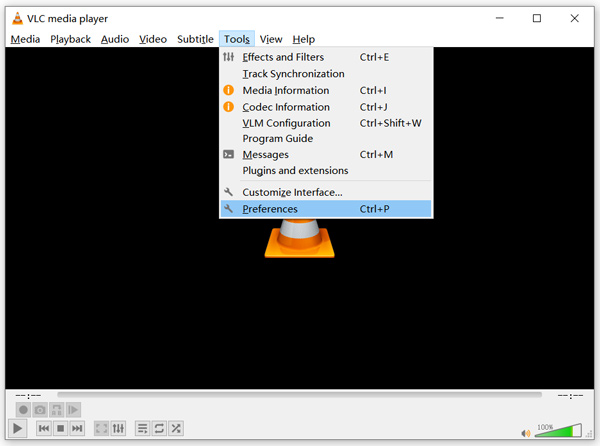
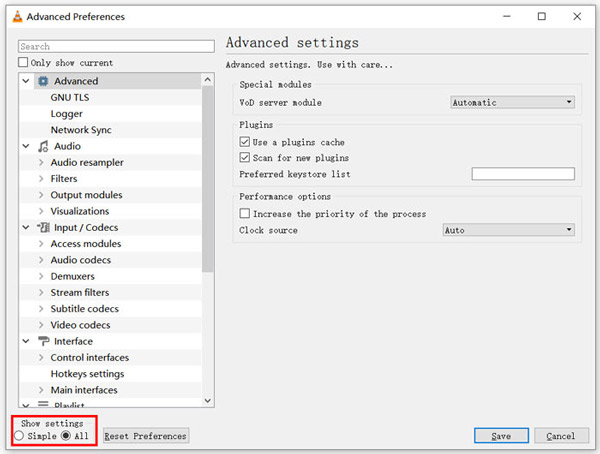
שלב 2. סמן את All תחת Show settings בפינה השמאלית התחתונה של חלון הדו‑שיח. כך תוכל להציג את חלון Advanced Preferences.
שלב 3. בחר בסעיף Input/Codecs משמאל, ולאחר מכן אתר את האפשרות File Caching(ms) מימין. ייתכן שתצטרך לגלול למטה כדי למצוא אותה.
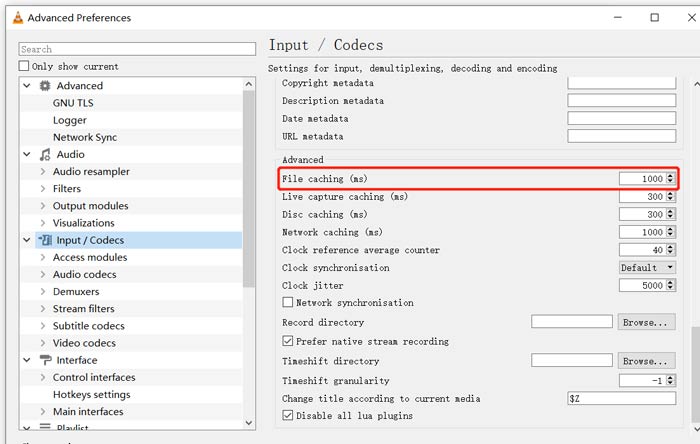
שלב 4. הגדר את File Caching לערך 1000 ואז לחץ על כפתור Save כדי לאשר את הפעולה. לאחר מכן הפעל מחדש את VLC ונסה לנגן שוב את קובץ ה‑MKV שלך.
חלק 2. עדכן או התקן מחדש את VLC כדי לתקן את הנגן לא ישמיע MKV
אם נגן VLC לא ישמיע בעיית MKV עדיין קיים, אתה יכול לבחור לשדרג אותו לגרסה האחרונה. עליך לדעת זאת, גרסה חדשה תמיד תתקן באגים רבים של גרסאות ישנות. אתה יכול לבצע את השלבים הבאים כדי לעדכן את נגן המדיה של VLC שלך.
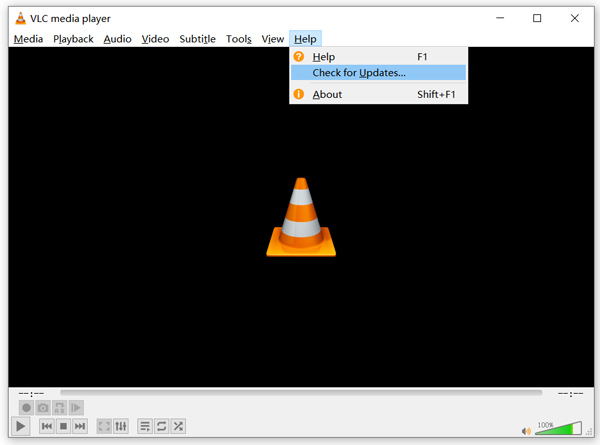
פתח את VLC ולחץ על תפריט Help. בחר באפשרות Check for Updates מהרשימה הנפתחת. VLC יתחיל לבדוק אם קיימת גרסת עדכון זמינה. לאחר מכן תוכל לעקוב אחר ההוראות כדי לשדרג את VLC לגרסה העדכנית ביותר.
תוכל גם להסיר ישירות את VLC מהמחשב שלך, ואז להיכנס לאתר הרשמי שלו, VideoLAN, כדי להתקין גרסה מתאימה. לאחר התקנת VLC Media Player חדש, נסה לנגן את קובץ ה‑MKV שלך ובדוק אם הוא פועל כרגיל.
חלק 3. אפשר אודיו לתקן נגן VLC ללא צליל בזמן השמעת MKV
אם נגן המדיה VLC שלך יכול להפעיל קובץ MKV אך ללא צליל, עליך לבדוק אם הגדרות השמע שלו נכונות.
שלב 1. בחר באפשרות Tools בשורת התפריטים של VLC. מתוך התפריטים הנפתחים, בחר Preferences. לאחר מכן תועבר לחלון Simple Preferences.
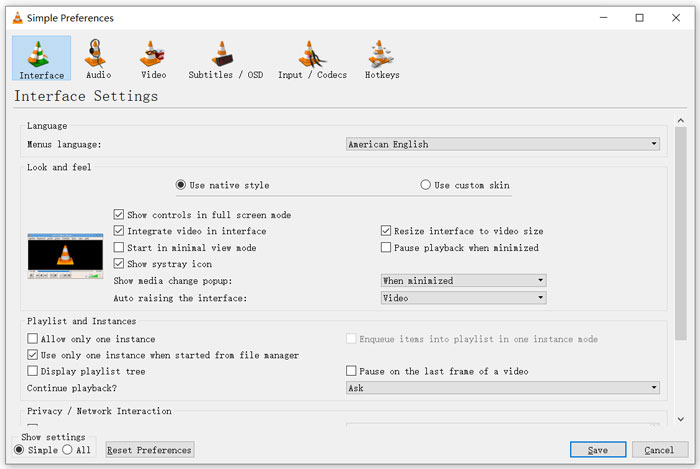
שלב 2. לחץ על לשונית Audio, ואז סמן את האפשרות Enable Audio. בשלב זה תוכל גם להתאים אישית את Output Module, HDMI/SPDIF audio passthrough ואת Device בהתאם לצורך. לחץ על כפתור Save כדי לשמור את השינויים.
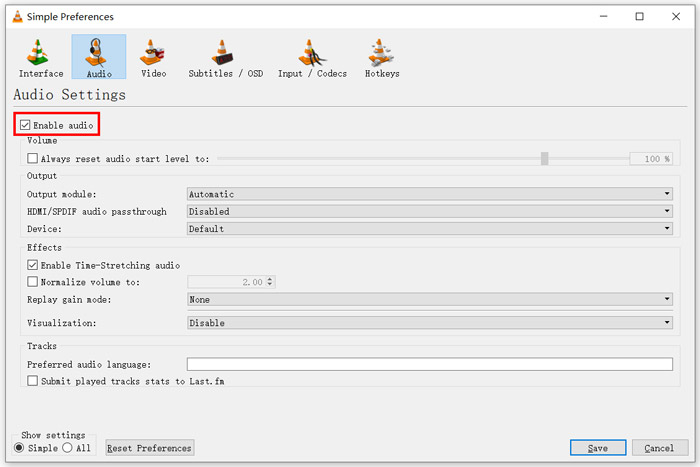
כעת תחזור לממשק הראשי של VLC, ותוכל ללחוץ על Media ואז על Open File כדי לנגן את קובץ ה‑MKV שלך.
חלק 4. בחר נגן VLC חלופי להפעלת קבצי MKV
כאשר תרצה לצפות בסרטי MKV, תוכל גם לבחור נגן אחר במקום VLC. תוכל לנסות את הנגן הווידאו המקוון החינמי הפופולרי. בין אם אתה משתמש במחשב Windows 10/8/7 או ב‑Mac, תוכל להסתמך עליו כדי לנגן כל קובץ MKV באיכות גבוהה.
נגן מקוון זה בחינם יכול לשחק נגן 4K, 1080p / 720p HD, קטעי וידאו SD, סרטוני תלת מימד וקבצי שמע בצורה חלקה. מלבד MKV, הוא תומך גם בפורמטים רבים אחרים כולל MP4, MOV, FLV, AVI, MPEG, WMV, WMA, AAC, MP3, ועוד.
שלב 1. כאשר אתה רוצה לצפות בקובצי MKV, תוכל להיכנס לאתר נגן הווידאו המקוון החינמי. הוא תואם לכל דפדפן אינטרנט, כגון Chrome, IE, Firefox ו‑Safari. לחץ על כפתור Play Now כדי להתקין במהירות משגר קטן לצורך ניגון קובצי MKV.
שלב 2. לאחר סיום ההתקנה, נגן MKV המקוון החינמי הזה יופעל אוטומטית. לחץ על כפתור Open File כדי לייבא את קובץ ה‑MKV שלך. כאן תוכל גם ללחוץ על Open Disc כדי לצפות בסרט DVD.
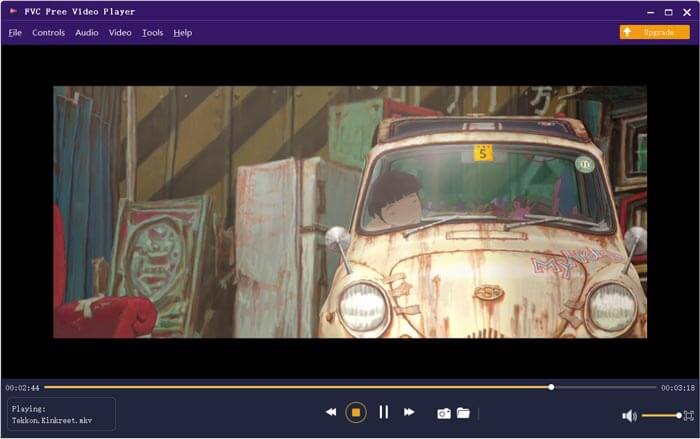
סרטון ה‑MKV שלך יתחיל להתנגן אוטומטית לאחר מכן. באפשרותך לשלוט באופן מלא בניגון ה‑MKV. בהשוואה ל‑VLC Media Player, הוא מציע דרך קלה יותר ליהנות מקובצי MKV. נגן MKV מקוון חינמי זה תומך גם ב‑DTS‑HD וגם ב‑Dolby TrueHD כדי להבטיח חוויית סאונד מעולה.
חלק 5. שאלות נפוצות של נגן VLC לא ישמיעו MKV
האם טלוויזיה חכמה מנגנת קבצי MKV?
כן. טלוויזיות חכמות רבות כמו סוני וסמסונג שיכולות לתמוך בקבצי MKV. אתה יכול לנגן את ה- MKV שלך דרך כונן קשיח חיצוני או מכשיר UBS
איך מנגנים DVD עם נגן המדיה VLC?
כשרוצים להשמיע סרט DVD עם VLC, תחילה עליך להכניס את דיסק ה- DVD לכונן הדיסק במחשב. פתח את VLC, לחץ על מדיה בשורת התפריטים ואז בחר פתח דיסק. דפדף וטען את סרט ה- DVD הזה ל- VLC והפעל אותו.
כיצד להשבית פענוח האצת חומרה ב- VLC?
כדי להשבית את פענוח האצת החומרה בנגן המדיה של VLC, עליך לעבור להעדפות מתפריט כלים. בחר בקטגוריית קלט / קודקים ואז קודקים. אתר את אפשרות הפענוח המואצת בחומרה והשבית אותה שם.
סיכום
כאשר אתה נתקל בבעיה שנגן VLC אינו מנגן קובצי MKV, תוכל להשתמש ישירות בנגן אחר, כמו נגן הווידאו המקוון החינמי המומלץ, כדי לצפות בקובצי ה‑MKV שלך. בנוסף, תוכל לבחור לשדרג את VLC Media Player או להתאים הגדרות שונות כדי לפתור את הבעיה.
-
 דרכים חופשיות ומקצועיות להמרת MKV ל- MOV
 כיצד ניתן להמיר MKV ל- MOV ב- Mac? האם iMovie יכול לקרוא MKV? מה הפירוש של פורמט MOV? פוסט זה מספר שתי דרכים פשוטות לעזור לך להמיר MKV ל- MOV עם ממירי וידאו מקוונים ומקצועיים בחינם.
-
 כיצד להמיר M2TS ל- MKV מבלי לאבד איכות
 רוצה להמיר M2TS ל- MKV תוך שמירה על האיכות המקורית? פוסט זה מראה לך שיטות חינמיות ומקוונות לשנות M2TS ל- MKV ללא הפסד.
-
 נגן מדיה VLC - נגן וידיאו סקירה קצרה והחלופות הטובות ביותר ב- Windows ו- Mac
 מדוע האודיו לא עובד על VLC Media Player? אם ברצונך ללמוד עוד על נגן המדיה הפופולרי, תוכל ללמוד עוד על הסקירה ועל החלופות הטובות ביותר מהמאמר.
