


 ממיר וידאו אולטימטיבי
 מקליט מסך
 תיקון וידאו
 הורדה מאובטחת
פתרונות מהירים לסרטון HTML5 לא נמצא שגיאה
זה תמיד הורס את האווירה כשמופיעה שגיאת HTML5 video not found כשאתה מנסה להפעיל וידאו. אבל אל דאגה – יש דרך לתקן את הבעיה הזו ולחזור ליהנות מהתוכן שלך בלי תקלות. במקום לתת להפסקה הזו להרוס לך את חוויית הצפייה, קח נשימה עמוקה ופעל לפי השלבים המפורטים במאמר זה. נלווה אותך בתהליך פתרון התקלות ונעזור לך לפתור את השגיאה בצורה מקצועית. לכן, אל תיתן לתקלה קטנה לשבש לך את הבידור. ממש בקרוב תוכל שוב ליהנות מהזרמת וידאו חלקה, בלי שום הפרעות מעיקות.
בואו נתחיל לפתור בעיה זו ולשפר את חווית הצפייה המקוונת שלך בווידאו!

חלק 1. מהו וידאו לא מנגן סרטוני HTML5 בדפדפן
וידאו HTML5 הוא דרך מודרנית לנגן סרטונים בדפדפני אינטרנט. זה מחליף את השיטה הישנה של שימוש ב-Adobe Flash, שהייתה מסובכת. זה עובד בכל הדפדפנים ומגיע עם פקדים מובנים כמו הפעלה אוטומטית והתאמת עוצמת הקול, מה שמקל על מפתחים ליצור חווית וידאו טובה יותר באתרים. כעת זו הבחירה הסטנדרטית להפעלת סרטונים באינטרנט. אז איזה סרטון HTML5 לא נמצא?
זוהי שגיאה שמתרחשת כאשר הדפדפן לא מצליח לאתר את הקובץ, ו־הווידאו אינו מופעל ב-HTML5. במקום להציג את תוכן הווידאו המצופה, המשתמש נתקל בהודעה המציינת שלא ניתן למצוא או לגשת ל־HTML5 video.
חלק 2. כיצד לתקן וידאו HTML5 לא נמצא
יש הרבה סיבות מדוע סרטון HTML5 לא נמצא. השגיאה מתרחשת בעת ניסיון להפעיל סרטון. אז הנה השיטות לתיקון השגיאה הזו בקלות:
שיטה 1: עדכון הדפדפנים שלך
הבטחת הדפדפן שלך מעודכן היא גישה שימושית לטיפול בבעיות כגון באגים ותקלות טכניות. בנוסף, שמירה על הגרסה העדכנית ביותר של הדפדפן שלך יעילה לעתים קרובות במניעת בעיות נפוצות כמו שגיאות וידאו מסוג HTML5 לא נמצא.
שלב 1. קודם כול, פתח את כרום (Chrome) שלך.
שלב 2. לאחר מכן, לחץ על שלוש הנקודות הקטנות או על כפתור Customize Control בפינה הימנית העליונה.
שלב 3. כעת, לחץ על Help.
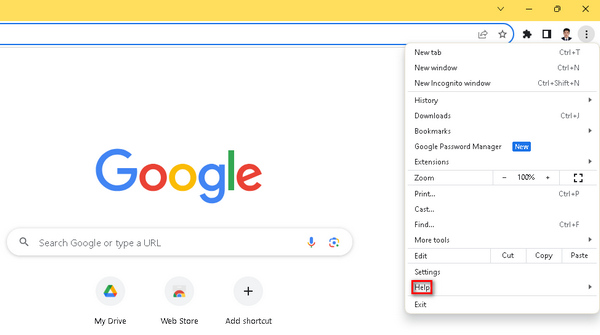
שלב 4. אחרי זה, בחר באפשרות About Google Chrome. אם מחכה גרסה חדשה, תראה את האפשרות Update Google Chrome. אם לא, תראה כפתור Relaunch.
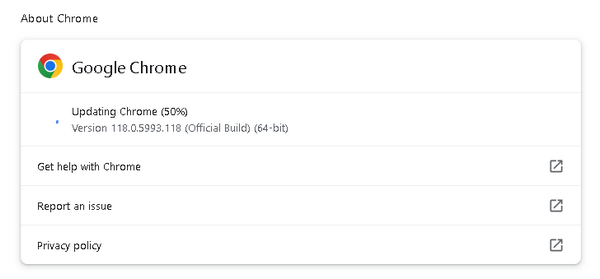
עדכון Google Chrome שלך אינו מבטיח תיקון קוד השגיאה של סרטון HTML5 לא נמצא. עדיין חיוני לשקול לבדוק גורמים אחרים ולהשתמש בכלי תוכנה כדי לתקן אותם.
שיטה 2: שימוש בכלי תיקון וידאו
שימוש בכלי וידאו יכול לפתור ביעילות את שגיאת HTML5 video not found. FVC Video Repair, המצויד באלגוריתמים מתקדמים של בינה מלאכותית, מתקן במהירות וביעילות תקלות שגורמות לכך שסרטונים בפורמטים כמו MP4, MOV ו־3GP אינם ניתנים להפעלה, תוך שמירה על איכות גבוהה. המשתמשים יכולים להציג תצוגה מקדימה של הווידאו שתוקן לפני השמירה, מה שהופך את הכלי החזק הזה לפתרון אמין להפעלת וידאו חלקה בדפדפני אינטרנט. בנוסף, הכלי מפשט את תהליך פתרון התקלות, ומציע דרך מהירה ויעילה לטפל בבעיות נפוצות בהפעלת וידאו, וכך משפר את חוויית הצפייה הכוללת. כדי להשתמש בו, פעל לפי השלבים הבאים:
שלב 1. קודם כול, הורד מהאתר הרשמי שלהם את התוכנה והתקן אותה במכשיר שלך.
הורדה חינמיתעבור Windows 7 ומעלההורדה מאובטחת
הורדה חינמיתעבור MacOS 10.7 ומעלההורדה מאובטחת
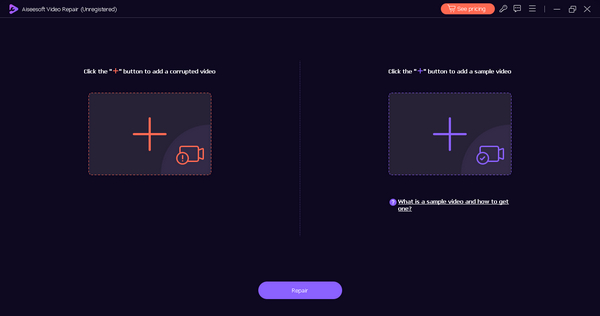
שלב 2. לאחר מכן, הפעל את הכלי. תראה שני כפתורים: בצד שמאל של המסך נמצא כפתור ה־Red Plus, ובצד ימין כפתור ה־Blue Plus. כעת, כדי לתקן את שגיאת HTML5 video not playing, לחץ על כפתור הפלוס האדום כדי להוסיף את הווידאו, והוסף את קובץ הדוגמה על ידי לחיצה על כפתור הפלוס הכחול.
שלב 3. לאחר מכן לחץ על כפתור Repair.
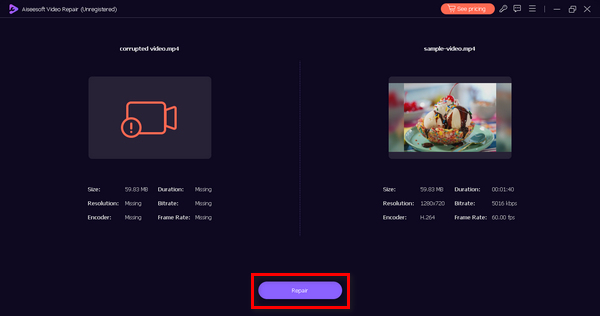
שלב 4. לבסוף, לחץ על כפתור Preview כדי לבדוק אם ההודעה HTML5 video not found עדיין מופיעה. אם הכול תקין, תוכל לשמור את הקובץ לאחר מכן.
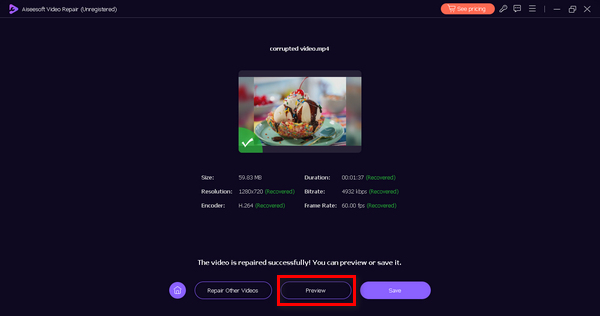
תיקון וידאו FVC הוא אכן כלי רב תכליתי. עם היכולות הרחבות שלו לתיקון בעיות וידאו, הכלי הזה יכול להיות כלי העזר שלך בכל פעם שאתה נתקל בבעיות ושגיאות בסרטונים שלך.
שיטה 3: ניקוי המטמון והעוגיות של הדפדפן
ניקוי המטמון והעוגיות של הדפדפן הוא חיוני כדי לפתור בעיות של הפעלת סרטוני HTML5 הנגרמות כתוצאה משחיתות נתונים. מטמון או קובצי Cookie פגומים עלולים לשבש את פונקציונליות האתר, ולהוביל לבעיות בהפעלת וידאו. המטמון מאחסן משאבי אתר לטווח ארוך, וקובצי Cookie שומרים על העדפות המשתמש. על ידי ניקוי קבצים אלה, אתה מבטל בעיות, ומאפשר לדפדפן להביא נתונים טריים וללא שגיאות מהאתר וכתוצאה מכך לטפל בבעיה של סרטון HTML5 לא נמצא. כך תוכל לנקות את המטמון והעוגיות של הדפדפן:
שלב 1. התחל בהקלדת Control Panel בשורת החיפוש ופתח אותו.
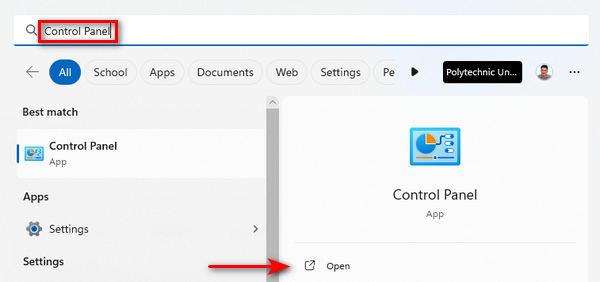
שלב 2. בתוך לוח הבקרה (Control Panel), אתר ובחר את האפשרות Network and Internet.
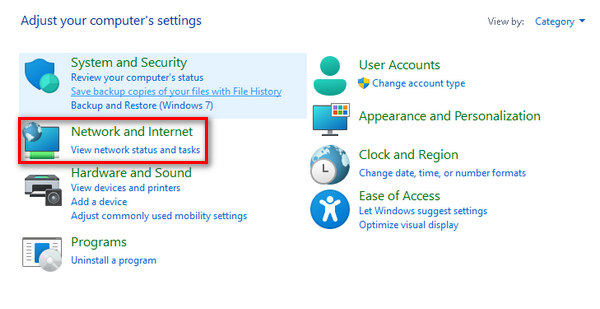
שלב 3. מצא את Delete Browsing History and Cookies, ואז לחץ עליה.
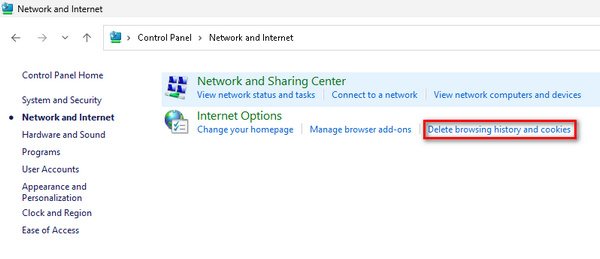
שלב 4. יופיע לשונית (טאב) חדשה, ובה תוכל לסמן את התיבות עבור הפריטים שברצונך למחוק. לאחר הבחירה, לחץ על כפתור Delete כדי להשלים את התהליך.
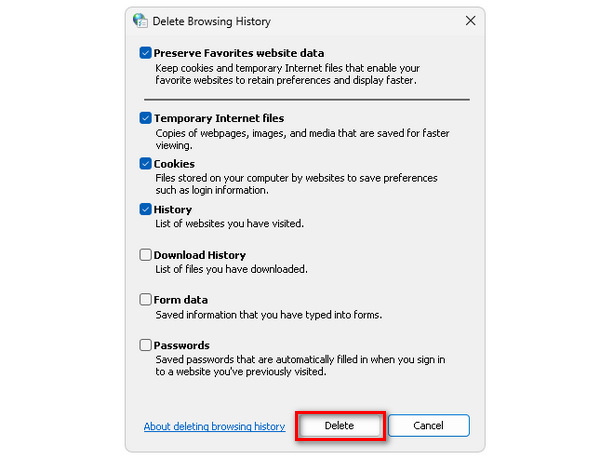
באמצעות השיטה הזו, אינך רק מונע שגיאות HTML5 video not found, אלא גם תקלות וידאו אחרות שגורמות לבעיות בדפדפנים. פתרון זה יעיל גם כאשר הווידאו שלך נתקע, מגמגם, ועוד.
חלק 3. שאלות נפוצות לגבי וידאו HTML5 לא נמצא
מדוע Chrome אינו מנגן סרטוני HTML5?
ייתכן ש-Chrome לא יפעיל סרטוני HTML5 מכמה סיבות, כולל גרסאות דפדפן מיושנות, הרחבות דפדפן סותרות או בעיות בקובץ הווידאו או באתר האינטרנט. כדי לפתור בעיות, נסה לעדכן את Chrome, להשבית תוספים ולבדוק אם יש בעיות ספציפיות לאתר.
מהו סרטון HTML5 שלא נמצא בפיירפוקס?
סרטון HTML5 לא נמצא בפיירפוקס מציין שהדפדפן אינו מסוגל לאתר או להפעיל את הסרטון שצוין. סיבות אפשריות כוללות בעיות תאימות, בעיות רשת או שגיאות בקובץ הווידאו. כדי לטפל בזה, שקול לעדכן את Firefox, לבדוק קישוריות לרשת או לנסות מקור וידאו חלופי.
כיצד אוכל להפעיל HTML5 ב-Chrome Android?
הפעלת HTML5 ב-Chrome ב-Android היא בדרך כלל אוטומטית. עם זאת, תוכל להבטיח תמיכה ב-HTML5 על ידי עדכון אפליקציית Chrome שלך דרך חנות Google Play. בנוסף, ניקוי מטמון הדפדפן וקובצי ה-cookie עשוי לפתור בעיות הקשורות להפעלת סרטוני HTML5 ב-Chrome עבור Android.
מדוע לסרטוני HTML5 יש לפעמים בעיות הפעלה?
סרטוני HTML5 עשויים להיתקל בבעיות הפעלה עקב גורמים כגון תאימות דפדפן, תוכנה מיושנת, בעיות רשת או שגיאות בקובץ הווידאו. הבטחת שהדפדפן שלך מעודכן, בדיקת קישוריות רשת ואימות שלמות קובץ הווידאו יכולים לעזור בפתרון בעיות השמעה.
כיצד אוכל לפתור בעיות בווידאו HTML5 מבלי למצוא שגיאות באתר שלי?
אם אתה נתקל בשגיאות וידאו HTML5 לא נמצא באתר האינטרנט שלך, התחל בבדיקת המיקום והשלמות של קובץ הווידאו. רק ודא כי תיקיית הקבצים נכונה, והקובץ אינו פגום. בנוסף, עיין בקוד ה-HTML של האתר שלך כדי לאשר את ההטמעה הנכונה של רכיב הווידאו. בדיקה בדפדפנים ובמכשירים שונים יכולה גם לסייע בזיהוי וטיפול בבעיות תאימות.
סיכום
באמת כך – פתרון שגיאת HTML5 video not found קל יותר ממה שאתה חושב. לכן, בין אם אתה מעדכן את הדפדפן ובין אם אתה משתמש ב־FVC Video Repair, השלבים הפשוטים האלה מאפשרים לך להתגבר על הפרעות בחוויית הווידאו שלך. קח שליטה, עקוב אחר הפתרונות האלה ותיהנה מתוכן וידאו רציף ובאיכות גבוהה. שדרג את חוויית הבידור שלך בקלות בעזרת התיקונים היעילים האלה!
-
 מהו קוד שגיאה 0xc00d5212 וכיצד ניתן לפתור אותו?
 אם אתה'נתקל בקוד השגיאה 0xc00d5212, המדריך הזה הוא בשבילך. בצע את שיטות פתרון הבעיות הבאות כדי לפתור את השגיאה.
-
 כיצד לפתור במהירות קוד שגיאת וידאו 23301 [מדריך]
 האם אתה מנגן סרטון שמראה פתאום 'לא ניתן להפעיל את קובץ הווידאו הזה עם קוד שגיאה 2330'? קרא את המדריך המקיף שלנו כדי ללמוד כיצד לתקן זאת בקלות.
-
 קוד שגיאה 232011: מה זה קשור ואיך לתקן את זה
 למד כיצד לפתור בעיות ולפתור את קוד השגיאה 232011 במחשב שלך עם הטיפים הקלים והיעילים האלה. אל תיתן לשגיאה זו לשבש יותר את השימוש במחשב שלך!
