


 ממיר וידאו אולטימטיבי
 מקליט מסך
 תיקון וידאו
 הורדה מאובטחת
כיצד לתקן סאונד באייפון שלא עובד [3 דרכים קלות]
ניסית אינספור דרכים להחזיר את השמע לסרטונים באייפון שלך, ובכל זאת הצליל עדיין לא עובד? זה לא אומר שאין דרך לפתור את בעיית הקול בסרטוני האייפון שלך, אלא שפשוט ניסית לפתור אותה בדרך שלא אמורה להיעשות. לכן, במאמר זה נבחן 3 דרכים קלות במיוחד לתיקון הבעיה של אין צליל בסרטון באייפון שלי. אנחנו מבינים שהבעיה הזו מאוד מעצבנת ומתסכלת. אם כן, ואם אינך יכול לחכות כדי לפתור את בעיית השמע בסרטוני האייפון שלך, קרא מאמר זה, הבן מדוע האודיו שלך אינו מתנגן בסרטונים, ופתור את הבעיה בהתאם.

חלק 1. למה לאייפון שלי אין סאונד בסרטונים
מדוע לאייפון שלי אין סאונד בסרטונים זו באמת שאלה ובעיה איתם מתמודדים רבים. ובכן, ישנן סיבות שונות מדוע זה קורה, אבל האם אתה באמת מבין מדוע זה קורה בדרך כלל? להלן הסיבות לכך שלאייפון אין צליל בעת הפעלת סרטונים:
לווידאו באייפון אין צליל בתמונות
תמונות היא אפליקציה ידועה לניהול ועריכת תמונות מתוצרת אפל. זה המקום שבו משתמשים יכולים לאחסן את התמונות והסרטונים שלהם, להציג ולערוך אותם ועוד! בעוד שתמונות היא פלטפורמה מכובדת לצפייה והשמעת סרטונים, במקרים מסוימים להפעלת סרטונים באפליקציה זו אין צליל. להלן חלק מהסיבות לכך שלסרטוני אייפון אין צליל בתמונות:
• ייתכן שהעוצמה מושתקת או נמוכה מדי. ודא שעוצמת השמע באייפון מוגברת ושמתג הצלצול אינו על מצב שקט.
• ייתכן שקובץ הווידאו פגום, מה שגורם לרצועת האודיו לא לתפקד כראוי או שלא להתנגן כלל.
• ייתכן שישנה בעיית תוכנה או באג באפליקציית התמונות (Photos) המונעים מהצליל להתנגן.
• ייתכן שלאפליקציית התמונות יש קושי בקריאת קודק האודיו של הווידאו, במיוחד אם הפורמט אינו נתמך באופן מלא.
• ייתכן שהאייפון מחובר להתקן Bluetooth, כמו אוזניות או רמקול שאינם בשימוש, מה שגורם לניתוב השמע אליהם.
לווידאו של אייפון אין סאונד בגלגלת המצלמה
כשאתה מצלם ישירות באייפון שלך, אתה יכול להציג את הסרטון שלך בתצוגה מקדימה על ידי הפעלתו מגלגל המצלמה שלך. עם זאת, חלק ממשתמשי האייפון אינם חווים צליל בעת הפעלת הסרטונים שלהם מגלגל המצלמה שלהם, מה שגורם להם להרגיש מוטרדים ומבולבלים מדוע לסרטונים שלהם אין קול. להלן כמה מהסיבות לכך שהצליל באייפון אינו פועל בעת הפעלת המצלמה:
• ייתכן שהמיקרופון היה חסום או לא תקין בזמן ההקלטה, ולכן לא נלכד אודיו כלל.
• אם האייפון שלך במצב 'נא לא להפריע' (Do Not Disturb), ייתכן שהוא מונע מהצלילים להתנגן בעת תצוגת תצוגה מקדימה של סרטונים בגלריית המצלמה.
• ייתכן שהאייפון במצב שקט, מה שעלול לגרום לסרטון להתנגן ללא צליל.
לאייפון אין סאונד שמנגן סרטונים ב-IG
הפעלת סרטונים באינסטגרם יכולה לפעמים להוות בעיה. חלקם חווים חוסר יכולת להפעיל את הסרטון; ישנם מקרים שבהם רק הסאונד אינו מושמע כאשר סרטונים מושמעים ב-IG. כעת, כדי להבין טוב יותר מדוע זה קורה, להלן הסיבות לכך שב-iPhone אין סאונד שמנגן סרטונים ב-IG:
• ייתכן שאינסטגרם השהתה (השתיקה) את הווידאו כברירת מחדל, ולכן יש ללחוץ על סמל הרמקול כדי להפעיל את השמע.
• ייתכן שהעוצמה בתוך אפליקציית אינסטגרם נמוכה או מושתקת, בנפרד מעוצמת השמע של מערכת האייפון.
• ייתכן שיש תקלה זמנית או באג באפליקציית אינסטגרם, הדורשים הפעלה מחדש או עדכון.
• חיבור רשת חלש או לא יציב עלול לגרום לטעינה שגויה של הסרטון, שתוביל להיעדר צליל.
• ייתכן שהאייפון מוגדר על מצב שקט או רטט, דבר היכול להשפיע על פלט השמע בתוך אפליקציית אינסטגרם.
חלק 2. פתרונות לתיקון אין צליל באייפון לא עובד
עכשיו כשאתה מבין כמה מהסיבות מדוע לאייפון שלך אין צליל בסרטונים, הגיע הזמן ללמוד כיצד לתקן את הבעיה הזו.
שיטה 1: שימוש ב-FVC Video Repair
כאשר אין קול בסרטוני האייפון שלך מפני שאתה מנגן וידאו פגום, הפתרון המושלם לכך הוא להשתמש ב־כלי תיקון הווידאו FVC. כולנו יודעים שכאשר וידאו נפגם, הדבר אינו משפיע רק על אפשרות ניגון הווידאו, אלא גם על האודיו, וגורם לבעיות כמו היעדר צליל. פגימה בקובץ וידאו עלולה לשבש את הסנכרון בין רצועות האודיו והווידאו או אפילו להסיר או לשבש לחלוטין את רצועת האודיו, מה שמוביל לניגון שקט. לכן, כלי תיקון הווידאו FVC נועד להתמודד עם בעיות אלו, לשקם גם את שלמות התמונה בווידאו וגם את האודיו הנלווה, ולהבטיח חוויית ניגון חלקה ומלאת צליל.
שלב 1. תחילה, בקר באתר הרשמי שלהם. לאחר מכן הורד את הכלי והתקן אותו במכשיר שלך.
הורדה חינמיתל-Windows 7 או גרסה מאוחרת יותרהורדה מאובטחת
הורדה חינמיתל-macOS 10.7 או גרסה מאוחרת יותרהורדה מאובטחת
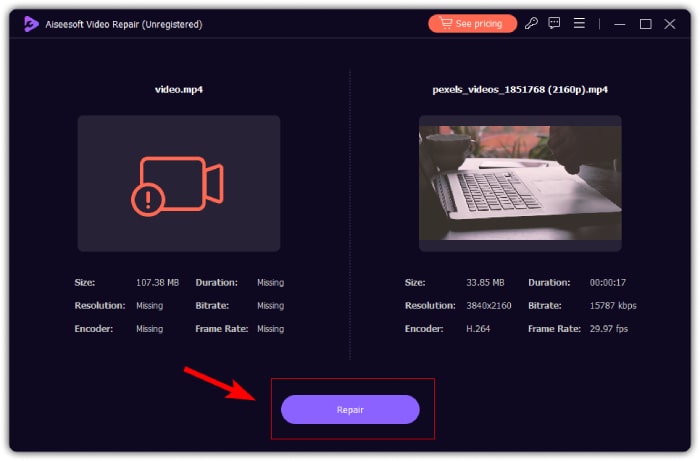
שלב 2. לאחר מכן, הוסף את הווידאו הפגום על‑ידי לחיצה על כפתור הפלוס האדום, באותו אופן שלחצת על כפתור הפלוס הכחול כדי להוסיף את סרטון הדוגמה. לאחר מכן לחץ על כפתור התיקון (Repair) כדי להתחיל לתקן את בעיית השמע.
שלב 3. לבסוף, לחץ על כפתור התצוגה המקדימה כדי להציג את הווידאו שתוקן ולבדוק אם האודיו שוחזר. כאשר תהליך התיקון מצליח, ניתן לשמור אותו על‑ידי לחיצה על כפתור השמירה.
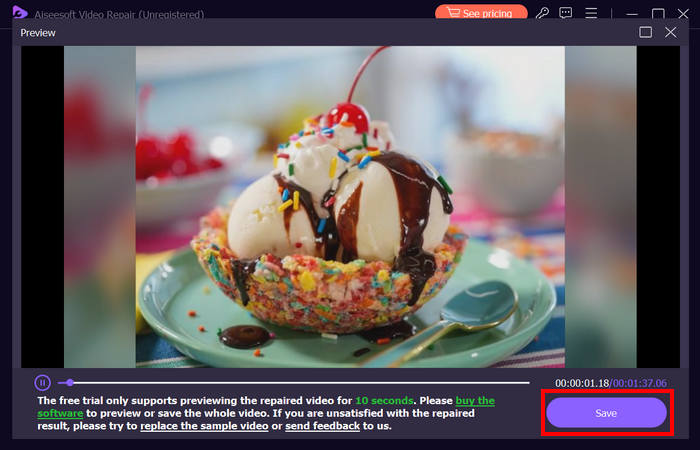
תיקון הווידאו FVC יכול באמת לתקן בקלות את האייפון אין בעיית קול בסרטונים. עם אלגוריתם הבינה המלאכותית העדכנית שלו והזיהוי האוטומטי של מידע חיוני ותיקונו ישירות, הוא יכול לשחזר ביעילות את צליל הווידאו באייפון שלך.
שיטה 2: שימוש ב-FVC Picked Video Converter Ultimate
בינתיים, אם הבעיה שלך נובעת מרצועת אודיו חסרה, כלומר רכיב האודיו של הווידאו שלך אבד, נפגם או לא קודד כראוי, תוכל להשתמש ב־Video Converter Ultimate שנבחר על‑ידי FVC. כלי זה יכול לעזור לך לתקן רצועת אודיו חסרה על‑ידי המרת הווידאו שלך לפורמט תואם. כדי לפתור את בעיית האייפון שאינו מנגן צליל עקב רצועת אודיו חסרה, פעל לפי השלבים הבאים:
שלב 1. אם הכלי אינו מותקן במחשב שלך, הורד והתקן תחילה את הכלי במחשב.
הורדה חינמיתעבור Windows 7 או גרסה מאוחרת יותרהורדה מאובטחת
הורדה חינמיתעבור MacOS 10.7 או גרסה מאוחרת יותרהורדה מאובטחת
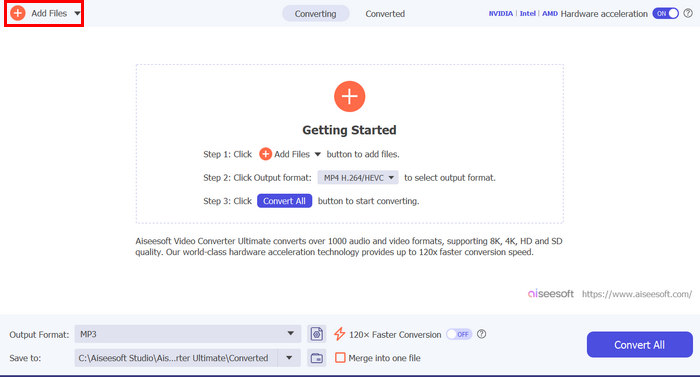
שלב 2. לאחר מכן, הוסף את הווידאו שהשמע שלו אינו מתנגן באייפון שלך על‑ידי לחיצה על כפתור Add Files.
שלב 3. כעת לחץ על Output Format, בחר MP3, ובתפריט בחר את פורמט האודיו הרצוי לווידאו שלך. לבסוף, לחץ על כפתור Convert All כדי לשמור את הקובץ.
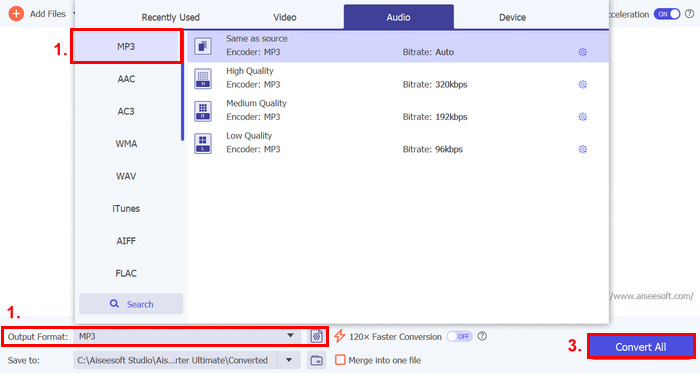
הכלי האולטימטיבי של ממיר וידאו FVC הנבחר הזה הוא באמת כלי גישה לכל בעיה הקשורה לווידאו ואודיו. ללא קשר לבעיה, בין אם מדובר בקובץ פגום, ב-codec שגוי או בפורמט לא נתמך, הכלי הזה באמת יכול לעזור.
שיטה 3: הפעלה מחדש של האייפון
אם לאייפון שלך יש בעיה כלשהי במערכת המשפיעה על האודיו בעת הפעלת סרטונים, אתה יכול פשוט להפעיל מחדש את האייפון שלך. בדרך זו תוכלו לרענן את מערכת ההפעלה של המכשיר, מה שיכול לנקות תקלות או באגים זמניים שעלולים לגרום לבעיית הסאונד. כך תוכל פשוט להפעיל מחדש את האייפון שלך כדי לתקן את בעיית האייפון ללא צליל בווידאו:
לאייפון X ומעלה
שלב 1. כדי להפעיל מחדש את האייפון, לחץ לחיצה ממושכת על הכפתור הצדדי ועל אחד מכפתורי הווליום עד שמופיע על המסך מחוון הכיבוי.
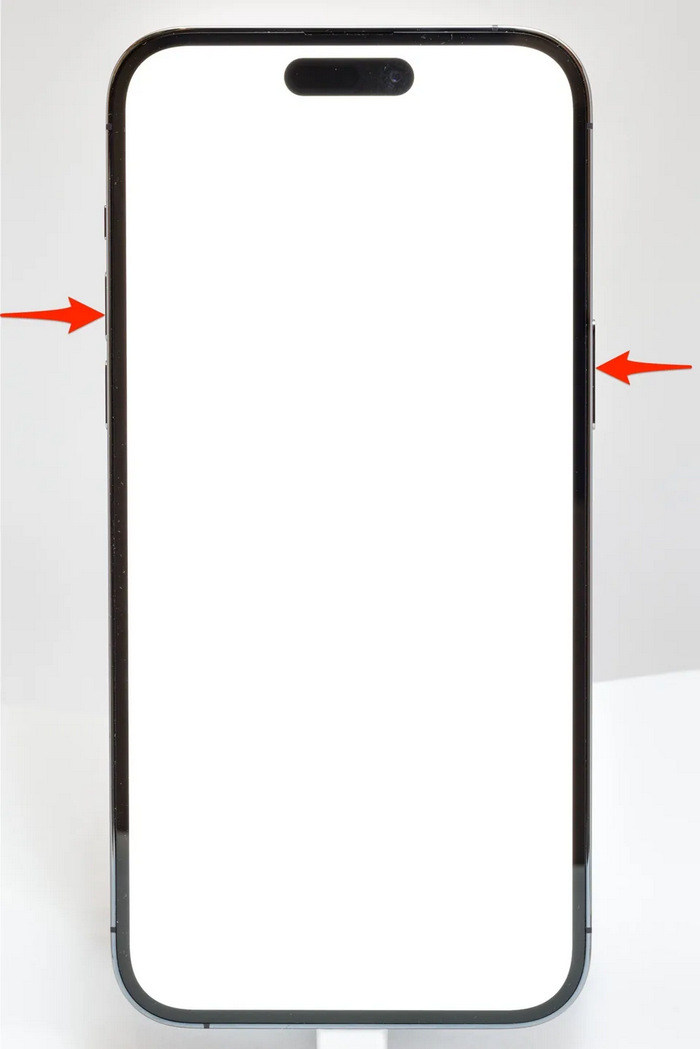
שלב 2. גע והחלק את המחוון כדי לכבות את האייפון.
שלב 3. כעת, כדי להדליק אותו, לחץ על הכפתור הצדדי.
לאייפון 6, 7, 8 ו‑SE
שלב 1. תחילה, עליך ללחוץ ולהחזיק את הכפתור הצדדי.
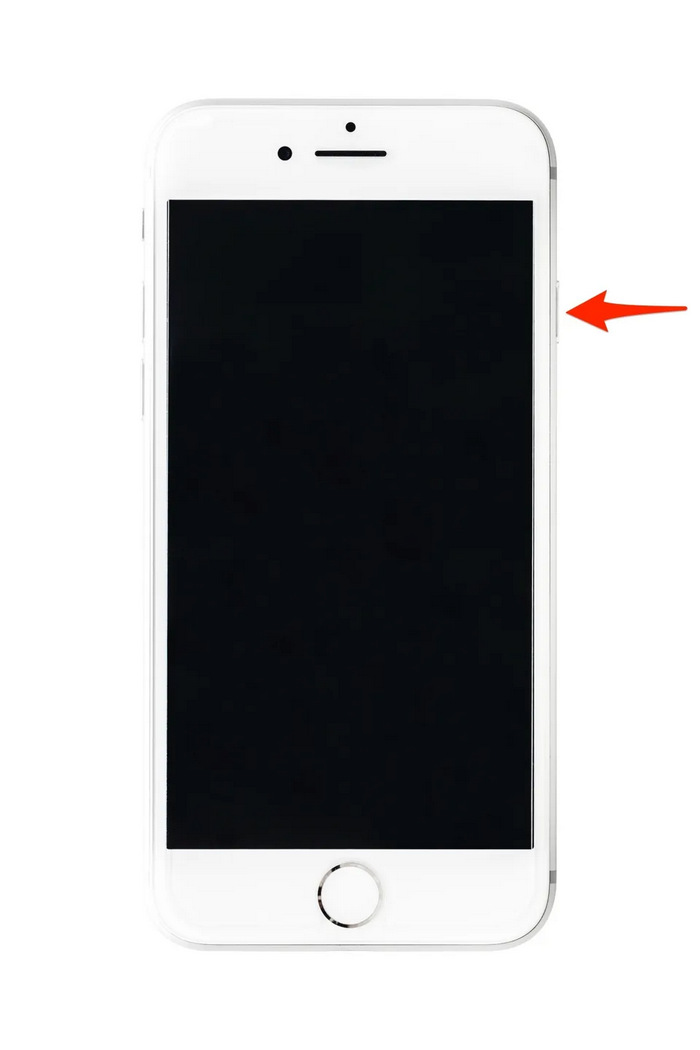
שלב 2. המתן עד שמחוון הכיבוי יופיע והחלק את המחוון כדי לכבות את המכשיר.
שלב 3. כעת, כדי להדליק אותו, לחץ על הכפתור הצדדי.
שיטות אלו הן פשוטות לביצוע ולא ידרשו ממך להשתמש בכלי של צד שלישי. עם זאת, זהו פתרון בסיסי ונפוץ מאוד, והם אינם מבטיחים תיקון מלא עבור האייפון הזה אין בעיית סאונד בווידאו.
חלק 3. שאלות נפוצות על תיקון Stellar for Video
אילו מכשירי אייפון תומכים בצליל Dolby Vision או DTS?
מכשירי אייפון מסדרת האייפון 12 וחדשים יותר תומכים ב-Dolby Vision, שמשפרת את איכות הווידאו עם צבע וניגודיות טובים יותר. עם זאת, מכשירי אייפון אינם תומכים בצליל DTS ישירות, מכיוון שהם משתמשים בטכנולוגיות שמע אחרות כמו Dolby Atmos.
האם אתה יכול לשחק FLAC auan dio באייפון?
כן, אתה יכול לנגן אודיו של FLAC באייפון שלך, אבל תזדקק לאפליקציית צד שלישי כמו VLC או נגן שמע מיוחד, מכיוון שאפליקציית המוזיקה המובנית של האייפון אינה תומכת באופן טבעי ב-FLAC.
האם סרטונים ינגנו צליל במצב שקט באייפון?
לא, סרטונים לא ינגנו צליל אם האייפון שלך במצב שקט. כדי לשמוע צליל, תצטרך לכבות את המצב השקט על ידי סיבוב המתג שבצד האייפון שלך.
סיכום
הסיבות לבעיה של אין צליל בסרטון באייפון משתנות, וכך גם הפתרונות לתיקונה. כעת, כשאתה יודע כיצד לטפל בכך, אל תתייאש אם תיתקל שוב בבעיה הזו. אבל לעת עתה, אם אתה חווה את אותה הבעיה, תוכל לנסות כל אחת מהשיטות המפורטות במאמר זה.
-
 2 השיטות המובילות להמיר FLV ל- Video Video בחינם
 מדריך קונקרטי זה חולק שתי דרכים קלות שיעזרו לכם ללמוד כיצד להמיר קבצי FLV לווידיאו של אייפון או לפורמטים רבים אחרים מבלי לשלם שקל.
-
 [נפתר] כיצד לתקן סרטונים שאינם פועלים באייפון עם שלבים מפורטים
 לא ניתן להפעיל סרטונים מקומיים בגלריה באייפון שלך דרך נגן הווידאו המוגדר כברירת מחדל? סרטוני YouTube מקוונים שלא מתנגנים באייפון תמיד קורה? להלן 5 פתרונות שיעזרו לך במאמר זה.
-
 מדריך קונקרטי להעלאת סרטוני ה- FLV שלך ליוטיוב
 העלאת FLV ל- YouTube אך נכשלה? אתה יכול לפתור בעיה זו בעצמך ולהמיר FLV לקודקים הנתמכים ב- YouTube בעקבות המדריך המפורט שלנו.
