


 ממיר וידאו אולטימטיבי
 מקליט מסך
 תיקון וידאו
 הורדה מאובטחת
VLC Rip DVD: כיצד להמיר בקלות DVD באמצעות VLC [2024]
מה שבטוח, צפייה בסרטים בנגן DVD הייתה פעם חלק מהחיים שלך? ספר לנו, איפה צפית בסרט המצויר או בסרט הראשון שלך כשהיית ילד? תחושה נוסטלגית, נכון? כיום, כשנטפליקס גוברת על כל פלטפורמות הזרמת המדיה, צפייה בסרטים מעולם לא הייתה קלה ונגישה יותר מאי פעם. עם זה, דיסקים רבים מתעלמים כעת, מחכים להירקב עם הזמן.
כעת, אם אתה מחפש דרך לשמור את האוספים שלך, הדרך היחידה לעשות זאת היא לחלץ כל אחד מהם בעזרת VLC. VLC הוא נגן מולטימדיה חינמי המאפשר למשתמשים להפעיל, להמיר ולתקן סוגים שונים של סרטונים. מעבר לכך, הכלי הזה יכול גם לחלץ (לרַפּ) תקליטורי DVD, על‑ידי הוצאת תוכן המדיה מהם. לכן, במאמר זה הכנו מדריך שיכול לעזור לך לרַפּ תקליטורי DVD באמצעות VLC. בנוסף לכך, בסוף המאמר מחכה לך חלופה ל‑VLC שעשויה להציע אפשרויות קלות ומתקדמות יותר. למה אתה מחכה? גלול למטה עכשיו והעמק במאמר הזה.

חלק 1. קרע DVD ב-VLC
VLC היא אפליקציית תוכנת נגן מדיה הזמינה עבור משתמשי Windows, macOS ו-Linux. כלי זה ידוע באופן נרחב בזכות תכונות ההיבט שלו, המאפשר למשתמשים לא רק להפעיל סרטונים שונים דרכו, אלא גם להעתיק DVD מה שהופך אותו לנגיש יותר וניתן להפעלה במכשירים שונים. מה שהכלי הזה עושה הוא שהוא מחלץ את התוכן מהדיסק ואז ממיר אותו לקובץ וידאו דיגיטלי שניתן לאחסן או לשתף בקלות.
מחיר: 100% חינם
להלן מדריך צעד‑אחר‑צעד כיצד לרַפּ תקליטורי DVD באמצעות VLC:
שלב 1: ראשית, עליך להוריד ולהתקין את VLC במכשיר שלך. לאחר מכן, טען את הדיסק.
שלב 2: לאחר מכן, עבור ללשונית Media ובחר באפשרות Convert/ Save מהרשימה.
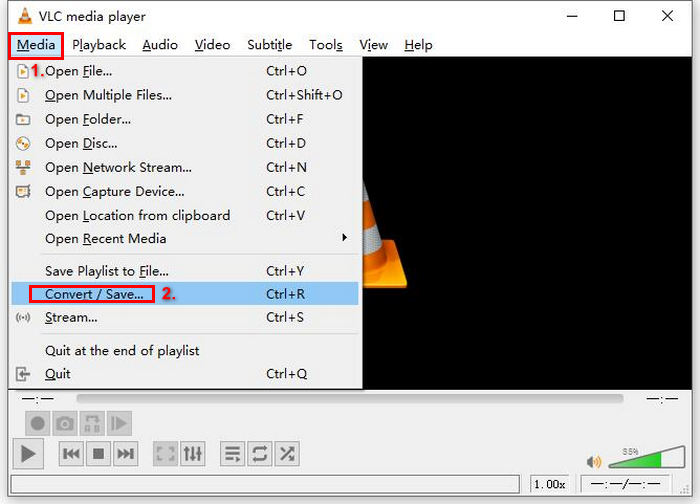
שלב 3: לאחר מכן, לחץ על Disc מלשונית העליונה, הפעל את האפשרות DVD, ובחר את ה‑DVD שברצונך לרַפּ תחת Disc device.
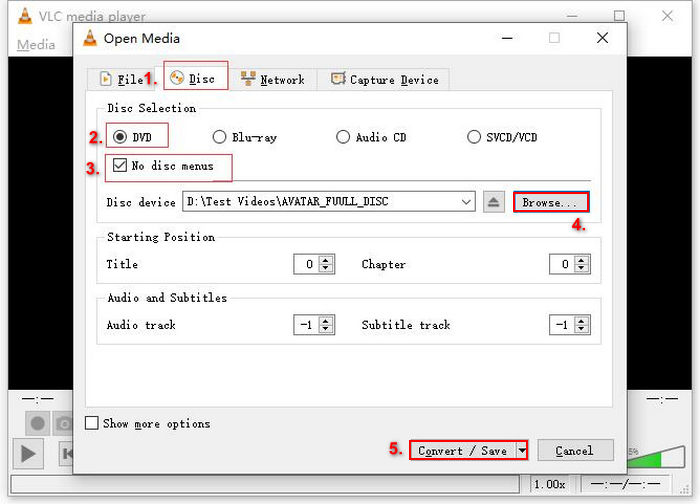
שלב 4: כעת לחץ על הכפתור Convert/ Save והגדר את פורמט הפלט ל‑MKV על‑ידי לחיצה על תפריט הפרופיל הנפתח למטה.
שלב 5: לאחר מכן, בחלק של Destination למטה, לחץ על Browse, בחר תיקייה ותן שם לקובץ הפלט.
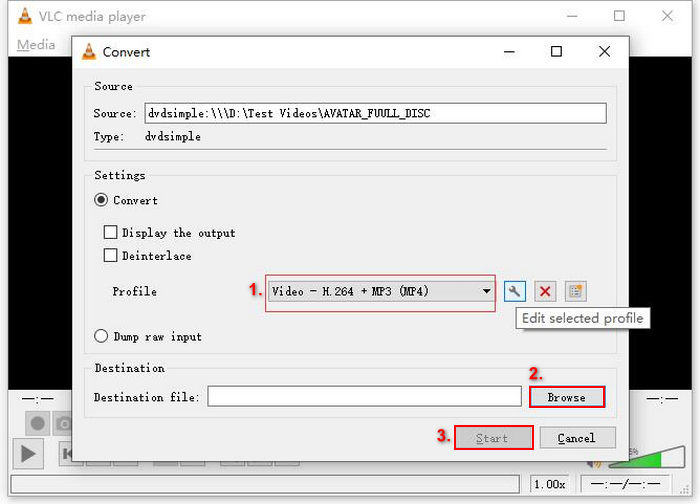
שלב 6: כאשר הכול מוכן, לחץ על הכפתור Start כדי לרַפּ את ה‑DVD בעזרת VLC.
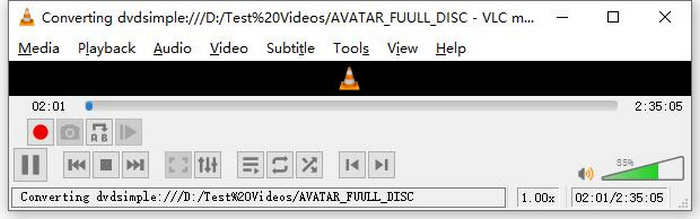
הערה: ניתן לראות את סרגל ההתקדמות של ההמרה (Converting) בתחתית. פשוט המתן עד ש‑VLC יסיים את תהליך הרִיפּ.
תגובה:
מה שאנחנו אוהבים בנגן המדיה של VLC הוא שהוא באמת אמין ורב-תכליתי, במיוחד עבור משתמשים שמחפשים אפשרות חינמית להעתיק תקליטורי DVD. עם זאת, למרות תכונה זו, הממשק שלו יכול להיות מעט טכני למתחילים, והתהליך עשוי להיראות ממושך בהשוואה לתוכנת מרטש DVD מתמחה וייעודי יותר. בנוסף, הוא עשוי להיתקל בכמה תקליטורים המוגנים בהעתקה, מה שמגביל את יעילותו במקרים אלה. עם זאת, עדיין מומלץ להעתיק תקליטורי DVD ב-VLC.
חלק 2. חלופות ל-VLC DVD Ripper
אם אתם מחפשים כלי חלופי להעתקת קבצי DVD מלבד VLC, AnyMP4 DVD Ripper הוא כלי בשבילכם. אלטרנטיבה זו ל-VLC DVD Ripper היא כלי מלא תכונות התומך במספר פורמטי פלט וידאו נפוצים, כולל MP4, MOV, AVI, MKV ועוד. בעזרת כלי זה, תוכלו להמיר בקלות קבצי DVD לפורמטים דיגיטליים להפעלה במכשירים שונים מבלי לאבד איכות. יכולות ההעתקה שלו ל-DVD יוצאות דופן, ותומכת בהמרת כל סוג של DVD, כגון DVD תוצרת בית, מסחרי, DVD לאימון ו-DVD עם 99 כותרים.
הורדה חינמיתעבור Windows 7 ומעלההורדה מאובטחת
הורדה חינמיתעבור MacOS 10.7 ומעלההורדה מאובטחת
שלבים כיצד להעתיק DVD באמצעות AnyMP4 DVD Ripper:
שלב 1: תחילה, עליך להוריד ולהתקין את הכלי במכשיר שלך. זכור להכניס את ה‑DVD לכונן ה‑DVD במחשב ולהמתין מספר דקות עד שיזהה אותו.
הורדה חינמיתעבור Windows 7 ומעלההורדה מאובטחת
הורדה חינמיתעבור MacOS 10.7 ומעלההורדה מאובטחת
שלב 2: כעת, הפעל את הכלי ולחץ על "Load DVD" כדי לטעון את הדיסק.
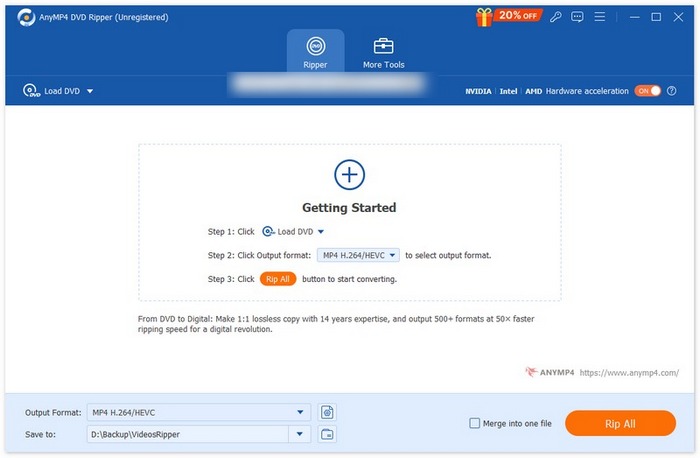
שלב 3: לאחר מכן, לחץ על "Output Format" למטה ובחר את פורמט הווידאו הרצוי לך מלשונית "Video". בתהליך זה תוכל להפוך את ה‑DVD שלך לקובץ וידאו נגיש יותר, הנתמך במגוון רחב של מכשירים. לאחר שסיימת, פשוט לחץ על הכפתור "Rip All" כדי להתחיל לרַפּ את ה‑DVD שלך.
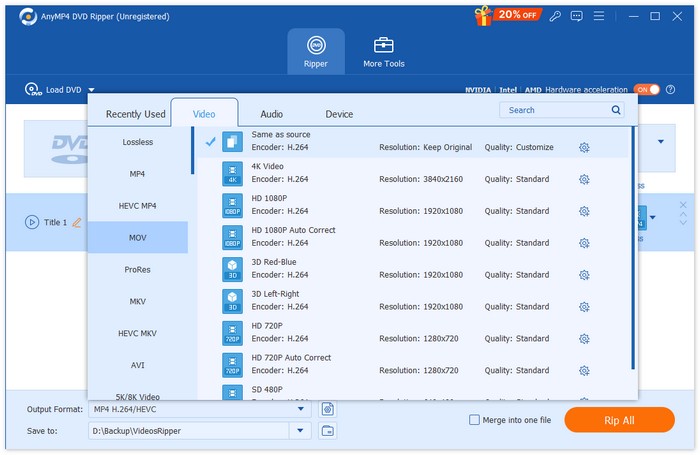
הרבה יותר קל, נכון? כלי ה-AnyMP4 DVD Ripper הוא באמת אלטרנטיבה נהדרת ל-VLC. מהממשק שלו, תהליך ההעתקה ותכונות נחוצות אחרות, כלי זה משנה את כללי המשחק וטוב בהרבה מהאופן שבו VLC קורעת קבצי DVD.
חלק 3. שאלות נפוצות לגבי העתקת תקליטורי DVD ב-VLC
מהו הפורמט הטוב ביותר לקריעת DVD?
הפורמט הטוב ביותר לקריעת DVD תלוי במכשיר של המשתמש. עם זאת, MP4 הוא פורמט וידאו בשימוש נרחב ונפוץ. לכן, בעת העתקת DVD, הפורמט הבטוח ביותר שאתה יכול לבחור הוא MP4.
האם אני יכול להעתיק DVD ב-Windows 7?
כֵּן. אתה יכול להעתיק DVD ב-Windows 7 באמצעות VLC Media Player. VLC תומך במגוון מערכות הפעלה, כולל Windows 7. כשזה מגיע להעתקת תקליטורי DVD ב-VLC, פשוט עקוב אחר אותו תהליך כמו בגירסאות אחרות של Windows. אבל ודא שכונן ה-DVD שלך פונקציונלי, ו-VLC מעודכן כדי למנוע בעיות תאימות.
כמה זמן לוקח לקרוע DVD?
משך הזמן הנדרש לרִיפּ של DVD משתנה בהתאם למספר גורמים. חובה לקחת בחשבון את גודל ה‑DVD, את מהירות כונן ה‑DVD שלך, ואת ההגדרות שבהן אתה משתמש לרִיפּ, לדוגמה: הרזולוציה, הפורמט ועוד. בדרך כלל, רִיפּ של DVD סטנדרטי יכול להימשך מ‑20 דקות ועד יותר משעה. ריפים באיכות גבוהה יותר ובגודל קובץ גדול יותר נוטים להימשך זמן עיבוד רב יותר. אם אתה רוצה לדעת מהי מהירות ניגון הסרטונים ב‑VLC, בדוק כאן.
האם אוכל להעתיק תקליטורי DVD מוגני העתקה עם VLC?
לא. לכל תוכנה קשה לקרוע תקליטורי DVD מוגנים מפני העתקה עקב הצפנה וניהול זכויות דיגיטליות.
סיכום
כעת, כשאתה יודע כיצד לרַפּ תקליטורי DVD באמצעות VLC, אין סיבה שתשמור את כל תקליטורי ה‑DVD שלך לנצח. פשוט עקוב אחר מדריך זה, ותוכל להמיר את כל הדיסקים שלך לקבצים דיגיטליים שתוכל להפעיל בכל מקום ועל כל מכשיר שתרצה. בינתיים, אם VLC לא פועל אצלך כראוי, תוכל לנסות את AnyMP4 DVD Ripper כחלופה. נרגש להתחיל? בוא נצלול פנימה ונתחיל ברִיפּ.
-
 כיצד להזרים סרטי DVD ממחשב / מק לטלוויזיה באמצעות Chromecast
 לא יודע איך לצפות בסרטי DVD בטלוויזיה דרך Chromecast? מאמר זה מציג את הדרך הקלה ביותר להעביר את סרטי ה-DVD שלך ממחשב לטלוויזיה באמצעות Chromecast.
-
 נגן DVD אנדרואיד - כיצד לנגן סרטוני DVD בניידים של אנדרואיד
 כיצד לנגן קבצי DVD בניידים של אנדרואיד? האם יש נגני DVD של אנדרואיד? במאמר זה תלמדו על 3 דרכים לנגן סרטוני DVD בניידים של אנדרואיד עם או בלי מנהל ההתקן החיצוני.
-
 שלוש החלופות הטובות ביותר לנגן DVDFab להפעלת סרטי DVD במחשב
 האם נגן DVDFab שווה קנייה? האם זה יכול להפעיל סרטוני 4K? מה דעתך על הגרסה בתשלום שלו? מאמר זה יציג את התכונות שלו בפירוט ויש את 3 החלופות הטובות ביותר לנגן DVDFab לבחירתך.
