


 ממיר וידאו אולטימטיבי
 מקליט מסך
 תיקון וידאו
 הורדה מאובטחת
כיצד להקליט MP4 באייפון: הגדרות והפתרונות הטובים ביותר לגילוי
האם האייפון מקליט בפורמט MP4? בדרך כלל, אייפונים מקליטים וידאו בפורמט MOV, שבדרך כלל עובד מצוין. עם זאת, אם תרצה לשתף את סרטוני האייפון עם מכשירים שאינם תומכים ב‑MOV, תיתקל בבעיות. לכן, בין אם אתה צופה, מצלם או עורך וידאו באייפון, חשוב להבין באילו פורמטים הווידאו משתמש. הידע הזה יכול לעזור לך להימנע מבעיות ניגון על‑ידי שימוש בסוג הקובץ ובקודקים המתאימים. במאמר זה אראה לך שלוש דרכים פשוטות להקליט וידאו בפורמט MP4 באייפון שלך, וכך להפוך את הסרטונים לתואמים לניגון ועריכה.

חלק 1. האם iPhone מקליט סרטונים ב-MP4
אנשים רבים, במיוחד לא משתמשי אייפון, תוהים אם אייפון אכן מקליט בפורמט MP4. ובכן, כדי לענות על זה במהירות, מכשירי אייפון יכולים להקליט סרטונים בשני פורמטים. אבל זה עדיין תלוי בהגדרות. אפשרות ברירת המחדל היא MOV, שהוא פורמט בשימוש נרחב עבור מכשירי אפל שמתנגן היטב במכשירים מסוימים. עם זאת, מכשירי אייפון מציעים גם אפשרות לחיסכון במקום הנקראת יעילות גבוהה או HEVC. זה משתמש בפורמט אחר, אבל אתה עדיין יכול להציג את ההקלטות האלה ישירות באייפון שלך.
כעת, לגבי הקלטת מסך, מקליט המסך המובנה של האייפון שומר רק הקלטות בפורמט MOV. לפיכך, אם אתה צריך הקלטות MP4 ואם אתה רוצה לערוך את סרטוני MP4 אלה ישירות באייפון שלך, תצטרך להיעזר במקליט מסך מקצועי או תוכנת עריכה במחשב שלך עקב מגבלות ב-App Store.
חלק 2. כיצד להקליט MP4 באייפון ללא המרה
בהתאם לנושא של הקלטת וידאו בפורמט MP4 באייפון, הנה תוכנה מקצועית בשם FVC Screen Recorder שתעזור לך להקליט את כל מה שמתרחש על מסך האייפון שלך, כולל סרטונים, ולהפיק מהם קובץ MP4. ל‑FVC Screen Recorder יש מספר מודולי הקלטה, כולל כזה המיועד לאייפון. הוא משקף את מסך הטלפון שלך למחשב ואז מקליט כל מה שמופיע עליו, כולל צליל המערכת. מה שמייחד אותו הוא כלי ההערות (Annotations) שמאפשרים לך להתאים אישית את ההקלטות שביצעת. בעזרת FVC Screen Recorder לא תצטרך להמיר את סרטוני האייפון רק כדי לקבל איכות וידאו מצוינת ב‑MP4. כל מה שעליך לעשות הוא לעקוב אחר מדריך ה״איך להקליט MP4 באייפון״ שלמטה, וזהו.
שלב 1. הדבר הראשון שצריך לעשות הוא להוריד את מקליט המסך למחשב. ניתן להוריד אותו למחשב שולחני או ל‑Mac על‑ידי לחיצה על כפתורי הDownload למטה. טיפ: כבר עכשיו אפשר להכין את האייפון ולחבר אותו לאותה רשת WLAN שאליה מחובר המחשב.
Free DownloadFor Windows 7 or laterSecure Download
Free DownloadFor MacOS 10.7 or laterSecure Download
שלב 2. הפעל את מקליט המסך ולחץ על כלי ההקלטה של Phone. לאחר מכן, בחר באפשרות iOS. עבור אל מרכז הבקרה (Control Center) בטלפון, הקש על הפונקציה שיקוף מסך (Screen Mirroring), ובחר שם את האפשרות Screen Recorder. כך יחוברו שני המכשירים ותוכל להתחיל להקליט.
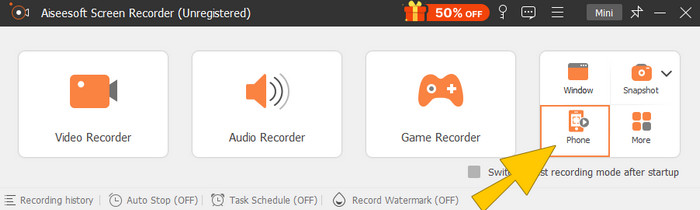
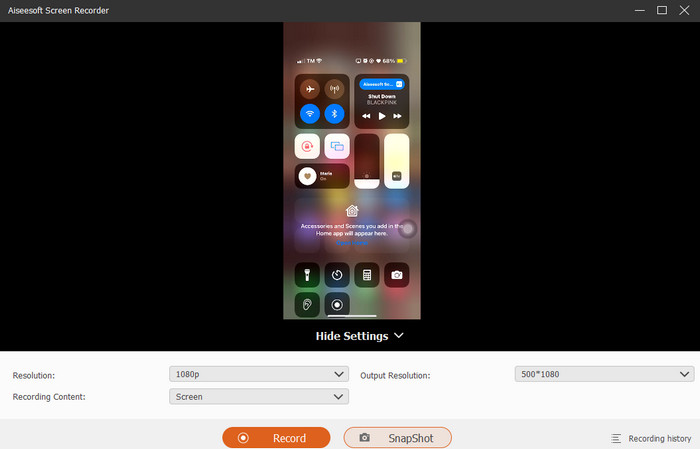
שלב 3. לאחר שהחיבור הושלם, ניתן ללחוץ על כפתור הRecord. כשתסיים, לחץ על כפתור הStop.
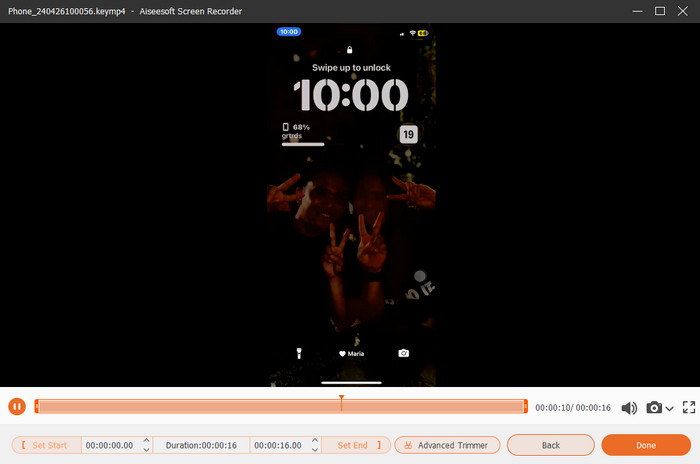
שלב 4. לאחר ההקלטה, הכלי יעביר אותך למסך השמירה, שבו תוכל לערוך את ההקלטה הגולמית. אפשרויות העריכה כוללות את עוצמת הקול, חיתוך (Trimming) וצילום מסך. לחלופין, לחץ על הכפתור Done כדי לשמור את קובץ ה‑MP4 שהוקלט.
חלק 3. כיצד להקליט MP4 דרך הגדרות האייפון
בדרך כלל, הסרטונים שאתה מצלם עם האייפון שלך לא מאוחסנים כקבצי MP4. עם זאת, אם אתה רוצה אותם בפורמט MP4, עליך לשנות את ההגדרות, וזו כנראה הדרך הפשוטה ביותר לעשות זאת. אבל רגע, חשוב לציין שמעבר ל-MP4 עלול לצרור נפח אחסון בטלפון שלך. לכן, לפני שתשנה את ההגדרות, שקול אם כדאי לנסות. אחרת, עיין בשלבים המפורטים להלן.
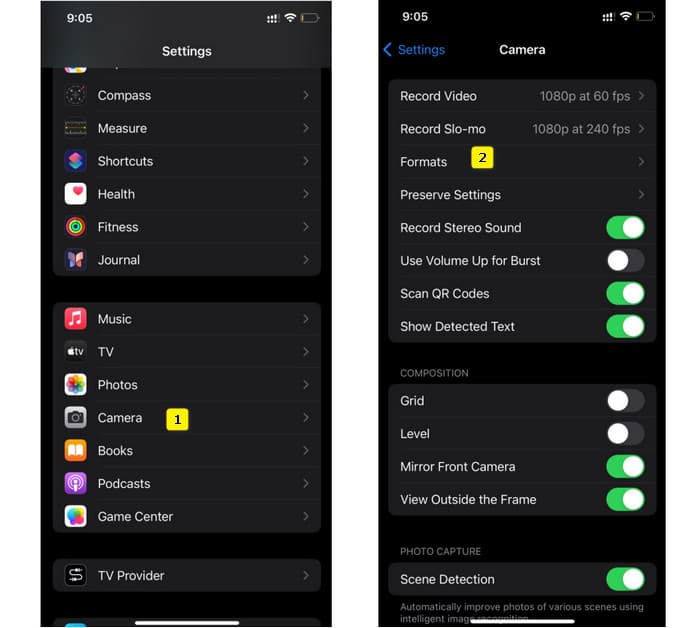
שלב 1. עבור לאפליקציית הגדרות (Settings) באייפון וחפש את אפליקציית המצלמה (Camera), ואז הקש כדי לפתוח אותה.
שלב 2. כעת עבור אל סעיף הFormat והקש עליו. לאחר מכן הגדר אותו ל‑Most Compatibility כדי לקבל כברירת מחדל קבצי MP4.
שלב 3. לאחר מכן, תוכל להתחיל להקליט את מסך האייפון באמצעות מקליט המסך המובנה שלו.
חלק 4. המרת הקלטות אייפון ל-MP4 באינטרנט בחינם
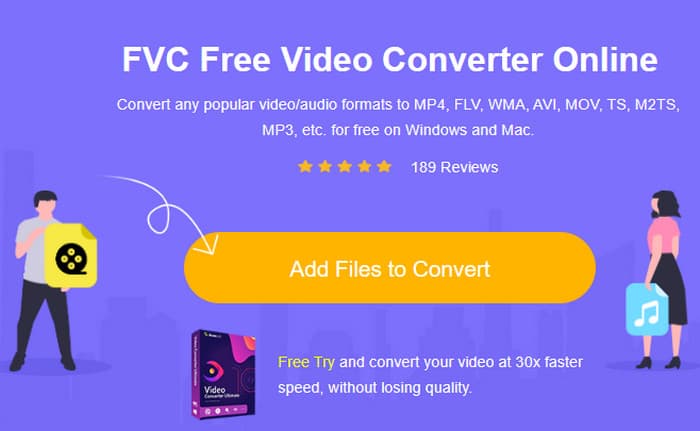
נודה באמת: כשאין אפשרות או רצון להקליט ישירות ל‑MP4, המוצא האחרון הוא המרה. לשם כך אפשר להשתמש בממיר מקוון חינמי שייתן לך פתרון קל ומהיר יותר עבור הווידאו שלך. הכירו את FVC Free Video Converter Online, תוכנה חינמית שמאפשרת להמיר את הסרטונים וקבצי המוזיקה שלך לפורמטים שונים. היא עובדת עם קובצי וידאו ושמע פופולריים ויכולה להמיר אותם לפורמטים כמו MP4, FLV, AVI, WMV, MOV, MKV ועוד רבים. גם סרטוני וידאו בהפרדה גבוהה ניתן להמיר במהירות מבלי לאבד איכות! באפשרותך גם להמיר מספר סרטונים בבת אחת, וכך לחסוך זמן. מה שהופך את השימוש בה לנוח עוד יותר הוא שאין צורך להוריד את הקבצים המומרים בנפרד – המערכת רק תבקש ממך לבחור תיקיית יעד, והפלט יישמר ישירות לשם! אז בוא ננסה את הכלי המדהים הזה ונמיר במהירות את סרטוני האייפון שלך!
שלב 1. בדפדפן שעל שולחן העבודה שלך, בקר באתר הרשמי של הכלי. לאחר מכן לחץ על כפתור Add Files to Convert כדי להוריד את המשגר (Launcher). כשההורדה תסתיים, לחץ שוב על הכפתור כדי להעלות את סרטוני האייפון שלך.
שלב 2. לאחר שתגיע לממשק הראשי, ואם תרצה להוסיף עוד סרטוני אייפון להמרה, פשוט לחץ על כפתור Add File. לאחר מכן הגדר את הקבצים ל‑MP4 על‑ידי לחיצה עליהם ובחירת הפורמט בתחתית.
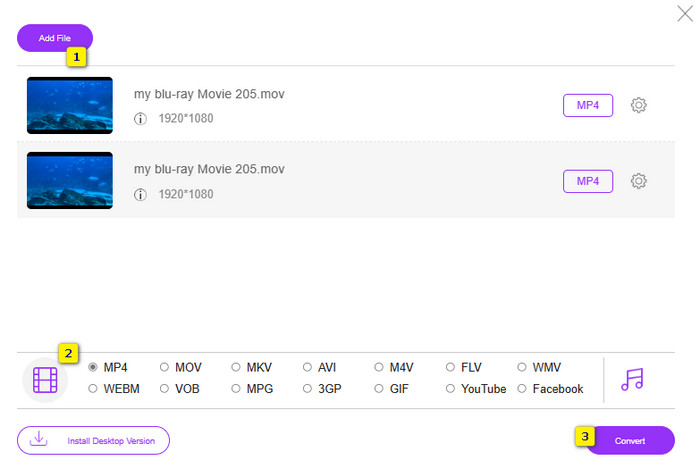
שלב 3. כשתסיים, לחץ על כפתור Convert ובחר את תיקיית היעד לקבצים. מיד לאחר הבחירה יתחיל תהליך ההמרה.
בעזרת השלבים שלמעלה, ניתן להמיר בקלות קובצי MOV מאייפון ל‑MP4 – בחינם.
חלק 5. שאלות נפוצות לגבי הקלטות וידאו MP4 של iPhone
האם אוכל לערוך סרטוני MP4 שהוקלטו באייפון שלי?
כן, אתה יכול לערוך את סרטוני ה-MP4 באייפון שלך. לשם כך, השתמש באפליקציות שונות לעריכת וידאו הזמינות ב-App Store שלך. אחרת, תוכל להעביר את הסרטונים למחשב ולערוך אותם באמצעות תוכנת עריכת וידאו מקצועית.
כיצד אוכל להעביר סרטוני MP4 מהאייפון למחשב?
ישנן מספר שיטות שבהן תוכל להשתמש כדי להעביר את הסרטונים שלך מאייפון למחשב. אתה יכול להשתמש בכבל USB, להעלות את הסרטונים לאחסון בענן, או להשתמש בתוכנה שתעזור לך להעביר אותם.
איזו איכות וידאו ורזולוציה מקליט האייפון ב-MP4?
זה תלוי בדגם של האייפון שלך. מכשירי אייפון בדרך כלל מקליטים וידאו בפורמט MP4 עם רזולוציות ואפשרויות איכות שונות. האפשרויות נעות בין הגדרה סטנדרטית ל-high-definition ואפילו 4K בדגמים חדשים יותר.
סיכום
אלו השיטות שנותנות לך הדרכה כיצד להקליט MP4 באייפון שלך בקלות. בחרו מה שיתאים לכם ביותר, ושתפו אותו גם עם חבריכם!
-
 כיצד להמיר MP4 ל- MOV ב- Mac / PC / Online
 כיצד להמיר MP4 ל- MOV ב- Mac? האם יש דרך חופשית להמיר MP4 ל- MOV ללא אובדן איכות? פוסט זה משתף 4 דרכים פשוטות לעזור לך לבצע את המרת הווידאו מ MP4 ל- MOV ב- Mac, Windows PC ומקוון.
-
 הדרכה - 4 דרכים חינם למיזוג סרטונים באייפון לחדש
 רוצה לשלב סרטונים לאחד באייפון שלך? קרא וקבל 4 דרכים קלות עם כל דגמי האייפון וגרסאות ה-iOS נתמכות.
-
 [נפתר] כיצד לתקן סרטונים שאינם פועלים באייפון עם שלבים מפורטים
 לא ניתן להפעיל סרטונים מקומיים בגלריה באייפון שלך דרך נגן הווידאו המוגדר כברירת מחדל? סרטוני YouTube מקוונים שלא מתנגנים באייפון תמיד קורה? להלן 5 פתרונות שיעזרו לך במאמר זה.
