


 ממיר וידאו אולטימטיבי
 מקליט מסך
 תיקון וידאו
 הורדה מאובטחת
3 מקליטי השיחות הטובים ביותר בפייסבוק - כיצד להקליט שיחות וידאו בפייסבוק
How to record Facebook video calls to remain the precious time between you and your friends and families? After Facebook equips the feature of video calling, more and more users are likely to contact others through Facebook calls rather than phone calls. But as an additional communication function of a social media platform, it doesn’t have the recording feature as the phone call. However, the derived standalone app—Facebook Messenger doesn’t have a built-in recorder. In this case, you can learn about 3 easy-to-use Facebook call recorders for computers, iOS devices, and Android mobile with the detailed guidelines in this article.

חלק 1: מקליט השיחות המקוון הטוב ביותר בפייסבוק עבור Windows / Mac
Without downloading any third-party software, you can use FVC Free Screen Recorder to record Facebook video calls online for free. It is a user-friendly Facebook call recorder that has a concise interface with multiple features you need.
- 1. הקלט שיחות וסרטונים בפייסבוק ברשת בחינם בצעדים פשוטים.
- 2. הקלטה ללא הפסד של אודיו וסרטונים לשמירה על סרטונים באיכות גבוהה.
- 3. אין סימן מים שיגן על הבעלות שלך.
- 4. ההקלטות יישמרו אוטומטית בספריית המדיה ותוכלו לבחור למחוק, להוריד ולשתף ב- SNS באופן חופשי.
Step 1: Navigate to the website of FVC Free Screen Recorder on any browser. Click the Start Recording button to install the launcher in a few seconds, and then click the Start Recording button again to launch the recorder.

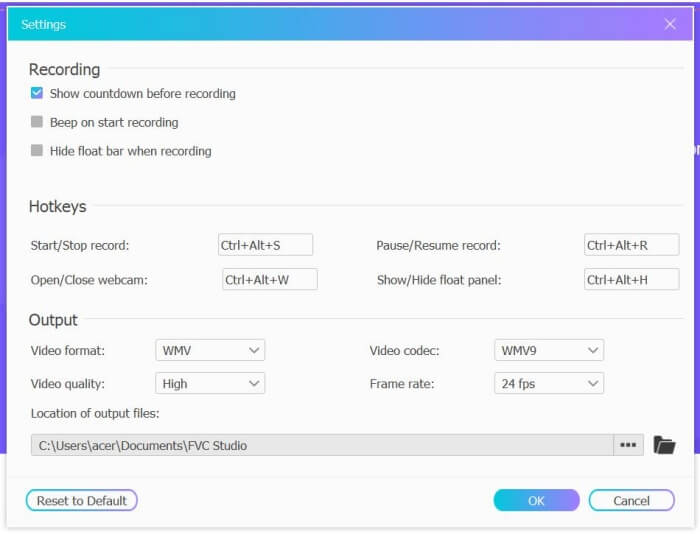
Step 2: Click the Recording Area menu to choose the full screen or select region freely. Then turn on the Microphone and the Speaker voice. As for adjusting the video settings, you can click the Setting icon. And you can choose the MP4 format, High quality, and 24 fps to keep the high quality of the recordings. Then click the REC button to start recording Facebook calls.
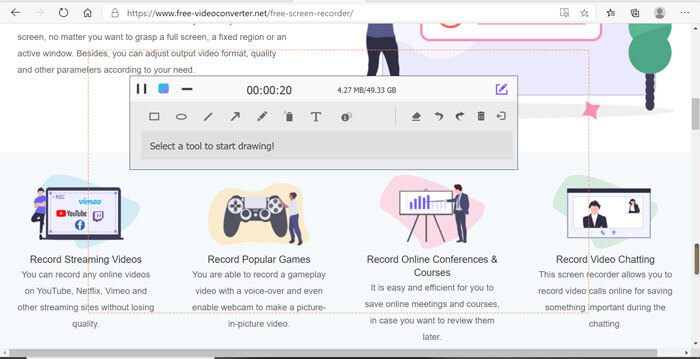
Step 3: There will pop up a toolbox with multiple editing tools. You can choose to add shapes, words, and lines according to your need. Then click the Stop icon to save your recording in the cloud. You can click the right mouse to choose to download it on your computer.
שימוש זה מקליט שיחות וידאו מקוון בחינם בפייסבוק הוא הדרך הטובה ביותר עבור משתמשי המחשב להקליט שיחות וידאו בפייסבוק באופן מקוון. על ידי התאמת הגדרות ההקלטה מראש, הוא יכול לשמור את שיחות הפייסבוק בפורמט MP4 בגודל קטן ובאיכות גבוהה. אם אתה רגיל להתקשר בפייסבוק בנייד, המשך לקרוא מאמר זה.
חלק 2: כיצד להקליט שיחת פייסבוק ל- iOS דרך מקליט ברירת המחדל
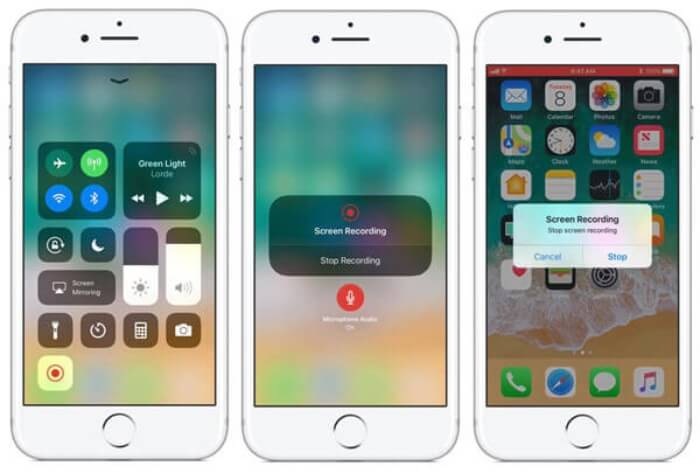
הגרסה המעודכנת של iOS 11 ומעלה כוללת מקליט ברירת מחדל חדש ב- iPhone וב- iPad שלך, שהיא הבחירה הטובה ביותר לצלם שיחות וידאו בפייסבוק מבלי להוריד אפליקציות כלשהן. כאן תוכלו ללמוד כיצד להוסיף את מקליט השיחות של פייסבוק לקיצורי הדרך במרכז הבקרה ולדרך השימוש בו.
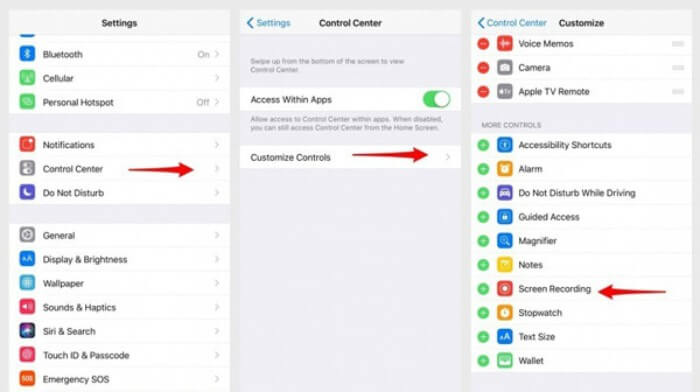
Step 1: Tap the Settings app on your iPhone/iPad and scroll down to choose the Control Center option. Then tap the Customize Controls tab and find the Screen Recording function. Tap the Plus icon to add this feature to the control center.
Step 2: Pull down from the top of the phone screen to open the control center and you will find the recording app at the bottom. Tap the Screen Recording icon to start the recording, and you can choose to capture the videos or only record the audio track. If you want to finish it, tap the red Status Bar at the top and tap the Stop option in the pop-up window.
חלק 3: מקליט מסנג'ר פייסבוק קל לאנדרואיד
בחלק מהטלפונים של אנדרואיד אין מקליטים מובנים, ויש יותר מדי מקליטי שיחות וידאו בפייסבוק שאפשר לאנדרואיד לבחור מהם. לפיכך, תוכל ללמוד את אחד המקליטים הטובים ביותר עבור מכשירי Android עם השלבים המפורטים בחלק הבא.
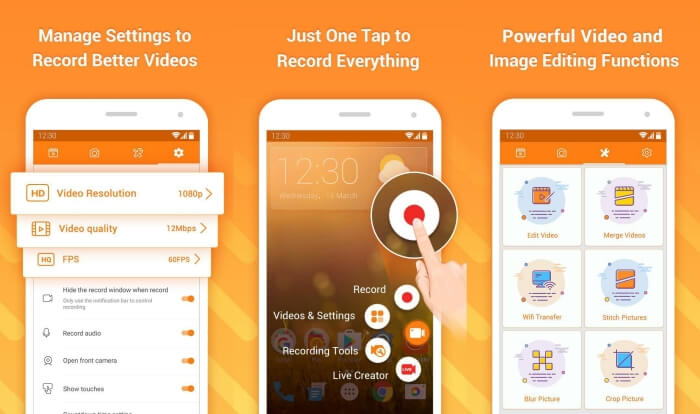
DU Recorder is an easy-to-use Facebook call recorder for Android and it’s famous for its smooth recording. Without root, everyone can use it to record Facebook Messenger calls in one tap.
Step 1: Launch the recorder and there are four menus including recordings, screenshots, editing tools, and settings. Firstly, tap the Settings menu to adjust the video parameters. To keep high quality, you can choose 1080p resolution and 30 fps frame rate.
Step 2: Don’t close the recorder and just launch Facebook Messenger. Then you can see the recorder icon. Tap the icon and choose the Recording icon to start capturing the screen and voice. And you can tap it again to stop the recording. Then you can tap the Editing icon to clip the recording and add music to it.
Here you may like:
חלק 4: שאלות נפוצות של מקליט שיחות בפייסבוק
1. האם לפייסבוק יש להקליט ברירת המחדל להקליט שיחות וידאו במחשב האישי?
לא, זה לא. לפיכך, עליכם להסתמך על מקליטי שיחות מקצועיים אחרים בפייסבוק. אם אינך רוצה להוריד תוכנה אחרת שתתפוס את שטח האחסון במחשב שלך, מקליט המסך החינמי FVC הוא הבחירה הטובה ביותר שלך.
2. איך להתחיל צ'אט עם חבר באפליקציית Messager Facebook?
ראשית, פתח את Messenger Messenger בפייסבוק שלך ואז בחר את תיבת הצ'אט של החבר שברצונך לקיים בו שיחת פייסבוק. ועכשיו אתה יכול לראות את סמל הווידאו, כך שתוכל ללחוץ עליו כדי להתחיל שיחת וידאו.
3. באיזה פורמט עלי לבחור לשמור את ההקלטות בעת שימוש בהקלטות פייסבוק מסנג'ר?
בין אם אתה משתמש במקליט שיחות בפייסבוק במחשב או בנייד, הפורמט הטוב ביותר לשמירת שיחות וידאו בפייסבוק הוא MP4. זה יכול לחסוך יותר מקום אחסון והוא תואם לכל המכשירים.
סיכום
The above article has introduced 3 Facebook video call recorders. For iPhone, iPad, and some Android mobiles, you can use the built-in recorder on your phone easily. Otherwise, you can choose any recorder including the DU recorder on Google Play. As for PC, FVC Free Screen Recorder is your best choice to capture Facebook calls. If you encountered other problems when using Facebook call recorders, please leave your comment below.
-
 סקירת Snagit 2021 - יתרונות, חסרונות והאלטרנטיבה הטובה ביותר
 מהי האלטרנטיבה הטובה ביותר ל- Snagit? האם יש כלי ללכידת מסך כמו Snagit? פוסט זה יסקור את Snagit וישתף את החלופה הטובה ביותר ל- Snagit לצילום המסך.
-
 6 מקליטי ה- WAV הטובים ביותר שאסור לך לפספס בשולחן העבודה ובאינטרנט
 לתוכנות ההקלטה הטובות ביותר ב- WAV שאנו חולקים במאמר זה יש מגוון תכונות שימושיות המסייעות לך לתפוס אודיו וקול כמו אנשי מקצוע.
-
 4 מקליטי הקול החופשיים של AIFF המפיקים אודיו באיכות גבוהה
 מאמר זה מדבר על AIFF וכמה מהכלים הפופולריים ביותר שבהם אתה יכול להשתמש כדי לייצר פורמט AIFF באיכות גבוהה.
