


 ממיר וידאו אולטימטיבי
 מקליט מסך
 תיקון וידאו
 הורדה מאובטחת
ללמד אותך כיצד להקליט אודיו עם VLC ב-Windows וב-Mac
שומעים פסקול אהוב אבל אף פעם לא מצליחים למצוא את המקור? אל דאגה, אתם יכולים להשתמש ישירות בתוכנת הקלטת אודיו כדי לעזור לכם ללכוד את הקליפ הזה. אם אינכם יודעים איזה סוג מוצר לבחור, עיינו ב-VLC Media Player. הוא לא רק חינמי לחלוטין אלא גם תואם למערכות הפעלה Windows, Mac ו-Linux. בין אם אתם רוצים לאסוף אודיו מוקלט או לאסוף חומר ליצירת צלצולים מותאמים אישית, תוכנה זו מספיקה בהחלט כדי לענות על הצרכים שלכם.
איך לגרום לנגן וידאו להקליט אודיו? אל דאגה. במאמר זה תמצא את התשובה שאתה מחפש. נציג בפניך כיצד להקליט אודיו בעזרת VLC Media Player. אם נראה לך שיש בו מעט מדי פונקציות, תוכל גם לנסות את החלופות המומלצות שלנו.

חלק 1. כיצד להקליט אודיו עם VLC ב-Windows
לנגן המדיה VLC יכולות הקלטת וידאו ואודיו מובנות, והוא מציע גם כמה תכונות עריכה פשוטות שיעזרו לכם להפיק את התוצאות הטובות ביותר. התכונות שלו אף פעם לא נגמרות בהפעלת קבצים בפורמטים שונים. בלי עיכובים נוספים, בואו נראה כיצד להשתמש ב-VLC כדי להקליט מסכים עם אודיו. חלק זה חל בעיקר על משתמשי Windows.
הנה מדריך שלב אחר שלב להקלטת אודיו באמצעות נגן המדיה VLC במחשב Windows.
שלב 1. ודא שיש לך את הגרסה החדשה ביותר של VLC Media Player במחשב האישי. פתח אותו ועבור לממשק הראשי.
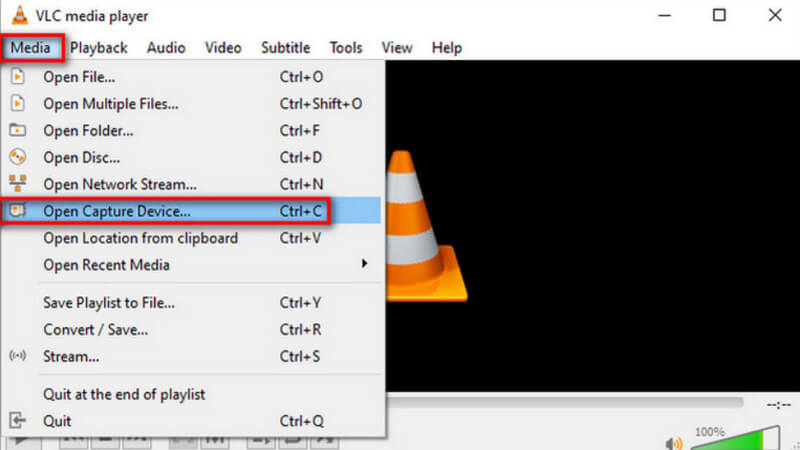
שלב 2. לחץ על Media בפינה השמאלית‑עליונה. לאחר מכן בחר Open Capture Device ברשימה הנפתחת.
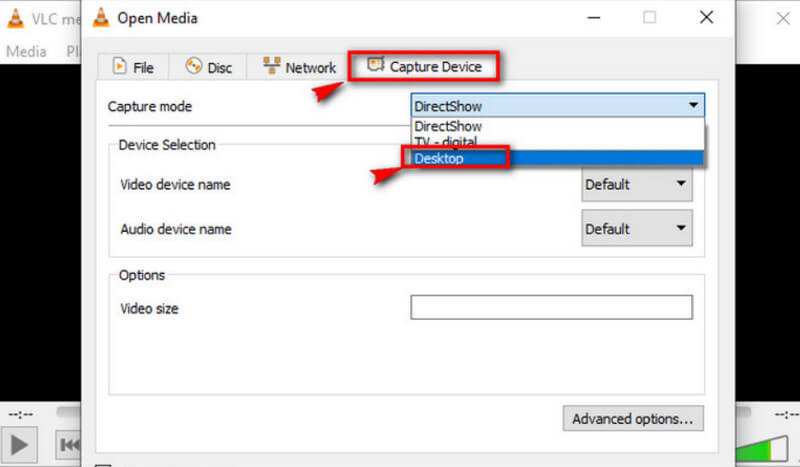
שלב 3. ייפתח חלון Open Media. עבור ללשונית Capture Device ובחר Desktop.
שלב 4. לאחר מכן, לחץ על Play כדי להתחיל להקליט.
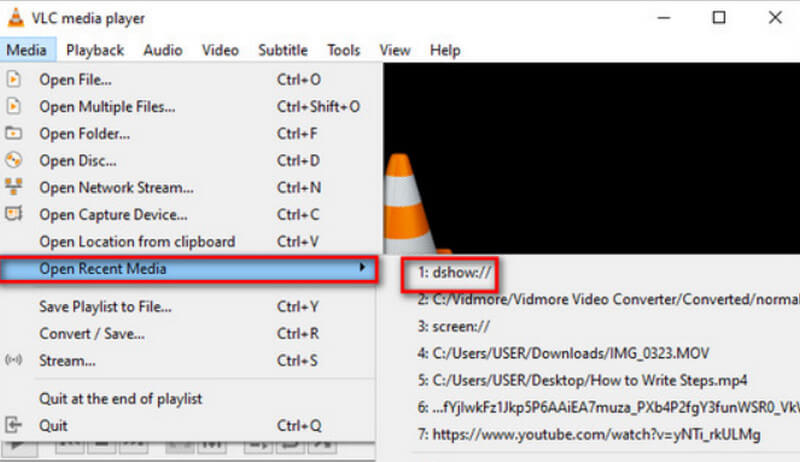
שלב 5. אם ברצונך לשמור את הווידאו המוקלט, לחץ על Media > Convert/Save. כדי למצוא את הווידאו השמור, בחר Media > Open Recent Media.
חלק 2. מדריך להקלטת אודיו עם נגן המדיה VLC ב-Mac
אם אתם משתמשי מחשב מק, עברו ישירות לסעיף זה. ישנן הוראות להקלטת אודיו בסטרימינג עם VLC כאן לעיונכם.
כך ניתן להקליט אודיו באמצעות VLC Media Player במכשיר מק.
שלב 1. הורד את VLC Media Player ל‑MacBook שלך. פתח אותו על שולחן העבודה.
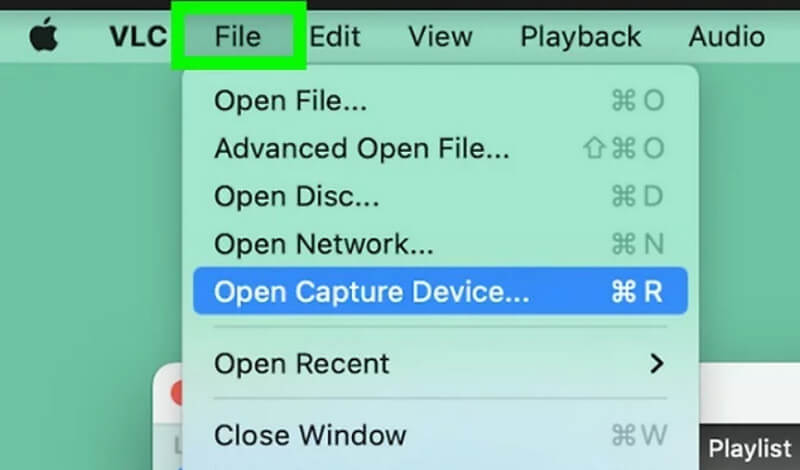
שלב 2. בחר File בתפריט העליון. לאחר מכן בחר Open Capture Device ברשימה הנפתחת.
שלב 3. יופיע חלון Open Source. בחר בלשונית Capture וסמן את התיבה שליד Audio. קבע את מקור השמע בתיבה שמתחת ל‑Audio.
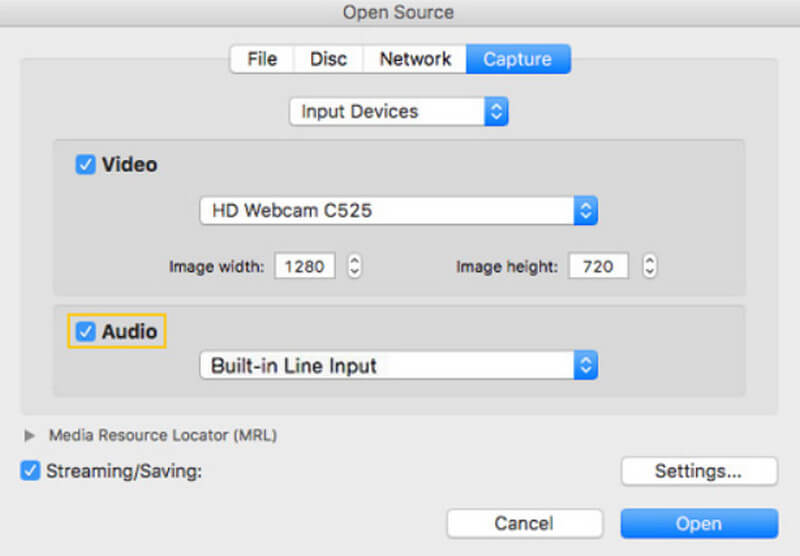
שלב 4. לאחר שתסיים את ההגדרות, לחץ על Open. חזור לשורת התפריטים ובחר Playback > Record.
כעת, הפעלת בהצלחה את מקליט הקול VLC.
אם ברצונך לחפש את האודיו שהוקלט, לחץ על Media > Open File. נווט אל הקובץ ששמו vlc-record.
חלק 3. האלטרנטיבה הטובה ביותר למקליט קול VLC להקלטת אודיו
מקליט מסך FVC
מקליט הקול של VLC הוא חינמי לחלוטין, אבל הפונקציונליות שלו מוגבלת מאוד, ואין לך הרבה פורמטי פלט לבחירה. למרות שיש בו עורך אודיו מובנה, הוא לא כל‑כך נוח לשימוש. כדי להקליט אודיו, יש לך אפשרות טובה בהרבה, והיא FVC Free Screen Recorder.
מקליט המסך FVC תומך בהקלטת אודיו ממיקרופון או ממערכת מחשב. פורמטי הפלט הנוכחיים שתוכלו לבחור מהם כוללים MP3, WMA, AAC, M4A, FLAC ועוד. לא יהיה הבדל כמעט באיכות האודיו המוקלט מהמוזיקה המקורית, ולא תתרחש השהייה. בנוסף, FVC מספק סט שלם של כלי עריכת אודיו ווידאו, כך שאם אינכם מרוצים מהעבודה שלכם, תוכלו לחתוך את אורך האודיו או אפילו להמיר את פורמט הקובץ לפני הפלט. זהו כלי הכל-באחד, כך שאם אתם צריכים להקליט וידאו, שיחת וידאו או משחק, תוכלו לחפש אותו גם כן.
הורדה חינמיתעבור Windows 7 ומעלההורדה מאובטחת
הורדה חינמיתעבור MacOS 10.7 ומעלההורדה מאובטחת
הנה מדריך כיצד להשתמש בחלופה הטובה ביותר לנגן המדיה VLC להקלטת אודיו.
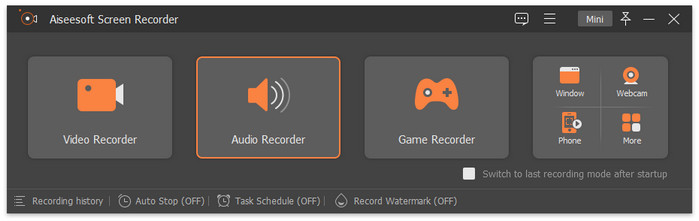
שלב 1. הורד והתקן את FVC Screen Recorder במחשב שלך. פתח אותו על שולחן העבודה. בחר Audio Recorder בממשק הראשי.
שלב 2. כשאתה נכנס לדף Audio Recorder, הגדר את עוצמת הקול להקלטה ובחר את System Sound או Microphone כמקור השמע.
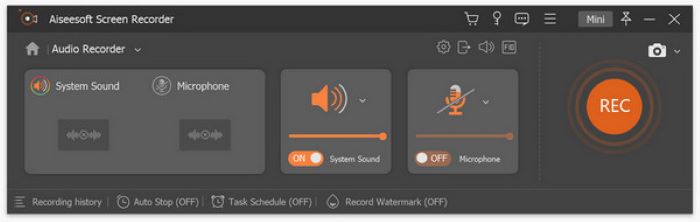
שלב 3. לאחר מכן, לחץ על REC כדי להתחיל להקליט אודיו.
אם ברצונך לבצע עריכות נוספות לקובץ ה‑MP3 המוקלט שלך, עבור לחלון היסטוריית ההקלטות. כאן תמצא חותך MP3, ממזג קבצים וממיר קבצים.
חלק 4. שאלות נפוצות על הקלטת אודיו עם VLC
האם VLC יכול להקליט את האודיו בנפרד מהמסך?
מצטערים, נגן המדיה VLC אינו תומך בתכונה זו כרגע. אך ניתן למצוא לוח זה ב-FVC Screen Recorder.
מה האלטרנטיבה הטובה ביותר ל-VLC כדי להקליט שולחן עבודה עם אודיו?
FVC Screen Recorder הוא החלופה הטובה ביותר: הוא לא רק תומך בהקלטת צליל משולחן העבודה של המערכת, אלא גם לוכד את התמונה. יש לו יכולות עריכת אודיו מקיפות יותר בהשוואה למקליט ה‑MP3 של VLC.
האם VLC בטוח למק?
VLC Media Player הוא כבר נגן ועורך וידאו קלאסי מאוד. הוא חינמי לחלוטין ובקוד פתוח למשתמשי מק, חלונות ולינוקס. הוא אינו נושא וירוסים או תוכנות זדוניות, והוא גם מגן באופן מוחלט על הפרטיות והאבטחה של המשתמשים שלו.
סיכום
אם אתה רוצה להבין איך להקליט אודיו בעזרת VLC Media Player, המאמר הזה הוא מה שאתה צריך. הסברנו כאן כיצד להשתמש בתוכנה כדי ללכוד אודיו ב‑Windows וב‑Mac, וגם הצבענו על הבעיות שעלולות להופיע בפועל. כדי לעזור לך להימנע מבעיות כאלה, אנחנו ממליצים להשתמש ב‑FVC Screen Recorder כחלופה ל‑VLC Media Player. יש לו פונקציות מקיפות יותר וממשק הקלטה אינטואיטיבי יותר. הוא תומך בהרבה יותר פורמטי פלט, וכן במגוון כלי עריכת אודיו ווידאו.
-
 תקן במהירות את נגן המדיה VLC שאינו מנגן וידאו [מדריך 2025]
 מחפש שיטה מהירה וקלה לתקן את VLC Media Player שלא מנגן סרטונים? מאמר זה כולל את כל הפתרונות האוטומטיים והידניים לפתרון בעיה זו.
-
 צילום מסך ב- VLC - כיצד לצלם Snapshot בנגן המדיה של VLC
 כיצד לצלם תמונות ב-VLC Media Player והיכן לשמור אותן? עבור על תכונת תמונת המצב של VLC והחלופה שלה מהמאמר.
-
 כיצד להקליט וידאו מסך עם אודיו עם
 זהו מדריך שלב אחר שלב לגבי תכונת הקלטת מסך VLC. אתה יכול למצוא את התהליך המפורט, פתרון הבעיות והחלופה הטובה ביותר מהמאמר.
