


 ממיר וידאו אולטימטיבי
 מקליט מסך
 תיקון וידאו
 הורדה מאובטחת
דרך פשוטה להקלטת Blu-ray באולפן OBS וכלים אפשריים אחרים
דיסק Blu-ray שומר את האיכות הגבוהה ביותר שדיסק יכול לאחסן. הוא יכול לשמור וידאו ברזולוציה של עד 1080 פיקסלים. כמו באודיו, הוא מפיק צליל צלול במיוחד לעומת תקליטורי CD. בנוסף, אין צורך לדאוג לגבי אחסון קבצים בנפח גדול על Blu-ray משום שיש בו הרבה מקום. בהמשך, OBS Studio הוא תוכנה חינמית בקוד פתוח שניתנת להורדה. היא תומכת בפלטפורמות כמו Windows, macOS ו‑Linux. נוסף על כך, היא מושלמת להקלטת וידאו ואודיו ממסך המחשב שלך. חלק מהמשתמשים מוצאים שזה מסובך להקליט Blu-ray ב‑Studio. אז הישאר במקומך וקרא את המאמר כדי לדעת כיצד להקליט סרטי Blu-ray בעזרת OBS ואיזה מקליט מקצועי כדאי להשתמש בו כדי לקבל פלט וידאו באיכות גבוהה.

חלק 1. כיצד להקליט סרטי Blu-ray עם OBS Studio
ידוע בתור כלי רב עוצמה ללא סטרימינג, OBS Studio מקבל עדכונים שוטפים בגלל נותני החסות המשפיעים שלהם Youtube, Twitch, Facebook, API.video, own3d.pro ופלטפורמות רבות אחרות. אין צורך לדאוג לגבי סטרימינג בגלל הפלטפורמות העיקריות הללו. מצד שני, הוא בונה את שמו ככלי המורכב ביותר להקלטה ופחות הדרכה. אבל אם אתה רוצה סטרימינג פשוט, אין צורך לצלול להגדרות מסובכות. יתר על כן, הפוך קשה לניהול על ידי קריאת מאמר זה לקבלת השלבים והפרטים על OBS Studio.
להלן כמה שלבים כיצד להשתמש ב-OBS Studio:
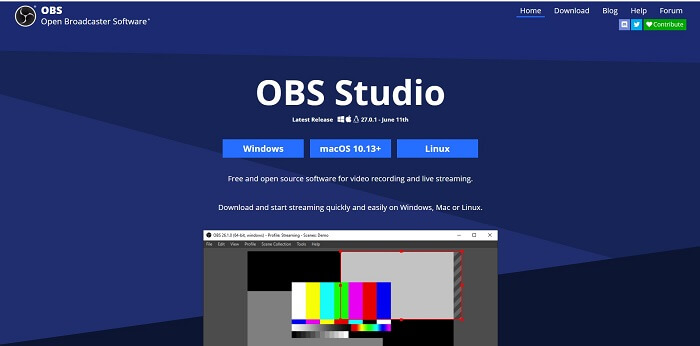
שלב 1. היכנס לדפדפן שלך. לאחר מכן בחר באיזה מערכת הפעלה (OS) אתה משתמש כעת, ואז הורד, הגדר, התקן ולבסוף לחץ על Finish כדי להפעיל את הכלי.
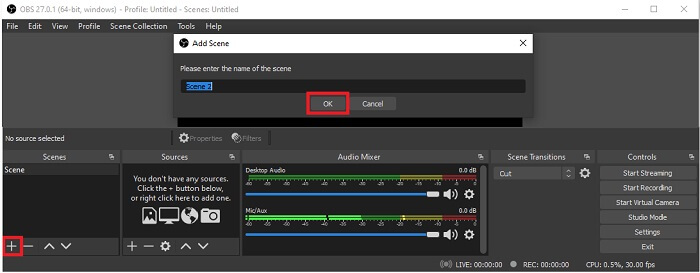
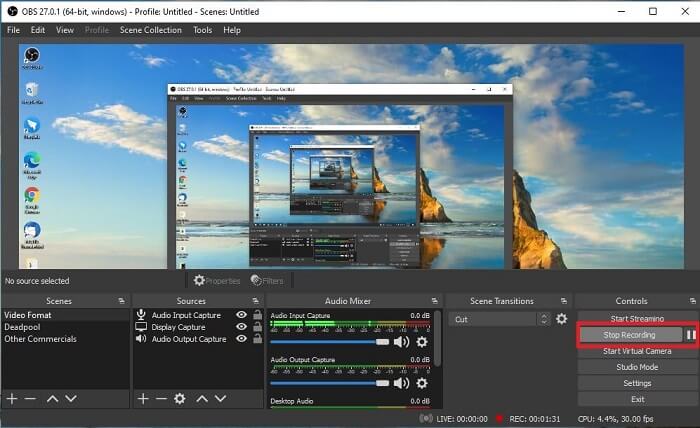
שלב 2. עבור ללוח Scenes, לחץ על סמל Add כדי להוסיף סצנה, לאחר מכן תן לה שם. לחץ על OK כדי להמשיך.
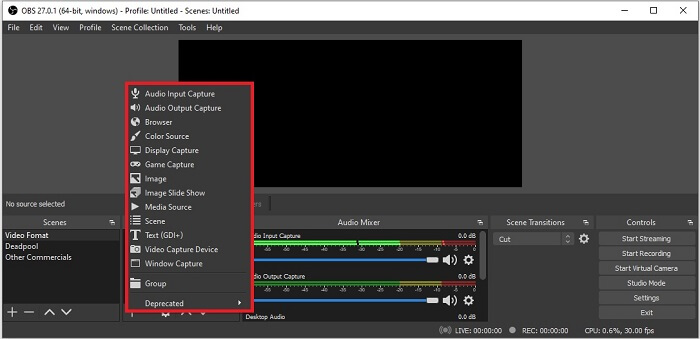
שלב 3. עבור ללוח המקורות (Source). לחץ על סמל הPlus ואז יופיעו אפשרויות שונות. הנה כמה אפשרויות בסיסיות המופיעות כאן. Audio Input Capture להקלטת הקול שלך דרך המיקרופון. לאחר מכן Audio Output Capture להקלטת הצליל היוצא מהמערכת שלך. ו‑Display Capture להקלטת כל המסך. לבסוף, Game Capture להקלטת קטעי משחק. לחץ על OK כדי לשמור. לאחר שסיימת לאסוף את כל המקורות הדרושים, כוונן את עוצמת הקול בלשונית Audio Mixer.
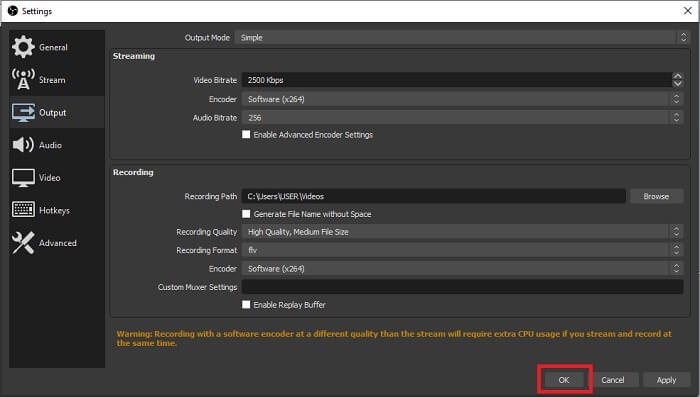
שלב 4. לחץ על כפתור Settings תחת Control Panel בצד הימני‑תחתון של הממשק. עבור ללשונית Output, הגדר את הפורמט וכוונן את האפשרויות לפי הצרכים שלך. הגדר את שאר האפשרויות ולחץ על OK כדי לשמור.
שלב 5. לחץ על כפתור Start Recording והתחל להקליט. כאשר ההקלטה מסתיימת, לחץ שוב בצד הימני‑תחתון באותו מקום שבו לחצת כדי להתחיל את ההקלטה. תוכל לבדוק את הקובץ המוקלט בסייר הקבצים.
יתרונות
- החליפה שלו להקלטת כל קטעי וידאו וסטרימינג בשידור חי.
- זה לא מציע לך ניסיון חינם. כי זה בחינם.
- מספק הרבה אפשרויות לבחירה.
חסרונות
- לא הבחירה הטובה ביותר למתחילים כי יש הרבה מה להגדיר.
- זה לא תומך בעריכת וידאו אז תצטרך להתקין כלי אחר כדי לערוך. והכלי עצמו הוא 85.6MB שזה האחסון הגדול ביותר שיש למקליט מסך.
חלק 2. שיטה מקוונת ללכידת Blu-ray עם אלטרנטיבה OBS
אולפן OBS הוא אכן בחירה טובה להקלטה והזרמה. אבל לכלי יש הרבה בממשק שלו, ולכן זה טרחה עבור המשתמש החדש להקליט. להלן כלי מקוון חלופי שתוכל להשתמש בו.
מקליט מסך חינם FVC (כלי מקוון)
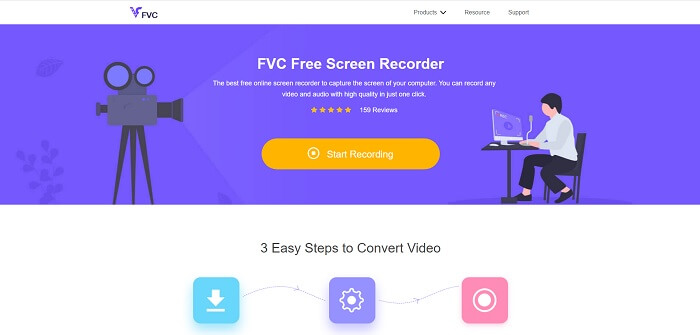
כלי חינמי מקוון שקל יותר למשתמש לנהל הוא FVC Free Screen Recorder. הוא פועל בדומה להקלטת Blu-ray ב‑OBS Studio, אך קל יותר לשימוש בזכות סרגל הכלים הצף והנוח שלו. כלי מדויק ומפורט זה עוזר לך להקליט כל פלטפורמת וידאו או אודיו זמינה. הוא מספק צליל ברור ופלט וידאו באיכות גבוהה שתוכל לשמור על Blu-ray. במקום להוריד קובץ גדול ואז להשתמש בו פעם אחת בלבד, למה שלא תנסה את הכלי המקוון הזה? עכשיו נעשה סיור קצר כיצד הכלי הזה פועל. להלן כמה שלבים לשימוש בכלי המקוון הזה.
שלב 1. פתח את הדפדפן שלך ובקר בכתובת https://www.free-videoconverter.net/free-screen-recorder/. לאחר מכן לחץ על כפתור Start Recording כדי להפעיל את הכלי המקוון. לאחר הפעלת הכלי יופיע על המסך שלך סרגל צף.
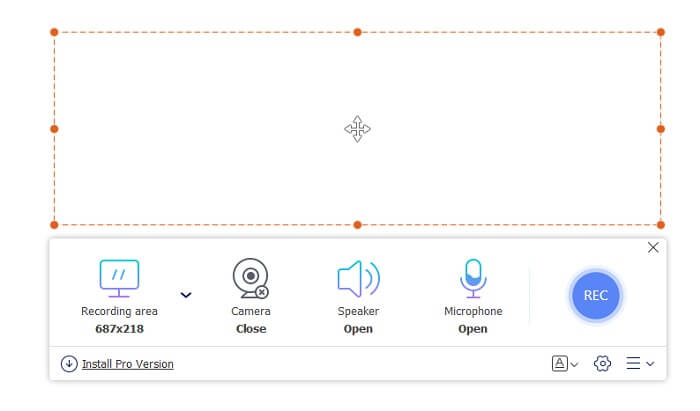
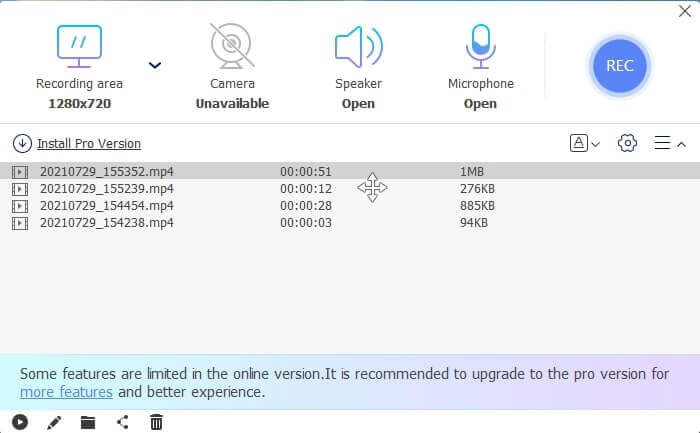
שלב 2. בסרגל הכלים הצף יש 4 לוחות שונים שתוכל לבחור מהם. תוכל להתאים את גודל המסגרת או ללחוץ על מסך מלא. לאחר מכן לחץ על סמל Speaker בעוצמת הקול של המערכת. כמו כן, תוכל להוסיף את הקול והפנים שלך אם תלחץ כדי לפתוח את הMicrophone ואת הWebcam. אם אינך מתכוון להוסיף אותם, תוכל ללחוץ שוב כדי לסגור. לאחר מכן לחץ על כפתור הREC העגול כדי להתחיל להקליט.
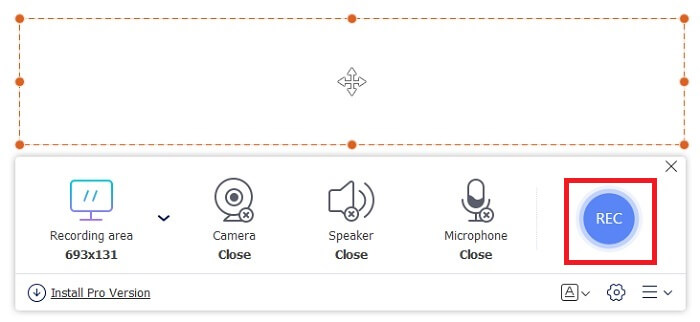
שלב 3. כשההקלטה מסתיימת, לחץ על כפתור הsquare להפסקת ההקלטה. כל ההקלטות שתפסת מופיעות ברשימת history dropdown. לחץ על סרטון הווידאו הראשון ברשימה, משום שזהו ההקלטה האחרונה.
יתרונות
- קוד פתוח בחינם באינטרנט. אין הורדה, אז אין טרחה.
- מקליט המסך הטוב ביותר לשירותים מקוונים התומך בכל הפלטפורמות.
- קל לשימוש בגלל ההוראה הנקודתית של הכלי.
חסרונות
- הוא צריך חיבור לאינטרנט כדי שהכלי יפעל.
- תכונות פרימיום אינן נתמכות בחינם.
חלק 3. תחליף OBS הטוב ביותר להקלטת סרטי Blu-ray
תקליט Blu-ray נוסף הטוב ביותר ב-OBS Studio הוא מקליט מסך FVC זה. אם אתה רוצה להקליט באופן מקוון ולא מקוון וזמין לכל הפלטפורמות אז זה בשבילך.
מקליט מסך FVC
שלא כמו OBS Studio הכלי הזה ידידותי למשתמש עם סרגל כלים שניתן לניהול. מקליט מסך FVC הוא אחת החלופות הטובות ביותר להקלטה. הוא כולל תכונות כמו ל-OBS שהן יותר נקודתיות וקלות להבנה. לדוגמה, הקלטת מסך, מצלמת אינטרנט, אודיו וסאונד מערכת ועוד רבים אחרים. לכלי זה יש גם את תכונת הנעילה שלו שאין ל-obs. אלא שהכלי הזה הוא בתשלום לשימוש. כמו כן, אם אתה משתמש במקליט מסך זה, אתה עושה את הבחירה הנכונה.
בצע את השלבים שלהלן כיצד להשתמש בכלי זה במלוא היקפו.
שלב 1. לחץ על כפתור ההורדה כדי להתקין את התוכנה, ואז הגדר את ההעדפות הרצויות שלך ולחץ על Finish כדי להמשיך. לאחר מכן הכלי יופעל.
הורדה חינמיתעבור Windows 7 או גרסה מאוחרת יותרהורדה מאובטחת
הורדה חינמיתעבור MacOS 10.7 או גרסה מאוחרת יותרהורדה מאובטחת
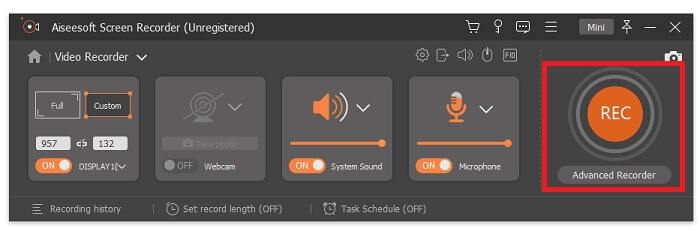
שלב 2. לחץ על Video Recorder. אז יופיעו 4 לוחות שונים. בלוח הראשון תוכל להתאים את גודל המסגרת כדי לשנות את יחס הממדים או ללחוץ על Full כדי להקליט את כל התצוגה. הלוח השני, Webcam, מיועד להקלטת הפנים שלך בזמן הקלטת המסך. הלוח הבא הוא System Sound כדי להקליט את השמע של המערכת. לבסוף, microphone להזנת הקול שלך לוידאו. לחץ על כפתור בצורת הדיסק כדי להתחיל להקליט.
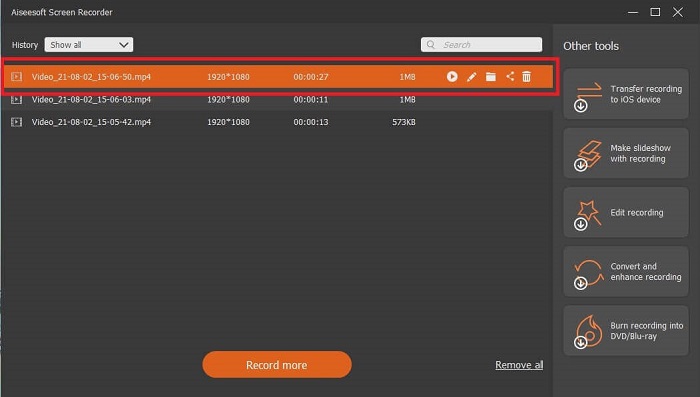
שלב 3. כשסיימת את הקלטת הווידאו, לחץ על כפתור הsquare כדי לעצור. לחץ על כפתור Play כדי לנגן את הווידאו המוקלט.
יתרונות
- יש לו תכונה ייחודית זו של מה שאנו מכנים מסך נעילה כדי למנוע הפרעות בזמן ההקלטה.
- זה יכול להקליט במשך 24 שעות ללא כל הפרעה בתפקוד אודיו-ווידאו.
- אחסון וידידותי למשתמש בגלל פורמט הנתונים הדחוס שלו ומידע קל לביצוע.
חסרונות
- כדי לרכוש אותו צריך לשלם בין אם חודש, שנה או לכל החיים.
- צריך להוריד מהאתר כדי להשתמש בו.
לקריאה נוספת
1. הקלטת וידאו מסך עם VLC Media Player
2. הקלטת מסך עם אודיו ב‑Mac באמצעות QuickTime
חלק 4. שאלות נפוצות של הקלטת Blu-ray באולפן OBS
מה ההבדל בין Blu-ray, DVD ותקליטורים?
ההבדל העיקרי בין כל פורמט דיסק אופטי הוא הפלט והאחסון שהוא יכול לאחסן בעצמו. הוא קובע שתקליטור יכול לאחסן עד 700 מגה-בייט של קובץ, DVD יכול לאחסן עד 4.7 ג'יגה-בייט של נתונים, בעוד שב-Blu-ray יכול לאחסן עד 25 ג'יגה-בייט. במקרים מסוימים, Blu-ray דו-שכבתי יכול להחזיק 50GB של נתונים. יש לו גם שכבת דיסק משולשת ושכבה מרובעת.
האם OBS הוא כלי חינמי? האם זה בטוח להוריד?
כן, OBS Studio הוא כלי ללא עלות ללא חיובים נסתרים. כמו כן, אתה יכול להוריד אותו בכל הפלטפורמות השונות. עוד כן, זה בטוח מפני תוכנות זדוניות, וירוסים, תולעים, חוטפי דפדפן ועוד.
אילו רכיבי Codec וידאו תומכים ב-Blu-ray?
לוידאו: MPEG-2, MPEG-4 AVC ו‑SMPTE VC-1.
לאודיו: Linear PCM (LPCM), Dolby Digital® (DD), Dolby Digital® Plus (DD+), Dolby® TrueHD, DTS Digital Surround® ו‑DTS-HD®.
סיכום
אחרי הכל, בסופו של יום מקליטי מסך שימושיים בגלל היכולת שלהם. OBS היא בחירה טובה להקלטה אבל בגלל אפשרויות שונות, זה גורם למשתמש לנחש ולשאול אם הוא עושה את זה נכון. אבל בגלל הרשימה מקוונת ולא מקוונת שתומכת בכל הפלטפורמות השונות. עכשיו יש לך את כוח הבחירה. לבחור מה הכי טוב בשבילך.
כמו מקליט מסך FVC. זהו כלי ידידותי למשתמש ונקודתי שעוזר למשתמש להקליט בכל זמן ובכל מקום. למרות שזהו כלי בתשלום לשימוש. ובכל זאת, זה שווה כל שקל שמוציאים. זכור לא להלחיץ את עצמך עם הקשה לשימוש אם הקל לשימוש יכול להשתפר.
-
 פעולה! סקירת מקליט המסך - חסרונות, יתרונות והאלטרנטיבה הטובה ביותר שלה
 האם מקליט מסך פעולה הוא תוכנת הקלטת המשחק הרצויה לצילום סרטוני משחק? פשוט ללמוד פרטים נוספים מהסקירה והחלופה שלה מהמאמר.
-
 3 מקליטי השיחות הטובים ביותר בפייסבוק למחשבים, iOS ו- Android
 כשרוצים להקליט שיחות בפייסבוק כדי לחסוך דברים יקרי ערך, יש הרבה מקליטי שיחות בפייסבוק לבחירה. כאן תוכלו ללמוד את 3 הכלים הטובים ביותר להקלטת שיחות וידאו בפייסבוק למחשבים אישיים, iOS ו- Android.
-
 6 מקליטי WAV בחינם המובילים זמינים ל- Windows ו- Mac
 תוכנת ההקלטה הטובה ביותר של WAV שאנו חולקים במאמר זה כוללת מגוון תכונות שימושיות, שעוזרות לך לצלם אודיו וקול כמו אנשי מקצוע.
