


 ממיר וידאו אולטימטיבי
 מקליט מסך
 תיקון וידאו
 הורדה מאובטחת
למד הכל על מה זה תלת מימד או תלת מימד
רוצה לדעת מה זה תלת מימד? סרטים ותמונות בתלת מימד או תלת מימד הופכים פופולריים יותר. מכיוון שאנו נמצאים בימים המודרניים, קל ליצור סרט תלת מימד באמצעות כלים שונים. אבל ראשית, עלינו להבין הכל על 3D: הרקע, ההגדרה וכיצד ליצור סרטון 3D.
במאמר זה נעמיק ב‑3D ובפרמטרים שלו. אז אם אתה רוצה ללמוד על מהו 3D, קרא מאמר זה.

חלק 1. מהו תלת מימד
אובייקטים תלת מימדיים או תלת מימדיים מראים את הרוחב, הגובה והעומק. מדי יום, אנו רואים אובייקטים תלת מימדיים מכיוון שהסביבה הפיזית שלנו היא תלת מימדית בעצמה. בגלל התפיסה התלת-ממדית שיש לנו בני האדם, אנו יכולים לתפוס את העצמים התלת-ממדיים, הנקראים גם תפיסת עומק. כאשר אתה מסתכל מסביב, הרשתית בעיניים שלנו יוצרת תמונה דו מימדית, והמוח שלנו מעבד את שתי התמונות כתמונות תלת מימדיות. אבל האם ידעת? לנו, בני האדם, יש כלים שאנו משתמשים בהם לתפיסת עומק?
להלן הכלים האנושיים שבהם אנו משתמשים לתפיסת עומק:
ראייה סטריאוסקופית – ראייה סטריאוסקופית היא תחושת עומק הנתפסת בעזרת שתי העיניים. זו אחת מיכולות המוח לרשום צורות ותמונות בתלת־ממד. בראייה זו, האובייקטים הקרובים נראים מופרדים יותר מאשר האובייקטים הרחוקים.
פרלקסה – סוג ראייה זה נמדד על פי הזוויות בין שני קווים. כאשר אתה מזיז את הראש מצד לצד, עצמים קרובים זזים יותר מעצמים רחוקים.
היכרות עם גודל – אם אתה מכיר את הגודל של אובייקט כלשהו, גם כשהוא רחוק, אתה יכול לדעת בערך כמה גדול הוא אמור להיראות. באותו אופן, אם לשני אובייקטים יש אותו גודל בפועל אבל אחד נראה גדול יותר, מניחים שהאובייקט הגדול יותר קרוב יותר.
אקומודציה – כאשר אתה מתמקד באובייקט קרוב, עדשות העין שלך משתנות פיזית. כך אתה יודע עד כמה האובייקט רחוק. בנוסף, זהו המנגנון שבו העין שומרת על המיקוד באובייקט.
פרספקטיבה אווירית – בפרספקטיבה אווירית תראה את האובייקטים קטנים יותר משום שהמבט מרוחק. עצמים רחוקים נראים גם כבעלי ניגודיות ורוויית צבע נמוכות יותר.
ישנם גם סוגים שונים של תלת מימד בעולם הפיזי שלנו. תלת מימד מתואר גם כתמונה שנותנת אשליה של עומק של מרחקים משתנים, הנפוצה בשימוש במשחקי מחשב, גרפיקה, מציאות מדומה וסרטים.
סוגים שונים של תלת מימד:
גרפיקה ממוחשבת בתלת־ממד – גרפיקה ממוחשבת בתלת־ממד יכולה ליצור אובייקטים בתלת־ממד על גבי מסך תצוגה או במרחב דו־ממדי. לפיקסלים בגרפיקה דו־ממדית יש תכונות שונות, כגון מיקום, צבע ובהירות. הפיקסלים בתלת־ממד ממוקמים אז על ציר Z. כאשר משלבים את הפיקסלים עם עומקם, מתקבלת משטח תלת־ממדי, הנקרא גם טקסטורה.
סרטי 3D – סרטי 3D הם סרטים בעלי עומק תלת־ממדי. בעזרת משקפי 3D ניתן לצפות בסרט בתלת־ממד. כדי ליצור סרט כזה, היוצרים משתמשים בראייה סטריאוסקופית, כלומר מקרינים שתי תמונות בו־זמנית, אחת לכל עין.
הדפסת תלת־ממד – הדפסת תלת־ממד, המכונה גם ייצור תוספתי, היא תהליך יצירת אובייקט תלת־ממדי מוצק מקובץ דיגיטלי. באמצעות תוכנת תיב"מ (Computer Aided Design – CAD) ניתן להדפיס אובייקט תלת־ממדי מתוך מודל דיגיטלי.
חלק 2. כיצד לנגן סרטי תלת מימד
עכשיו כשאתה יודע את המשמעות של התלת-ממד, ספר לנו כיצד להפעיל סרטי תלת-ממד באמצעות יישום התוכנה המצטיין ביותר שאתה יכול להשתמש בו.
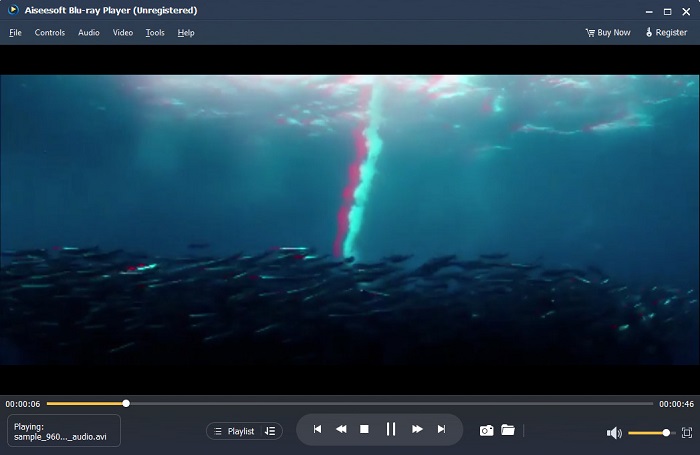
Blu-ray Player הוא יישום שולחן עבודה שבו אתה יכול לנגן כל סוג של וידאו. עם הכלי הזה, אתה יכול גם לנגן סרטי תלת מימד ללא שימוש בתוספים. בנוסף, אנשים רבים ממליצים על נגן המדיה הזה בגלל ממשק המשתמש הפשוט והנקי שלו. יתר על כן, נגן מדיה רב עוצמה זה יכול לנגן תקליטורי Blu-ray, תיקיות Blu-ray, קבצי DVD/תיקיות/ISO, שבהם נגני מדיה אחרים אינם תומכים. אתה יכול גם ליהנות מצפייה בסרטוני HD עם אודיו ללא אובדן של 100 אחוז וצליל היקפי HD דרמטי. מה שאפילו מדהים הוא שאתה יכול ליצור את רשימת ההשמעה שלך כך שלא יהיה לך קשה להפריד בין הסרטונים או השמע שאתה רוצה.
כיצד להפעיל סרט תלת מימד בנגן Blu-ray:
שלב 1. הורד Blu-ray Player למכשיר שלך. עקוב אחר תהליך ההתקנה ולאחר מכן הפעל את האפליקציה.
שלב 2. בממשק הראשי של התוכנה לחץ על כפתור Open File. קובצי המכשיר שלך יופיעו, ושם תבחר את סרט ה‑3D שלך.
שלב 3. לאחר מכן הסרטון שלך יתחיל להיטען. כעת תוכל להרכיב את משקפי ה‑3D המיוחדים שלך וליהנות מצפייה בסרט ה‑3D שלך.
חלק 3. מהן טלוויזיית תלת מימד ומשקפי תלת מימד
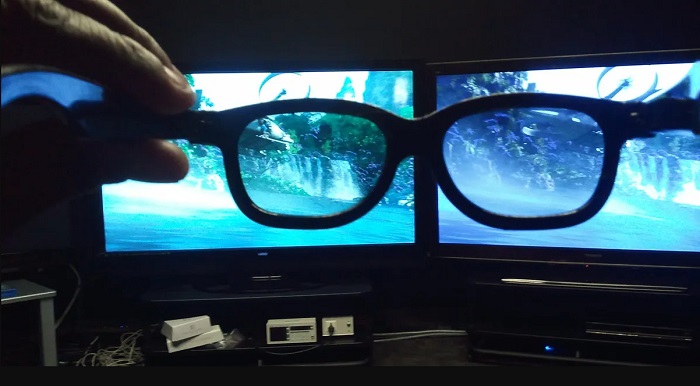
ישנם שני סוגים של טלוויזיות תלת מימד: תלת מימד עם תריס פעיל, תלת מימד פעיל ותלת מימד פסיבי. חלק זה יבחין את ההבדלים ביניהם ויקבע באיזה סוג של משקפי תלת מימד להשתמש בעת צפייה ב-Active-shutter או 3D TV.
Active-shutter או Active 3D הוא סוג של טלוויזיית 3D המציגה תמונות תלת־ממד באיכות גבוהה לסירוגין על המסך. טלוויזיית Active 3D מציגה תמונות מתחלפות על המסך עבור העין הימנית והעין השמאלית. משקפי ה‑3D אז מחשיכים (שומרים על תריס שחור) את כל אחת מן העדשות לסירוגין כדי ליצור את אפקט התלת־ממד הנראה על מסך הטלוויזיה. כך כל עין רואה את התמונה שיועדה לה. משקפי ה‑3D שעליך להשתמש בהם בעת הצפייה ב‑Active-shutter 3D הם משקפי 3D אקטיביים. סוג זה של משקפי 3D זקוק לסוללה, המשמשת לחסימה ולפתיחה אלקטרונית של העדשות במשקפיים. במשקפיים אלו משולבות עדשות LCD המתואמות עם המסגרות המתחלפות.
לעומת זאת, טלוויזיית Passive 3D דומה במידת־מה לטכנולוגיית ה‑3D שבה משתמשים בבתי קולנוע. סוג זה של טלוויזיית 3D משתמש במסננים מיוחדים על המסך כדי לאפשר ראיית תלת־ממד באמצעות עדשות מקוטבות במשקפיים. בנוסף, טלוויזיות Passive 3D משלבות את שתי המסגרות לאחת, תוך החלפה בין הקווים האופקיים עבור העין השמאלית והעין הימנית. המשקפיים שבהם משתמשות טלוויזיות אלו הם משקפי Passive 3D, המכילים קיטוב שונה בכל עדשה. עין אחת רואה רק את הקווים האי־זוגיים, ואילו העין השנייה רואה את הקווים הזוגיים, כדי ליצור את התמונה בתלת־ממד. משקפי Passive 3D אינם דורשים סוללות כדי לפעול.
חלק 4. 2D לעומת 3D
דו-ממד ותלת-ממד הם ממדים בפועל בסביבת עבודה של מחשב. 2D או דו מימדי הם אובייקטים שטוחים המשתמשים בממדים האופקיים והאנכיים (ציר X ו-Y). מכיוון של-2D יש רק שני ממדים, תראה קו רק כאשר תפנה אותם הצידה. יש לו רק גובה ורוחב אבל אין לו עומק. בעוד שמצד שני, תלת מימד או תלת מימד מכיל גובה, רוחב ועומק. דימויים תלת מימדיים זקוקים לאפקט של שתי עיניים הפועלות במקביל כדי לראות תפיסה תלת מימדית. אם 2D משתמש בציר X ו-Y, 3D מוסיף את מימד Z, ומאפשר לך לראות את עומק האובייקט.
אם תשאלו במה טוב להשתמש, 2D לעומת 3D, התשובה היא גם וגם. ל-2D ו-3D יש יתרונות וחסרונות שונים. לדוגמה, אתה יכול לצפות בסרטוני 2D או סרטים בכל מקום בכל מכשיר מבלי להרכיב משקפי 3D מיוחדים. עם זאת, אפקט התלת מימד שסרטי תלת מימד מייצרים מדהים ומהנה יותר לצפייה מאשר דו מימד.
חלק 5. כיצד להמיר סרט דו מימדי לתלת מימד
אם אתה רוצה לצפות בסרט 3D מדהים או קליפ בבית שלך ללא משקפי 3D, אתה יכול להמיר את הסרט 2D שלך לתלת מימד באמצעות ממיר הווידאו האולטימטיבי. אז, אם אתה רוצה להמיר את הסרט 2D שלך לסרט 3D, אז השתמש ביישום התוכנה המדהים הזה.
FVC Video Converter Ultimate היא אפליקציה פופולרית להמרת וידאו. תוכנת יישום זו אינה רק ממירה פורמטי קבצים, אלא גם מאפשרת לך להפוך סרטון דו־ממדי לסרטון תלת־ממדי, כגון Anaglyph 3D ו‑Split Screen 3D. FVC Video Converter Ultimate מפורסמת בקרב משתמשים משום שהיא תומכת כמעט בכל פורמטי הקבצים, כגון MP4, MKV, AVI, FLV, WEBM, MOV, DIVX ועוד יותר מ‑1000 פורמטים נוספים. היא גם מגיעה עם שלל פונקציות עריכה מתקדמות, כגון יוצר 3D, יוצר GIF, מסיר סימן מים מווידאו ועוד.
כיצד להמיר סרטי 2D לסרטי 3D באמצעות FVC Video Converter Ultimate:
שלב 1. תחילה הורד את FVC Video Converter Ultimate על ידי לחיצה על כפתור Download למטה.
הורדה חינמיתל-Windows 7 ומעלההורדה מאובטחת
הורדה חינמיתל-MacOS 10.7 ומעלההורדה מאובטחת
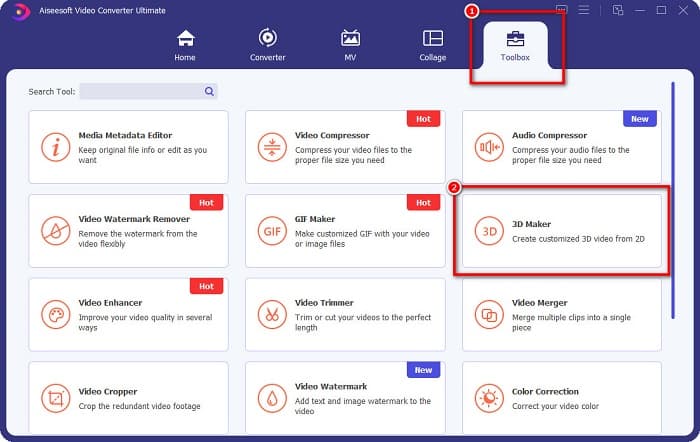
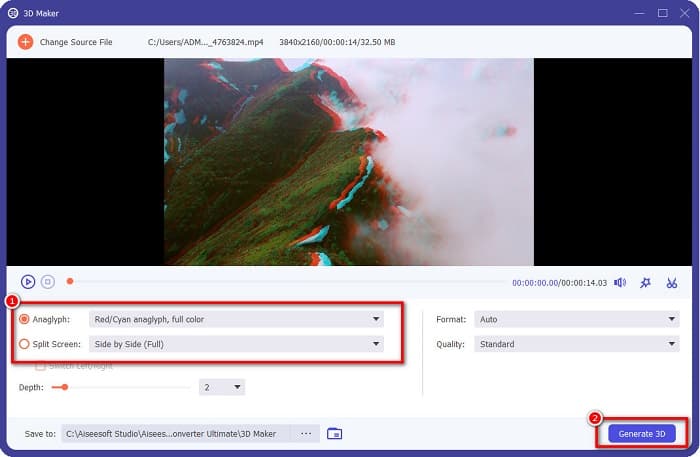
שלב 2. פתח את האפליקציה, עבור ללשונית Toolbox ובחר ב‑3D Maker.
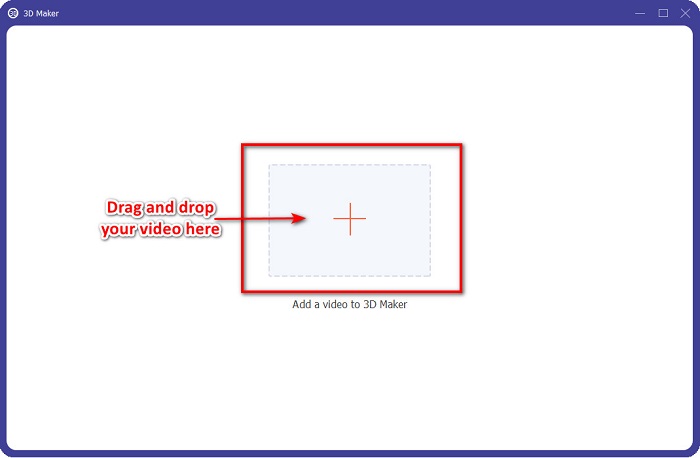
שלב 3. לחץ על כפתור הסימן + או גרור ושחרר את סרטון ה‑2D שלך אל התיבה בממשק הבא.
שלב 4. לאחר מכן בחר בין Anaglyph 3D או Split Screen 3D. ולאחר מכן לחץ על כפתור Generate 3D.
קשור ל:
הדרכים המהירות ביותר להמיר AVI ל‑WMV [ממירים מומלצים]
המרת MOV ל‑WMV בקלות באמצעות ממירים מעולים אלו
חלק 6. שאלות נפוצות לגבי מהו תלת מימד
האם אתה יכול לצפות בסרטוני 3D ב-VLC Media Player?
כן. VLC Media Player תומך בכל פורמטי הקבצים. אתה יכול גם לנגן סרטי תלת מימד בנגן המדיה VLC.
האם אתה יכול להמיר סרטוני 3D ל 2D?
FVC Video Converter Ultimate יכול להמיר סרטוני 3D ל-2D. אתה יכול גם לשנות את פורמט הקובץ של הסרטון שלך עם ממיר זה.
מה יותר משומש, דו-ממד או תלת-ממד?
כיום, בתעשיית הקולנוע, סרטי תלת מימד דומיננטיים יותר מסרטי דו מימד. בגלל הגרפיקה המעניינת והאנימציה הריאליסטית, סרטי תלת מימד פופולריים יותר מסרטי דו מימד.
סיכום
3D או תלת־ממד מוכר היטב בתעשיית הקולנוע ובמיוחד במחשבים. כעת, כאשר אתה יודע מהו 3D, יש לך את הידע הבסיסי כיצד ליצור אחד. אם אתה רוצה ליצור סרטון 3D בקלות, השתמש ב‑FVC Video Converter Ultimate.
-
 3 דרכים להמיר MPG ל-3GP ב-Windows וב-Mac [חינם]
 אם אתה מחפש דרכים להמיר MPG ל-3GP, קרא את המאמר הזה כדי לדעת את הדרכים הטובות ביותר להמיר MPG ל-3GP ב-Windows וב-Mac.
-
 5 ממירי MPEG ל-DivX הטובים ביותר בחינם עבור Windows ו-Mac
 המר בקלות את קובץ ה-MPEG שלך לקובץ DivX באמצעות ממירי MPEG ל-DivX הטובים ביותר. קרא מאמר זה כדי לדעת פרטים נוספים עליהם.
-
 ממירי MOV ל-DivX הטובים ביותר לשימוש בחינם עבור Mac ו-Windows
 יש לנו את הפתרון בשבילך אם אתה מחפש ממירי MOV ל-DivX בחינם. מאמר זה מציג את ממירי MOV ל-DivX המובילים עבור Mac ו-Windows.
