


 ממיר וידאו אולטימטיבי
 מקליט מסך
 תיקון וידאו
 הורדה מאובטחת
מהו M4A, וכיצד להמיר אותו ל-MP3 או WAV לקבלת נגישות רבה יותר
האם קרה לך שהורדת שירים או מוזיקה שלא התנגנו בנגן המוזיקה שלך? ייתכן שזה משום שהם בפורמט M4A. למעשה, זהו פורמט פופולרי בזכות איכות הצליל הטובה שלו וגודל הקובץ הקטן. עם זאת, כמו סוגי פורמטים אחרים של אודיו, גם כאן יש מגבלות שתיתקל בהן כשתעבוד עם M4A. אבל אל תדאג, כי מדריך הכתבה הזו כאן כדי לעזור! בוא נפרק מהו בעצם M4A, ניתן לך לראות את היתרונות והחסרונות שלו, וכן מידע נוסף, ונראה לך איך להמיר בקלות את הקבצים האלה לפורמטים שעובדים בכל מכשיר. אנחנו יודעים שזה מעניין אותך, אז בלי להאריך עוד, בוא נתחיל ללמוד על‑ידי קריאת התוכן למטה.

חלק 1. מהו M4A
פורמט M4A, הנקרא גם MPEG-4 Audio, הוא פורמט אודיו דיגיטלי בשימוש נרחב לאחסון נתוני אודיו דחוסים. ידוע שהוא מציע סאונד באיכות גבוהה בגודל קובץ קטן. יתר על כן, קבצי M4A משויכים למכשירי אפל ו-iTunes ומכילים גם מטא נתונים, כגון מידע על אמן ואלבומים, מלבד האודיו הדחוס. זו הסיבה שב-iTunes Store הורדות שירים הן בדרך כלל בפורמט M4A, בעוד שירים המוגנים בהעתקה נשמרים עם סיומת M4P. דבר נוסף שאתה חייב לדעת על הדחיסה M4A הוא שהוא תומך בקודקים אודיו שונים, מה שמבטיח תאימות עם נגני מדיה ומכשירים שונים. לעתים קרובות הוא מקודד ב-Advanced Audio Coding או Codec AAC כדי להקטין את גודל הקובץ, וקובצי M4A עשויים להשתמש גם ב-Apple Lossless Audio Codec או ALAC.
כדי לתת לך תובנה ברורה יותר לגבי ה-M4A, נוצר תרשים למטה.
| היבטים של M4A | |
| סיומת קובץ | .m4a |
| פורמט מיכל | MPEG-4 |
| Codec אודיו | • קידוד אודיו מתקדם (AAC) • Apple Lossless Audio Codec (ALAC) |
| שימושים נפוצים | • הורדות מוזיקה מ-iTunes Store. • ספרי שמע. • פודקאסטים. • שיתוף אודיו דיגיטלי עקב גודל קובץ קטן יותר. |
חלק 2. יתרונות וחסרונות של M4A
יתרונות
- האיכות של M4a היא בדרך כלל גבוהה. זה הופך אותם למעולים עבור מוזיקה והקלטות אודיו אחרות.
- קבצי M4A משתמשים באלגוריתמי דחיסה מתקדמים. זה מאפשר לך לחסוך מקום משמעותי במכשיר שלך אפילו מבלי להקריב הרבה איכות שמע.
- הקובץ זוכה לתמיכה רחבה בפלטפורמות והתקנים שונים. בעיקר מכשירי אפל, iTunes ונגני מדיה רבים אחרים.
- קובץ השמע תומך במטא נתונים המאפשרים להטמיע מידע. כך, אתה יכול להטמיע פרטים כמו שם האמן, פרטי הרצועה וכותרת האלבום ישירות לתוך הקובץ.
חסרונות
- קבצי M4A מסוימים עשויים להיות מוגנים על ידי DRM או ניהול זכויות דיגיטליות. זה מגביל את היכולת שלך לשנות או לשתף אותם באופן חופשי.
- הם עדיין עשויים להיות גדולים יותר מפורמטי שמע אחרים כמו MP3. זה נכון במיוחד עבור הקלטות אודיו באיכות גבוהה.
- לפעמים, עריכת קובץ M4A עלולה לגרום לאובדן איכות השמע. זה נכון במיוחד אם אתה משנה שוב ושוב את הקובץ או מקודד אותו מחדש.
חלק 3. כיצד להמיר M4A ל-WAV ו-MP3
אם יש לך אוסף של קבצי M4A אבל נוח לך יותר להמיר M4A ל‑MP3 או WAV, אולי תרצה להעביר אותם לפורמטים אחרים. כעת, אם המצב שלך מחייב לבצע את ההמרה אונליין, ואתה זקוק למשהו חזק יותר מממיר בסיסי, תוכל להיעזר בכלי אונליין FVC Free Audio Converter Online. זהו כלי מקוון נוח שעוזר לך להחליף קבצי אודיו מסוג אחד לאחר. בעזרת הממיר המדהים הזה, תוכל להחליף את פורמט המוזיקה שלך בין M4A, MP3, WAV, WMA, AIFF, AAC, AC3, FLAC ועוד, בלי הרבה טרחה.
מה שעוד ממש מגניב בממיר האודיו החופשי הזה FVC הוא שהוא עובד מצוין כדי שהשמע שלך יישמע נהדר. זה לא יאפשר לך לדאוג מכיוון שהוא לא יאבד שום איכות בתהליך ההמרה, כך שהשמע שלך עדיין יישמע מדהים. כעת, אתה יכול להאזין לשירים האהובים עליך בפורמט M4A בכל מכשיר או לשתף אותם עם חבריך ללא כל דאגות לגבי חוסר תאימות אם תשנה את M4A ל-WAV או MP3. בנוסף, זה אפילו מאפשר לך להוריד את הקבצים שהומרו ישירות למחשב שלך ללא כל מאמץ נוסף. אֵיך? פשוט עקוב אחר כמה צעדים פשוטים, ואתה מוכן.
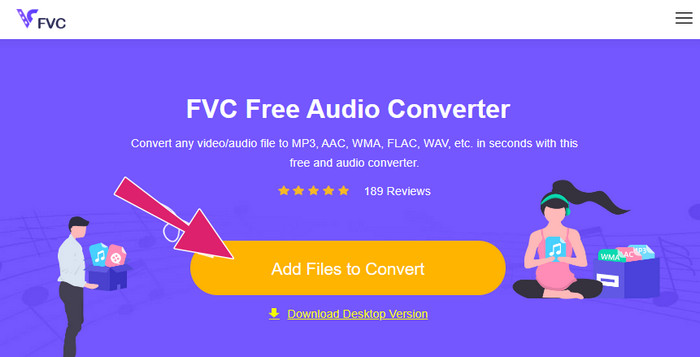
שלב 1. התחל בהורדת המשגר החזק שלו כדי ליהנות מהמרה בטוחה ויעילה. לחץ על הכפתור Add Files to Convert ולאחר מכן לחץ על כפתור ההורדה שמופיע.
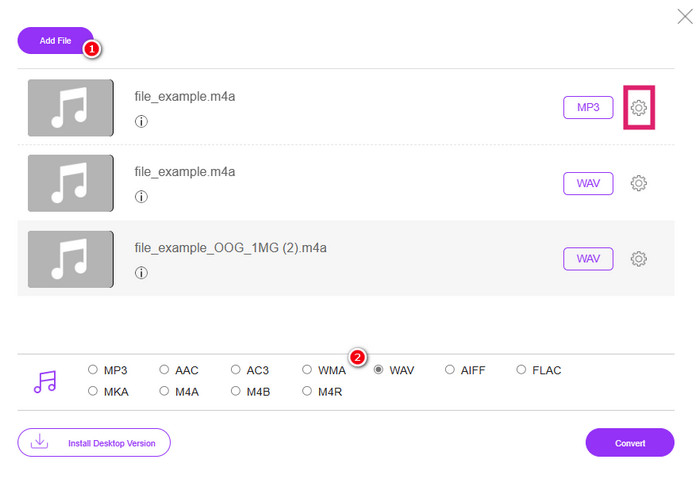
שלב 2. לאחר מספר שניות, הכלי כבר יאפשר לך להעלות את קבצי ה‑M4A שברצונך להמיר. אם בייבוא הראשוני התאפשר לך להעלות רק קובץ אחד, תוכל ללחוץ על הלשונית Add File מהממשק הראשי כדי להעלות עוד קבצי M4A.
שלב 3. לאחר הייבוא, הכלי יציע לך מספר אפשרויות לפורמט פלט שתראה בחלק התחתון של הממשק. משם תוכל לבחור עבור קבצי ה‑M4A שלך או ב‑WAV או ב‑MP3.
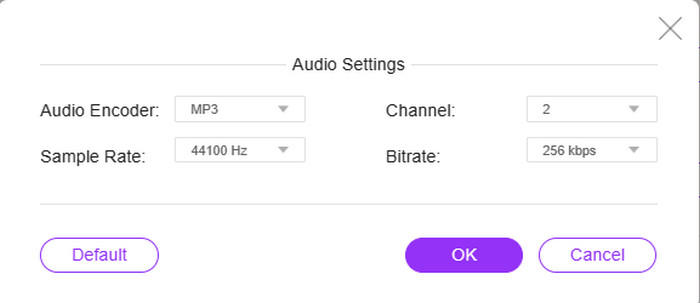
שלב 4. אתה יכול לבצע שלב אופציונלי זה כחלק מההגדרות. אם תלחץ על כפתור Setting של כל קובץ, תהיה לך אפשרות לגשת אל ולהתאים את מקודד האודיו, קצב הדגימה (sample rate), הערוץ והקצב הסיביות (bitrate) של הקובץ.
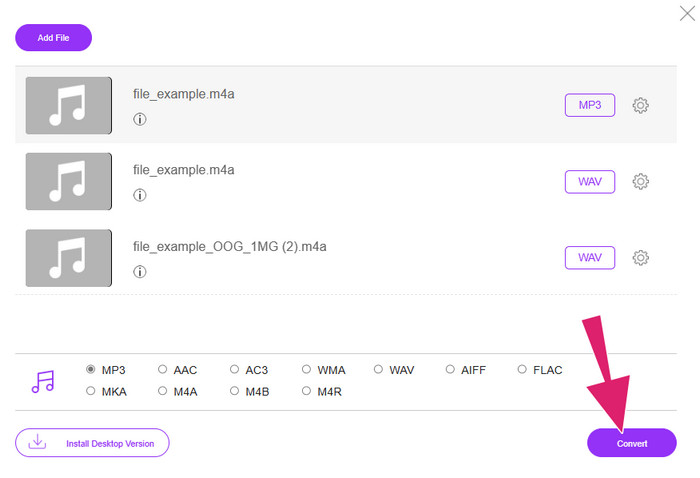
שלב 5. לחלופין, אם ברצונך להמשיך מיד לתהליך ההמרה, לחץ במקום זאת על הכפתור Convert.
חלק 4. שאלות נפוצות לגבי M4A
במה נבדלים M4A ו-MP3 זה מזה?
ב‑השוואה בין M4A ל‑MP3, קבצי M4A בדרך כלל מציעים איכות אודיו גבוהה יותר מ‑MP3, גם אם קצב הסיביות שלהם זהה. M4A תומך גם בתכונות נוספות כמו עטיפת אלבום (cover art) ותיוג מטא‑דאטה. עם זאת, קבצי MP3 זוכים לתמיכה רחבה יותר במגוון פלטפורמות ומכשירים.
האם אני יכול להמיר קובץ M4A לפורמט וידאו?
כן, ניתן להמיר קבצי אודיו M4A לקבצי וידאו, למשל M4A ל‑MP4. עושים זאת על‑ידי שילוב הקובץ עם תמונה סטטית או קליפ וידאו באמצעות תוכנת עריכת וידאו.
מהו קצב הסיביות הטוב ביותר שחייב להיות לקובץ M4A?
קצב הסיביות הטוב ביותר עבור קבצי M4A תלוי בהעדפות שלך. עליך לשקול את איכות השמע ואת גודל הקובץ שאתה מעדיף. קצבי סיביות גבוהים יותר מביאים בדרך כלל לאיכות שמע טובה יותר אך לגדלים גדולים יותר של קבצים. בינתיים, קצבי הסיביות הנפוצים או הסטנדרטיים של קבצי M4A נעים בין 128 kbps ל-256 kbps ו-320 kbps עבור שמע באיכות גבוהה.
סיכום
זהו זה! בפוסט הזה קיבלת תשובות לשאלה שלך לגבי מהו M4A. למדת ש‑M4A מספק חוויית האזנה גבוהה בזכות האיכות העדיפה שלו. אכן, ניתן לנגן אותו באמצעות נגני מדיה שונים, אך עליך לזכור שעדיין יש כאלה שאינם תומכים בו. לכן יש לך אפשרות להמיר אותו לפורמטים אחרים של אודיו, כמו MP3 ו‑WAV.
-
 מהו MP4: תיאור, יתרונות ועוד
 לפני שתמיר MP4 לפורמטים אחרים, תחילה עליך לדעת משהו על זה. פוסט זה חושף את כל מה שאתה צריך לדעת על ה-MP4 והחלופות שלו.
-
 מדוע סרטון ה-MP4 אינו מוצג ב-Premiere Pro [תוקן]
 סרטוני MP4 אינם מוצגים ב-Premiere Pro, מה שעשוי להיות בגלל שהקבצים פגומים או שגויים. בדוק כאן את כל הסיבות והפתרונות האפשריים!
-
 מה ההבדלים בין M4V לעומת MP4
 מבולבל לגבי ההבדלים בין פורמטי וידאו M4V ו-MP4? למד אותם כאן, וידריך אותך כיצד שני אלה שונים וכיצד להמיר אותם בקלות.
