


 ממיר וידאו אולטימטיבי
 מקליט מסך
 תיקון וידאו
מיטב הממירים הטובים ביותר שבהם אתה יכול להשתמש כדי להמיר 3GP ל-AVI באופן מקוון ולא מקוון
פורמט 3GP הוא פורמט גמיש שמעביר את זרמי האודיו והווידאו לטלפון סלולרי מדור שלישי (3G) באמצעות GSM. הוא תואם לחיבורי 3G להעברת קבצים מהירה יותר. פורמט זה היה בשימוש הנפוץ ביותר בטלפונים הישנים, משום שהוא רב־שימושי וניתן להעברה מהירה. עם זאת, כיום לא ניתן לנגן קובצי 3GP בנגן המדיה המקומי שלכם, משום שהפורמט הזה לא מאפשר לנגני מדיה חדשים להבין את מבנה הקובץ. לכן הדרך הטובה ביותר לצפות בכל קובצי ה‑3GP בטלפון או במחשב שלכם היא להמיר אותם. במקום לחפש באינטרנט איזה ממיר הוא הטוב ביותר לשימוש, ריכזנו ארבעה ממירים שתוכלו לבחור מתוכם. הכלים המוזכרים למטה מצוינים ויכולים להמיר 3GP ל‑AVI בלי איבוד איכות.
חלק 1. המר 3GP ל-AVI במצב לא מקוון עם הממיר האולטימטיבי
ממיר וידיאו אולטימטיבי
אם אינכם רוצים להתאמץ כלל בהמרת קובצי ה‑3GP שלכם, אנו ממליצים בחום להשתמש ב‑FVC Video Converter Ultimate. תוכנה זו היא אחת הבחירות הטובות ביותר להמרת קבצים, והיא ממירה את הקובץ בתוך כמה שניות במהירות רבה. נוסף על כך, לקוחות רבים שמשתמשים בתוכנה הזו חולקים את אותה דעה. בסיכומו של דבר, הם הצהירו בבירור שהכלי הזה סייע להם לפתור את בעיית ההמרה שלהם בן רגע.
הסבר נוסף, הכלי הזה הוא לא רק הטוב ביותר בהמרת הקובץ; יש לו גם את התכונות המתקדמות ביותר שתרצה לנסות. דוגמאות לכך הן עורך, יצרן GIF, מגביר עוצמת קול, סנכרון אודיו ווידאו, היפוך, ועוד. אם תרכוש את הכלי הזה, תקבל את כל הכלים שהוזכרו קודם לכן, ויש עוד הרבה מה לעלות. אז עכשיו, בואו ננסה לעקוב אחר שלב אחר שלב כדי להמיר 3GP ל-AVI ב-Mac וב-PC מבלי לאבד את איכותו.
שלב 1. לחצו על כפתור ההורדה ובחרו אם אתם משתמשי PC או Mac, ואז התקינו את התוכנה.
הורדה חינמיתל-Windows 7 ומעלההורדה מאובטחת
הורדה חינמיתל-MacOS 10.7 ומעלההורדה מאובטחת
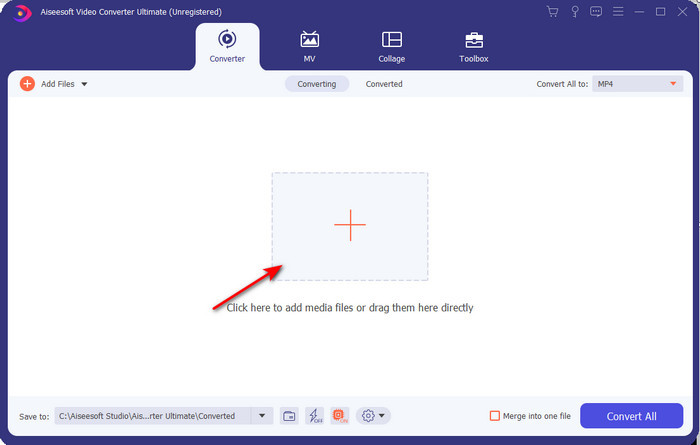
שלב 2. הפעילו את הכלי, לחצו על סימן ה‑+ במרכז הממשק, בחרו בקובץ .3gp בתיקייה שלכם ולחצו על Open. תוכלו גם לבצע כאן המרה באצווה אם תרצו; לחצו על Add Files כדי להוסיף עוד קבצים.
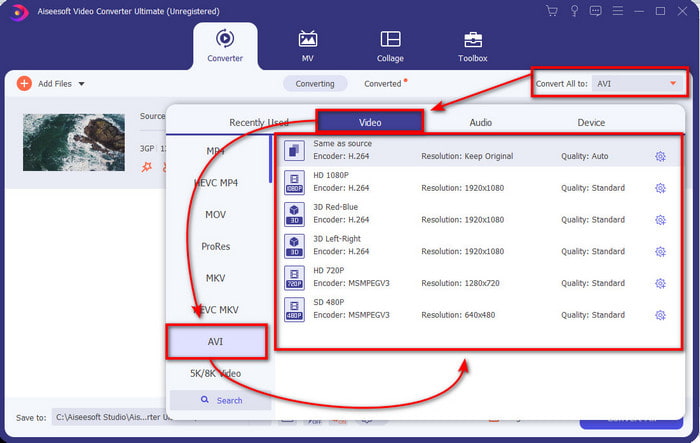
שלב 3. כדי לשנות את קובץ ה‑3GP, לחצו על האפשרות Convert All ובחרו את פורמט AVI תחת קטגוריית Video.
שלב 4. כדי להתחיל את תהליך ההמרה, לחצו על Convert All, ותהליך המרת קובצי ה‑3GP שלכם יתחיל כעת.

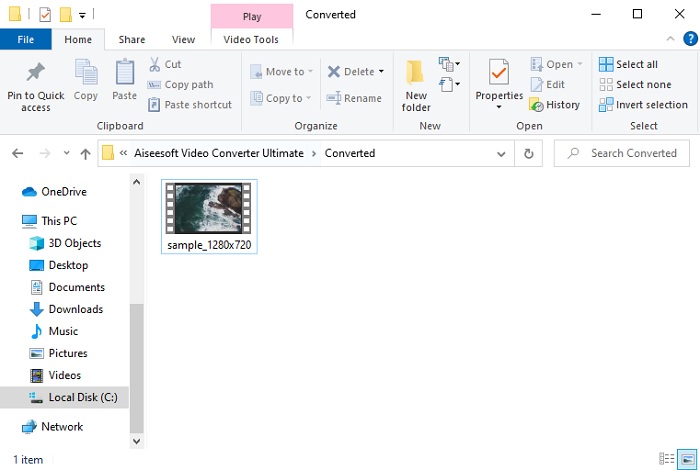
שלב 5. לאחר ההמרה, תופיע על המסך תיקייה עם קובץ ה‑3GP שהומר. לחצו על קובץ ה‑AVI החדש שיצרתם כדי לצפות בו ולערוך אותו מאוחר יותר אם תרצו.
חלק 2. 3 ממירים זמינים באינטרנט להמרת 3GP ל-AVI
1. FVC Free Video Converter Online

אנו מבטיחים שהכלי שברשימה הזו הוא ממיר ה‑3GP ל‑AVI הטוב ביותר ברשת, והוא FVC Free Video Converter Online. כל הפונקציות שתרצו לראות בממיר אונליין נמצאות כאן. זהו הממיר המקוון הטוב ביותר שאנו מזכירים מכל הבחינה. לדוגמה, אם אתם רוצים ממיר מקוון יעיל, תהליך המרה מאובטח וללא פרסומות כלל – זהו הכלי המקוון בשבילכם. למרות שכלי האינטרנט נראה מצוין ועובד בצורה חלקה, הוא עדיין תומך במבחר פורמטים בינוני. פונקציות מתקדמות שתיתקלו בהן בעת שימוש ב‑FVC Video Converter Ultimate אינן זמינות כאן. אך היתרון שלו על פני גרסת התוכנה הוא שהוא חינמי לחלוטין. בלי עיכובים נוספים, נעבור לשלבים להמרת הקובץ שלכם לגרסה חדשה.
שלב 1. לחצו על קישור זה כדי לעבור לאתר.
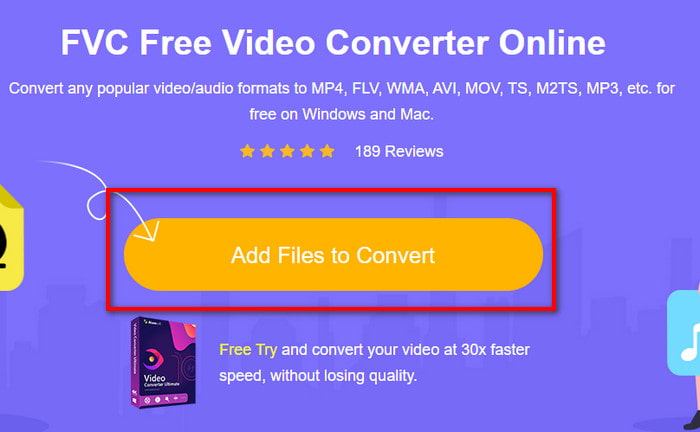
שלב 2. לחצו על Add Files to Convert כדי להפעיל את הכלי המקוון, תופיע תיקייה, ואז חפשו את קובץ ה‑.3gp. אם זו הפעם הראשונה שלכם בשימוש בכלי, תצטרכו להוריד את המשגר (launcher) על ידי לחיצה על Add Files to Convert ואז ללחוץ שוב כדי להפעיל.
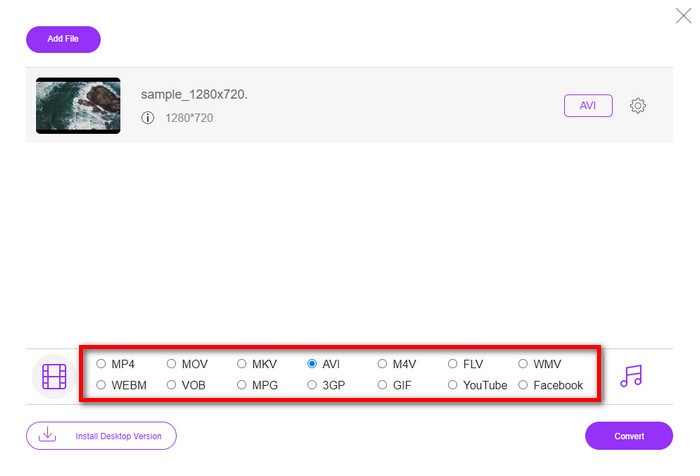
שלב 3. לאחר שסיימתם לבחור את הקובץ, בחרו בפורמט AVI בסעיף שמתחת.
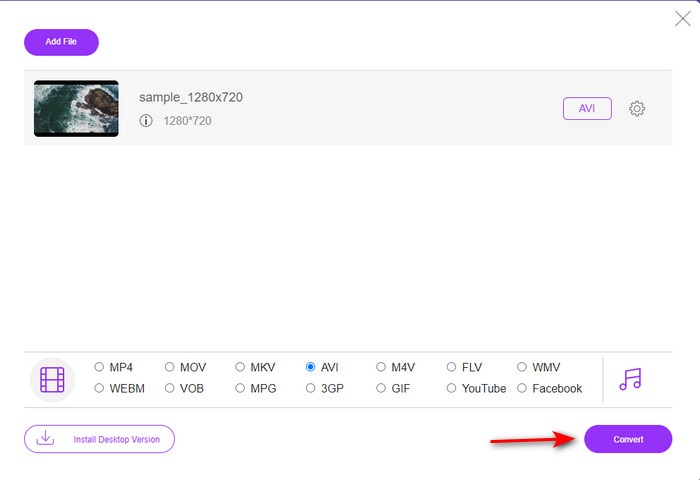
שלב 4. אם אתם מוכנים כעת להמיר את הקובץ, לחצו על Convert.
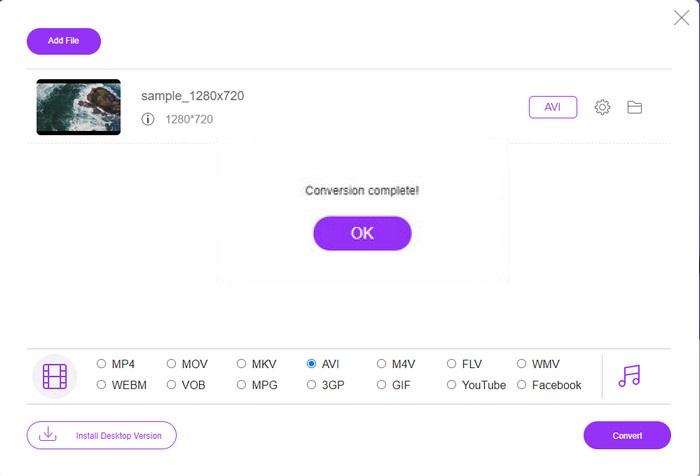
שלב 5. לאחר ההמרה, תופיע שוב תיקייה, הפעם עם הקובץ שהמרתם קודם.
2. Fconvert.com
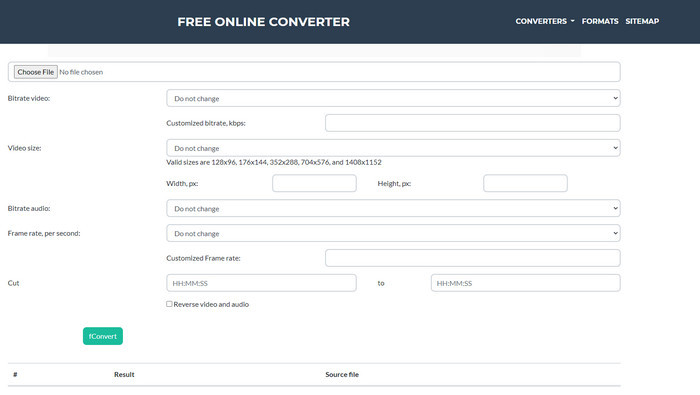
בתחום המרת הקבצים, Fconvert.com חייב להיות ברשימה, כי כלי מקוון זה הוא אחד הממירים המצוינים שניתן להשתמש בהם בחינם. ממיר זה מסוגל להמיר כמעט את כל הפורמטים שאתם מכירים, ואולי גם את הקבצים שלכם. עם זאת, יש בעיה בכלי הזה – והיא הפרסומות. בכל פעם שאתם לוחצים על משהו באתר, תופיע קודם פרסומת לפני שתעברו למה שלחצתם. על אף שהפרסומות מציקות, האפליקציה עדיין נראית נקייה ומבצעת עבודה מצוינת בהמרת פורמטים. אם תרצו לחוות עד כמה הכלי הזה טוב, עקבו אחרי השלבים הבאים ולמדו כיצד להמיר 3GP ל‑AVI בחינם.
שלב 1. חפשו בדפדפן את האתר הרשמי של הכלי הזה.
שלב 2. לחצו על AVI תחת video, לחצו על Choose File, מצאו את קובץ ה‑.3gp, ואז גללו מטה ולחצו על fConvert.
שלב 3. גללו מטה, ותראו את סעיף ה‑Result; לחצו על הקובץ כדי להוריד אותו.
3. Anyconv
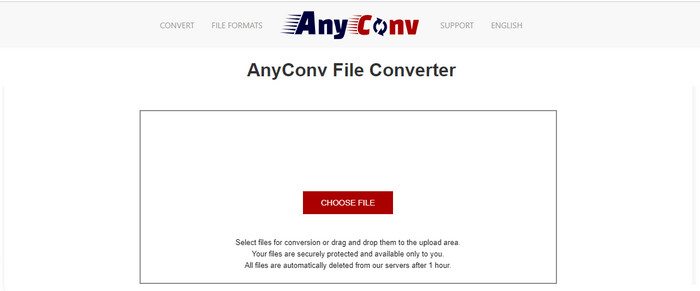
כלי נוסף שמתמחה בהמרת פורמטים הוא Anyconv. כלי מקוון זה שונה למדי מ‑Fconvert.com, משום שהוא טוב ומהיר יותר. בנוסף, יש בו פחות פרסומות מהכלי הקודם. אף שיש בו פחות פרסומות, הן בולטות יותר לעין בהשוואה ל‑Fconvert.com, אבל מבחינת ביצועים – הכלי הזה מתפקד היטב. בואו נבדוק את הכלי הזה כדי לראות אם הוא עובד בהמרת 3GP ל‑AVI בחינם, ללא עיכובים נוספים.
שלב 1. פתחו את מנוע החיפוש שלכם ומצאו את אתר Anyconv.
שלב 2. לחצו על Choose File, ותופיע תיקייה; הכניסו את קובץ ה‑.3gp לכלי המקוון והמשיכו. כדי לשנות את הפורמט, עליכם ללחוץ על כפתור ה‑drop-down ולמצוא את AVI. כדי להתחיל את תהליך ההמרה, לחצו על Convert.
שלב 3. המתינו לסיום התהליך, ואז לחצו על Download AVI כדי להוריד את הקובץ שהומר.
חלק 3. איזה פורמט הוא הטוב ביותר; 3GP או AVI
אם אתה משתמש בטלפון דור שלישי וברצונך לאחסן וידאו באיכות גבוהה, העבר אותו מהר יותר בדור הטלפון השלישי, אז 3GP הוא הפורמט לתפקיד. עם זאת, אם תנסה לשלוח פורמט AVI לטלפונים מהדור השלישי, הקובץ לא ייפתח כי פורמט זה אינו נתמך. אבל במקרה של היום, AVI הרבה יותר טוב. זה כבר זכה לתמיכה רבה מכל נגני המדיה והעורכים בהשוואה ל-3GP. למרות שפורמט AVI הוא הבחירה הטובה ביותר כיום, גודל הקובץ הוא עצום בהשוואה ל-3GP, ואם הייתם עומדים לשמור אותו בטלפון שלכם, הוא היה גוזל הרבה מקום. יתר על כן, שני הפורמטים נהדרים, אך יש להם מטרות ושימושים שונים.
חלק 4. שאלות נפוצות על 3GP ו-AVI
האם אוכל להשתמש ב-FFmpeg כדי להמיר 3GP ל-AVI?
אפשר להשתמש ב‑FFmpeg כדי להמיר את קובץ ה‑3GP שלכם; עם זאת, זה מעט מסובך, אבל ניתן לביצוע אם משקיעים בזה זמן. השלב הראשון הוא להוריד למחשב את קובץ ה‑zip של FFmpeg ואז לחלץ אותו. השלב השני הוא לפתוח את ה‑CMD כדי לתקשר עם הכלי. לאחר מכן עליכם לאתר את הקובץ באמצעות שורת הפקודה, ffmpeg -i input.3gp -vn -ar 44100 -ac 2 -b:a 192k output.avi העתיקו קוד זה והדביקו אותו ב‑CMD ולחצו על Enter כדי להתחיל את תהליך ההמרה.
האם ניתן לשחק 3GP בטלפונים מהדור הרביעי?
פורמט זה משמש בטלפונים מדור שלישי, ועדיין ניתן לנגן סרטוני 3GP בחלק מהטלפונים מדור רביעי, אך לא בכולם. משום שכפי שנאמר קודם, 3GP מיועד לדור השלישי ולא לחלק מהטלפונים מדור רביעי. לחלופין תוכלו לפנות לנגני 3GP מקצועיים כדי ליהנות מהווידאו שלכם.
איזה פורמט עדיף: 3GP או MP4?
מבחינת איכות ותמיכה רחבה בפורמטים, MP4 טוב יותר בתחום זה. עם זאת, 3GP קטן יותר ועובד טוב יותר ברשתות 3G להעברה מהירה יותר של פורמט קובץ זה. רוצים להמיר MP4 ל‑3GP או להפך? לחצו כאן כדי ללמוד עוד פרטים.
סיכום
כל מסע חייב להסתיים, וכעת תוכלו להמיר בקלות 3GP ל-AVI בעזרת הכלים שהוזכרו לעיל. יתר על כן, כל הכלים שהוצגו לעיל, בואו נכלול את FFmpeg, אכן עובדים מצוין. ובכל זאת, הבחירה הטובה ביותר נופלת תמיד ל-FVC Video Converter Ultimate. הכלי הזה עולה על כל הממירים המקוונים שיכולים לעשות בהמרה והיבטים רבים נוספים. אז עכשיו, אם אתה רוצה לקבל את התוכנה לחץ על כפתור ההורדה ובצע את ההמרה במהירות.
-
 [מקוון ובחינם] 3 שיטות להמרת MP4 ל-3GP ללא טרחה
 רוצה להמיר MP4 ל- 3GP בדרך מהירה וקלה? כאן נשתף 3 ממירי MP4 ל- 3GP כדי לשנות MP4 ל- 3GP למשחק בטלפונים ניידים שונים.
-
 3 הדרכים המובילות בחינם להמיר FLV ל- 3GP ב- Windows / Mac
 לא מצליח לפתוח קבצי FLV בסמארטפון או בטאבלט? אל תדאג! כאן אנו חולקים שלוש שיטות להמרת FLV ל-3GP מבלי לאבד איכות למשחק בנייד.
-
 בחירה מצוינת להמיר MKV לפורמט AVI
 אמן כיצד להמיר סרטוני MKV עם שלבים פשוטים הניתנים בלעדית עבורך. רוצה לדעת איך? לאחר מכן לחץ על קישור זה למידע נוסף.
