


 ממיר וידאו אולטימטיבי
 מקליט מסך
 תיקון וידאו
 הורדה מאובטחת
המדריך האולטימטיבי להורדת קנה המידה של סרטונים מ-4K ל-1080p
היום אנחנו לא רק מעלים את רזולוציית הסרטונים כדי לשפר את חוויית הצפייה שלנו. יש גם מי שעושים את ההפך – מורידים את רזולוציית הסרטונים שלהם מכמה סיבות. ייתכן שהם רוצים להקטין את גודל הקבצים, להפוך את הסרטונים שלהם לתואמים יותר למכשירים ישנים, או פשוט לייעל את תהליך העריכה. אם אתה מחפש דרכים להנמיך את רזולוציית הסרטונים שלך מ4K ל‑1080p, הגעת למקום הנכון. במאמר זה נעמיק ב‑3 דרכים שיעזרו לך להמיר בקלות סרטונים ברזולוציה גבוהה לפורמט נוח יותר, מבלי לוותר על האיכות. בין אם אתה יוצר תוכן, קולנוען או פשוט מישהו שרוצה לייעל את ספריית הווידאו שלו – יש לנו פתרון עבורך. בוא נצלול פנימה ונפשט את מסע ההנמכה של הווידאו שלך!

חלק 1. למה אתה צריך להמיר סרטונים מ-4K ל-1080p
הורדת קנה המידה של סרטונים מ-4K ל-1080p חשובה מכמה סיבות. הדברים הבאים מסבירים מדוע:
חסוך מקום אחסון.
סרטוני 4K תופסים הרבה יותר אחסון מסרטוני 1080p. על ידי המרה ל-1080p, תוכל לפנות שטח אחסון יקר במכשיר או בכונן הקשיח.
שפר את התאימות למכשירים.
מכשירים מסוימים עשויים להתקשות להפעיל או לערוך סרטוני 4K בצורה חלקה. המרה ל-1080p מבטיחה תאימות למגוון רחב יותר של מכשירים, כולל מחשבים ישנים יותר, סמארטפונים וטאבלטים.
האץ את תהליך העריכה.
עריכת סרטוני 4K יכולה להיות עתירת משאבים וגוזלת זמן רב יותר מאשר עריכת סרטוני 1080p. המרה ל-1080p יכולה להאיץ את תהליך העריכה, ולאפשר השמעה חלקה יותר וזמני רינדור מהירים יותר.
שפר את רציפות ונוחות הניגון.
בדרך כלל קל יותר להזרים סרטונים ברזולוציה נמוכה יותר להזרמה ולהפעלה ללא חציצה או גמגום, במיוחד בחיבורי אינטרנט איטיים יותר או במכשירים פחות חזקים.
מטב לשיתוף מקוון.
פלטפורמות מקוונות רבות ואתרי מדיה חברתית דוחסים אוטומטית ומבצעים אופטימיזציה של סרטונים להשמעה. המרת הסרטונים שלך ל-1080p מבטיחה שהם עומדים בדרישות הפלטפורמה ושומרים על איכות במהלך השיתוף.
חלק 2. כיצד להמיר מ-4K ל-1080p עם ממיר הווידאו הטוב ביותר
ישנן דרכים שונות שבהן תוכל להקטין את גודל הסרטונים שלך במצב לא מקוון, וזה באמצעות תוכנות שולחניות לממיר וידאו. להלן הכלים שבהם תוכל להשתמש:
ממיר 4K חינם FVC
FVC Free Video 4K Converter הוא כלי שמציע פתרון מקיף למשתמשים המעוניינים להמיר רזולוציית וידאו מ‑4K ל‑1080p. בעזרת הפונקציות הגמישות שלו, משתמשים יכולים להמיר בקלות סרטוני 4K ברזולוציה גבוהה לפורמט 1080p, וכך להבטיח תאימות למכשירים ולפלטפורמות פופולריים. בנוסף, התוכנה שומרת על איכות הווידאו המקורי במהלך תהליך ההמרה, תוך שימור חדות הפרטים והבהירות החזותית. בעזרת ממשק אינטואיטיבי וידידותי למשתמש וביצועים יעילים, הכלי הזה מפשט את המשימה של המרת סרטוני 4K ל‑1080p למגוון מטרות.
שלב 1. הורד את FVC Free 4K Converter והתקן אותו במכשיר שלך.
הורדה חינמיתל־Windows 7 ומעלההורדה מאובטחת
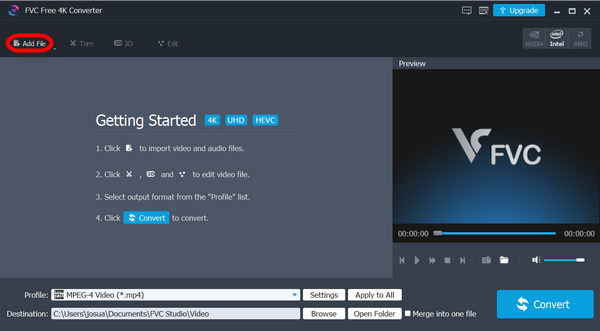
שלב 2. הפעל את הכלי ולחץ על Add Files.
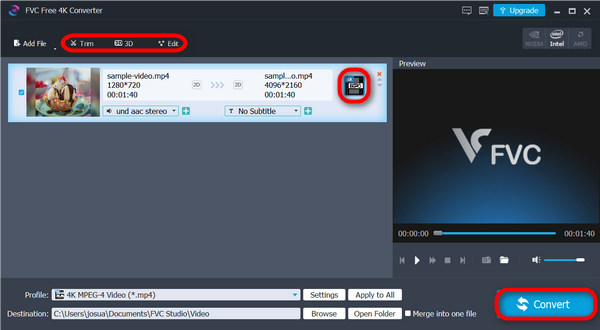
שלב 3. כעת, בפינה העליונה, תוכל להשתמש בזה כדי לערוך את הסרטונים שלך, ובצד ימין לחץ על התפריט הנפתח כדי לבחור את תוצאת הרזולוציה המבוקשת לסרטון שלך. הפעם אתה עומד להנמיך את הרזולוציה, לכן בחר 1080p. לאחר שסיימת, לחץ על כפתור Convert.
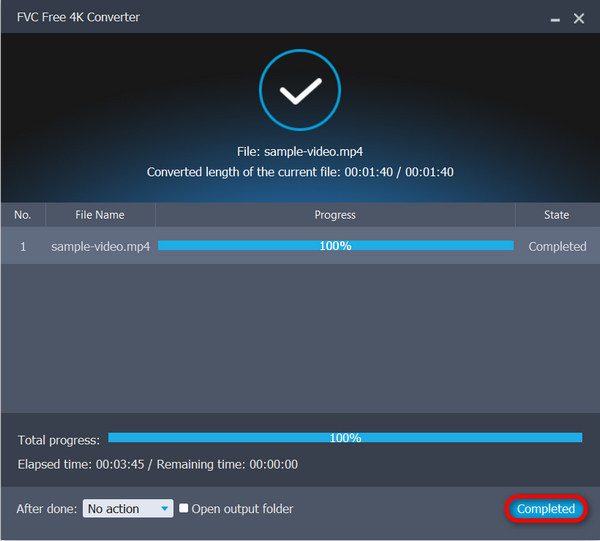
שלב 4. לאחר ההמרה תתקבל הודעה שהתהליך הושלם. פשוט לחץ על Complete.
הכלי הרב-תכליתי הזה לא רק מאפשר לך לשדרג את הסרטונים שלך, אלא זה גם יכול לעזור לך להקטין את הסרטונים שלך מ-4K ל-1080p. כלי כל כך נהדר למי שמחפש מטרה הפוכה כפולה.
ממיר וידיאו אולטימטיבי
FVC Video Converter Ultimate היא תוכנת וידאו נוספת שמציעה יכולות המרה מקיפות, כולל הנמכת רזולוציה מ‑4K ל‑1080p. באמצעות פונקציית ההמרה שלה, משתמשים יכולים בחופשיות ובקלות להמיר סרטוני 4K ל‑1080p פשוט על‑ידי בחירה מתוך שלל רזולוציות פורמט פלט מוגדרות מראש הזמינות בכלי.
שלב 1. הורד את FVC Video Converter Ultimate למכשיר שלך.
הורדה חינמיתעבור Windows 7 או גרסה מאוחרת יותרהורדה מאובטחת
הורדה חינמיתל‑MacOS 10.7 ומעלההורדה מאובטחת
שלב 2. לחץ על Converter.
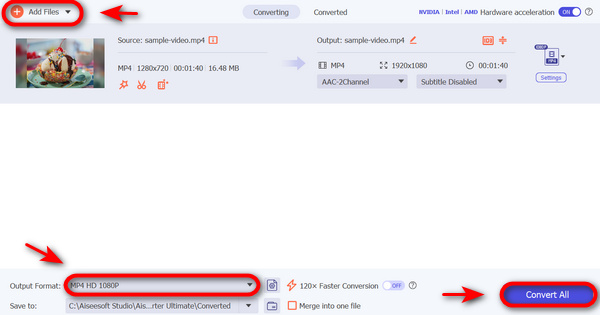
שלב 3. כדי להוסיף את סרטון ה‑4K שברצונך להמיר ל‑1080p, לחץ על כפתור Add Files.

שלב 4. כעת לחץ על האפשרות Output Format, עבור ללשונית Video ובחר וידאו HD 1080p כמו 1080p MP4, 1080p MKV, 1080p AVI, 1080p WMV ועוד.
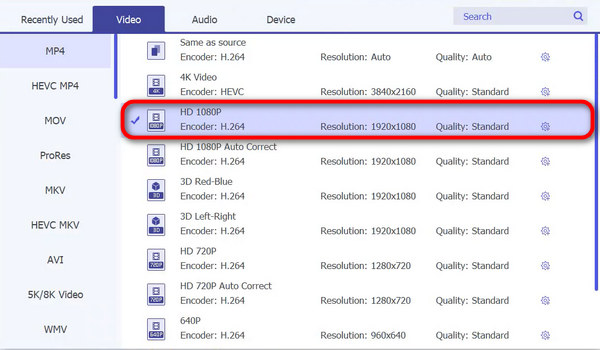
שלב 5. לאחר שסיימת, לחץ על Convert.
עם FVC Video Converter Ultimate, המרת סרטוני ה-4K שלך ל-1080p היא אכן מהירה וקלה.
נגן מדיה VLC
VLC Media Player ידוע במגוון הרחב של פורמטי קבצים נתמכים ויכולות השמעה. למרות שידוע בעיקר ביכולתו לנגן פורמטים שונים של אודיו ווידאו, כלי זה כולל גם תכונות המרת וידאו בסיסיות, כולל הקטנת קנה מידה מ-4K ל-1080p. למרות שאינה חזקה כמו תוכנת המרת וידאו ייעודית כמו FVC Free Video 4K Converter או FVC Video Converter Ultimate, VLC Media Player מציע אפשרות נוחה למשתמשים שדורשים מדי פעם משימות המרת וידאו ללא צורך בהתקנות תוכנה נוספות.
שלב 1. תחילה, הורד את VLC Media Player למכשירך והתקן אותו.
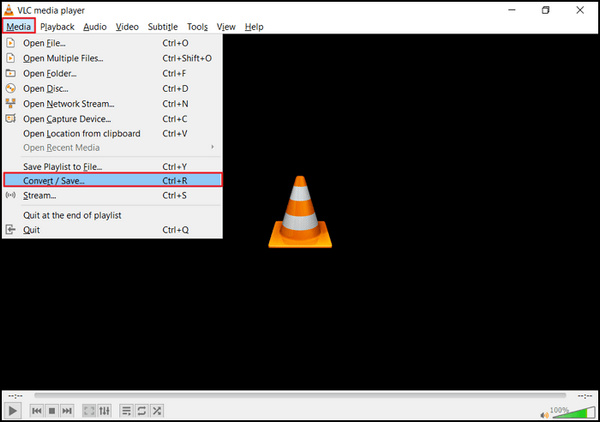
שלב 2. הפעל את הכלי ועבור ללשונית Media, ואז בחר Convert/Save.
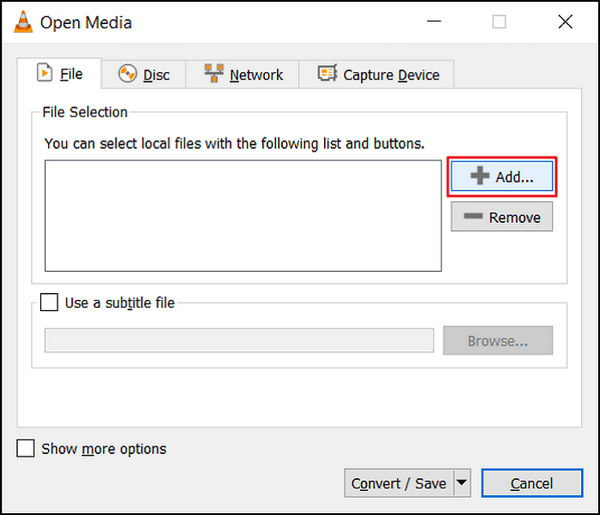
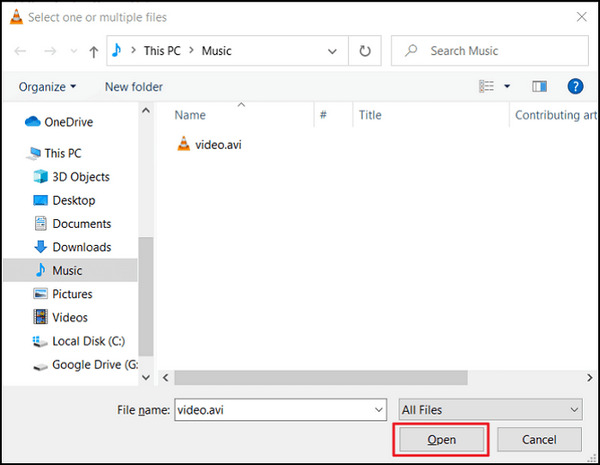
שלב 3. כעת לחץ על כפתור Add כדי לייבא את הווידאו שברצונך להנמיך ברזולוציה.
שלב 4. ציין את שם הקובץ ויעד השמירה בתיבת Convert.
שלב 5. בחר ב‑Convert/Save והקלד בשדה Frame size רוחב של 1920p ו‑1080p כגובה לפני הלחיצה על Start. זכור שאתה עומד להנמיך את הרזולוציה של הסרטונים שלך, לכן בחר את הרזולוציה המועדפת עליך.
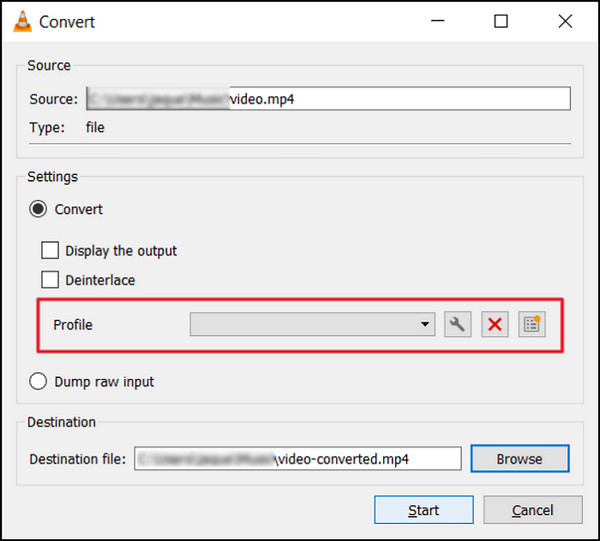
שלב 6. לבסוף, לחץ על Start כדי להתחיל את תהליך ההמרה.
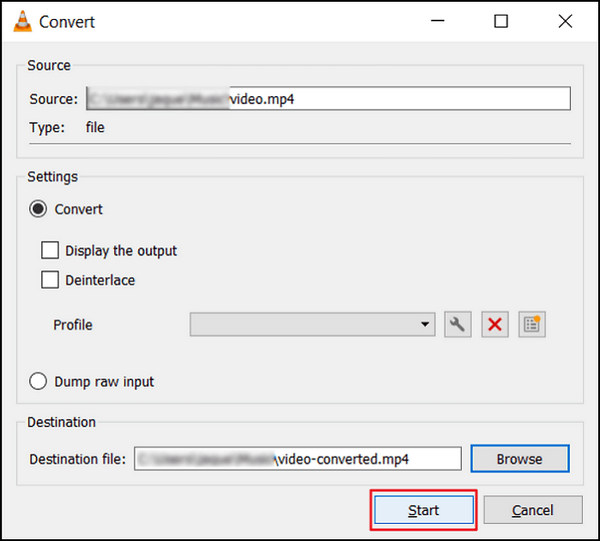
בעוד VLC הוא כלי נהדר, זה איכשהו נופל בשדרוג לאחור של סרטונים מ-4K ל-1080p, אבל זה עדיין עושה זאת. עם זאת, בניגוד לכלים אחרים לעיל, VLC אינו מוכן לטפל בסרטונים מורכבים כדי להקטין אותם.
אם אתה רוצה עוד תוכנות דומות ל‑VLC, תוכל לבדוק אותן כאן.
חלק 3. כיצד להמיר מ-4K ל-1080p באינטרנט
בינתיים, כשאתה מחפש דרך להקטין סרטונים מ-4K ל-1080p באינטרנט, HD Convert הוא הטוב ביותר עבורך.
HD Convert Video הוא ממיר וידאו HD מקוון, המתאים להמרת סרטונים לפורמטים שונים, כולל Full HD 1080p ו‑4K Ultra HD. הוא מציע אפשרות להנמיך סרטונים מ‑4K ל‑1080p, להקטין את גודל הקבצים ולשפר את התאימות.
שלב 1. קודם כול, היכנס לאתר הרשמי שלהם.
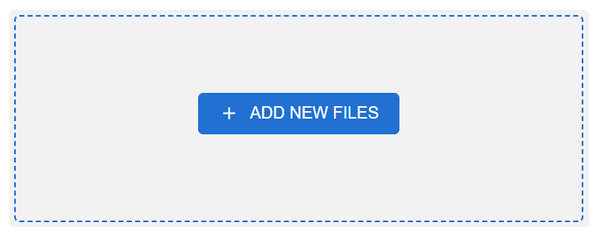
שלב 2. לחץ על כפתור Add Files.
שלב 3. בחר את פורמט הפלט. לחץ על Next, ובחר ב‑1080p כאיכות הפלט שלך.
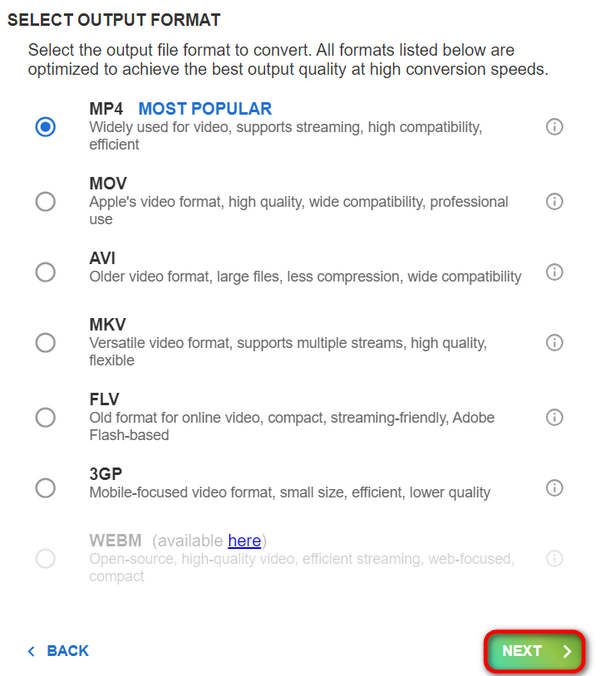
שלב 4. לאחר שהגדרת הכול, לחץ על Next כדי להתחיל את ההמרה.
אתה לא יכול להוריד את הקנה מידה ל-1080p כאשר החשבון שלך בחינם. אתה צריך להירשם למבצעים שלהם כדי להשיג המרת וידאו של 4K ל-1080p.
חלק 4. שאלות נפוצות לגבי הורדת קנה מידה של סרטונים מ-4K ל-1080p
למה שארצה להקטין את הסרטונים שלי מ-4K ל-1080p?
צמצום קנה המידה מ-4K ל-1080p יכול להיות מועיל מכמה סיבות, כולל הפחתת גדלי קבצים לאחסון ושיתוף קלים יותר, שיפור תאימות עם מכשירים או פלטפורמות ישנות יותר, והאצת תהליך העריכה על ידי דרישת פחות כוח עיבוד.
האם סרטונים מוקטנים יאבדו איכות בהשוואה לצילומי 4K המקוריים?
בעוד שלסרטונים מוקטנים תהיה רזולוציה נמוכה יותר בהשוואה לצילומי 4K המקוריים, מידת אובדן האיכות תלויה במידה רבה בשיטת ההקטנה ובהגדרות שבהן נעשה שימוש. עם התאמה מדוקדקת של פרמטרים, כגון הגדרות קצב סיביות ודחיסה, ניתן למזער את אובדן האיכות במהלך תהליך ההקטנה.
באילו כלים או תוכנות אוכל להשתמש כדי להקטין את גודל הסרטונים מ-4K ל-1080p?
ישנם כלים ותוכנות שונות הזמינות להורדת קנה המידה של סרטוני וידאו, החל מממירי וידאו ייעודיים כמו FVC Video Converter ו-HD Convert Video ועד לנגני מולטימדיה כמו VLC Media Player, המציעים תכונות הקטנת קנה מידה. פלטפורמות מקוונות כמו HDconvert.com מספקות גם אפשרויות נוחות להקטנת סרטונים לרזולוציית 1080p.
סיכום
לסיכום, הנמכת רזולוציית וידאו מ‑4K ל‑1080p מציעה יתרונות מעשיים כמו חיסכון במקום אחסון ושיפור התאימות. כדי ליהנות מהיתרונות האלה, הורד את FVC Video Converter Ultimate או נסה את FVC Free 4K Converter כדי לשדרג את חוויית הווידאו שלך כבר עכשיו!
-
 סקירת ממירי הווידאו החינמיים הטובים ביותר עבור Windows 2025
 מחפשים ממיר וידאו? אל תחפש עוד! רשמנו את 10 הכלים הטובים ביותר להמרת סרטונים בחינם בכל פורמט לפלט הרצוי.
-
 ממירי הווידאו החינמיים הטובים ביותר עבור Mac [רשימת 2025]
 גלה את הדרכים הקלות והיעילות ביותר להמרת סרטונים עם 5 הבחירות המובילות שלנו לממירי וידאו בחינם עבור Mac. הורד עכשיו והתחיל להמיר!
-
 כיצד לשדרג 1080p ל-4K [דרכים מקוונות ולא מקוונות]
 רוצה לגרום לסרטונים שלך להיראות כאילו צולמו ברזולוציית 4K? תפסנו אותך! למד כיצד לשדרג 1080p ל-4K עם מדריך שלב אחר שלב זה. קרא עוד!
