


 ממיר וידאו אולטימטיבי
 מקליט מסך
 תיקון וידאו
מדריך מקיף כיצד להמיר AMV ל-WMV עם שלבים [נפתר]
רוצים ליהנות מצפייה בקובצי וידאו בפורמט AMV במחשב ה‑Windows שלכם או להשתמש בהם לסטרימינג מקוון? אם כן, כדאי לכם לקרוא את המאמר הזה כדי לדעת כיצד להמיר AMV ל‑WMV, לשפר את האיכות ולהפוך את הקבצים ליותר תואמים. ברשימה זו תלמדו על התוכנות שאפשר להשתמש בהן כדי להמיר את קובצי ה‑AMV שלכם. לכן, בלי עיכובים נוספים, הגיע הזמן לחגור חגורות וללמוד הרבה יותר על הפורמטים AMV ו‑WMV.

חלק 1. המר AMV ל-WMV עם FVC Video Converter Ultimate
FVC Video Converter Ultimate הוא הבחירה הראשונה שלנו להמרת AMV ל‑WMV מפני שהוא מאפשר לקודד מחדש מדיה ופורמטים ייעודיים למכשירים. בנוסף, הוא מסוגל להמיר לא רק קובץ אחד, שניים או שלושה בו‑זמנית, אלא אפילו יותר. יתר על כן, ממיר זה מחויב לספק למשתמשיו רק מצוינות בתהליך ההמרה. רוצים לדעת למה? קראו את התכונות המרכזיות הבאות.

ממיר וידיאו אולטימטיבי
4,355,888+ הורדות- זה יכול לעזור לך עם בעיית ההמרה שלך ב-AMV ל-WMV, AVI, FLV, SWF, MP4, AVI.
- זה תומך בהמרה מהירה במיוחד כדי להמיר את הפורמט אפילו מהר יותר.
- ערוך את סרטוני ה-AMV שלך עם תכונות העריכה הייחודיות שהכלי הזה מספק.
- עזור לך להיות מומחה תוך כמה קליקים.
- זה תומך בכל הפלטפורמות כמו Windows ו-macOS.
הורדה חינמיתל-Windows 7 ומעלההורדה מאובטחת
הורדה חינמיתל-MacOS 10.7 ומעלההורדה מאובטחת
האם אתה מופתע מהתכונות של הכלי? אם כן, בואו לקרוא את ההליך להמרת קבצי AMV ונעתיק את השלבים כדי להצליח בהמרה.
שלב 1. הורידו את FVC Video Converter Ultimate לכונן המחשב שלכם על‑ידי לחיצה על כפתור ההורדה המוצג למטה. המשיכו בלחיצה על קובץ ההתקנה כדי להתקין ולחצו על Start Now כדי להפעיל את הכלי.
הורדה חינמיתל-Windows 7 ומעלההורדה מאובטחת
הורדה חינמיתל-MacOS 10.7 ומעלההורדה מאובטחת
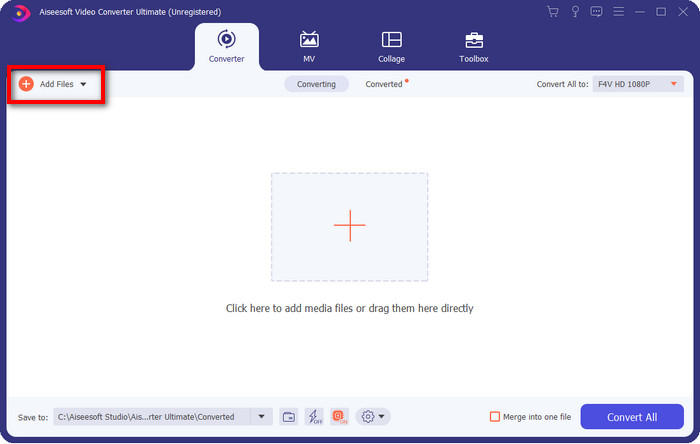
שלב 2. לאחר הפעלת התוכנה תוכלו להוסיף קובץ אחד או יותר על‑ידי לחיצה על האפשרות Add Files. תיקיית המחשב תופיע על המסך, בחרו את קובץ ה‑AMV וליחצו על Open כדי להעלות אותו.
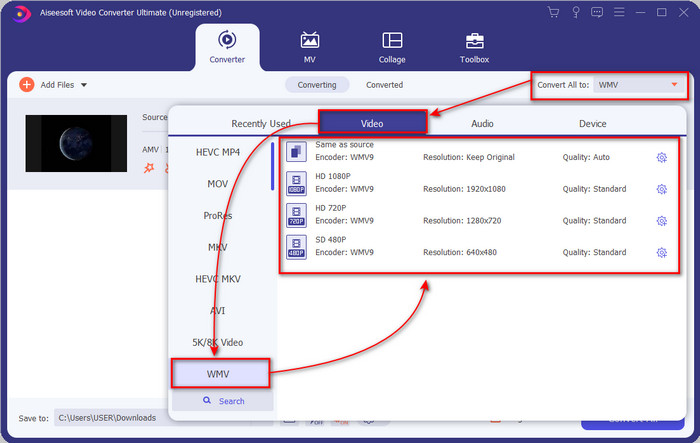
שלב 3. בלחיצה על האפשרות Convert All to תופיע רשימת פורמטים. מצאו את פורמט WMV ובחרו את הרזולוציה, המקודד (encoder) והאיכות שברצונכם לקבל.
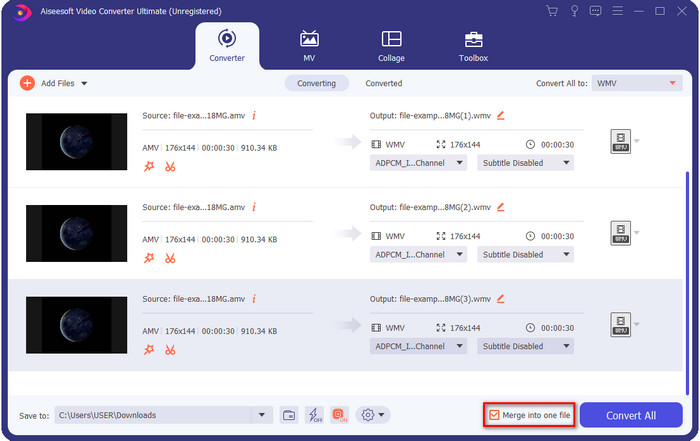
אופציונלי. רוצים להפוך את כל קובצי ה‑AMV שלכם לקובץ WMV אחד? במקרה כזה עליכם לסמן את הריבוע שבו כתוב merge into one file.
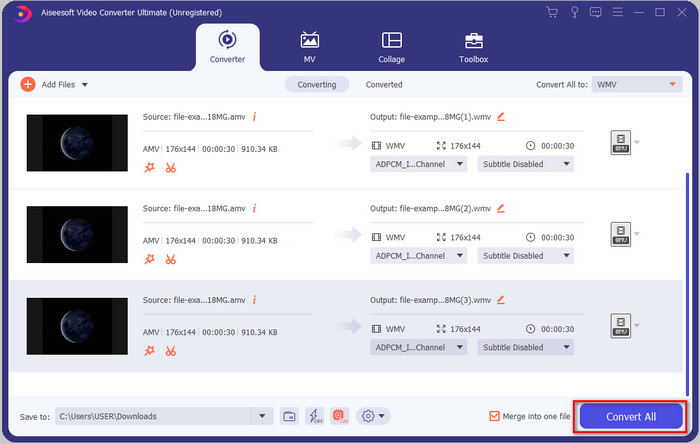
שלב 4. לחצו על Convert All כדי להתחיל בתהליך ההמרה. לאחר סיום התהליך תופיע על המסך תיקייה ובה קובץ ה‑WMV שהומר.
חלק 2. המר AMV ל-WMV באינטרנט
לא רוצים להוריד ממיר לא מקוון כי אין לכם מספיק שטח אחסון להתקנה? השתמשו אז ב‑FVC Free Online Video Converter. אינכם צריכים להוריד את כל תוכנת ההמרה; במקום זאת תצטרכו רק את המשגר (launcher), שהוא קטן מאוד ולא ישפיע על נפח האחסון במחשב. בנוסף, ממיר מקוון זה ממיר AMV ל‑WMV תוך התאמת הרזולוציה. עם זאת, מהירות ההמרה תלויה במהירות חיבור האינטרנט שלכם. יש לכם חיבור אינטרנט? אז כדאי לנסות את הכלי הזה ולהתנסות בהמרה מקוונת.
שלב 1. לחצו על קישור זה כדי לפתוח את האתר הראשי של הממיר.
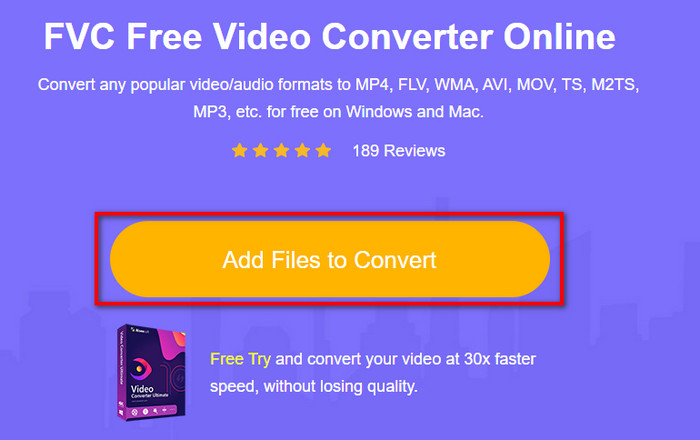
שלב 2. בלחיצה על Add Files to Convert תופיע תיקייה שבה תוכלו למצוא את קובץ ה‑AMV וללחוץ על Open.
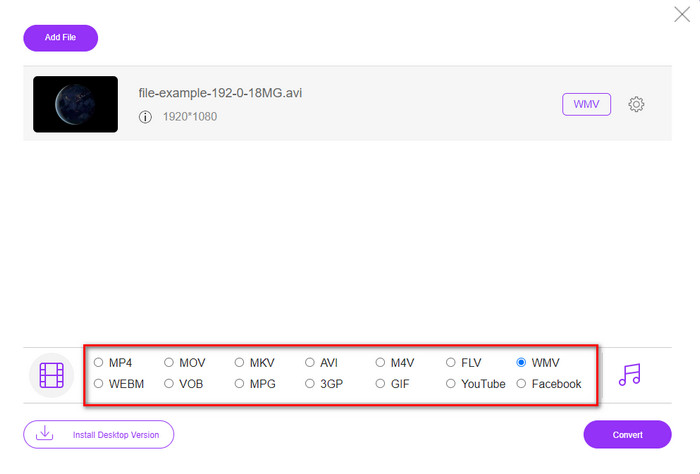
שלב 3. בחרו את פורמט WMV שיופיע על המסך.
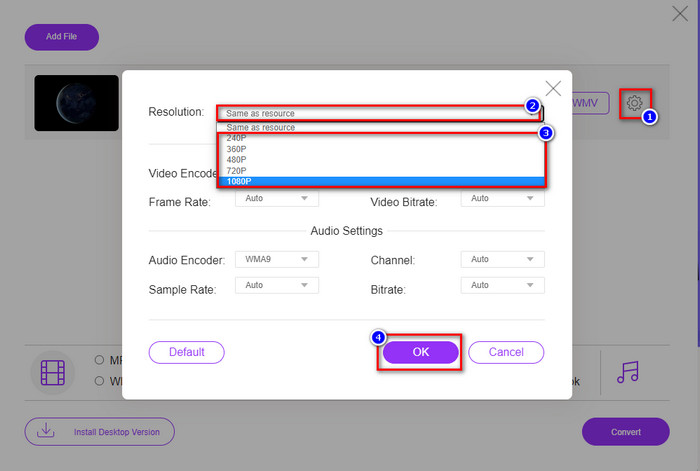
אופציונלי. כפי שאמרנו קודם, כאן תוכלו להתאים את הרזולוציה. כעת נכוון את הרזולוציה על‑ידי לחיצה על כפתור גלגל‑השיניים. בחלק העליון לחצו על כפתור drop-down, תופיע רשימת רזולוציות, בחרו אחת ולחצו על OK כדי להמשיך.
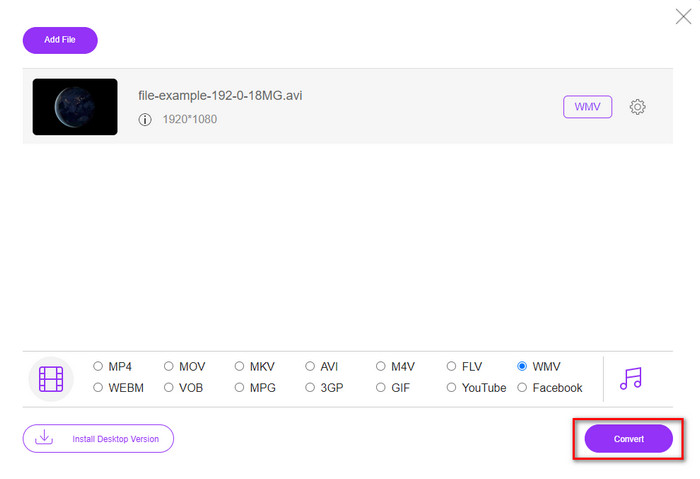
שלב 4. כעת, אם ברצונכם להתחיל בהמרה, תוכלו ללחוץ על כפתור Convert והתהליך יתחיל.
חלק 3. מה ההבדל בין AMV ל-WMV
קודם כל, שני מיכלי המדיה הללו הפכו פופולריים בגלל היכולות הייחודיות שלהם כפורמט. אבל היום, נלמד מה הם היתרונות והחסרונות של הפורמט עצמו. יתר על כן, נפרט שלושה היבטים על ידי הפיכתו לשאלה כדי לדעת יותר על AMV ו-WMV.
לאיזה פורמט יש רזולוציית מדיה טובה יותר?
בין שני הפורמטים, ללא כל ספק, ל-WMV יש איכות טובה יותר. קובץ WMV יכול לאחסן ולהזרים רזולוציית וידאו של עד 300,000 פיקסלים לקבלת פלט חזותי מפורט יותר. אבל אתה יכול להגדיר את הקצב ברזולוציית מסך של 528x576. ועבור AMV, האיכות שהוא יכול להכיל היא 96x96 עד 320x240, וזה די נמוך בהשוואה לרזולוציה הנמוכה של ה-WMV. אחת הסיבות ל-AMV יש רזולוציה קטנה יותר היא שהיא צריכה להיות מותאמת למסך של נגן המדיה הסיני.
לאיזה פורמט יש גודל קובץ קטן יותר?
הניצחון הזה ילך עם ה-AMV כי הפורמט הזה הוא סופר דחוס. למרות של-WMV יש מדחס, עדיין הגודל של ה-AMV ידידותי יותר מבחינה כלכלית, במיוחד בכונן המחשב שלך, מאשר ה-WMV.
איזה פורמט מתאים יותר?
כשמדברים על תאימות אפשר לומר שלכל פורמט יש יתרונות אחרים, מפני ש‑WMV מיועד בעיקר לתוכנות של Windows. אם אתם משתמשי Mac אינכם יכולים פשוט להשתמש בפורמט הזה ולהשמיע אותו ב‑QuickTime או לערוך אותו ב‑iMovie. במקום זאת תצטרכו להמיר WMV ל‑MOV כדי להפוך אותו לתואם. לגבי AMV, הפורמט הזה הושמע במקור על‑ידי נגן מדיה נייד סיני ייעודי. אבל כיום אפשר להשתמש בנגן מדיה נייד רגיל במקום לקנות נגן AMV מיוחד. עם זאת, למצוא נגן שתומך ב‑AMV זו משימה מייגעת, כי יש מספר מצומצם של נגנים שתומכים בפורמט ובמקודד הזה. אפשר לומר של‑WMV יש הרבה יותר תאימות מאשר ל‑AMV, במיוחד כשמעבירים קובץ ל‑Windows.
ועכשיו, כשאנחנו יודעים את הסיבה, המרת הקובץ לפורמט חדש נחוצה במקרה זה. מסיבה זו, עליך ללמוד כיצד להמיר AMV ל-WMV כדי להפוך את קובץ המדיה לתואם לתוכנת Windows.
חלק 4. שאלות נפוצות לגבי המרת AMV ו-WMV
איך להפוך את ה-AMV שלי ל-MOV?
יש אינספור טכניקות ושיטות שאפשר לחפש ולנסות באינטרנט לצורך המרה. אבל קשה לבחור איזה כלי עדיף לשימוש כדי להמיר AMV ל‑MOV. כדי לקצר, לחצו על הקישור הזה והבינו כיצד להמיר AMV ל‑MOV ולהפוך אותו לתואם ל‑macOS.
האם אני יכול להשתמש בנגן מדיה VLC כדי לצפות ולשחק ב-AMV?
בהחלט, אפשר להוריד את נגן המדיה VLC למחשב השולחני כדי לנגן את קובצי ה‑AMV שלכם בלי צורך להוריד מקודד נוסף. אבל אם תרצו לדעת עוד על VLC והחלופות שלו, נסו לקרוא את המאמר הזה על‑ידי לחיצה על הקישור.
למה אני צריך לדחוס AMV?
אנחנו מכווצים (מכוּסים) את קובצי המדיה וה‑AMV שלנו משום שעלינו לפנות מקום בכונן האחסון. רוצים ללמוד כיצד לדחוס קובצי AMV? אז לחצו על הקישור הזה.
סיכום
שני הפתרונות הללו מספקים מצוינות כדי להפוך את ההמרה שלך מ-AMV ל-WMV קלה ומוצלחת. יתר על כן, אלו הם הפתרונות הטובים ביותר שאנו יכולים למצוא באינטרנט. אז עכשיו, זה בידך לבחור באיזה ממיר אתה משתמש כדי להמיר את קובץ AMV שלך ל-WMV. כדי להשיג הצלחה, עליך להשתמש בכלי FVC שסופקו לעיל.
-
 השיטה הטובה ביותר לשימוש בהמרת AMV ל-AVI [אושרה]
 האם אתה מתקשה להמיר את קובץ הווידאו שלך בפורמט AMV ל-AVI? הנה כמה טיפים בתנאי שתוכל למצוא רק במאמר זה.
-
 [מוכח] 2 דרכים להמרת AMV ל-FLV במצב לא מקוון ומקוון
 האם אי פעם שקלת לנסות ממיר להמרת קבצי AMV שלך לפורמט קובץ FLV. כדי לפתור את הבעיה שלך בצפייה בסרטון AMV, קרא את המאמר הזה כדי לדעת את הממירים המתאימים שבהם אתה צריך להשתמש.
-
 חינם | 3 השיטות הטובות ביותר להמיר MP4 ל WMV מבלי לאבד איכות
 פוסט זה משתף כיצד להמיר וידאו MP4 לפורמט WMV ב- Mac או Windows. אנו מציעים לך גם מספר אפשרויות, כולל תוכנות שולחן עבודה וגם ממירים מקוונים מבוססי אינטרנט. מוכנים לדעת את הכלים הטובים ביותר להמרת MP4 ל WMV?
