


 ממיר וידאו אולטימטיבי
 מקליט מסך
 תיקון וידאו
 הורדה מאובטחת
אודיו מתכווץ: כיצד להמיר WAV לפורמט OGG לגדלים קטנים יותר
קבצי אודיו גדולים עלולים לצרוך הרבה זיכרון במחשב או במכשיר הנייד שלך אם אתה עובד איתם. המרה של קבצים אלה מתבנית WAV ל‑OGG מפחיתה מאוד את הגודל שלהם, וכך מקלה על ניהול והעברה. במאמר זה נבחן את היתרונות של המרת קובצי WAV לתבנית OGG ונראה לך צעד‑אחר‑צעד איך לבצע זאת. בנוסף נסקור כמה מהתוכנות הטובות ביותר למשימה, כדי לוודא שתקבל את האודיו האיכותי ביותר. לכן, בין אם אתה מוזיקאי, פודקאסטֶר או פשוט מישהו שרוצה לארגן את הקלטות האודיו שלו, המאמר הזה מיועד לך.

חלק 1. השוואה של OGG לעומת WAV
להלן טבלת השוואה המתארת את ההבדלים בין המרת WAV ל- OGG. אתה יכול לבדוק אותם לעיונך.
| WAV | OGG | |
| גודל הקובץ | גָדוֹל | קָטָן |
| דְחִיסָה | לא דחוס | דָחוּס |
| איכות שמע | איכות גבוהה | איכות גבוהה |
| תְאִימוּת | תואם באופן נרחב | פחות תואם |
| תמיכה בפלטפורמה | נתמך בכל הפלטפורמות | תמיכה מוגבלת בחלק מהפלטפורמות |
| עֲרִיכָה | קל לעריכה | קצת יותר קשה לערוך |
חלק 2. הדרך הטובה ביותר להמיר WAV ל- OGG או OGG ל-WAV
1. ממיר וידאו FVC Ultimate
FVC Video Converter Ultimate הוא תוכנת המרת וידאו עוצמתית שיכולה לעזור לך להמיר את קובצי האודיו בפורמט WAV שלך לפורמט הדחוס OGG במהירות ובקלות. בעזרת ממשק אינטואיטיבי וידידותי למשתמש, תוכל לבחור בקלות את קובצי ה‑WAV שלך, לבחור בתבנית OGG ולהתחיל את תהליך ההמרה בכמה לחיצות בלבד.
בנוסף, FVC Video Converter Ultimate כולל תכונות מתקדמות של עריכת וידאו, המאפשרות לך לחתוך, לחתוך, להוסיף סימני מים ולהחיל מסננים שונים על קבצי האודיו שלך לפני ההמרה. תכונה זו יכולה להיות מועילה אם אתה צריך לבצע התאמות קטנות או לשפר את איכות קבצי השמע שלך לפני המרתם לפורמט OGG. לכן, אם ברצונך להמיר OGG ל-WAV באצווה או להיפך, בצע את השלבים הבאים:
שלב 1. התקן את התוכנית וייבא קובצי OGG או WAV
ניתן להוריד ולהתקין את FVC Video Converter מהאתר הרשמי. הפעל את היישום ובחר בלחצן הסימן Plus כדי לייבא את קובץ האודיו שברצונך להמיר.
הורדה חינמיתעבור Windows 7 או גרסה מאוחרת יותרהורדה מאובטחת
הורדה חינמיתעבור MacOS 10.7 או גרסה מאוחרת יותרהורדה מאובטחת
שלב 2. בחר ב‑OGG כתבנית הפלט
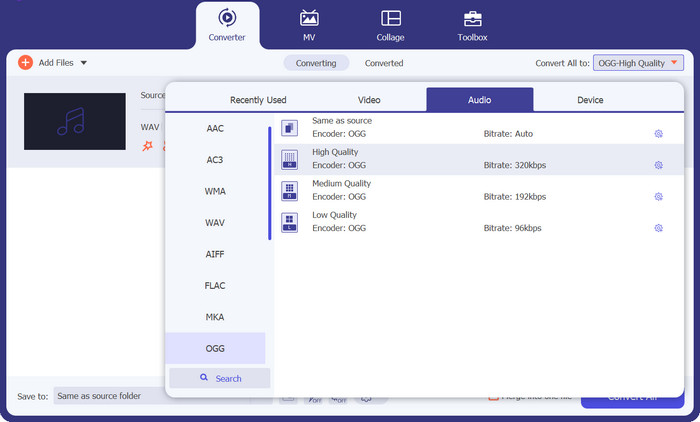
על‑ידי לחיצה על תפריט הנפתח Profile ובחירה ב‑OGG מרשימת התבניות הזמינות, תוכל לבחור ב‑OGG כתבנית הפלט. ניתן גם לשנות את הגדרות הפלט על‑ידי בחירה בלחצן Settings, במידת הצורך. כך תוכל לשנות פרמטרים כמו קצב סיביות (bit rate), קצב דגימה (sampling rate) וערוצים.
שלב 3. הגדרת מיקום הפלט
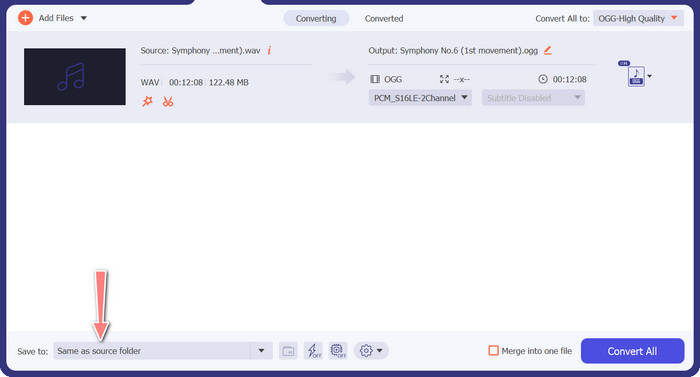
על‑ידי בחירה בלחצן Browse שליד שדה Output Folder, תוכל לבחור את תיקיית הפלט שבה תרצה לשמור את הקובץ המומר.
שלב 4. המרת קובץ WAV ל‑OGG
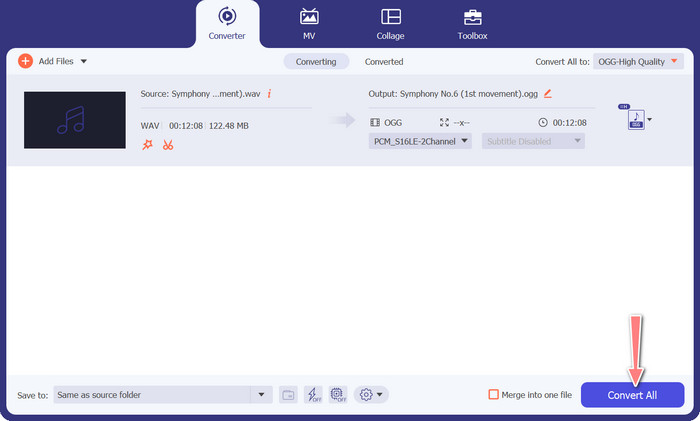
לאחר שאתה מרוצה מההגדרות, לחץ על הלחצן Convert All כדי להתחיל בהמרה. FVC Free Video Converter יתחיל להמיר את קובץ ה‑WAV שלך לפורמט OGG. פס ההתקדמות מציג באיזה שלב נמצא תהליך ההמרה, וכן את הזמן המשוער שנותר.
2. ממיר אודיו בחינם באינטרנט
ה‑Free Audio Converter Online הוא כלי עוצמתי להמרת WAV ל‑OGG באופן מקוון. משתמשים יכולים להוסיף במהירות קובצי WAV או OGG ולהמיר אותם לפורמט OGG באמצעות הממשק הפשוט שלו. הממיר גם מאפשר למשתמשים לשנות את הגדרות הפלט, כמו קצב הסיביות וקצב הדגימה, כדי להשיג את איכות ה‑OGG הרצויה. תהליך ההמרה מהיר ופשוט, והמשתמשים יכולים להוריד את הקבצים המעובדים ישירות מן האתר.
שלב 1. גלוש לאתר Free Video Converter Online באמצעות דפדפן האינטרנט המועדף עליך.
שלב 2. העלה את קובץ ה‑OGG שברצונך להמיר ל‑WAV על‑ידי לחיצה על הלחצן Add Files to Convert.
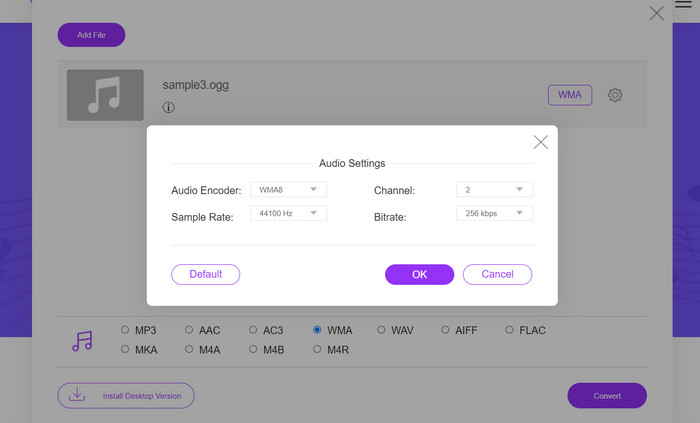
שלב 3. בחר ב‑OGG כתבנית הפלט מתוך רשימת התבניות הנתמכות בתפריט פורמטי ה‑Audio. באפשרותך גם להגדיר את קצב הסיביות ואיכות הפלט עבור קובץ ה‑OGG.
שלב 4. כדי להתחיל בתהליך ההמרה, לחץ על הלחצן Convert. כך ממירים OGG ל‑WAV באופן מקוון.
חלק 2. המר OGG לWAV או WAV ל-OGG עם Audacity
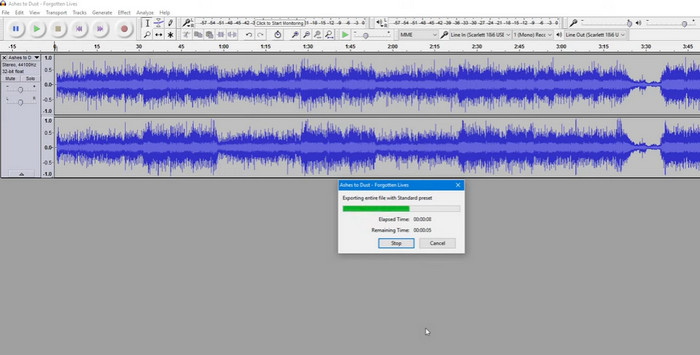
כלי זה הוא תוכנת עריכת אודיו בקוד פתוח שיכולה להמיר קבצי MP3 לקבצי OGG. Audacity מציעה מגוון כלי עריכה ואפקטים בנוסף להמרה, מה שמאפשר למשתמשים לצבוט ולשפר את קבצי האודיו שלהם, מה שהופך אותו לכלי רב-תכליתי לעריכת אודיו ולפעולות המרה.
יתר על כן, Audacity זמין עבור Windows, macOS ו-Linux, מה שהופך אותה לזמינה נרחבת. Audacity היא אלטרנטיבה טובה לכל מי שרוצה להמיר קבצי WAV לפורמט OGG בשל היכולות המתוחכמות וקלות השימוש שלה. עיין במדריך שלהלן כדי ללמוד כיצד תוכנית זו פועלת.
שלב 1. הורד והתקן את Audacity במחשב שלך. פתח את Audacity ואז את קובץ ה‑OGG או ה‑WAV שברצונך לערוך. ניתן לעשות זאת על‑ידי בחירה ב‑File > Open, ניווט אל קובץ ה‑WAV שבמחשב ובחירתו.
שלב 2. לאחר שקובץ ה‑WAV פתוח ב‑Audacity, לחץ על File ואז על Export. בתיבת הדו‑שיח Export Audio, בחר ב‑OGG Vorbis Files כסוג הקובץ.
שלב 3. ניתן להתאים את איכות קובץ ה‑OGG על‑ידי גרירת מחוון ה‑Quality. הגדרות איכות גבוהות יגדילו את גודל הקובץ, בעוד שהגדרות איכות נמוכות יקטינו את גודל הקובץ אך עלולות לפגוע באיכות השיר.
יתרונות
- יש לו את היכולת להמיר WAV ל-OG באצווה.
- המר OGG ל-WAV ב-Windows, macOS ו-Linux.
חסרונות
- לתוכנית אין קהילת תמיכה ייעודית.
חלק 3. המר OGG ל-WAV או WAV ל-OG עם VLC
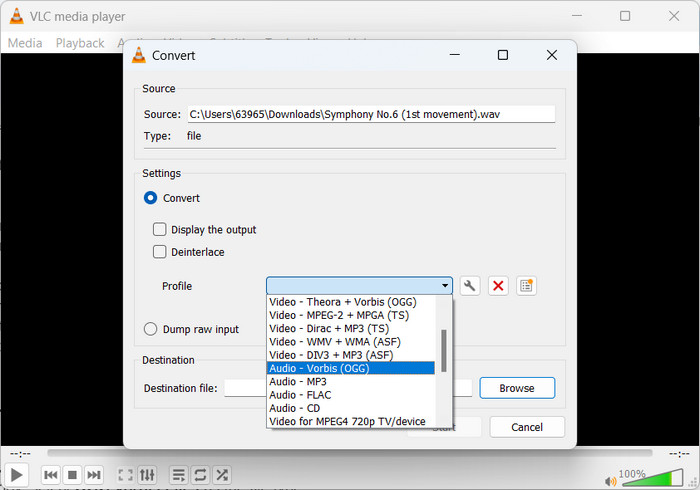
נגן מדיה VLC הוא כלי מולטימדיה רב עוצמה שנמצא בשימוש נרחב להפעלת סוגים שונים של קבצי מדיה. עם זאת, משתמשים רבים עשויים שלא להיות מודעים לכך שתוכנית זו פועלת היטב וממירה OGG ל-WAV עבור Mac. עם כלי הממיר המובנה שלו, נגן המדיה VLC יכול להמיר במהירות ובקלות קבצי WAV לפורמט OGG, מה שמאפשר למשתמשים ליהנות מהמוזיקה האהובה עליהם במגוון פורמטים. עבור כל צרכי המרת האודיו שלך, נגן המדיה VLC מציע פתרון פשוט וידידותי למשתמש בין אם אתה מחפש להמיר קובץ בודד או אצווה של קבצים. בצע את השלבים הבאים כדי ללמוד כיצד להמיר קובץ MP3 לקובץ OGG:
שלב 1. כדי לנגן וידאו, הפעל את VLC ובחר מן שורת התפריטים של הנגן. בתפריט הנפתח תופיע האפשרות Convert / Save; בחר בה.
שלב 2. לחץ על הלחצן Add ובחר את קובץ ה‑WAV שברצונך להמיר מאזור File Selection. כאשר אתה מוכן להמיר או לשמור את הקובץ, הגיע הזמן ללחוץ על הלחצן Convert / Save.
שלב 3. לחץ על התפריט הנפתח Profile ובחר ב‑Audio - Vorbis (OGG) כפרופיל המועדף עליך.
שלב 4. לחץ על הלחצן Browse שמשמאל לחלק ה‑Destination file כדי להגדיר מיקום חדש ושם קובץ עבור הקובץ המומר. ניתן להתחיל את תהליך ההמרה בלחיצה על לחצן Start בתחתית החלון.
יתרונות
- ממשק ידידותי למשתמש.
- הוא תומך בפורמטים רבים של וידאו ואודיו.
חסרונות
- אובדן איכות שמע אפשרי.
לקריאה נוספת:
המר MP3 ל‑OGG ותיהנה מאיכות צליל מעולה
כיצד להמיר בחינם MP4 ל‑WAV במחשב או אונליין [2023]
חלק 4. שאלות נפוצות לגבי המרת OGG ל-WAV
האם אוכל להמיר קבצי WAV מרובים לפורמט OGG בבת אחת?
כן, תוכנות רבות להמרת אודיו, כולל FVC Video Converter Ultimate, תומכות בהמרת אצווה המאפשרת לך להמיר WAV לפורמט OGG בו זמנית.
האם ניתן להמיר קבצי OGG בחזרה לפורמט WAV?
כן, אפשר להמיר קבצי OGG בחזרה לפורמט WAV באמצעות תוכנת המרת שמע. עם זאת, זכור שאיכות השמע עלולה להיות מושפעת אם קובץ ה-WAV המקורי נדחס לפורמט OGG.
האם אני יכול להמיר את קבצי ה-WAV שלי לפורמטי שמע אחרים מלבד OGG?
כן, רוב תוכנות המרת השמע תומכות במגוון רחב של פורמטי שמע, כולל MP3, AAC, FLAC ועוד.
סיכום
המרת קבצי ה‑WAV ל‑OGG יכולה להציע מספר יתרונות, כגון הקטנת גודל הקובץ ושמירה על איכות אודיו גבוהה. במקביל, בעזרת כלי ההמרה המתאימים וקצת ידע בסיסי, ניתן בקלות להמיר את קובצי האודיו שלך לפורמט המתאים ביותר לצרכים שלך.
-
 נגני OGG מצוינים עבור Windows ו- Mac שאסור לכם לפספס
 כשאתה רוצה להשמיע את האודיו המועדף עליך בפורמט OGG, במיוחד כשיש פחות אחסון. תוכלו ללמוד עוד על 5 שחקני ה- OGG הטובים ביותר ממאמר זה.
-
 למד כיצד להמיר MP3 לפורמט WAV
 האם אתה רוצה לדעת איך להמיר MP3 ל WAV? קבע איזה מהכלים מייצר את ההמרה האיכותית ביותר שאתה יכול לקבל.
-
 2 הדרכים הטובות ביותר לערוך מטא נתונים של OGG שכדאי לנסות בחינם
 צריך לערוך מטא נתונים של OGG? ובכן, אתה יכול בקלות להתמודד עם עריכת התגים באמצעות התוכנה הנכונה. אם אין לך אחד לקרוא את המאמר הזה הוא חובה.
