


 ממיר וידאו אולטימטיבי
 מקליט מסך
 תיקון וידאו
הבן מה הם הממירים שניתן להשתמש בהם כדי להמיר DivX ל-AVI
פורמטי DivX ו‑AVI אינם מתחרים זה בזה, למרות ששניהם משויכים לקובצי וידאו, ועדיין יש ביניהם לא מעט הבדלים. למשל, DivX משמש לדחיסת המכל (container) של סרטים ארוכים ולהקטנת הגודל שלהם ככל האפשר, מבלי לאבד מאיכות הווידאו עצמו. לעומת זאת, AVI הוא אחד מסוגי קובצי המכולות שניתן להשתמש בהם כדי לאחסן וידאו באיכות גבוהה, אך בגודל קובץ גדול יותר. כעת, לאחר שיש לנו רקע קצר על השניים, נעמיק עוד כדי להבין אותם טוב יותר וללמוד כיצד להמיר DivX ל‑AVI בחינם באמצעות המשך הקריאה במאמר הזה.
חלק 1. DivX לעומת AVI
כפי שנאמר קודם לכן, DivX ו-AVI אינם באמת מתחרים משלהם כי ניתן להשתמש בהם גם בקובץ כזה או אחר. בנוסף, DivX הוא מדחס קבצים שפותח על ידי DivX, Inc. בעצמה. המדחס הזה הוא קנייני ונאמר שהוא הדור הבא של השכרת וידאו של תקליטורי DVD. אבל כעת ה-DivX נסגר בגלל הניסיון הכושל להחליף את ה-DVD. אבל עכשיו, אתה עדיין יכול לגשת לכלי ולצפות בו בכמה נגני מדיה ישנים התומכים בסוג הדחיסה ש- DivX מספק.
AVI הוא פורמט קובץ מדיה שמשמש כמכל לכל סוגי הווידאו והאודיו עם מקודדים (codecs) שונים. פורמט זה פותח על‑ידי מיקרוסופט כדי לשמש לניגון כל זרמי הווידאו או האודיו. בסוף 1992 נוצר AVI כדי לספק וידאו ואודיו מתקדמים לשימוש במערכות ההפעלה של Windows בלבד. אך כיום ניתן להשתמש ב‑AVI גם ב‑Mac, ב‑Linux ואפילו בטלפונים. בנוסף, יש דבר אחד שפורמט AVI עדיין לא שופר בו, והוא הדחיסה וגודל הקובץ.
DivX
◆ מדחסים המשמשים להקטנת גודל הקובץ של מיכל מבלי לגעת באיכות שלו.
◆ זהו מדחס קנייני של DivX Inc.
◆ נאמר שזו הגרסה הטובה יותר של תקליטורי DVD אך היא נכשלה בניסיון שלה.
◆ רוב נגני המדיה החדשים כיום אינם תומכים ב-DivX.
אבי
◆ זה ידוע כאחד ממיכלי הווידאו והשמע שעברו מהפכה בעידן המודרני הזה.
◆ פורמט זה נתמך ברוב הפלטפורמות והתוכנות.
◆ אין לו דחיסה מדויקת נתמכת מכיוון שהוא נטול אובדן.
ועכשיו, כשאנחנו יודעים את ההבדל בין השניים, עכשיו זה הזמן המתאים להכיר את ממיר DivX ל-AVI באופן מקוון ולא מקוון שבו אתה יכול להשתמש כדי לצפות בקובץ DivX.
חלק 2. 4 מהממירים הטובים ביותר ולמד כיצד להמיר DivX ל-AVI
למעלה 1. FVC Video Converter Ultimate
אם המרת קובצי ה‑DivX שלך היא הבעיה, אז FVC Video Converter Ultimate הוא כנראה הפתרון. בניגוד לממירים אחרים, התוכנה הזו השתפרה לאורך השנים עד שהפכה לאחד מהממירים הבולטים. מעבר לכך שהיא מהטובות ביותר, תהליך ההמרה בה הוא גם מהיר במיוחד, מפני שהיא מונעת על‑ידי האצת חומרה והמרה מהירה. ובזכות הפונקציות המובנות שלה היא טיפסה בקלות לראש הרשימה. למרות שזו תוכנה בתשלום, אינך צריך לשלם סכום גבוה כדי להשתמש בה. אז אם אתה רוצה ללמוד איך להמיר DivX ל‑AVI ב‑Mac או במחשב אישי, עקוב אחר השלבים המפורטים בהמשך כשאנו מנסים זאת בעצמנו.
שלב 1. לפני הכול, לפני שתוכל להשתמש בכלי, עליך להוריד אותו לכונן שלך. לאחר מכן התקן אותו, בצע את ההגדרות הראשוניות ולחץ על Start Now כדי להמשיך.
הורדה חינמיתל-Windows 7 ומעלההורדה מאובטחת
הורדה חינמיתל-MacOS 10.7 ומעלההורדה מאובטחת
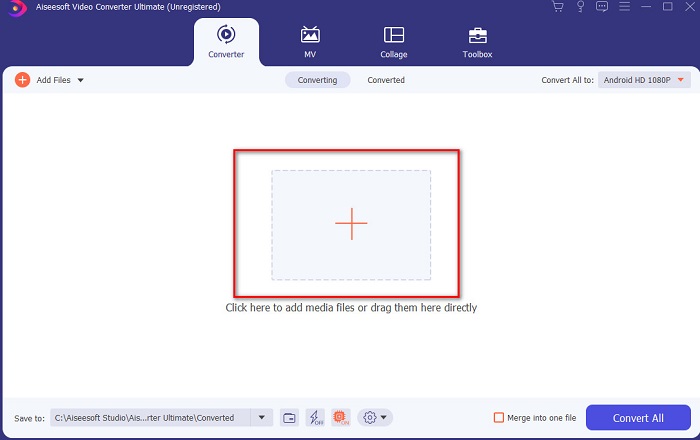
שלב 2. הפעל את הכלי כדי להמשיך, ולאחר מכן תופיע ממשק כמו זה. בחלק האמצעי לחץ על כפתור ה‑+ ואתר את קובץ ה‑DivX שברצונך להוסיף, ואז לחץ על Open.
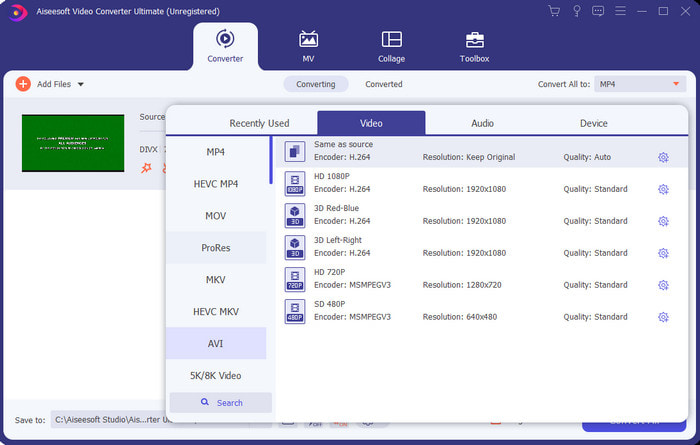
שלב 3. כדי לשנות את DivX ל‑AVI לחץ על Convert All to ואתר את פורמט AVI ולחץ עליו.
שלב 4. כדי להתחיל את תהליך ההמרה לחץ על Convert All והמתן עד לסיום התהליך.
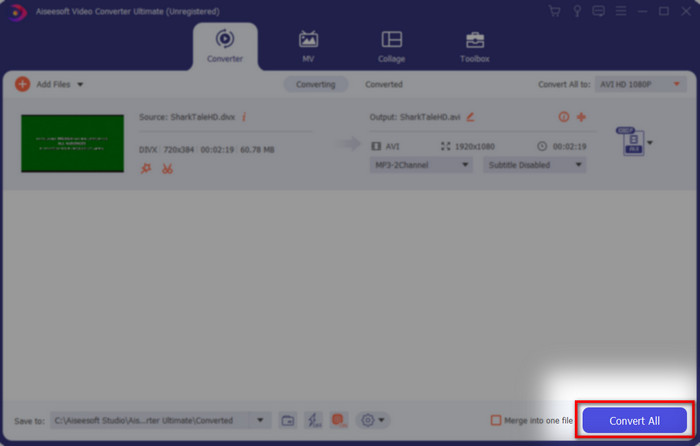
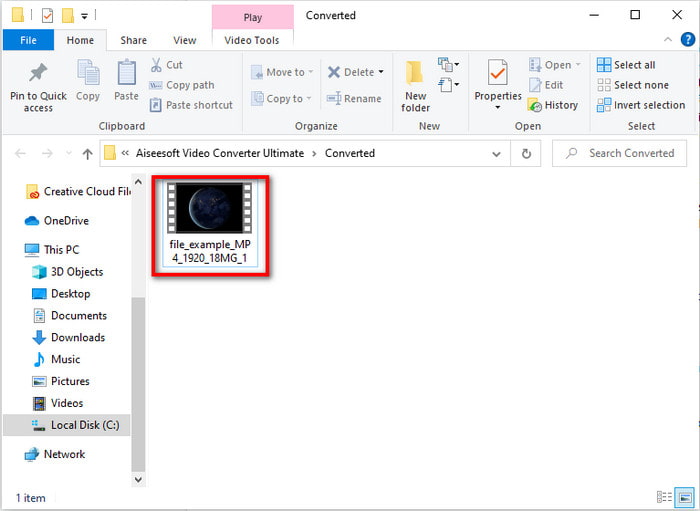
שלב 5. המתן לסיום תהליך ההמרה. לאחר שהסתיים, תופיע תיקייה על המסך שלך עם הקובץ שהומר; לחץ עליה כדי לצפות וליהנות.
Top 2. Freemake Video Converter
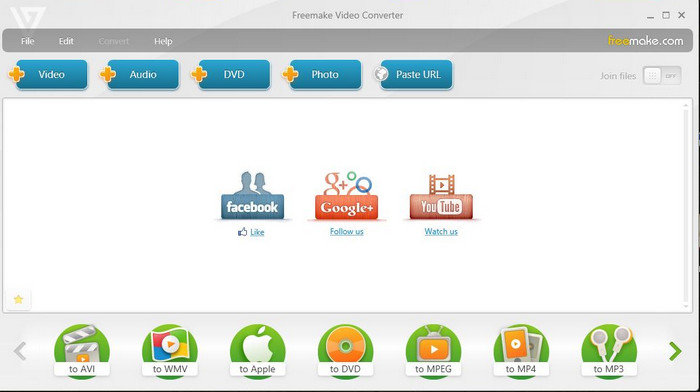
תוכנה נוספת שניתנת להורדה ושאפשר להשתמש בה להמרת פורמטים היא Freemake Video Converter. כלי זה כבר סייע למשתמשים רבים להמיר כל קובץ מדיה לפורמט חדש. בנוסף, הוא נחשב לאחת מהתוכנות הטובות שניתן להוריד ולהסתמך עליהן. עם זאת, על אף שהכלי טוב, הוא עדיין חסר תמיכה בחלק מהפורמטים ותהליך ההמרה בו איטי מאוד, מפני שאין לו האצת חומרה כמו ב‑FVC Video Converter Ultimate. לכן, אם אתה רוצה להמיר DivX ל‑AVI בחינם, זו יכולה להיות תוכנת ברירת המחדל שלך.
יתרונות
- חינם להורדה של כל תוכנה.
- מבחינת מראה זה פשוט.
חסרונות
- אין האצת חומרה.
- חלק מהפורמטים אינם נתמכים כאן.
למעלה 3. FVC Free Video Converter
מה אם אתה רוצה להמיר קובץ מדיה לפורמט חדש אבל אינך מעוניין להוריד תוכנה? אז FVC Free Video Converter נמצא כאן כדי לעזור לך. בניגוד לשני הכלים שהוזכרו קודם, לכלי זה ניתן לגשת גם בלי להוריד אותו. אף שהתוכנה חינמית לשימוש, עדיין יש מספר פורמטים שאינם נתמכים. בנוסף, יש לך רק מבחר מוגבל של פורמטים להמרה. עם זאת, תהליך ההמרה מהיר יותר בהשוואה ל‑Freemake Video Converter. אז עכשיו, אם אתה רוצה לדעת איך להמיר DivX ל‑AVI אונליין, עקוב אחר השלבים שלהלן.
שלב 1. עבור לאתר הראשי של FVC Free Video Converter באמצעות לחיצה על קישור זה.
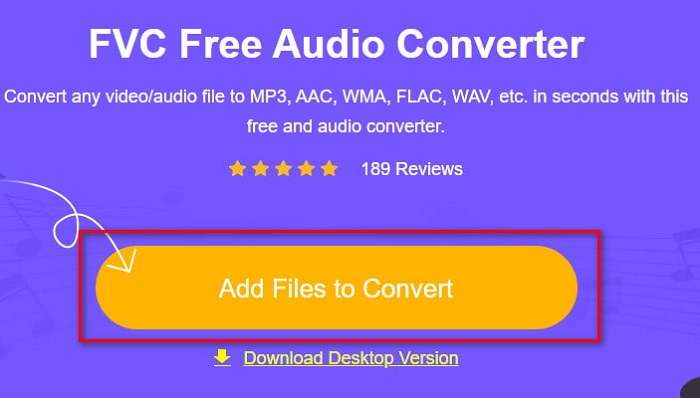
שלב 2. לחץ על Add Files to Convert כדי להוריד את המשגר אם זו הפעם הראשונה שלך. ואם המשגר כבר מותקן, לחץ שוב על Add Files to Convert, אתר את הקובץ בתיקייה, לחץ עליו ואז לחץ על Open.
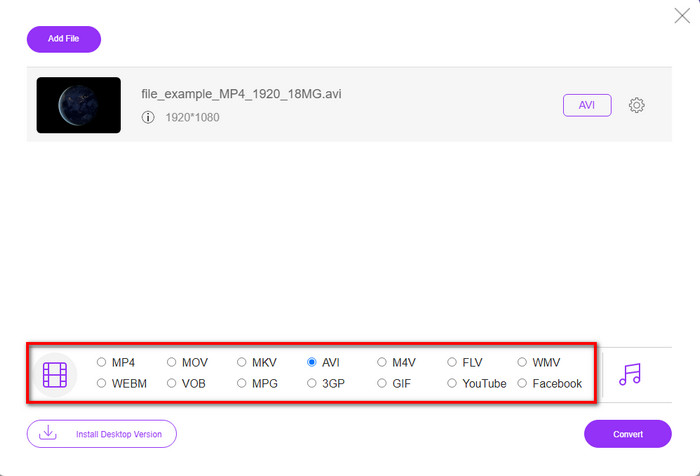
שלב 3. בחר את פורמט AVI מתוך האפשרויות המופיעות למטה, או כל פורמט אחר שברצונך להמיר אליו.
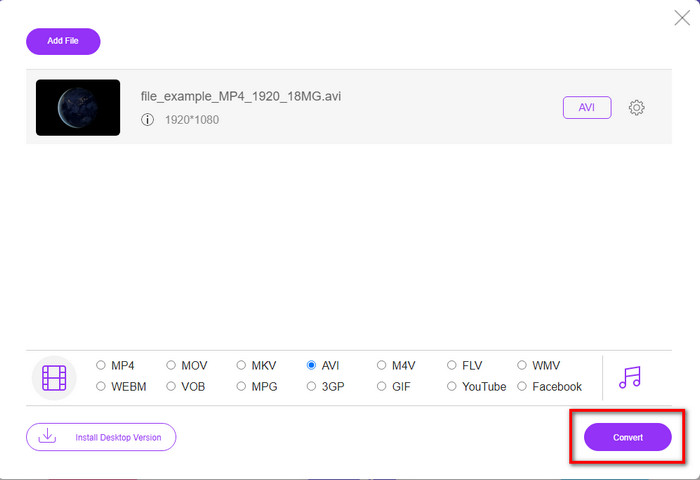
שלב 4. לאחר שסיימת לבחור את הפורמט, הגיע הזמן לשמור אותו בכונן שלך באמצעות לחיצה על Convert.
שלב 5. לאחר שהתהליך הושלם, המתן לחלון התיקייה שיקפוץ על המסך. פתח את הקובץ בלחיצה וצפה בקובץ המדיה שהומר.
למעלה 4. Online-Convert.com
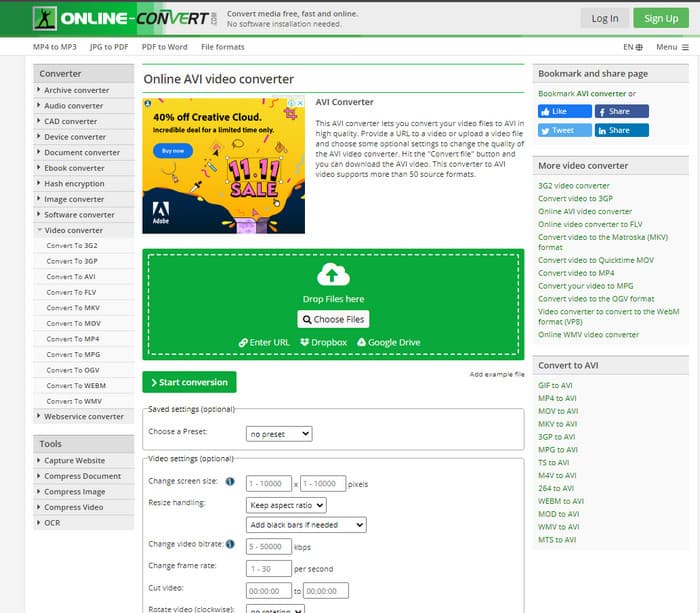
כלי אונליין נוסף שניתן להשתמש בו להמרת כל קובץ מדיה הוא Online-Convert.com. כמו חלק מהכלים המקוונים, ממיר זה תומך במגוון קטן יחסית של פורמטים. עם זאת, יש בו אפשרויות מובנות להתאמת הווידאו, שניתן להשתמש בהן אך הן קשות לניהול, במיוחד אם אין לך מושג בנושא. בנוסף, העלאה והורדה של קבצים כאן איטיות מאוד בהשוואה ל‑FVC Free Video Converter.
יתרונות
- ניתן לגשת בחינם באינטרנט.
- הממשק של הכלי נהדר ויש לו מעט עד אין פרסומות.
- תהליך ההמרה יהיה תלוי בחיבור לאינטרנט.
חסרונות
- לא ניתן לגשת ללא אינטרנט.
- תהליך יבוא ויצוא ייקח הרבה זמן בהשוואה לכלים האחרים.
חלק 3. איזה מהם עדיף להמיר DivX ל-AVI?
| מאפיינים | ממיר וידיאו אולטימטיבי | ממיר וידיאו פריימייק | ממיר וידאו חינם FVC | Online-Convert.com |
| המרת וידאו ואודיו |  | | | |
| המרת אצווה | |  | | |
| האצת חומרה | | | | |
| כלי מבוסס תוכנית | כלי מבוסס שולחן עבודה | כלי מבוסס שולחן עבודה | כלי מבוסס אינטרנט | כלי מבוסס אינטרנט |
| קישוריות רשת | לא חובה | לא חובה | נדרש | נדרש |
חלק 4. שאלות נפוצות לגבי ממירי DivX ל-AVI
איזה יותר טוב? DivX ו-XviD?
DivX הוא קודק קנייני ידוע לקובץ מיכל הווידאו והשמע וגם הוא מתמחה בהקראת הקובץ בדיסק תוך כדי דחיסה מבלי לאבד את האיכות. אמנם XviD היא גרסת ה-knock-off של DivX והיא הרבה יותר טובה מה-DivX. כמו כן, זה לא קנייני מה שאומר שכל אחד יכול להשתמש בזה מתי או בכל מה שתרצה.
מה זה קודקים?
קודק משמש לדחיסת קובץ ולהפצת כל אחד מקבצי האודיו והווידאו הרבה יותר מהר בתוך גודל קובץ קטן יותר. כמו כן, הוא משמש לביטול דחיסה של קובץ המחובר לקודק האמור כדי לפתוח את הקובץ הדחוס שיצרת מבלי להרוס את האמינות שלו.
כדי לקבל גודל קובץ קטן יותר, האם זה אידיאלי לדחוס או להמיר?
אם אתה רוצה לשמור על איכות הווידאו ולהקטין את גודל הקובץ, מומלץ לדחוס אותו בעזרת הקישור הזה. אבל אם אתה רוצה דרך קלה יותר, כדאי לשקול להמיר וידאו ל‑MP4 על‑ידי קריאת המאמר הזה כדי לקבל מושג איך לעשות זאת.
סיכום
כשאנו מסיימים את המאמר, כעת קל לנו יותר לדעת מהו DivX ומהו AVI. הצגנו לך גם ארבעה כלים מועילים שניתן להשתמש בהם כדי לנגן קובץ DivX שלך באמצעות המרתו לפורמט AVI. אז אם אתה רוצה לחוות הצלחה של 100%, השתמש ב‑FVC Video Converter Ultimate כדי להבטיח את ההצלחה.
הורדה חינמיתל-Windows 7 ומעלההורדה מאובטחת
הורדה חינמיתל-MacOS 10.7 ומעלההורדה מאובטחת
-
 [חינם ומקוון] 7 דרכים להמיר MTS ל-AVI במחשב Mac/Windows
 כיצד להמיר MTS ל- AVI בקלות? במדריך זה תוכלו למצוא 7 דרכים בחינם וקלות להמיר קבצי MTS ל- AVI ב- Windows או Mac ללא אובדן איכות.
-
 הדרכה להמרת MP4 לקבצי AVI עם 7 ממירי וידאו בחינם
 רוצה לקבל את כל הדרכים החינמיות להמרת וידאו AVI ל-MP4? אתה לא צריך לפספס את המאמר הזה. להלן 7 דרכים להמיר קבצי AVI ל-MP4 בחינם ב-Windows, Mac, iPhone, Android ובאינטרנט.
-
 3 שיטות קלות להמיר FLV ל- AVI בשולחן העבודה ובאינטרנט
 להלן שלוש שיטות שיעזרו לך להמיר ביעילות את קובצי הווידאו FLV שלך לפורמט AVI ב-Windows וב-Mac, כך שתוכל לצפות בהם באיכות גבוהה.
