


 ממיר וידאו אולטימטיבי
 מקליט מסך
 תיקון וידאו
 הורדה מאובטחת
המר GIF ל-MKV בשיטה הכי פשוטה
פורמט GIF הוא אחד מפורמטי הקבצים הנפוצים ביותר שאפשר להשתמש בהם במכשיר שלך, אבל יש מצבים שבהם ייתכן שתרצה להמיר אותו לפורמט וידאו אחר, כמו MKV. עם זאת, חיפוש אחר יישום מתאים עלול להיות מתיש. לממירים רבים יש בעיות בתהליך ההמרה, וחלק מהאפליקציות דורשות תיקון. מעבר לכך, מאתגר למצוא כלי שתומך במגוון רחב של פורמטי וידאו. במאמר זה תמצא את הפתרון הטוב ביותר עבורך. תגלה שיטה מצוינת להמרת GIF ל‑MKV באמצעות יישום אמין שניתן להשתמש בו גם ב‑Windows וגם ב‑Mac.

חלק 1: הקדמה של GIF ו-MKV
לפני ההמרה, תחילה תלמד את המידע על שני הפורמטים הללו. ראה את הפרטים החיוניים בטבלה למטה.
| פוּרמָט | GIF | MKV |
| שֵׁם | פורמט מחלף גרפיקה | מיכל מולטימדיה מאטרוסקה |
| סיומת קובץ | .gif | .mkv |
| תיאור | פורמט להחלפת תמונות הוא GIF. זהו פורמט גרפי בשימוש נרחב המאחסן נתונים דחוסים בפורמט ללא איכות ומשתמש לא יותר מ-256 צבעים. CompuServe יצרה את פורמט GIF להחלפת תמונות רסטר ברשתות בשנת 1987 (GIF87a). פורמט הקובץ שונה בשנת 1989 (GIF89a), והוסיף את היכולת לאנימציה ושקיפות. ניתן להעלות GIF בטוויטר ובפייסבוק. אי אפשר להעלות קובצי GIF ליוטיוב או באינסטגרם כי הם לא סרטונים. לא ניתן להפעיל קובצי GIF גם בנגני מדיה. פורמט Graphics Interchange מכונה GIF. האם יש לבטא את GIF "jiff" או "gif", כאשר ה-"g" מבוטא כמו "g" ב-"goat", היה במחלוקת חריפה. אפשר גם לאחסן מספר קבצים בקובץ GIF אחד. | MKV הוא מיכל קוד פתוח שיכול להכיל חומרי מדיה שנדחסו באמצעות קודקים שונים. יש לו יתרונות רבים על פני מיכל ה-AVI המסורתי, כולל היכולת לכלול רצועות אודיו וכתוביות בשפות רבות שניתן להחליף מבלי להשהות את ההשמעה וחיפוש והרצה של קבצים מהירים. בנוסף, הפורמט פשוט לשינוי, מה שהופך אותו לפשוט לחלץ נתוני אודיו ווידאו. |
| פותח על ידי | CompuServe | מאטרוסקה |
| קטגוריה | פורמטים של קבצי תמונה | פורמטים של קבצי וידאו |
| סוג MIME | תמונה/גיף | וידאו/x-matroska |
חלק 2: שלבים מפורטים להמרת GIF ל-MKV
Video Converter Ultimate הוא היישום שאתה מחפש אם ברצונך להמיר קובצי GIF לפורמט MKV במהירות ובקלות. בעזרת התוכנה הזו, תוכל להמיר את קבצי ה‑GIF שלך בלי לאבד איכות. בנוסף, ממיר זה מציע תהליך המרה מהיר במיוחד — עד פי 30 מהר יותר מממירים אחרים. אתה גם יכול להמיר מספר קבצי GIF לפורמט MKV אחד בו‑זמנית, משום שהתוכנה תומכת בהמרה בצרור (Batch). כך תוכל להיות בטוח שהמרת הקובץ לפורמט אחר היא קלה ומהירה. יתר על כן, Video Converter Ultimate מציע ממשק אינטואיטיבי, המתאים לכל המשתמשים. מבחינת נגישות, גם משתמשי Windows וגם משתמשי Mac יכולים להשתמש בממיר הזה, מה שהופך אותו לנוח במיוחד.
יתר על כן, יש עוד פונקציות שאתה יכול להיתקל בהן. נניח שאתה רוצה ליצור קליפ מוזיקה מדהים להשמעה במסיבות יום הולדת, חתונות, מסיבות חג המולד ועוד. אתה עדיין יכול לסמוך על יישום זה מכיוון שהוא מציע יוצר וידאו מוזיקה. ליוצר הזה יש ערכות נושא בחינם כדי להפוך את הסרטון שלך ליצירתי וייחודי יותר. תכונה נוספת שהיא יכולה להציע היא כלי תיקון הצבע. באמצעות פס ההזזה, כלי זה מאפשר לך להתאים בקלות את הבהירות, הניגודיות, הרוויה והגוון של הסרטון שלך. בדרך זו, הסרטון שלך יהיה נעים יותר לצפייה. ישנן תכונות נוספות שתוכלו לחוות באפליקציה הניתנת להורדה זו. כדי לגלות עוד על כלי זה, עיין בפרטים הנוספים להלן.
תכונות
◆ המר מגוון רחב של פורמטי וידאו, כולל MP4, MKV, M4V, MOV, AVI, FLV, WMV, VOB, SWF, ועוד יותר מ-100.
◆ המר קבצים רבים בבת אחת.
◆ הוא מציע תהליך המרה מהיר.
◆ הוא מציע פונקציית משפר וידאו לשיפור הווידאו.
יתרונות
- יש לו ממשק קל לשימוש עם מדריכים מפורטים.
- מתאים למתחילים.
- חינם להורדה.
- נגיש גם ב-Windows וגם ב-Mac.
- זה יכול להמיר קבצי וידאו/תמונות ללא הגבלה.
חסרונות
- קבל את הגרסה בתשלום כדי לחוות תכונות יפות יותר.
עקוב אחר ההוראות המפורטות שלהלן כדי להמיר GIF ל‑MKV מיד באמצעות Video Converter Ultimate במחשב ה‑Windows או ה‑Mac שלך.
שלב 1: אם ברצונך להוריד את Video Converter Ultimate בקלות, לחץ על כפתור הורדה למטה. לאחר מכן, הפעל את התוכנה לאחר ההתקנה.
הורדה חינמיתל-Windows 7 ומעלההורדה מאובטחת
הורדה חינמיתל-MacOS 10.7 ומעלההורדה מאובטחת
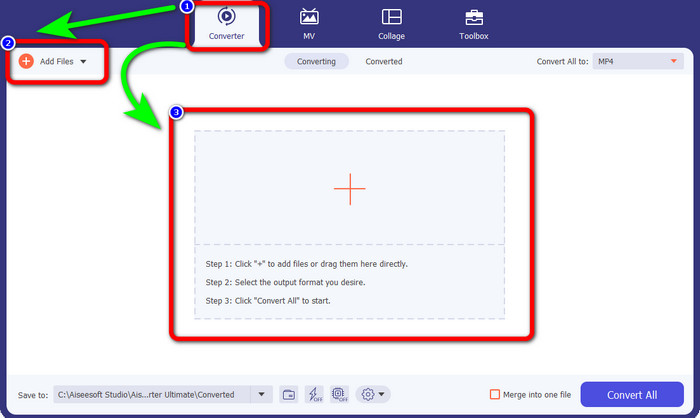
שלב 2: עבור ללשונית Converter כאשר הממשק כבר מופיע על המסך. לאחר מכן לחץ על כפתור Add Files כדי לייבא את קובץ ה‑GIF. אפשר גם ללחוץ על סימן הפלוס במרכז הממשק כדי להוסיף את הקובץ.
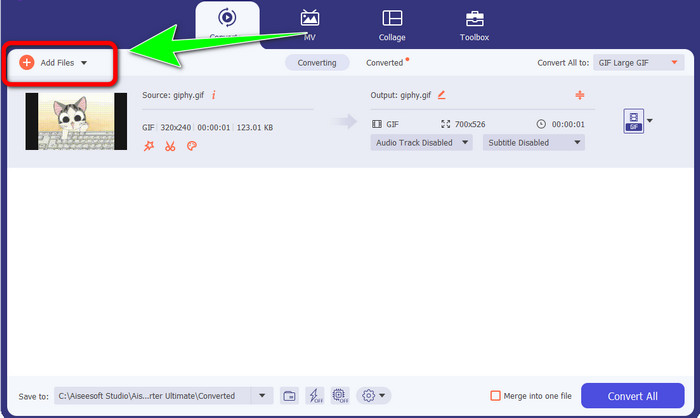
שלב 3: אם ברצונך לבצע המרה בצרור (Batch), לחץ שוב על כפתור Add Files.
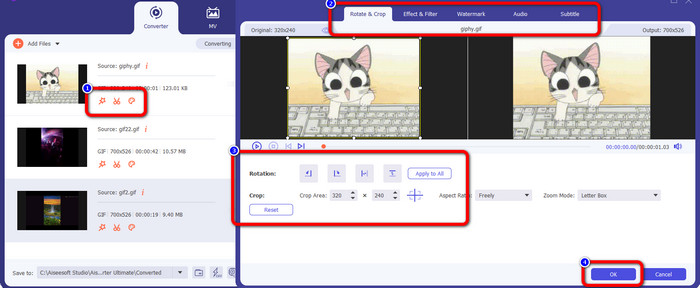
שלב 4: אם ברצונך לערוך את הווידאו לפני ההמרה, לחץ על סמלי כלי העריכה. בכלי זה אפשר להוסיף פילטרים ואפקטים לסרטונים שלך. תוכל גם לסובב ולחָתוך את הווידאו. לאחר מכן לחץ על כפתור OK.
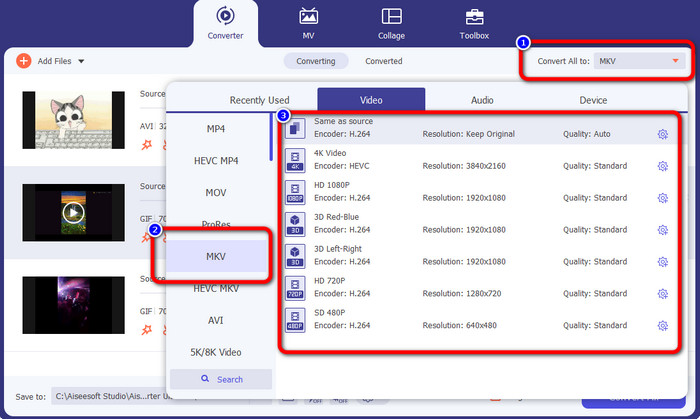
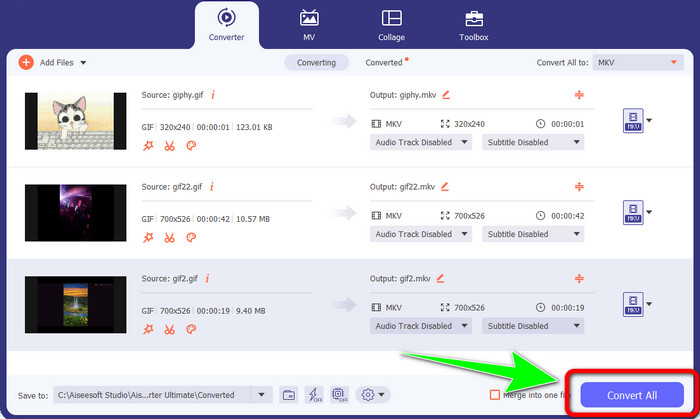
שלב 5: לאחר מכן עבור אל כפתור Convert All to כדי להמיר את כל הקבצים. בחר בקובץ MKV מתוך אפשרויות הפורמט ובחר את איכות הווידאו הרצויה, מ‑480p ועד 4K.
שלב 6: בשלב הסופי, לחץ על כפתור Convert All בפינה הימנית‑תחתונה של הממשק. המתן לסיום תהליך ההמרה ושמור את סרטון ה‑MKV בשולחן העבודה שלך. תוכנה זו יכולה גם לעזור לך להמיר GIF ל‑M4V.
חלק 3: שאלות נפוצות על המרת GIF ל-MKV
1. מהו פורמט הקובץ הטוב ביותר להמרה של MKV?
הפורמט הטוב ביותר שניתן להמיר אליו MKV הוא פורמט MP4. פורמט MP4 הוא הפורמט הנפוץ ביותר בעידן המודרני. מבחינת תאימות, הוא מצוין משום שניתן לנגן קובץ MP4 בכל התוכנות והמכשירים. לחץ כאן כדי ללמוד כיצד להמיר MKV ל‑MP4.
2. האם ל-MKV יש איכות טובה יותר מ-MP4?
כן. למרות שקובץ ה-MP4 תואם לכל המכשירים, לקובץ ה-MKV יש איכות טובה יותר מקובץ ה-MP4. הסיבה לכך היא שבגלל התמיכה בתכונות נוספות, רצועות שמע מרובות ורצועות כתוביות, קבצי MKV בדרך כלל גדולים יותר מסרטוני MP4. קובץ ה-MKV תומך גם בקבצי כתוביות שונים שבהם אתה יכול להשתמש בשפות שונות.
3. מהם היתרונות והחסרונות של קבצי GIF?
היתרון של קבצי GIF הוא שגודל הקובץ שלהם קטן, זמן הטעינה קצר, האנימציה אפשרית ודחיסה ללא הפסדים. אז החיסרון של הקובץ הזה הוא שיש לו מבחר מוגבל של צבעים, התמונה שטוחה בלבד, והוא לא מושלם לצילום עם מגוון רחב של צבעים.
4. מדוע יש פעמים שקובץ ה-MKV לאחור?
אחת הסיבות היא שייתכן שלמחשב אין מספיק זיכרון וכוח מעבד כדי להתמודד עם וידאו באיכות גבוהה או UHD MKV. לפורמט הקובץ הזה יש גודל קובץ גדול, אחרי הכל.
5. אילו נגני וידאו יכולים לתמוך בקבצי MKV?
אתה יכול לנגן את קובץ ה-MKV שלך ב-VLC Media Player, Media Player Classic, 5KPlayer, Real Player, KMPlayer, Pot Player, וכו '. עם תוכניות אלה, אתה בהחלט יכול לנגן את קובץ הווידאו MKV שלך.
סיכום
באמצעות שיטה זו תוכל להמיר GIF ל‑MKV בקלות ובמהירות. וVideo Converter Ultimate הוא הבחירה הנכונה עבור ממיר אופליין מרשים. אז למה לחכות? נסה את היישום הזה ותהנה ממגוון הפיצ’רים שתפגוש בו!
-
 כיצד להמיר TRP ל-MKV מבלי לאבד את האיכות
 האם אתה מתקשה לגלות כיצד להמיר TRP ל-MKV? אז אתה בפוסט הנכון. אנו נציע לך את הדרכים הטובות ביותר להמיר TRP ל-MKV בקלות.
-
 4 הפתרונות הטובים ביותר להמרת MXF ל-MKV [נפתר]
 הכירו את ארבע השיטות הנהדרות הללו להמרת MXF ל-MKV באופן מקוון ולא מקוון בקלות. האפליקציות הכלולות בפוסט זה יכולות לעזור לך להמיר קבצים ללא טרחה.
-
 דרכים מדהימות להמיר OGV ל-MKV ביעילות ובקלות
 פוסט מדריך זה ייתן לך הליך ללא טרחה להמרת OGV ל-MKV ללא הפסדים. נסה את הממירים האמינים ביותר, ותחווה את הפונקציה הנהדרת שלהם
