


 ממיר וידאו אולטימטיבי
 מקליט מסך
 תיקון וידאו
 הורדה מאובטחת
הטוב מ-7: ממיר אודיו יעיל M4A ל-WAV שלא כדאי לפספס
כשמדובר בהתאמה, פורמט M4A אינו יוצר בעיות. עם זאת, אם אתה קפדן מאוד לגבי השירים שאתה מנגן או האודיו שאתה מקליט, פורמט M4A אינו הבחירה הטובה ביותר לכך. לכן, אפשר להשתמש במכולת אודיו חסרת אובדן נתונים כמו מכולת WAV כדי לפתור את הבעיה. כדי לעשות זאת, תצטרך תוכנה אמינה. כדי לחסוך זמן בחיפוש אחרי כלים להמרת M4A לתוכנת WAV, הישאר במאמר זה כשאנו בוחנים אותם בקפידה.

חלק 1: ממיר M4A ל-WAV עבור Windows ו-Mac
1. Video Converter Ultimate
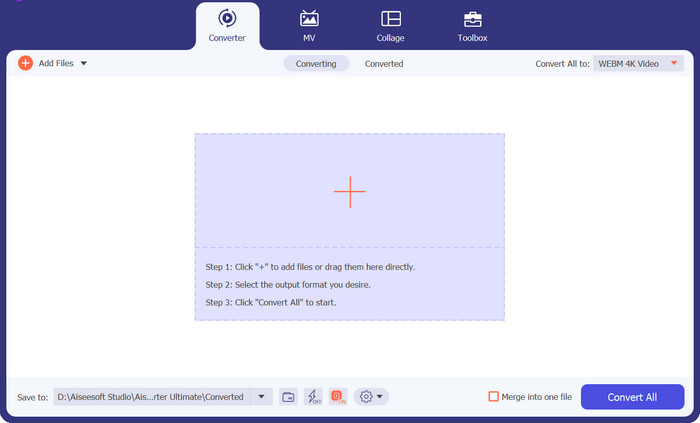
משתמש מומלץ: הפלטפורמה הזו מתאימה ביותר למתחילים, למשתמשים רגילים ולמשתמשים מקצועיים.
פלטפורמה תואמת: מכשירי Windows ו‑Mac
כמובן שנתחיל עם הפתרון האולטימטיבי להמרת קבצי M4A באמצעות תוכנת WAV. Video Converter Ultimate היא ממיר מקצועי המצויד בטכנולוגיית האצת GPU. פירוש הדבר שהתוכנה יכולה להמיר במהירות גבוהה גם כשאתה עובד עם כמות גדולה וקבצים מדיה כבדים. בנוסף, היא ידועה בכך שהיא מציעה תכונת המרה באצווה המאפשרת לך להמיר תיקייה של קבצי M4A לפורמט WAV בפעם אחת. יתרה מזו, התוכנה מציעה יותר מ‑1000 פורמטי וידאו ואודיו שיתאימו לכל צורכי המרת הפורמט שלך.
הורדה חינמיתעבור Windows 7 או גרסה מאוחרת יותרהורדה מאובטחת
הורדה חינמיתל‑MacOS 10.7 ומעלההורדה מאובטחת
מה אנחנו הכי אוהבים:
ממשק משתמש פשוט וברור: הכלי הזה עובד מצוין גם עבור מתחילים. ממשק המשתמש שלו פשוט אך אלגנטי, מה שמקל מאוד על הניווט.
ארגז כלים מקיף: Video Converter Ultimate אינה רק בחירה מצוינת להמרת M4A באמצעות תוכנת WAV. היא חורגת מעבר לכך ומעניקה למשתמשים כלים שימושיים נוספים כמו יוצר GIF, משפר וידאו, ממזג וידאו ועורך וידאו.
תצוגה מקדימה בזמן אמת של הפלט: התוכנה יכולה להציג את תוצאת הפלט בזמן אמת בחלון התצוגה שלה בזמן יצירת קליפים מעריצים לקבצים שלך. כך תדע אילו חלקים בצילומים שלך עדיין צריכים שיפור.
חיסרון:
הגבלת גרסת הניסיון החינמית: Video Converter Ultimate מאפשרת לך ליהנות מחלק מהתכונות הטובות ביותר שלה בגרסת הניסיון החינמית. כדי לקבל גישה לכלל הפונקציות, תצטרך לרכוש מנוי.
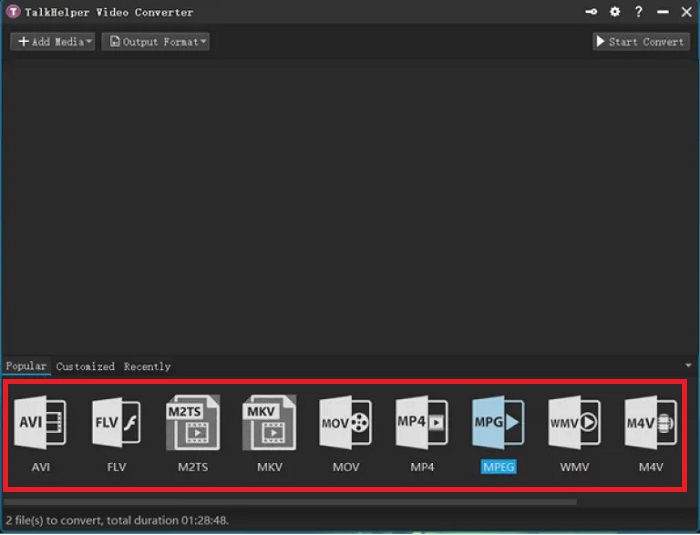
2. ממיר וידאו של TalkHelper
משתמש מומלץ: מתחילים עד משתמשים ברמת ביניים
פלטפורמה תואמת: Windows
המרה באיכות גבוהה היא רק אחד היתרונות שתקבלו עם TalkHelper Video Converter. ממיר M4A ל-WAV חלופה זו משתמשת במעבד מרובה ליבות כדי להאיץ את תהליך ההמרה של הקבצים שלך. יתרה מכך, תוכנית זו מציעה פורמטים ספציפיים לווידאו ולמכשירים כמו נוקיה, אקסבוקס, בלקברי, סמסונג, קונסולות משחקים ועוד.
מה אנחנו הכי אוהבים:
מהירות המרה גבוהה: TalkHelper Video Converter מכפילה את מהירות ההמרה בהשוואה למתחרים שלה.
המרה באצווה: הכלי הזה מאפשר לך להמיר ספרייה של קבצים בו‑זמנית, פשוט על ידי העלאת תיקייה או הוספת עוד קבצים בזמן ההמרה.
חיסרון:
ממשק מיושן למראה: בהשוואה לתוכנות אחרות שסקרנו, הממשק של TalkHelper Video Converter נראה פשוט ומעט מיושן מבחינת העיצוב.
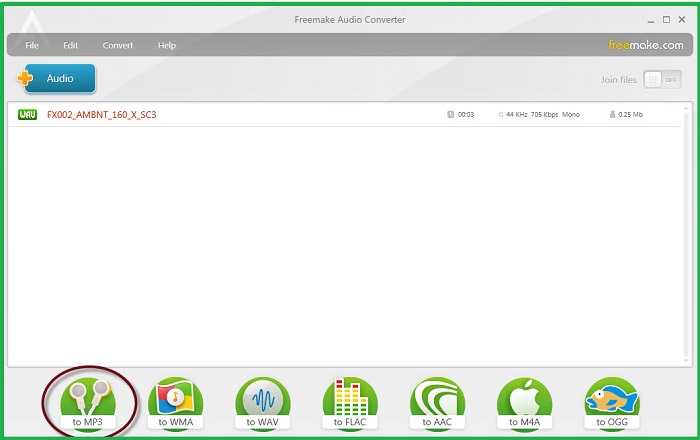
3. Freemake Free Audio Converter
משתמש מומלץ: מתחילים עד מקצוענים
פלטפורמה תואמת: מכשירי Windows
עם למעלה מ-73 מיליון משתמשים ברחבי העולם, הנה Freemake Audio Converter. כפי שהשם מרמז, הכלי הזה הוא לגמרי בחינם לכולם לשימוש. פתרון ממיר m4a ל-wav לא מקוון זה מבטיח המרה מהירה של רקט הודות לשילוב של טכנולוגיית האצת GPU. יתר על כן, אנו אוהבים כיצד התאימות שלו פועלת עד לגרסה של Windows Vista.
מה אנחנו הכי אוהבים:
המרת אודיו באיכות גבוהה: התוכנה מאפשרת למשתמשים להתאים את איכות פלט הקבצים שלהם, מרמת סטנדרט ועד 320 kbps.
שיתוף מהיר באינטרנט: לאחר המרת קבצי ה‑M4A שלך ל‑WAV, תוכל לשמור אותם ב‑Google Drive או להעלות אותם לחשבונות המדיה החברתית שלך.
חיסרון:
פורמטי אודיו מוגבלים: Freemake Audio Converter מציג רק יותר מ-50 פורמטי אודיו.
חלק 2. ממיר M4A ל-WAV מקוון
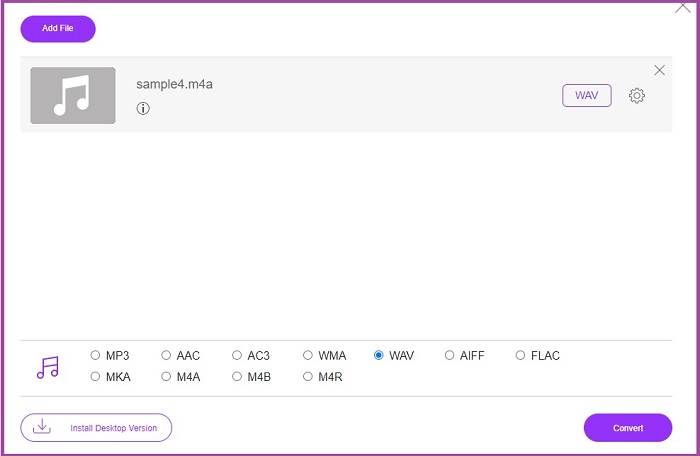
1. ממיר אודיו בחינם
משתמש מומלץ: מתחילים עד משתמשי ביניים
פלטפורמה תואמת: Windows OS
אם אתה חושש לאבד מאיכות קובץ האודיו שלך, קיים פתרון מקוון שנועד לעזור לך. Free Audio Converter מאפשר לך ליהנות מתהליך המרה נהדר ללא כל מגבלת גודל העלאה. בנוסף, ממיר M4A ל‑WAV חינמי זה גם אינו דורש מהמשתמשים הרשמה או יצירת חשבון.
מה אנחנו הכי אוהבים:
ללא סימן מים: שלא כמו חלק מהתוכנות המקוונות, מפתיע למדי למצוא ממיר אודיו אונליין כזה שאינו משאיר סימני מותג על הקבצים היקרים שלך.
הגנת פרטיות: Free Audio Converter מתחייב למחוק את הקבצים שלך עם יציאתך מהתוכנה לאחר סיום ההמרה.
חיסרון:
חיבור לאינטרנט נדרש: אתה יכול להשתמש בכלי בכל מכשיר אבל צריך להיות חיבור יציב, אחרת ההמרה לא תצליח.
המרת אצווה לא זמינה: התוכנית יכולה להמיר רק קבצי M4A בנפרד.
חלק 3. אפליקציית ממיר M4A ל-WAV עבור אנדרואיד ו-iOS
1. כל ממיר אודיו
משתמש מומלץ: משתמשים ברמת ביניים
פלטפורמה תואמת: Android ו‑iOS
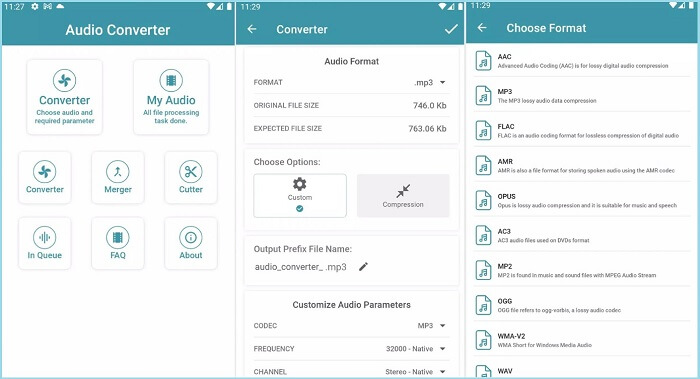
ממיר כל האודיו, ששוחרר על ידי Highdea Apps Studio, הוא כלי אמין להפיכת קבצי M4A שלך ל-WAV. מלבד היותו ממיר M4A ל-WAV בחינם, תוכנית זו מציעה עוד שלושה כלים מובנים. עם המיזוג, אתה יכול לתפור יותר משני קבצי שמע באחד או לחתוך קובץ באמצעות הכלי Cutter. מצד שני, אם אתה רוצה למזער את גודל הקובץ, אתה יכול ליהנות בחופשיות מהקומפרסור.
מה אנחנו הכי אוהבים:
נגן מובנה: לאחר המרת קבצי האודיו בפורמט M4A, תוכל להאזין ישירות לפורמט החדש פשוט על ידי לחיצה על כפתור הניגון בתוך האפליקציה עצמה.
נתונים מוגנים: הכלי הזה מחויב להעניק הגנת נתונים למשתמשים באמצעות תהליך הצפנה.
חיסרון:
עורך מטא‑דאטה לא זמין: בניגוד לממירי אודיו ניידים אחרים, לתוכנה הזו אין עורך מטא‑דאטה שבו תוכל להזין את הפרטים הנחוצים של שיר או קובץ.
2. עורך אודיו ועורך מוזיקלי
משתמש מומלץ: משתמשים ברמת ביניים עד מקצוענים
פלטפורמה תואמת: Android ו‑iOS
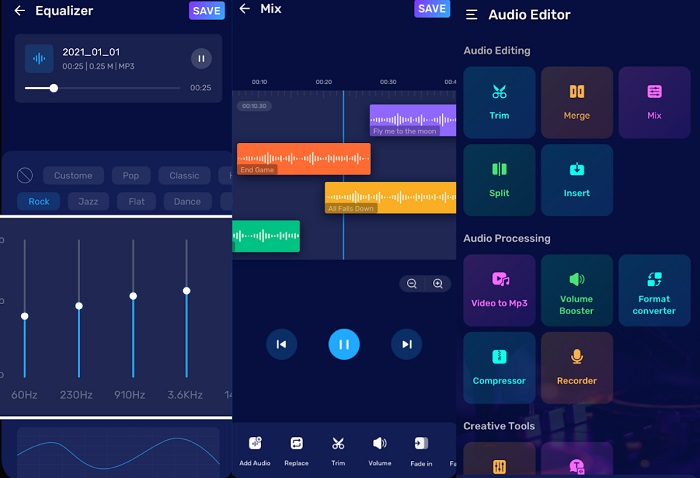
אם אתם מחפשים התגלמות של יעילות, עורך אודיו ועורך מוזיקלי לא דורשים היכרות. אפליקציית המרת M4A ל-WAV אינה ממיר אודיו יותר, אלא יכולה גם לבצע פעילויות עריכת אודיו מתקדמות לכל הצרכים שלך. זה מאפשר לך לערבב אודיו כדי ליצור מצגת מותאמת להפליא. בנוסף, זה מאפשר לך להקליט קול או צלילים ולעבור ישר לעורך האודיו המובנה שלו כדי לחסל רעש לא רצוי ברקע.
מה אנחנו הכי אוהבים:
פרמטרי אודיו ניתנים להתאמה אישית: בעזרת התוכנה תוכל להתאים את קצבי הסיביות (bitrate) של האודיו בקובץ לפני המרתו לפורמט אחר. זה מעניק לך שליטה על איכות הפלט.
תכונת טקסט לאודיו: Audio Editor and Music Editor מציע כלי יצירתי המאפשר להפוך טקסט כתוב לקובץ אודיו. תכונה זו תחסוך לך זמן בהקלטת קריינות.
חיסרון:
מנוי יקר: אם ברצונך לפתוח את הכלים המתקדמים של האפליקציה, תצטרך לשדרג לגרסת ה‑Pro.
לקריאה נוספת:
נגן WAV – חמש אפליקציות ה‑WAV המובילות ל‑Android, iPhone, PC ו‑Mac
חלק 4. השווה ממיר M4A ל-WAV בטבלה
צריכים הכוונה נוספת? העיפו מבט בסקירה המהירה הזו של שאר הפרטים שאסור לכם לפספס על הממירים שהוזכרו כאן.
| מחיר | מחיר | פורמט קייטרינג | |
| ממיר וידאו אולטימטיבי | $49.95/ לכל החיים | מהיר פי 30 | אודיו ווידאו |
| TalkHelper Video Converter | $29.95/ לכל החיים | מהיר פי 50 | אודיו ווידאו |
| Freemake FreeMake Audio Converter | חינם | נוֹרמָלִי | אודיו בלבד |
| ממיר אודיו בחינם באינטרנט | חינם | נוֹרמָלִי | אודיו ווידאו |
| כל ממיר אודיו | רכישה בתוך האפליקציה | נוֹרמָלִי | אודיו בלבד |
| עורך אודיו ועורך מוזיקלי | רכישה בתוך האפליקציה | 30× מהר יותר | אודיו בלבד |
חלק 5. שאלות נפוצות על איך להמיר M4A ל-WAV
האם M4A טוב בתור WAV?
פורמטי M4A הם בדרך כלל באיכות נמוכה יותר בהשוואה לקבצי WAV. מכיוון שקובצי M4a כבר דחוסים, חלק מהפרטים בקובץ שלך מצטמצמים. מצד שני, מיכלי קבצי WAV אינם דחוסים, ומעניקים לך תוכן באיכות גבוהה.
מה היתרון בשימוש ב-M4A?
קבצי M4A מתאימים לשיתוף קבצים דרך האינטרנט. בניגוד לפורמטים חסרי אובדן כמו WAV, גדלי M4A קטנים יחסית. יתר על כן, לא תצטרך לדאוג לבעיות השמעה מכיוון ש-M4A תואם מאוד לכל נגן מדיה.
האם אני יכול לדחוס WAV ולשמור על האיכות שלו?
כל עוד אתה משתמש בממירים ללא הפסדים, לא תצטרך לדאוג לאבד את האיכות של קבצי ה-WAV שלך. מצד שני, אתה יכול להמיר WAV לפורמטים אחרים ללא אובדן כמו FLAC.
מהו פורמט האודיו הטוב ביותר?
נכון להיום, פורמט ה-WAV נחשב למעולה בשל הדינמיות ועומק הסיביות שלו.
האם M4A הוא פורמט באיכות נמוכה?
פורמט M4A דומה למדי ל-MP3. כשזה מגיע לאיכות, קבצי M4A די מומלצים לשימוש.
סיכום
לאחר ההדרכה הקצרה הזו, תוכל מעתה לעבור קדימה ואחורה בין קבצי M4A ו‑WAV בכל עת. עם ממירי M4A ל‑WAV אלה, עומדות לרשותך אפשרויות בלתי מוגבלות להשתמש בכל מכשיר שתרצה. עם זאת, אם עליך למקסם את כל פעילויות עריכת האודיו שלך, אנו ממליצים בחום להשתמש במחשב וב‑Video Converter Ultimate.
-
 כיצד להמיר M4A ל MP3 עם 4 ממירי שמע בחינם
 לא מצליחים לנגן M4A וצריך להמיר אותו ל- MP3? האם יש דרך חופשית להמיר M4A ל- MP3 באופן מקוון? פוסט זה משתף 4 דרכים חינמיות שיעזרו לך להמיר M4A ל- MP3 עם iTunes, ממירי שמע מקוונים ומקצועיים.
-
 מדריך להמרת WMA ל-WAV לאיכות צליל ללא דופי
 גלה את הדרך הבלתי מתאמצת להמיר WMA ל-WAV ולחוות איכות צליל מעולה, בהירות משופרת והנאת האזנה סוחפת.
-
 חמשת ממירי FLAC ל-M4A הטובים ביותר בשנת 2025 (כל הפלטפורמות)
 בפוסט הזה, תהיו מלאים ברעיונות חדשים לאן לרוץ כדי להמיר FLAC ל-M4A באופן מקוון ולא מקוון.
