


 ממיר וידאו אולטימטיבי
 מקליט מסך
 תיקון וידאו
כיצד להמיר M4V ל-AVI בחינם עם 3 התוכנות הטובות ביותר [מקוון ולא מקוון]
משתמשי Apple כבר מכירים את iTunes כנגן המדיה המקומי שלהם לצפייה בסרטים, מוזיקה ואפילו תוכניות טלוויזיה. למעשה, הם גם משתמשים באחד מפורמטי ברירת המחדל שלהם, והוא M4V. עם זאת, לא ניתן לנגן פורמט זה בנגן המקומי של Windows, וחלק מהתוכנות של צד שלישי אינן תומכות בו. אבל אין סיבה להתאכזב, כי עדיין אפשר לצפות בקובצי M4V גם במכשירים אחרים על‑ידי המרתם. כמו כן, אפשר לקרוא גם את ההשוואה בין השניים. כעת נלמד אותך כיצד להמיר M4V ל‑AVI בחינם ברשימה שלהלן.
חלק 1. הסבר קצר לפורמטים M4V ו-AVI
אז עכשיו, בואו נסתכל על ההבדל בין שני הפורמטים האמורים במבוא. ככל שנמשיך להלן, נבין את שני הפורמטים אך מנקודת מבט שונה. ולפני שתפנה, אתה יודע מהו ממיר M4V ל-AVI החינמי הטוב ביותר. בואו נבדיל תחילה בין שני הפורמטים על ידי קריאה למטה.
M4V
◆ פורמט קובץ זה הוא קנייני של iTunes, והוא מוגן על ידי ה-DRM המיישם בעיות בזכויות יוצרים.
◆ משמש לקידוד קבצי מדיה המשמשים גם להפעלת סרטונים, אודיו, תוכניות טלוויזיה וסרטים.
◆ אחסון והעברת קבצים בפורמט זה הרבה יותר קל ומהיר.
◆ יש לו כמעט אותו מבנה כמו פורמט MP4.
◆ מכיוון שהפורמט הזה מוגן ומוגבל למכשירי אפל, הוא אינו גמיש באותה מידה עם נגן המדיה האחר לשחק איתו.
אבי
◆ פורמט ידוע המשמש להפעלה ואחסון של קובץ וידאו ואודיו מפורט.
◆ מיכל קבצים לאחסון השמעה רציפה.
◆ גודל הקובץ גדול בהרבה בהשוואה לפורמט הקובץ האחר מכיוון שהוא אינו מקודד.
◆ צריך להשתמש בקומפרסור או ב-codec כדי להקטין את הקובץ.
חלק 2. למד את 3 הדרכים כיצד להמיר M4V ל-AVI
דרך 1. FVC Video Converter Ultimate
FVC Video Converter Ultimate הוא אחד מממירי ה‑M4V ל‑AVI המרשימים ביותר שניתן להוריד למחשב האישי או ל‑Mac. זאת בזכות הפונקציונליות המתקדמת שלו והאפשרויות שהוא מספק, תוך התחשבות במשתמשים כדי למנוע כל טרחה בתהליך ההמרה. בניגוד לממירים אחרים, תוכנה זו שונה מאוד בהיבטים רבים: היא תומכת במגוון רחב של פורמטים, אפשרויות העריכה ניתנות לביצוע בקלות, וביצועית היא מהירה וטובה יותר, ועוד ועוד.
למרות שההמרה כאן היא בחינם ואין הגבלה, תצטרך לקנות אותה קודם לפני השימוש בה, אבל היא זולה מאוד. בסך הכל בוא נראה מה נדרש כדי להמיר פורמט לפורמט חדש עם הממיר הזה. אם אתה רוצה לדעת איך לבצע המרה של קובץ, בצע את השלבים הסינכרוניים שלהלן.
שלב 1. הורד תחילה את התוכנה למחשב האישי או ל‑Mac שלך. לאחר שסיום ההורדה, זה הזמן להתקין אותה ולבצע את ההגדרות הראשוניות.
הורדה חינמיתל-Windows 7 ומעלההורדה מאובטחת
הורדה חינמיתל-MacOS 10.7 ומעלההורדה מאובטחת
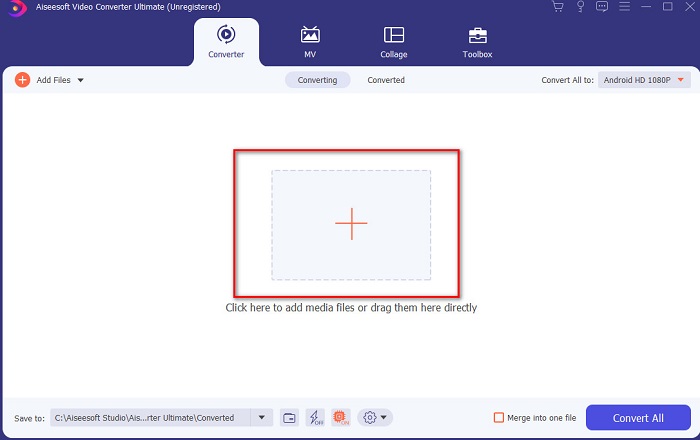
שלב 2. הפעל את הכלי ולחץ על כפתור ה‑+ במרכז הממשק, ותופיע תיקייה. חפש בה את הקובץ, לחץ עליו ואז לחץ על Open כדי להוסיף את קובץ ה‑M4V.
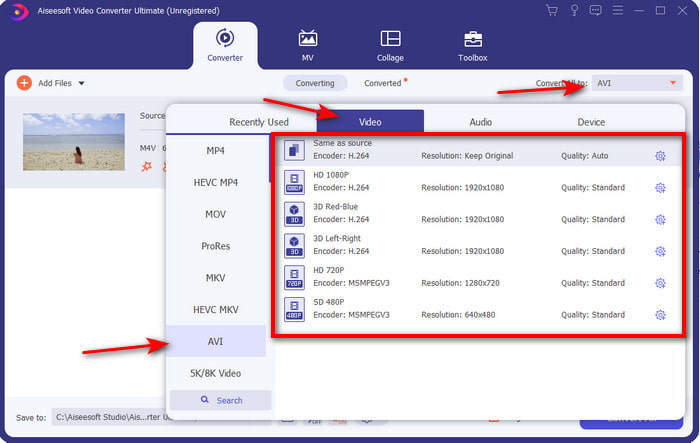
שלב 3. לפני שתתחיל בהמרת M4V ל‑AVI ב‑Mac או ב‑PC, עליך תחילה ללחוץ על כפתור הנפתח ולאתר את פורמט AVI.
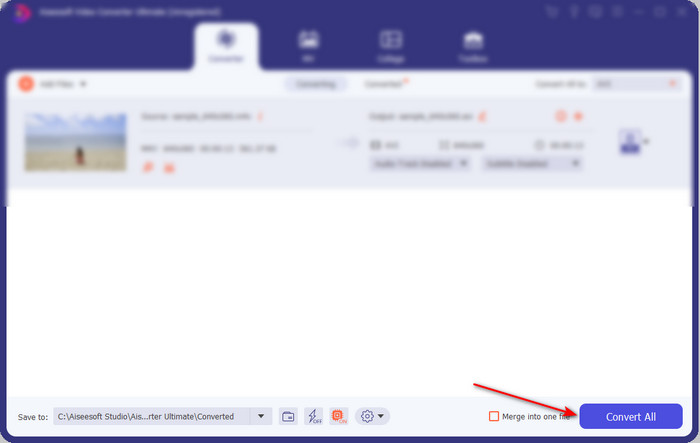
שלב 4. לאחר שבחרת את הפורמט, הגיע הזמן להמיר. בחלק התחתון של הממשק לחץ על הכפתור Convert All.
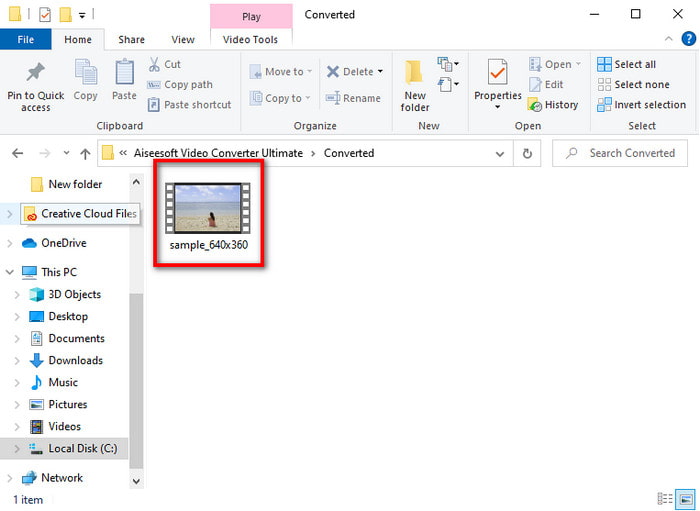
שלב 5. המתן מספר שניות עד שההליך יושלם. לאחר סיום, תופיע תיקייה עם הקובץ שהומר קודם, לחץ עליו כדי לצפות בו מיד.
דרך 2. ממיר וידאו חינם FVC
אם אינך מעוניין לרכוש את התוכנה שמעל, אז הבחירה הטובה ביותר היא להשתמש בממיר M4V ל‑AVI חינמי הזמין ברשת, FVC Free Video Converter. ואם ברצונך להשיג את איכות ההמרה הטובה ביותר, בדומה ל‑FVC Video Converter Ultimate, זה צריך להיות הבחירה שלך. למרות שהכלי הזה מספק המרה תקינה, עדיין כלי אונליין זה תומך במספר מצומצם של פורמטים, אינו כולל אפשרויות עריכה וההמרה בו איטית בהרבה בהשוואה לתוכנת שולחן העבודה. בנוסף, יהיה צורך בחיבור לאינטרנט כדי להשתמש בו. אבל אם אתה מחפש ממיר אונליין, אז זו הבחירה הנכונה. כעת, עקוב אחר השלבים שלהלן כדי לדעת כיצד לעשות זאת.
שלב 1. לחץ על קישור זה כדי לעבור לאתר הראשי של ממיר FVC.
שלב 2. אם זו הפעם הראשונה שאתה משתמש בו, לחץ על Add Files to Convert כדי להוריד את המשגר. לאחר שההורדה הסתיימה, לחץ שוב כדי להפעיל, בחר את הקובץ מהתיקייה שלך ולחץ על Open.
הורד את גרסת הדסקטופ כדי להמיר קבצים במצב אצווה.
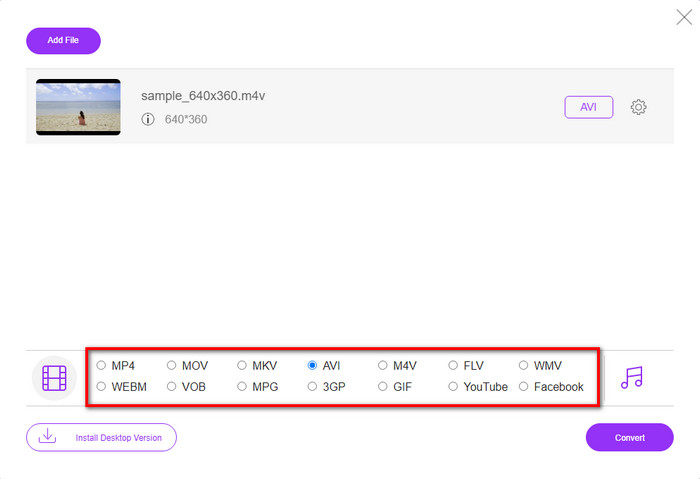
שלב 3. בחר את הפורמט הזמין למטה על‑ידי לחיצה עליו לפני ביצוע תהליך ההמרה.
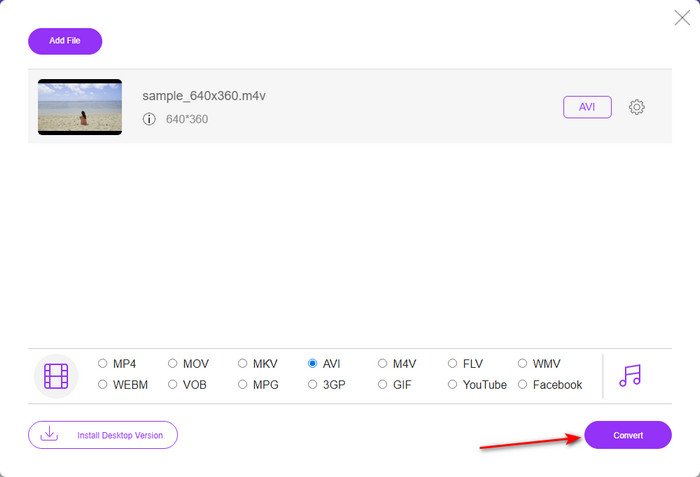
שלב 4. לאחר שבחרת את הפורמט, לחץ על Convert כדי להמשיך בתהליך שינוי הפורמט.
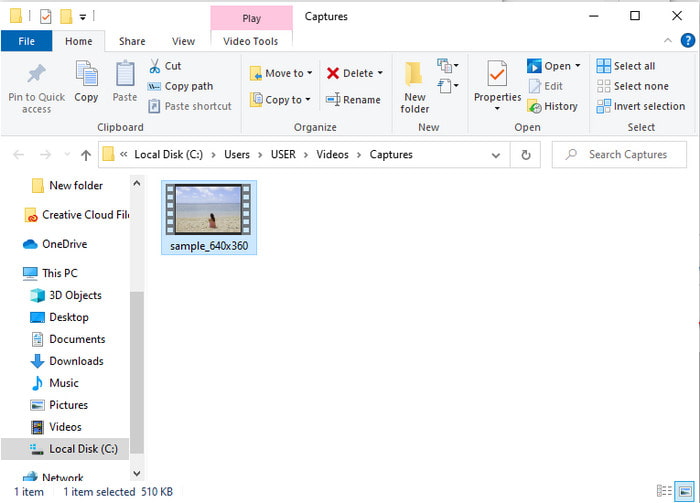
שלב 5. המתן מספר דקות, ולאחר סיום עיבוד הקובץ תופיע תיקייה עם הקובץ שהומר; לאחר מכן לחץ עליו כדי לצפות.
דרך 3. WinX Video Converter בחינם
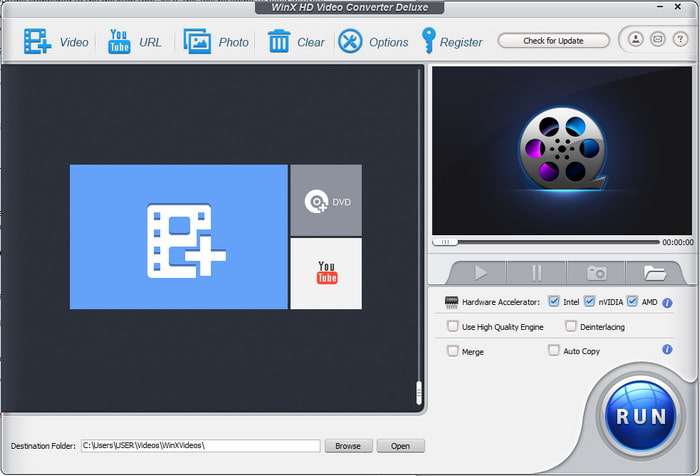
תוכנה נוספת שבחרנו שתסייע לך להמיר פורמט קובץ היא WinX Video Converter Free. כלי זה מספק המרה איכותית ותומך גם במגוון רחב של פורמטים שונים. אף שביצועיו טובים למדי, כך שכדאי להוריד ממיר M4V ל‑AVI זה ל‑Mac או ל‑PC. עם זאת, הוא שונה מהכלי הקודם. אם ברצונך לנסות אותו, עקוב אחר השלבים.
שלב 1. הורד את התוכנה למחשב האישי או ל‑Mac
שלב 2. לאחר מכן לחץ על Video כדי להוסיף את הקובץ, אז אתר את PC General Manager ולחץ על AVI Video ואז על OK.
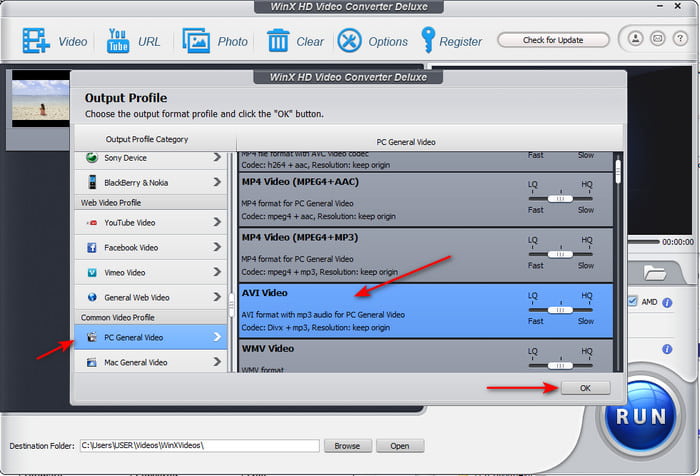
שלב 3. לחץ על Run כדי להתחיל את ההמרה.
חלק 3. טבלת השוואה של ממיר 3 M4V ל-AVI
| מאפיינים | ממיר וידיאו אולטימטיבי | ממיר וידאו חינם FVC | WinX Video Converter בחינם |
| המרת פורמטים |  | | |
| המרה מרובה | |  | |
| האצת חומרה | | | |
| המרה מהירה במיוחד | | | |
| תוכנית נתמכת | זמין בכל הפלטפורמות | זמין בכל הפלטפורמות | זמין בכל הפלטפורמות |
M4V לעומת AVI
ה-M4V פותח על ידי אפל, אשר משתמשת גם ב-MPEG 4. קבצי M4V משמשים לעתים קרובות לאחסון סרטונים אלו שהורדו מחנות ה-iTunes של Apple, כמו סרטוני מוזיקה, פרקי טלוויזיה וכו'. ייתכן שתמצא כמה קבצי M4V מוגנים מפני העתקה מכיוון שהוא משתמש הגנת זכויות יוצרים של FairPlay DRM של אפל.
בהתבסס על Resource Interchange File Format (RIFF), פורמט AVI הוצג על ידי מיקרוסופט בשנת 1992. הוא יכול לשמור וידאו/אודיו באיכות גבוהה מכיוון שהוא משתמש בפחות דחיסה. אבל זה גם גורם לגודל הקובץ הגדול של קובץ AVI, מה שעלול להוות בעיה כאשר יש מקום מוגבל.
חלק 4. שאלות נפוצות לגבי הפורמטים M4V ו-AVI
למה אני צריך להמיר לפורמט M4V?
פורמט M4V זמין רק במכשירי Apple בלבד, ולכן אם תעביר פורמט קובץ זה ל‑Windows או לכל מכשיר אחר, לא ניתן יהיה לנגן אותו. לכן עדיף להמיר את קובץ ה‑M4V לפורמט חדש כמו MP4 או AVI כדי לנגן אותו.
האם לאחר המרת M4V הוא מאבד מהאיכות?
למעשה, סביר להניח שאבדן איכות יקרה ל-M4V או לכל פורמט אחר שהפך לפורמט חדש. עם זאת, זה יכול לגרום גם לתקלה בתוכנה או בממיר. לכן, עדיף לך לבחור את הממיר שעובד בצורה מושלמת וקל לשימוש.
האם המרת M4V מורידה את גודל הקובץ שלו?
ובכן, זה תלוי בפורמט שעמדת לבחור. בדיוק כמו שאם תמיר אותו ל-AVI תצפה שהוא יהפוך קצת יותר גדול בגלל שהקובץ לא דחוס. שלא כמו, אם תמיר אותו ל-MP4, גודל הקובץ עדיין יישמר או ירד. למרות שגודל הקובץ עדיין ישתנה בכל פורמט שתבחרו, תקבלו פלט נהדר בסוף.
סיכום
לסיכום, כל אחד משלושת כלי האונליין ושולחן העבודה פועל היטב וממלא את תפקידו כממיר. במהלך הסקירה של כל תוכנה המפורטת כאן, גילינו כי FVC Video Converter Ultimate היא הבחירה הטובה ביותר עבור כולם. זאת בשל קלות השימוש, המחיר המשתלם והגמישות, הפונקציות המתקדמות שהיא מספקת ועוד הרבה יתרונות נוספים. אם אתה עדיין מתלבט מה לבחור, נסה את הממיר המרשים הזה ותיהנה מתהליך המרה מהיר וקל.
-
 ממיר M4V ל- MP3 - 4 השיטות הטובות ביותר לחילוץ MP3 מקבצי M4V
 כשרוצים לחלץ את אודיו MP3 מסרטוני M4V בקלות, תוכלו ללמוד עוד על 4 הממירים הטובים ביותר ל- M4V ל- MP3 כדי לקבל את קבצי האודיו הרצויים מהמאמר.
-
 מהי הדרך הטובה ביותר להמיר GIF ל-AVI [קוד פתוח ופרימיום]
 האם אתה רוצה להמיר את ה-GIF שלך לפורמט AVI מבלי לאבד את איכות הסרטון? המשך לקרוא כדי ללמוד כיצד להמיר את קובץ ה-GIF שלך ל-AVI.
-
 4 דרכים יעילות להמיר MOV ל-AVI במחשב וב-Mac [2021]
 האם אתה רוצה לדעת מהו ממיר ה- MOV ל- AVI הטוב ביותר באינטרנט? ולמה ממיר הווידאו Ultimate FVC עשוי להיות זה בשבילך.

