


 ממיר וידאו אולטימטיבי
 מקליט מסך
 תיקון וידאו


2 דרכים קלות להמיר M4V ל-WMV ללא מאמץ וללא אובדן
לחלק מהחברות יש פורמטים של דחיסת וידאו. אפל ומיקרוסופט פיתחו קבצי וידאו בלעדיים לנגני המדיה שלהם. לכן, כאשר אחד הוריד או רכש קבצי M4V מ-Apple iTunes Store ורצה לשתף אותם עם חברים או משפחה עם מחשבים אישיים, המרת M4V ל-WMV עשויה להיות הטובה ביותר לעשות זאת לפני שתעשה זאת. לפיכך, אנו מספקים לך את הממיר היחיד מסוגו שעושה את העבודה הזו במהירות, ביעילות וללא טרחה במיוחד.

חלק 1. כיצד להמיר M4V ל-WMV בקלות ב-Mac וב-Windows
Free Video Converter Ultimate הוא ממיר וידאו פשוט אך יעיל מבית FVC Studio. במחשב Windows או Mac שלך תוכל להמיר קובצי וידאו ואודיו. נוסף על כך, פורמטי הווידאו הנתמכים על‑ידי ממיר וידאו זה מגוונים וכוללים את הנפוצים ביותר – הוא תומך בקובצי MP4, FLV, M4V, WMV, TS, M2TS, קובצי iPhone/Android הפופולריים. התוכנה משתמשת בטכנולוגיית HEVC, כך שאין צורך לדאוג לאיכות בעת המרה באיכות גבוהה. ובענייני איכות – היא תומכת גם ב‑4K UHD. כדי להשתמש בה, אלו הצעדים הפשוטים שעליך לבצע:
שלב 1: הורד את קובץ ה‑.exe על‑ידי לחיצה על הכפתור Free Download למטה, בהתאם למערכת ההפעלה שלך, Windows או Mac. לאחר סיום ההורדה, פתח את הקובץ והתחל בהתקנת התוכנה. לאחר מכן הפעל את התוכנה.
הורדה חינמיתל-Windows 7 ומעלההורדה מאובטחת
הורדה חינמיתל-MacOS 10.7 ומעלההורדה מאובטחת
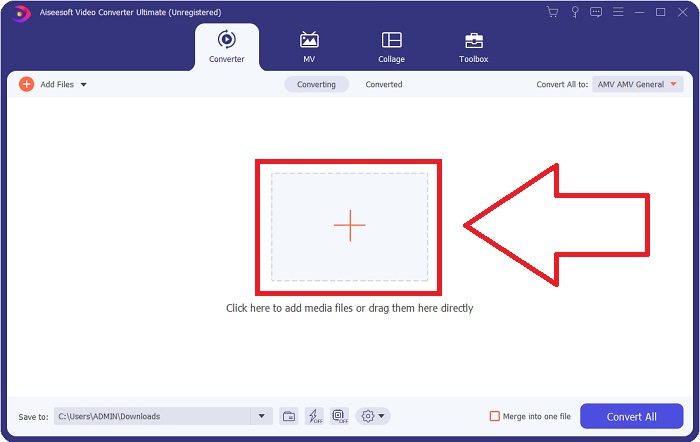
שלב 2: ייפתח חלון, ותופיע בו ממשק עם כפתור + במרכז. עליך ללחוץ עליו כדי לייבא את קובץ הווידאו שברצונך להמיר. לחלופין, תוכל לגרור ולשחרר את הקובץ בקלות.
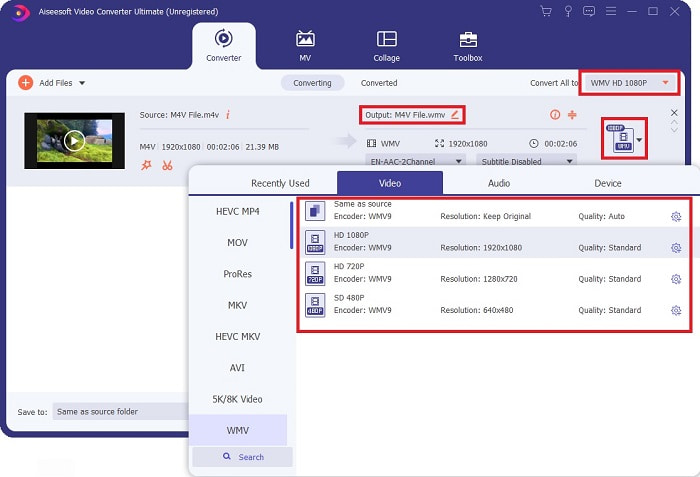
שלב 3: תראה את הקובץ שייבאת בממשק. מימינו תוצג תבנית הווידאו הנוכחית. לחץ עליה, ותופיע רשימה של כל הפורמטים הזמינים לבחירה. במקרה זה, גלול למטה ומצא את WMV או פשוט הקלד אותו בשורת החיפוש לצורך גישה מהירה יותר. נוסף על כך, כל איכויות הווידאו הזמינות יופיעו בצד הימני של הלשונית, ותוכל לבחור כל איכות מועדפת.
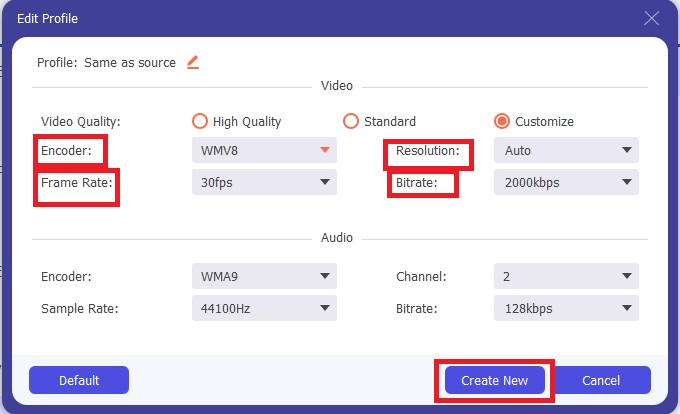
שלב 4: מעבר לבחירת האיכות שצוינה, תוכל לערוך עוד יותר את תוצאת הווידאו שלך על‑ידי לחיצה על סמל גלגל‑השיניים בצד הימני של איכות הווידאו שבחרת. יוצגו כל ההגדרות האפשריות, כולל קצב פריימים, רזולוציה, קצב סיביות (bitrate), קצב דגימה, מקודד ועוד רבים. פשוט לחץ על הכפתור Create New כדי לשמור את השינויים שביצעת.
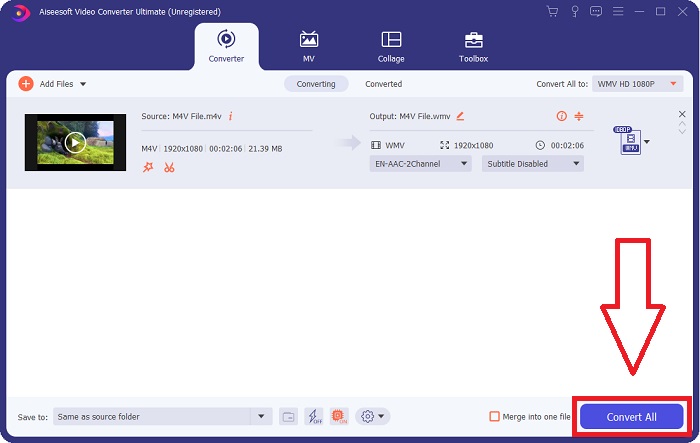
שלב 5: כדי לסיים את תהליך ההמרה, לחץ על הכפתור Convert All שנמצא בפינה הימנית התחתונה של הלשונית, המתן לסיום, ולאחר מכן תקבל את הקובץ המומר.
חלק 2. כיצד להמיר M4V ל-WMV באמצעות בלם יד
Handbrake היא תוכנת המרה פופולרית בחינם הפועלת על פלטפורמות Windows, Mac ולינוקס. משתמשים רשאים להעלות סרטונים בכל פורמט ממקורות DVD ו-Blu-ray לממיר קוד פתוח זה להמרה ל-WMV. הליך ההמרה מהיר וקל, הודות לממשק ידידותי למשתמש. עקוב אחר ההוראות הקלות האלה כדי להמיר M4V ל-WMV באמצעות בלם יד.
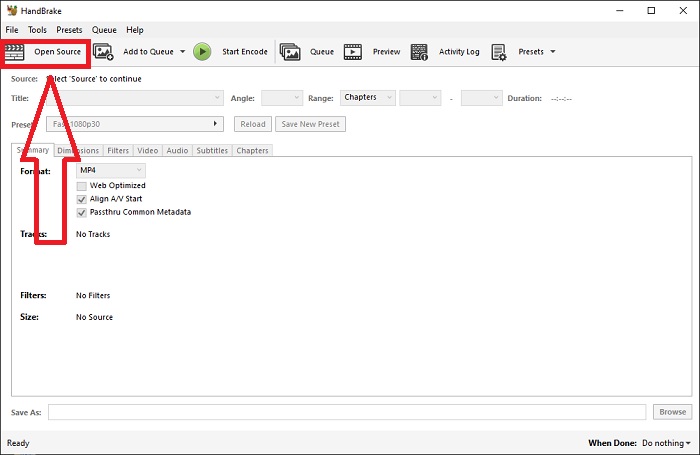
שלב 1: הפעל את יישום HandBrake במחשב שלך. לחץ על הכפתור Open Source במסך הראשי כדי לעיין ולהוסיף את קובצי ה‑WMV שהומרו. תוכל גם פשוט לגרור ולשחרר את הסרטונים אל הממשק.
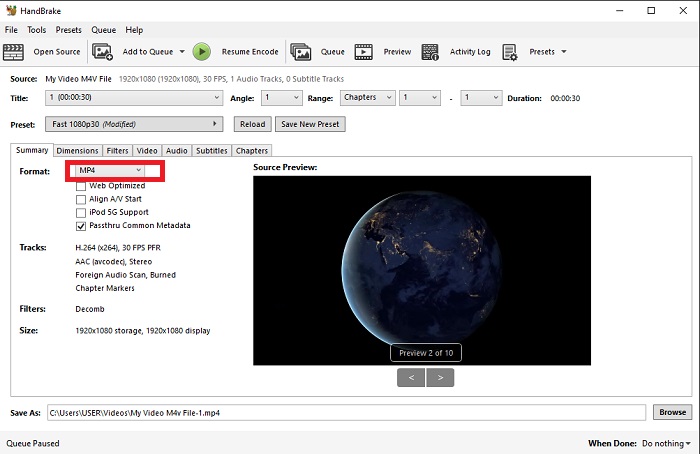
שלב 2: הקובץ שזה עתה הוספת יוצג באזור Source. לאחר מכן בחר WMV כתבנית הפלט הרצויה מתוך רשימת האפשרויות בתפריט הנפתח Format בלשונית Summary. ניתן להתאים מסננים, מקודדי וידאו ומאפייני קובץ אחרים במידת הצורך.
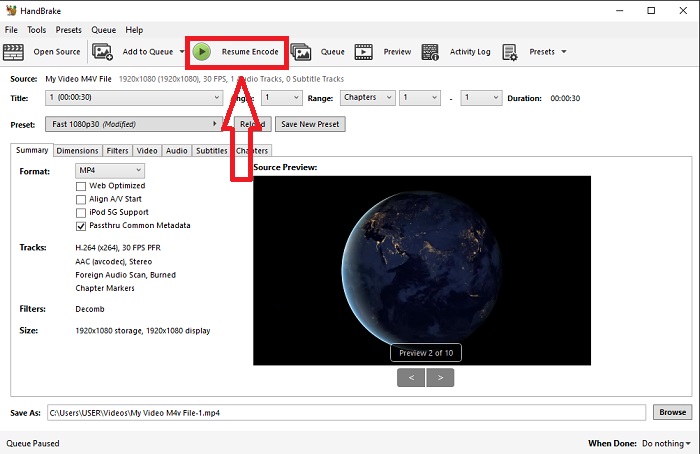
שלב 3: בחר את שם קובץ הפלט ואת מיקומו במחשבך תחת החלק Destination. לבסוף, לחץ על הכפתור Start Encode כדי להמיר את קובץ ה‑M4V ל‑WMV.
חלק 3. עוד כלי מועיל להמרת M4V ל-WMV באינטרנט
ככלי אינטרנט בחינם, FVC Free Video Converter שימושי. MP4, MOV, MKV, AVI, M4V, FLV, WMV, WEBM, VOB, MPG, 3GP, GIF ופורמטים של וידאו שאושרו על ידי YouTube ו-Facebook הם בין הסוגים שבהם הם תומכים. יתר על כן, ממיר הווידאו המקוון החינמי הזה יכול גם להמיר קבצי אודיו, מה שמאפשר לך להמיר את הווידאו או המוזיקה שלך ל-MP3, AAC, AC3, WMA, WAF, FLAC ופורמטים אחרים. FVC Free Video Converter מאפשר לך גם לציין קבצים לפני שתתחיל להמיר. אתה יכול לשנות את הרזולוציה, קצב הפריימים וקצב הסיביות של הסרטון, כמו גם את ערוץ האודיו, קצב הדגימה וקצב הסיביות של הווידאו.
שלב 1: לחץ על קישור זה כדי לעבור לכלי המקוון עצמו. תחילה עליך להוריד משגר קטן. באפשרותך לעשות זאת על‑ידי לחיצה על הכפתור Add Files to Convert שנמצא במרכז הדף. שלב זה יאפשר לך לייבא את הקבצים שלך.
שלב 2: לחץ שוב על אותו כפתור כדי להעלות סוף‑סוף את הווידאו. תדע שההעלאה הצליחה כאשר כל הפורמטים המוצגים יופיעו בממשק. משם, בחר WMV מבין האחרים.
שלב 3: בצד ימין תוכל למצוא סמל גלגל‑שיניים עבור אפשרויות נוספות בתוכנה. לחץ עליו, ותוכל לשנות את הגדרות הווידאו והאודיו מבחינת רזולוציה, קצב פריימים ועוד פרמטרים דומים. כשתסיים, לחץ על OK ולאחר מכן על הכפתור Convert כדי להשלים את תהליך ההמרה.
קשור:
חלק 4. ידע מורחב על M4V ו-WMV
למידע נוסף שאולי תרצה על שני הפורמטים, תוכל לקרוא את מה שסיפקנו להלן:
M4V הוא פורמט קובץ שנוצר על ידי אפל. זה דומה מאוד לפורמט הקובץ MP4, פרט לכך שקובצי M4V עשויים להיות בעלי הגנת Fairplay DRM של אפל. פורמט M4V יכול למצוא בחומר וידאו שנרכש מחנות iTunes. אם קובץ M4V מופעל DRM, חשבון iTunes המשמש לרכישת הקובץ חייב להיות מורשה במכשיר שמנגן אותו.
מצד שני, קבצי WMV הם קבצי וידאו שנוצרו על ידי מיקרוסופט הכוללים בדרך כלל אודיו. גם בפלטפורמות Mac וגם ב-PC, משתמשים עשויים להפעיל קבצים אלה עם מספר נגני וידאו. הגנת ניהול זכויות דיגיטליות (DRM) עשויה להיכלל בקובצי WMV מסוימים, ולמנוע ממשתמשים ליצור עותקים לא חוקיים של קבצים שנרכשו מקמעונאים מקוונים.
| M4V | WMV | |
| סיומת קובץ | .m4v | .wmv |
| מפתח | אפל בע"מ. | מיקרוסופט |
| תוכניות תומכות | ◆ נגן מדיה קלאסי ◆ נגן מדיה VLC ◆ KMPlayer ◆ נגן זום | ◆ נגן מדיה VLC ◆ MPlayer ◆ נגן מדיה קלאסי ◆ Windows Media Player |
חלק 5. שאלות נפוצות לגבי המרת M4V ו-WMV
האם M4V איכותי יותר מ-MP4?
כעת אנו יודעים שאין הבדל מהותי בין MP4 ל-M4V לאחר ביצוע השוואת M4V MP4 זה לצד זה. לאחר הסרת הגנת ה-DRM מקובץ הווידאו M4V, קבצי הווידאו MP4 ו-M4V זהים.
האם בלם היד מסיר DRM?
זוהי ספרייה לצפייה בתקליטורי DVD מוצפנים עם מערכת ה-Content Scramble System (CSS), שיטה המשמשת באופן נרחב על ידי תוכנת נגן חינמית כדי לפענח דיסקים מוגנים. זה תואם ל-Windows, macOS, Linux ומערכות הפעלה שונות. HandBrake מסוגל להסיר ביעילות DRM מתקליטורי DVD ולקרוע אותם.
מהו השימוש הטוב ביותר ב-WMV?
מיקרוסופט יצרה את פורמט הווידאו WMV בשימוש נרחב בנגני מדיה של Windows. קבצי WMV קטנים ודחוסים יותר מקבצי MP4. זו הסיבה שהוא פופולרי להזרמת וידאו באינטרנט.
סיכום
אין ספק שישנן דרכים רבות להמיר M4V ל-WMV, אך רק מעטות יכולות לעשות זאת תוך ביצוע התאמות בכמה מפרטים נוספים. לכן אנו ממליצים על Video Converter Ultimate מכיוון שהוא יהיה לצידך בכל פעם שתצטרך ממיר. אם הזמן אינו מאפשר התקנת התוכנה, המקבילה המקוונת שלה תמיד זמינה לשימוש. אז, עזור לנו לעזור לך לספק את חוויית עריכת הווידאו הטובה ביותר באמצעות FVC Video Converter Ultimate.
-
 חינם | 3 השיטות הטובות ביותר להמיר MP4 ל WMV מבלי לאבד איכות
 פוסט זה משתף כיצד להמיר וידאו MP4 לפורמט WMV ב- Mac או Windows. אנו מציעים לך גם מספר אפשרויות, כולל תוכנות שולחן עבודה וגם ממירים מקוונים מבוססי אינטרנט. מוכנים לדעת את הכלים הטובים ביותר להמרת MP4 ל WMV?
-
 3 הדרכים המובילות להמיר FLV ל- WMV ב- Windows ו- Mac
 מחפש את הדרך הטובה ביותר להמיר FLV ל- WMV מבלי לאבד את האיכות במחשב או ב- Mac? יש לך מזל מכיוון שכאן אנו חולקים שלוש שיטות לבצע את העבודה בקלות.
-
 מדריך פשוט כיצד להפוך את ה- GIF ל- WMV ב- Windows/Mac
 האם אתה רוצה לדעת איך להמיר GIF לפורמט WMV? לאחר מכן עקוב אחר מאמר זה מכיוון שהוא מציג פתרונות שונים שתוכל לבחור בהם.

