


 ממיר וידאו אולטימטיבי
 מקליט מסך
 תיקון וידאו
 הורדה מאובטחת
השיטה המהירה ביותר כיצד להמיר MXF ל-M4V בשולחן העבודה ובאינטרנט
קובץ MXF הוא פורמט סטנדרטי בתעשייה עבור אודיו ווידאו. עם זאת, פורמט קובץ זה אינו נתמך על‑ידי Apple QuickTime Player, ולכן אי‑אפשר לנגן קובץ MXF באמצעות תוכנה זו. אם אינך יכול לנגן את קובץ ה‑MXF שלך ב‑Apple QuickTime Player, עליך להמיר אותו לפורמט קובץ אחר, כמו M4V. יש לך מזל, מפני שיש לנו את הפתרון הטוב ביותר בשבילך. מאמר זה יציג את השיטות היעילות והשימושיות ביותר להמרת MXF ל‑M4V באמצעות ממירים אמינים, הן במצב לא מקוון והן מקוון. בנוסף, נסייע לך לקבל מושג כיצד להפוך את הסרטונים שלך למושכים יותר באמצעות עריכה פשוטה. קרא את המאמר מיד וקבל את המידע שאתה צריך.

חלק 1: שיטה מצוינת להמרת MXF ל-M4V באינטרנט
אחד מהממירים המקוונים הטובים ביותר שניתן להשתמש בהם כדי להמיר MXF ל‑M4V הוא FVC Free Video Converter Online. התוכנה המקוונת הזו מסוגלת להמיר קובצי וידאו שונים, כמו MOV, MKV, AVI, FLV, MP4, WEBM, VOB ועוד. בנוסף, ניתן להמיר קבצים רבים בהליך אחד, משום שממיר זה תומך בהמרה באצווה. כמו כן, לפני המרת הסרטונים, באפשרותך לערוך את הרזולוציה, קצב הסיביות (bit rate) וקצב הפריימים בהתאם להעדפתך. לממיר יש גם ממשק ידידותי למשתמש ואופן המרה פשוט. כך כל אחד יכול להפעיל את הממיר המקוון הזה, בין אם הוא משתמש מתקדם או חסר ניסיון. יתרה מזו, ממיר מקוון זה זמין בכל הדפדפנים, כגון Google Chrome, Mozilla Firefox, Microsoft Edge ועוד, מה שהופך אותו לנגיש למשתמשים.
יתר על כן, מלבד המרת וידאו, אתה יכול גם להמיר פורמטי שמע רבים, כולל AAC, MP3, M4A, M4B, FLAC ועוד. יש לו גם הגדרת שמע המאפשרת לך להתאים את קצב הדגימה והסיביות שלהם. עם תכונות אלה, אתה יכול לדעת ש-FVC Free Video Converter Online הוא אמין.
תכונות
◆ המר פורמטי וידאו שונים, כגון MP4, AVI, M4V, MXF, MOV, WMV, MKV, FLV ועוד.
◆ מסוגל לערוך את רזולוציית הווידאו, קצב הסיביות וקצב הפריימים.
◆ מציע תהליך המרת אצווה.
◆ המר קבצי שמע כמו MP3, AAC, AC3, M4B, FLAC ועוד.
◆ יכול לערוך את קצב הדגימה וקצב הסיביות של האודיו.
ראה את השלבים שלהלן כדי ללמוד על המרת קובץ MXF לפורמט M4V באמצעות FVC Free Video Converter Ultimate.
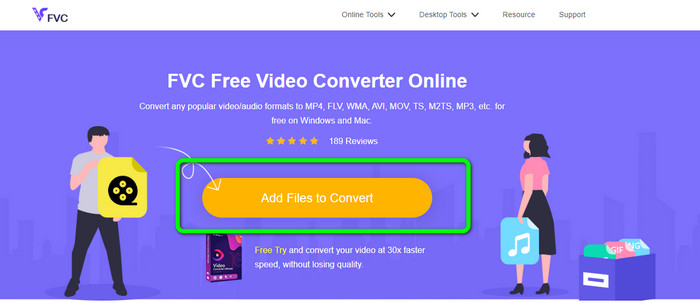
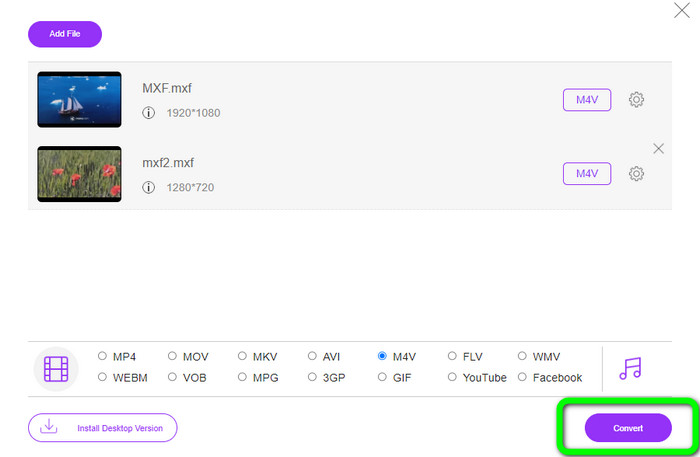
שלב 1: עבור לדפדפן שלך ובקר באתר FVC Free Video Converter Online. לאחר שתהיה בעמוד הראשי, לחץ על Add Files to Convert כדי להעלות את קובץ ה‑MXF שברצונך להמיר.
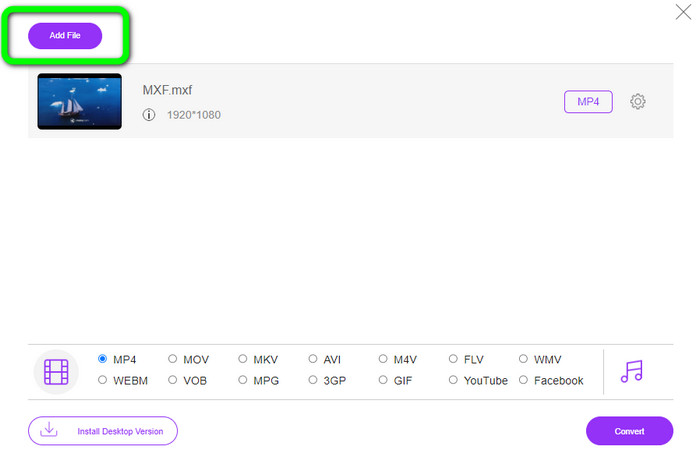
שלב 2: ממיר זה מציע תהליך המרה באצווה. לכן, אם ברצונך להעלות עוד קובצי MXF, לחץ על כפתור Add File.
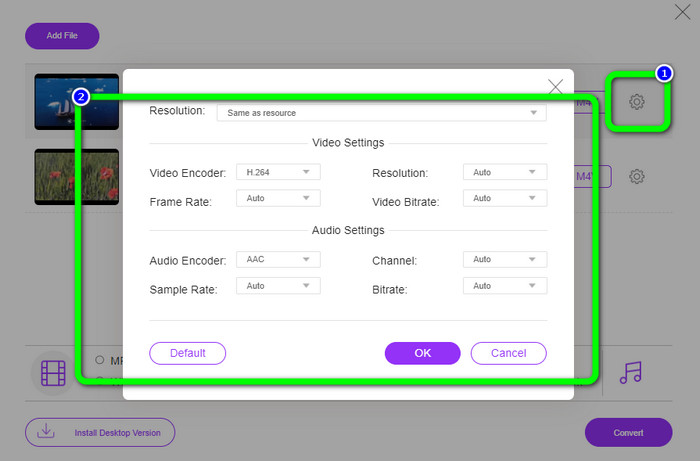
שלב 3: בשלב זה תוכל לערוך את הווידאו שלך על‑ידי לחיצה על סמל Setting. לאחר הלחיצה על סמל זה, תוכל לערוך את קצב הפריימים, הרזולוציה וקצב הסיביות של הווידאו. בנוסף, באפשרותך לשנות את קצב הדגימה (sample rate) וקצב הסיביות של האודיו. לאחר מכן לחץ על כפתור OK.
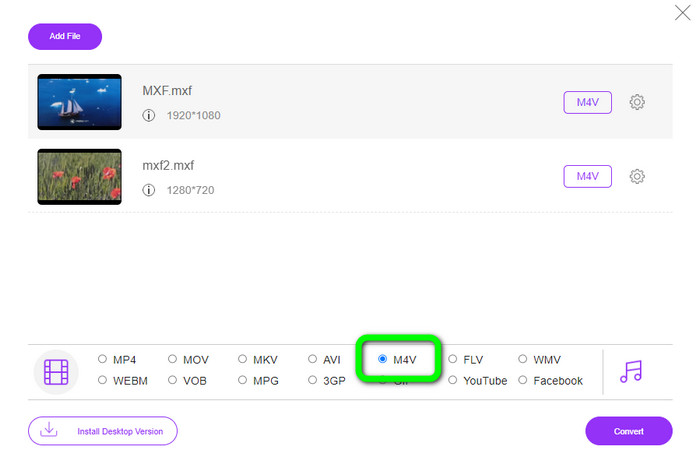
שלב 4: לאחר עריכת הסרטונים שלך, תוכל לשנות את פורמט הפלט על‑ידי לחיצה על פורמט M4V מתוך אפשרויות הפורמט שבחלק התחתון של הממשק.
שלב 4: בשלב האחרון, לחץ על כפתור Convert. המתן לתהליך ההמרה ושמור את הווידאו שלך במיקום הרצוי.
חלק 2: הדרך המהירה ביותר להמיר MXF ל-M4V ללא אובדן
אם אתה מעוניין בכלי להורדה שימיר MXF ל‑M4V ללא אובדן איכות, Video Converter Ultimate הוא הבחירה הטובה ביותר. ממיר מתקדם זה מסוגל להמיר קבצים שונים במהירות, משום שיש לו תהליך המרה מהיר – לא פי 10, לא פי 20, אלא פי 30 מהמהירות הממוצעת. בנוסף, יש לו תכונה מצוינת נוספת שתוכל ליהנות ממנה: באפשרותך להמיר קבצים מרובים בו‑זמנית, מפני שממיר זה מציע תהליך המרה באצווה. כמו כן, מעבר ל‑MXF ו‑M4V, הכלי הזה תומך בפורמטי וידאו רבים נוספים, כולל MP4, FLV, AVI, MKV, MOV, WMV, VOB ועוד. יתרה מזו, Video Converter Ultimate זמין גם ב‑Windows וגם ב‑Mac, דבר שהוא נהדר עבור משתמשי Mac ומשתמשי Windows כאחד.
יתר על כן, לאפליקציה להורדה זו יש עוד תכונות נהדרות מלבד המרת סרטונים. אם אתה רוצה ליצור סרטון מוזיקה עבור בן/בת הזוג, המשפחה, החברים שלך וכו', אז אתה יכול להשתמש בכלי זה. Video Converter Ultimate מציע יוצר וידאו מוזיקלי שבו אתה יכול ליצור סרטים נפלאים עם מוזיקה. הוא גם מספק ערכות נושא בחינם, כגון לילות שמחים, שיקיים, פשוטים, מושלגים, רומנטיים ועוד. כמו כן, אם יש לך סרטון עם גודל קובץ גדול, אתה יכול לדחוס אותו באמצעות מדחס הווידאו. בעזרת הכלי הזה תוכל לשנות בקלות את גודל הסרטון שלך.
תכונות
◆ המר 100+ פורמטים של קבצי וידאו, כולל M4V, MXF, FLV, AVI, MP4, XVID, VOB, MOV, SWF, MKV ועוד.
◆ המר מספר קבצים בו זמנית.
◆ מציע יוצר וידאו מוזיקה.
◆ צור קולאז' פנטסטי.
◆ הצע כלי עריכת וידאו, כגון גוזם וידאו, מדחס, משפר, תיקון צבע וכו'.
◆ המר פורמטים של קבצי תמונה כמו BMP, PNG, JPG ועוד.
בצע את השלבים המפורטים להלן כדי להמיר MXF ל-M4V ללא הפסדים באמצעות FVC Video Converter Ultimate.
שלב 1: הורד את Video Converter Ultimate למכשיר שלך על‑ידי לחיצה על כפתור Download. יש שני כפתורי הורדה למטה. אם אתה משתמש Windows, לחץ על גרסת Windows, ואם אתה משתמש Mac, לחץ על גרסת Mac. לאחר מכן הפעל את היישום.
הורדה חינמיתל-Windows 7 ומעלההורדה מאובטחת
הורדה חינמיתל-MacOS 10.7 ומעלההורדה מאובטחת
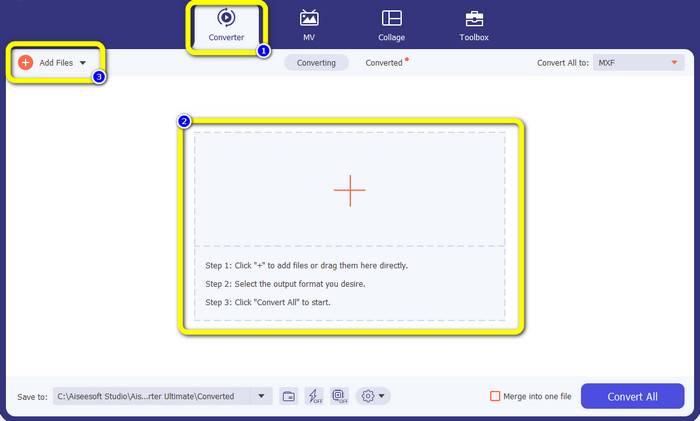
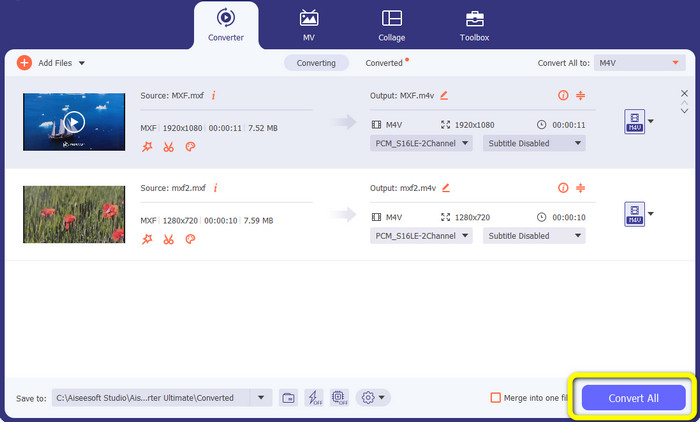
שלב 2: לאחר מכן, בחר בלשונית Converter. לחץ על סמל + או על כפתור Add File כדי לייבא את קובץ הווידאו בפורמט MXF.
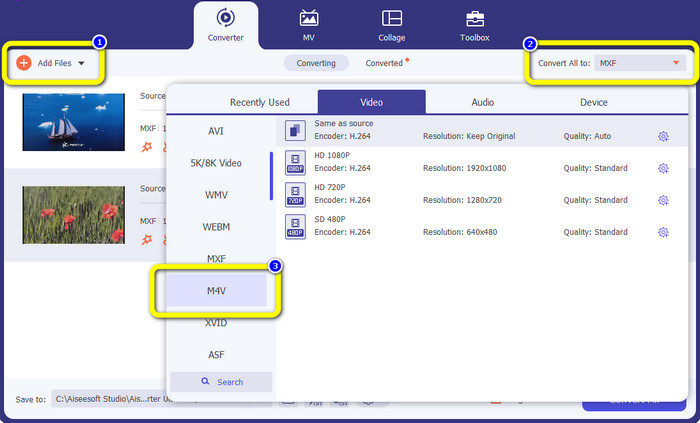
שלב 3: אם אתה רוצה להמיר מספר קבצים בו‑זמנית, לחץ על כפתור Add File. לאחר מכן לחץ על כפתור Convert All ובחר את פורמט הקובץ M4V. תוכל גם לבחור את הרזולוציה הרצויה לסרטון שלך.
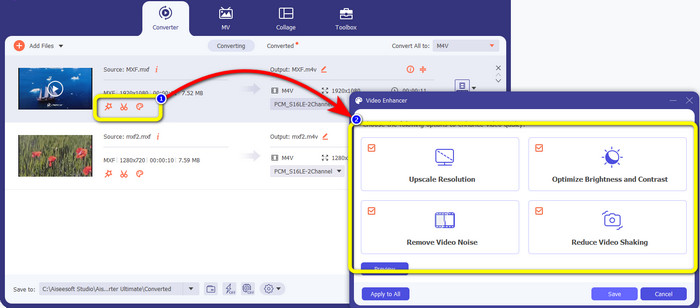
שלב 4: אם ברצונך לערוך את הסרטונים לפני ההמרה, תוכל לעשות זאת. לחץ על כלי העריכה בתיבה הראשונה. לאחר מכן בחר את סמל video enhance. סמן את כל התיבות כדי לשפר רזולוציה, לאפשר אופטימיזציה של בהירות וניגודיות, ולהפחית רעש ורעידות בווידאו.
שלב 5: כאשר סיימת לערוך ולשנות את פורמט הפלט של הסרטונים שלך, לחץ על כפתור Convert All ושמור את הווידאו במכשיר שלך.
חלק 3: מה זה MXF?
עמותת SMPTE יצרה את מיכל המדיה MXF לשימוש עסקי. MXF מיישמת חלק מסכימת הנתונים Advanced Authoring Format (AAF) ולאחרונה הופיעה כסטנדרט בתעשייה לעריכת וידאו מקצועית לא ליניארית. קבצי MXF ניתנים להמרה בקלות לכל פורמט וידאו נפוץ ולדחוס באמצעות כמעט כל codec. חשוב לציין שליישום הפורמט הזה על ידי סוני, פנסוניק וקנון היו אי-תאימות רבים, נקודת חולשה גדולה של מיכל זה. עדכון התקן משנת 2009 מטפל בבעיות אלו.
חלק 4: מהו M4V?
M4V הוא סוג של מיכל וידאו המשמש את קבצי iTunes לאחסון נתוני אודיו ווידאו. עדיף לרכוש קבצי אודיו או וידאו מחנות iTunes אם הם מוגנים מ-Apple FairPlay DRM מפני צפייה והעתקה בלתי מורשית. מכיוון שהפורמט מבוסס על מבנה MPEG-4, כמעט כל נגן עכשווי יכול להציג קבצים לא מוגנים.
לקריאה נוספת:
ממירי MXF ל‑WMV הטובים ביותר להמרת MXF ל‑WMV בחינם
4 הפתרונות הגדולים ביותר להמרת MXF ל‑MKV [נפתר]
חלק 5: שאלות נפוצות לגבי המרת MXF ל-M4V
כמה גדול קובץ MXF?
MXF תומך בגדלים של עד 2 גיגה-בייט. בנוסף, MXF תומך בקבצים ארוכים יותר. זמן לכידת קובץ המדיה המרבי עבור פורמט OMF הוא שלוש שעות. MXF יכול להתמודד עם 12 שעות של שמע בשני ערוצים בתדר 48 קילו-הרץ.
מי משתמש בקבצי MXF?
כמה פרסומות הפקה, כולל SONY MSW 2000 Series של מכשירי וידאו IMX, השתמשו בו. כמו כן, ציוד העריכה של Avid תומך בגרסה מסוימת של MXF.
איך אני ממיר MXF ל-MOV?
באפשרותך להשתמש בFVC Free Video Converter Online. העלה את קובץ ה‑MXF, בחר את פורמט MOV מתוך אפשרויות הפורמט ולחץ על כפתור Convert. כך תוכל להמיר MXF ל‑MOV באופן מיידי.
סיכום
יש דרכים רבות להמיר MXF ל‑M4V. אך אם אתה רוצה את הממירים הטובים והמשתלמים ביותר, תוכל להשתמש ביישומים שהוזכרו לעיל: Video Converter Ultimate ו‑FVC Free Video Converter Online. שני הממירים הללו יכולים להמיר קבצים מהר יותר מאשר ממירים אחרים, ותוכל להשתמש בהם בחינם.
-
 שיטות שונות כיצד לשנות את פורמט הקובץ MOV ל-M4V
 האם אתה רוצה שיטה יעילה להמרת קובץ MOV לפורמט M4V? לאחר מכן, מאמר זה ימלא את רצונך. להלן הממירים הטובים ביותר שתוכל להשתמש בהם.
-
 טכניקות מצוינות להמרה מיידית של GIF ל-M4V
 פוסט מדריך זה מספק לך את האסטרטגיות היעילות ביותר להמרת GIF ל-M4V. בנוסף, נציג בפניכם את שני הממירים הטובים ביותר שתוכלו לנסות.
-
 2 דרכים יוצאות דופן כיצד להמיר M2TS ל-M4V
 האם אתה חושב שהמרת קובץ M2TS לפורמט אחר אפשרי? אנו נראה לך כיצד להמיר M2TS לפורמט קובץ M4V אם אתה רוצה את הפתרון הטוב ביותר.
