


 ממיר וידאו אולטימטיבי
 מקליט מסך
 תיקון וידאו
דרכים יוצאות דופן להמיר VOB ל-3GP בקלות [הממירים הטובים ביותר]
רוצים להפעיל קובץ VOB שלכם על מכשיר דור‑שלישי אבל לא מצליחים? הפתרון הטוב ביותר עבורכם הוא להמיר את קובץ ה‑VOB לקובץ 3GP. קובצי 3GP הם הקבצים שנתמכים במכשירי 3G. לכן, אם אתם מחפשים את הדרך הטובה ביותר לפענח (decode) את קובץ ה‑VOB שלכם ל‑3GP, המאמר הזה יכול להיות התשובה עבורכם. סיפקנו את הדרכים הקלות והיעילות ביותר כדי להמיר VOB ל‑3GP.

חלק 1. כיצד להמיר באמצעות FVC Video Converter Ultimate
FVC Video Converter Ultimate הוא אחד מממירי הווידיאו בעלי הביצועים הגבוהים ביותר הזמינים ברשת. ממיר לא‑מקוון חינמי זה ממיר פורמטים רבים, כולל VOB, 3GP, MP4, MKV, MOV, AVI, FLV ויותר מ‑1000 פורמטים נוספים. הממיר הזה גם מאפשר לכם לחתוך את אורך הווידיאו שלכם, ואף להוסיף אפקטים לשיפור קובץ הווידיאו. נוסף על כך, אם תרצו למזג קבצים מרובים, הממיר הזה מציע המרה באצוות (batch). לכן, אם אתם רוצים להמיר את ה‑VOB שלכם ל‑3GP בקלות, קראו את הפרטים הבאים והורידו אותו בחינם.

ממיר וידיאו אולטימטיבי
5,689,200+ הורדות- יכול להמיר ליותר מ-1000 פורמטים של קבצים הזמינים באינטרנט.
- יכול להמיר מספר פורמטים של קבצים באצוות.
- יש לו תהליך המרה מהיר במיוחד והאצת חומרה.
- יש לו תכונות עריכה מתקדמות לחתוך, להוסיף כתוביות ולהוסיף סימני מים לקובץ שלך.
- זמין בכל פלטפורמות המדיה כמו Windows ו-Mac.
הורדה חינמיתל-Windows 7 ומעלההורדה מאובטחת
הורדה חינמיתל-MacOS 10.7 ומעלההורדה מאובטחת
להלן השלבים כיצד להמיר VOB ל-3GP באמצעות FVC Video Converter Ultimate:
שלב 1. תחילה, הורידו את האפליקציה על‑ידי לחיצה על כפתור Download עבור Windows או Mac. לאחר מכן עקבו אחר תהליך ההתקנה ופתחו את האפליקציה.
הורדה חינמיתל-Windows 7 ומעלההורדה מאובטחת
הורדה חינמיתל-MacOS 10.7 ומעלההורדה מאובטחת
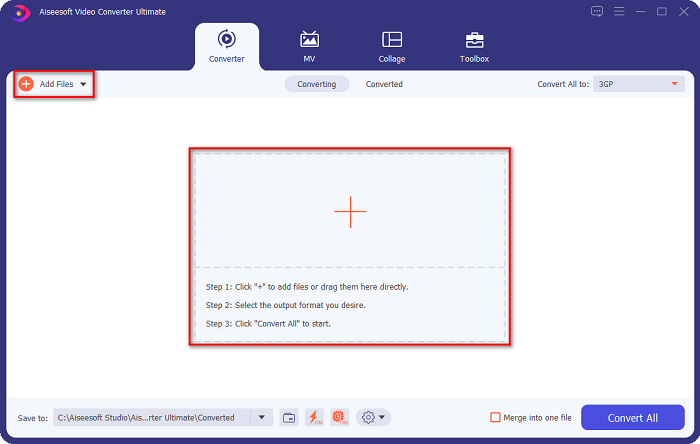
שלב 2. לחצו על כפתור Add Files או על כפתור הסימן +. קובצי המחשב שלכם יופיעו, ואז בחרו את קובץ ה‑VOB כדי להעלות אותו לתור (queue).
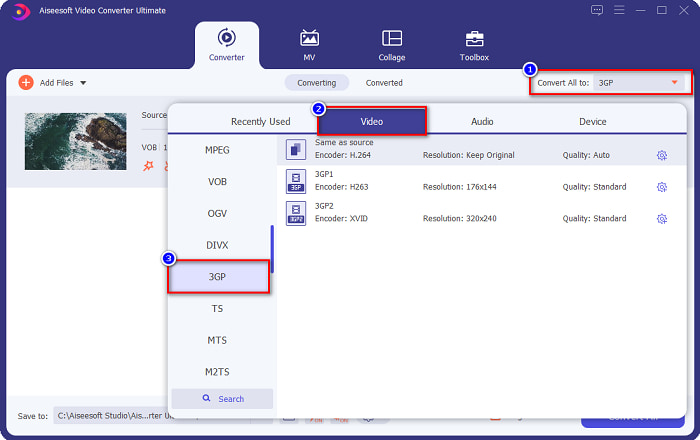
שלב 3. בשלב השלישי, לחצו על הכפתור Convert All to כדי לבחור את פורמט הפלט הרצוי. לחצו על 3GP, ואז עברו לשלב הבא.
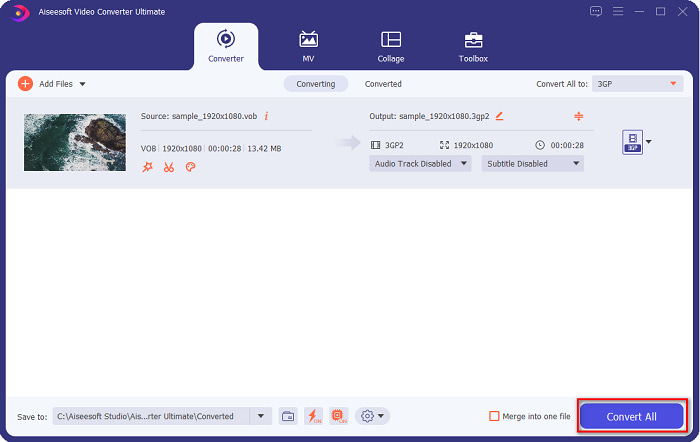
שלב 4. לאחר בחירת פורמט הפלט הרצוי, לחצו על כפתור Convert All כדי להתחיל את ההמרה. חכו כמה שניות, וזהו! בעזרת כמה צעדים פשוטים תוכלו להמיר בקלות את קובץ ה‑VOB שלכם ל‑3GP.
חלק 2. כיצד להמיר VOB ל-3GP בחינם באינטרנט
אם אתה רוצה להמיר את קובץ ה-VOB שלך לקובץ 3GP מבלי להוריד, אתה יכול להשתמש בממירים מקוונים הזמינים באינטרנט. הנוחות והיעילות של שימוש בממיר מקוון הן ללא ספק טובות. לכן, סיפקנו שתי דרכים להמיר את קובץ ה-VOB שלך לפורמט קובץ 3GP.
FileProInfo
FileProInfo הוא ממיר מקוון עם ממשק גרפי (GUI) נוח לשימוש, מה שהופך אותו לכלי ידידותי למתחילים. הוא תומך כמעט בכל פורמטי הקבצים הסטנדרטיים הזמינים באינטרנט. עם זאת, ממירים מקוונים אלה מכילים הרבה פרסומות מטרידות. למרות זאת, רבים עדיין משתמשים בממיר זה.
שלב 1. בדפדפן שלכם, חפשו FileProInfo כדי להיכנס לדף הבית שלהם. בממשק הראשי של התוכנה, לחצו על כפתור Select VOB file ובחרו את קובץ ה‑VOB שלכם כדי להעלותו.

שלב 2. לאחר מכן, בחרו את פורמט פלט הקובץ הרצוי בתיבה שליד המילה to.

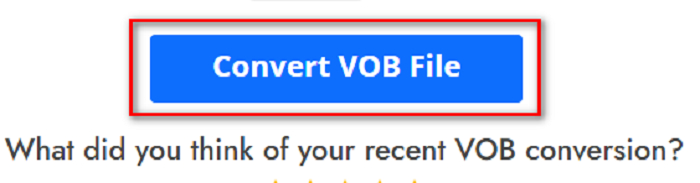
שלב 3. לבסוף, לחצו על Convert VOB File בחלק התחתון של ממשק התוכנה. לאחר מכן חכו לסיום תהליך ההמרה.
וזהו! מבלי להזיע, אתה יכול להמיר את קובץ ה-VOB שלך ל-3GP.
המר365
Convert365 הוא ממיר מקוון מ‑VOB ל‑3GP המאפשר לכם להמיר את רוב הפורמטים הסטנדרטיים, כולל VOB, 3GP, AVI, MOV, MP4, MPEG ועוד. ואם אתם מחפשים ממיר מקוון שיכול לנרמל את עוצמת האודיו, לכלי זה יש את הפונקציה הזו. עם זאת, מכיוון שמדובר בכלי מקוון, ייתכן שתיתקלו במהירות המרה איטית משום שהוא תלוי בחיבור לאינטרנט. בנוסף, עקבו אחר ההוראות שלהלן כדי להמיר קובץ VOB ל‑3GP באמצעות Convert365.
שלב 1. חפשו Convert365 בדפדפן שלכם, לחצו על כפתור Add Files ובחרו את קובץ ה‑VOB שלכם כאשר קובצי המחשב מופיעים.

שלב 2. אחר כך, בכפתור ה‑drop-down שליד Convert to, בחרו את פורמט הפלט. לחצו על פורמט הקובץ 3GP.
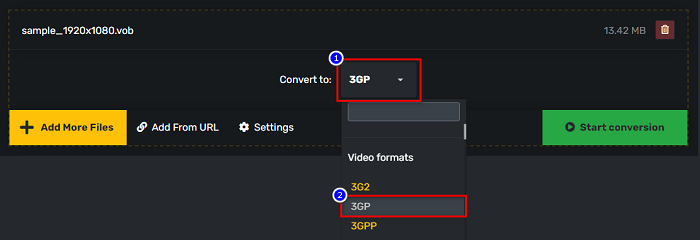
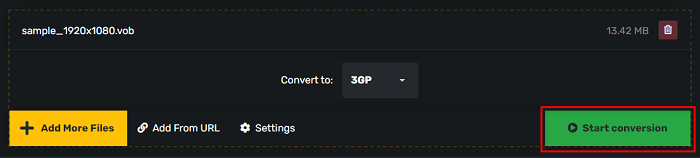
שלב 3. ולבסוף, לחצו על Start conversion לחצן כדי להמיר את ה-VOB שלך לקובץ 3GP.
חלק 3. באיזה ממיר VOB ל-3GP עלי להשתמש
בבחירת הממיר הטוב ביותר להמרת VOB ל-3GP, עליך תמיד לשקול את המהירות, הקבצים שבהם הוא תומך, והייחודיות של תכונות הממיר. אנו ממליצים להשתמש בכלי הלא מקוון FVC Video Converter Ultimate בין הממירים המקוונים והלא מקוונים הטובים ביותר המוצגים למעלה. ממיר זה מציע הרבה תכונות ברורות שאין לממירים אחרים, כמו יצרן 3D GIF Creator, מסיר סימני מים ורבים נוספים.
יתרה מכך, למרות שהוא יכול לתת פלטים כמו מקצועיים, יש לו גם ממשק קל לשימוש כך שלא תתקשו להשתמש בו.
חלק 4. עוד על VOB ו-3GP
VOB או Video Object הוא פורמט מיכל קבצים שבו משתמשים בתקליטורי DVD. הוא מכיל וידאו, אודיו, כתוביות ותוכן תפריט. לסוג זה של קבצים יש מגבלות והגבלות העתקה כדי להגן עליהם מפני העתקה ישירה. לעומת זאת, קבצי 3GP הם פורמטים של קבצים שניתן להפעיל רק במכשירים ניידים מהדור השלישי. פורמטים אלה של קבצים פותחו על ידי פרויקט השותפות של הדור השלישי (3GPP). יתרה מכך, סוג זה של קבצים מכיל רק גודל קובץ קטן, בהשוואה לקבצי VOB, מכיוון שהם מיועדים לשיתוף עם מכשירי דור שלישי. 3GP יכול לאחסן קבצי וידאו ושמע הנמצאים בשימוש נפוץ בטלפונים 3G.
חלק 5. שאלות נפוצות לגבי המרת VOB ל-3GP
האם אתה יכול לשחק 3GP ב-macOS?
קבצי 3GP אינם ניתנים לניגון ב‑macOS, במיוחד בגרסאות החדשות יותר של QuickTime. עם זאת, תוכלו להמיר את קובץ ה‑3GP שלכם לקובץ שנתמך ב‑macOS, כלומר MOV. כדי ללמוד עוד על המרת קובצי 3GP ל‑MOV, לחצו על הקישור הזה.
האם המרת VOB ל-3GP תשפיע על איכות הקובץ שלך?
בהחלט כן. גודל הקובץ יושפע כאשר תמיר VOB ל-3GP. מכיוון ש-3GP מכיל רק קבצי וידאו ואודיו ויש לו גודל קובץ קטן יותר, גודל הקובץ של קובץ ה-VOB שלך יהיה קטן יותר.
האם פורמט קובץ 3GP הוא קובץ נפוץ?
למרבה הצער, בימינו, פורמטים של קובץ 3GP אינם כל כך נפוצים מכיוון שיש פחות טלפונים 3G בימינו. הקובץ הנפוץ ביותר למשתמשים ניידים בימינו הוא פורמט הקובץ MP4.
סיכום
מכיוון שאנו מציגים את הממירים הטובים והקלים ביותר לשימוש להמרת VOB ל-MOV ב-Windows וב-Mac, אנו מסיקים כי FVC Video Converter Ultimate הוא הטוב ביותר מבין כלי הממירים המקוונים והלא מקוונים המועדפים. לא רק שיש לו תכונות ייחודיות לנסות, הוא גם מציע המרה במהירות גבוהה. עדיין יש לך ספקות לגבי הממיר הזה, הורד אותו עכשיו ונסה את ממיר VOB ל-3GP הטוב ביותר.
-
 הדרכים הטובות ביותר להמיר VOB ל-FLV [כלול בחינם ומקוון]
 רוצה להמיר קובץ VOB לקובץ FLV? אתה יכול להשלים את המשימה בקלות באמצעות ממירים שולחניים או מקוונים. קרא מדריך זה ולמד כיצד להפוך את VOB ל- FLV בקלות ובמהירות.
-
 3 ממירים שימושיים זמינים לשינוי קובץ VOB לפורמט AVI [2021]
 יש לך בעיה כי קבצי VOB אינם נתמכים להפעלה? אז בואו ננסה להמיר אותו ב-3 הדרכים המוצגות להלן עם שלבים מפורטים על כל ממיר.
-
 שיטות מצוינות לשימוש בהמרת VOB ל-MOV
 הורדות וידאו מקוונות הן נוחות, אבל מה אם הסרטון הוא בפורמט VOB והנגן שלך לא תומך בו? פוסט זה ילמד אותך כיצד להמיר VOB ל-MOV.
