


 ממיר וידאו אולטימטיבי
 מקליט מסך
 תיקון וידאו
למד את הדרכים להמיר WebM ל-MKV עם הממירים הטובים ביותר
פורמטי וידאו רבים מגיעים בתבנית הקובץ WebM, ודפדפנים רבים כמו Google, Mozilla Firefox, Opera ו‑Microsoft Edge תומכים בסוג קובץ זה. עם זאת, קובצי WebM הם מכולות שיכולות לאחסן רק זרמי וידאו הדחוסים בעזרת מקודדי הווידאו VP8 או VP9. לכן, אם ברצונך להמיר את קובץ ה‑WebM שלך למכולת קבצים שיכולה להכיל מספר בלתי מוגבל של רצועות אודיו, וידאו וכתוביות, עליך לשנות את קובץ ה‑WebM שלך לפורמט קובץ MKV. בנוסף, במאמר זה נדון בממירי ה‑WebM ל‑MKV הטובים ביותר.

חלק 1. למה אתה צריך להמיר WebM ל-MKV
קובצי WebM הם פורמטי וידאו הנתמכים בהרחבה כמעט בכל דפדפני האינטרנט. זהו פורמט קובץ שבו HTML5 משתמש לעיתים קרובות לצורכי הזרמת וידאו. נוסף על כך, זהו פורמט קובץ חופשי מתמלוגים, שנוצר בעיקר עבור הרשת. סוג קובץ זה משמש גם כמכולה לפורמטי אודיו ווידאו. לעומת זאת, קובצי MKV או Matroska מכילים מספר בלתי מוגבל של רצועות אודיו, וידאו וכתוביות. אז מדוע אנחנו צריכים להמיר WebM ל‑MKV? פשוט משום שקובצי WebM יכולים להכיל רק סרטונים הדחוסים באמצעות מקודדים VP8 ו‑VP9, בעוד שקובצי MKV יכולים לטפל במספר זרמי כתוביות ורצועות אודיו בשפות שונות, דבר שהוא שימושי לחובבי סרטים.
חלק 2. המר קבצי WebM ל-MKV באמצעות ממיר במהירות בזק
כולם רוצים ממיר שיכול להמיר קבצים במהירות. למרבה המזל, מצאנו כלי שיכול להמיר קבצים בן רגע. FVC Video Converter Ultimate הוא ממיר לא‑מקוון המאפשר לך להמיר WebM ל‑MKV במהירות. הוא גם תומך כמעט בכל הפורמטים הסטנדרטיים, כמו WebM, MKV, AVI, MP4, MOV, M4V, FLV ועוד רבים אחרים. ואם ברצונך למזג מספר קבצים לקובץ אחד, לממיר זה יש אפשרות לבצע המרה באצווה.

ממיר וידיאו אולטימטיבי
5,689,200+ הורדות- זה מאפשר לך לבצע המרת אצווה.
- אתה יכול לשפר, לערוך, לדחוס את הקובץ שלך.
- יש לו תכונה שיכולה להמיר את הקובץ שלך תוך שניות ספורות.
- יש לו ממשק קל לשימוש.
הורדה חינמיתל-Windows 7 ומעלההורדה מאובטחת
הורדה חינמיתל-MacOS 10.7 ומעלההורדה מאובטחת
שלב 1. כדי להוריד את היישום, לחץ על כפתור Download למטה. לאחר מכן עקוב אחר תהליך ההתקנה ופתח את היישום.
הורדה חינמיתל-Windows 7 ומעלההורדה מאובטחת
הורדה חינמיתל-MacOS 10.7 ומעלההורדה מאובטחת
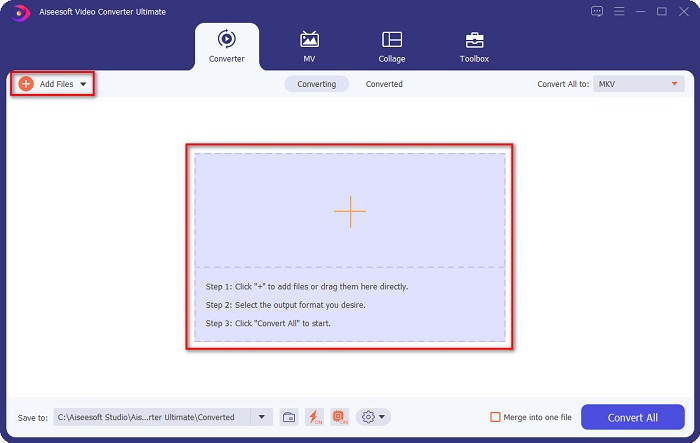
שלב 2. לאחר פתיחת היישום, לחץ על כפתור Add Files או על כפתור הסימן + כדי להעלות את קובץ ה‑WebM שלך בממשק הראשון של התוכנה.
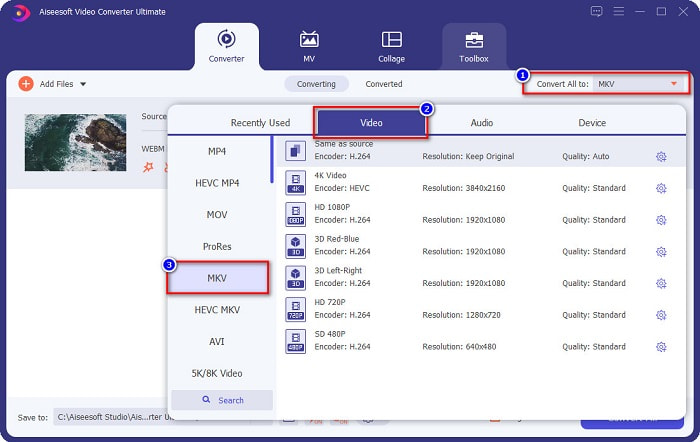
שלב 3. כדי לבחור את פורמט הפלט הרצוי, לחץ על הכפתור Convert All to בפינה הימנית העליונה של ממשק התוכנה. בחר MKV, ואז המשך לשלב הבא.
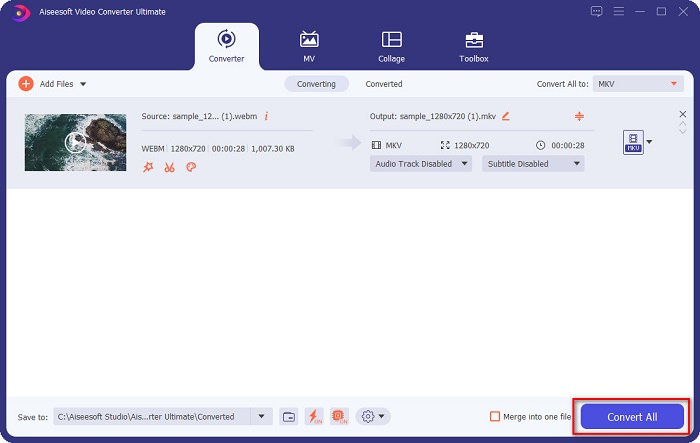
שלב 4. ולשלב האחרון, לחץ על כפתור Convert All כדי להתחיל להמיר את ה‑WebM שלך לקובץ MKV. המתן כמה שניות, והופ! קובץ ה‑MKV שלך מוכן.
על‑ידי ביצוע שלבים פשוטים אלו ושימוש בממיר WebM ל‑MKV הזה, תוכל להמיר קבצים ללא מאמץ. כמו כן, באפשרותך להשתמש בו כדי להמיר WebM ל‑MP3 או לקובצי אודיו אחרים.
חלק 3. המר קבצי WebM ל-MKV באמצעות FFMPEG
FFMPEG הוא כלי שורת פקודה בשימוש נפוץ לקידוד פורמטים, עריכת וידאו, שינוי קנה מידה ואפקטים לאחר הפקת וידאו. יתר על כן, תוכנה זו גם מאפשרת לך להמיר פורמטים של קבצים. מכיוון שזהו ממיר מבוסס טקסט, אנשים רבים שרוצים להשתמש בו מתקשים להשתמש בממיר זה. עם זאת, זו גם דרך יעילה ויעילה להמיר WebM ל-MKV ב-FFmpeg.
שלב 1. כדי להשתמש בממיר זה, הורד את FFMPEG למחשב שלך. עקוב אחר תהליך ההתקנה ואז הפעל את ffmpeg.exe במערכת המחשב שלך.
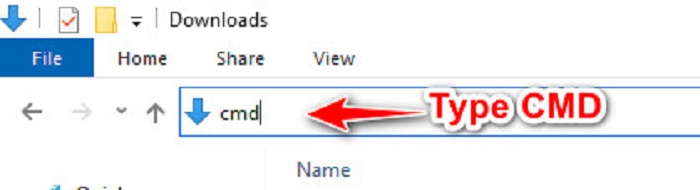
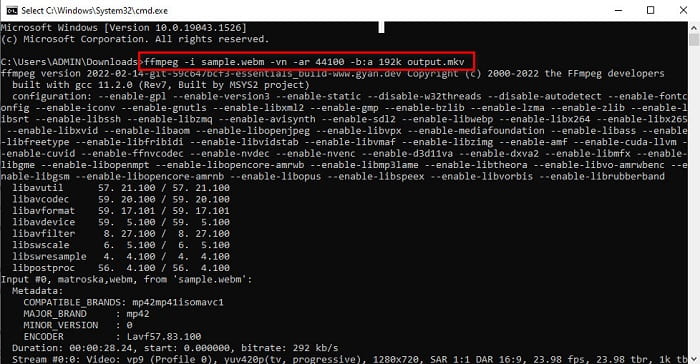
שלב 2. אתר את קובץ ה‑WebM שלך בקבצי המחשב, ואז בתיקייה שבה הקובץ נמצא הקלד CMD כדי לפתוח את שורת הפקודה לצורך המרת הקובץ.
שלב 3. לבסוף, הקלד את הפקודה הבאה ffmpeg -i sample.webm -vn -ar 44100 -b:a 192k output.mkv. לאחר מכן לחץ על מקש Enter במקלדת שלך, ותופיע רשימה של קודים, המצביעה על כך שההמרה הושלמה.
חלק 4. המר קבצי WebM ל-MKV באופן מקוון באמצעות הממיר המקוון הטוב ביותר
אחד מממירי האונליין הטובים ביותר הזמינים כיום ברשת הוא FVC Free Online Video Converter. ממיר זה מאפשר לך להמיר קבצים רבים, כולל WebM, MKV, MP4, AVI, MOV, WMA, MP3 ועוד. ממיר מקוון זה קל מאוד לשימוש בשל הממשק הפשוט שלו. עם זאת, מאחר שזהו כלי מבוסס‑אינטרנט, ייתכן שתחווה המרה איטית של קבצים עקב בעיות חיבור. למרות זאת, רבים עדיין משתמשים בו כדי להמיר WebM ל‑MKV אונליין, והמשתמשים מרוצים מהביצועים שלו.
שלב 1. בדפדפן שלך, חפש FVC Free Online Video Converter או לחץ על קישור זה כדי לעבור לדף האינטרנט שלהם.
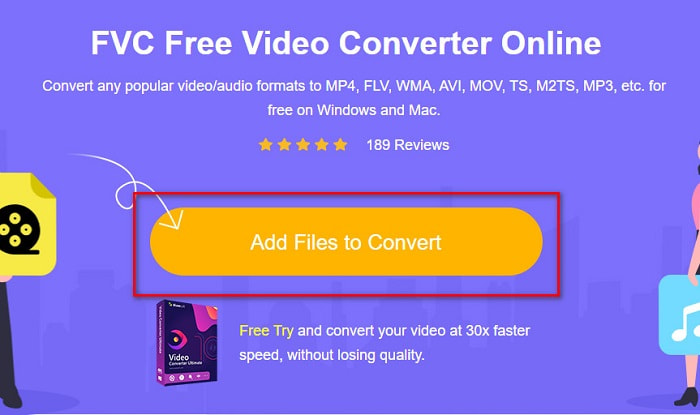
שלב 2. לאחר מכן לחץ על Add Files to Convert והפעל את היישום. לאחר הפעלת היישום, קבצי המחשב שלך יופיעו כדי שתוכל לבחור את קובץ ה‑WebM שלך.
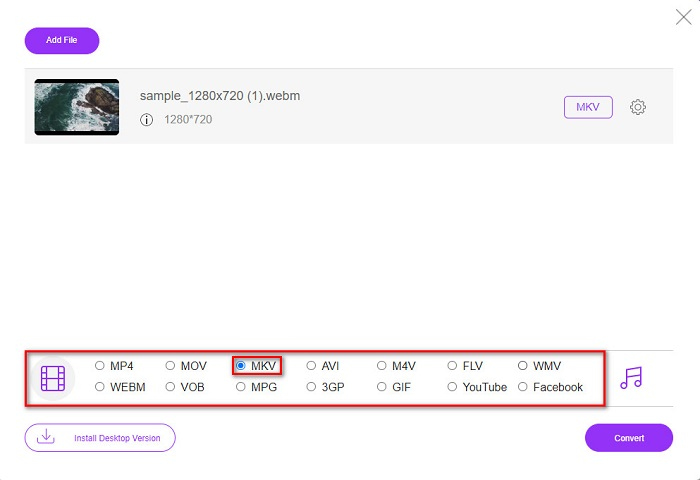
שלב 3. לאחר מכן, בחר בקובץ MKV כפורמט הקובץ הרצוי. רשימת פורמטי הקבצים ממוקמת מתחת לממשק השני של התוכנה.
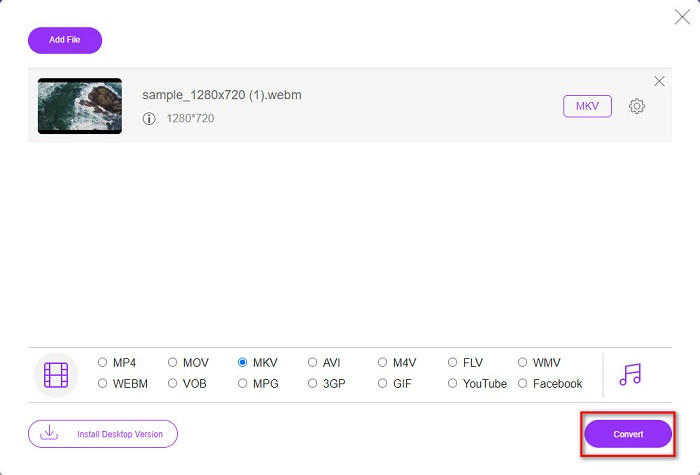
שלב 4. לבסוף, לחץ על כפתור Convert, ואז הקובץ שלך יתחיל לעבור המרה.
חלק 5. טבלת השוואה
| תכונות | ממיר וידיאו אולטימטיבי | FFMPEG | ממיר וידאו מקוון בחינם |
| המרה מהירה במיוחד |  | – | – |
| המרת אצווה | | – | – |
| תבניות קבצים נתמכות | יכול להמיר WebM ל-MKV, MP4, MOV, AVI, M4V, FLV, +1000 פורמטים נוספים. | הוא תומך בפורמטים שונים של קבצים כמו AIFF, AVI, FLV, GIF ופורמטים מסוימים של קבצים. | מאפשר לך להמיר כמעט את כל הפורמטים המוכרים כמו FLV, AVI, MP4, MOV, MP3 ועוד. |
| ממשק קל לשימוש | | – | |
| חיבור לאינטרנט | – | – | |
חלק 6. שאלות נפוצות לגבי המרת WebM ל-MKV
האם אוכל להמיר WebM ל-MKV ללא הפסדים?
כן. באמצעות FVC Converter Ultimate כממיר שלך, באפשרותך לשנות WebM ל‑MKV מבלי לאבד את איכות הקובץ.
מדוע ל-MKV יש גודל קובץ עצום?
לקבצי MKV יש גודל קובץ עצום מכיוון שהוא תומך בתכונות נוספות של רצועות אודיו ווידאו שונות.
האם אני יכול להמיר WebM ל-MP4?
אכן, ניתן לפענח ולהמיר WebM ל‑MP4 באמצעות מגוון ממירי קבצים הזמינים בשוק. באפשרותך גם לקרוא מאמר זה כדי ללמוד עוד על הנושא של המרת WebM ל‑MP4.
סיכום
למרות ש-WebM ו-MKV הם שניהם מיכלי קבצים, בטוח לומר שהמרת קובץ ה-WebM שלך ל-MKV היא החלטה טובה. וכל הממירים המקוונים והלא מקוונים החינמיים שהוצגו לעיל מציגים תכונות מובחנות. אבל אם אתה רוצה ממיר עם תכונות ייחודיות רבות שיכולים להמיר את קובץ ה-WebM שלך ל-MKV במהירות רבה במיוחד, אנו מאמינים ש-FVC Video Converter Ultimate הוא הכלי הטוב ביותר עבורך!
-
 3 תוכנות מדהימות המשמשות להמרת קובץ WebM לפורמט AVI
 אין לך מושג איך להמיר WebM ל-AVI? אז בואו נתחיל לקרוא את המאמר הזה. כפי שאנו מציינים את כל הפרטים על WebM ושלושת הממירים שבהם אתה יכול להשתמש כדי להמיר.
-
 שיטות קלות לביצוע כיצד להמיר WEBM ל-MOV
 האם אתה מתקשה שסרטוני ה-WebM שלך לא יכולים להיות מופעלים על ידי ספארי, ואינך רוצה לעבור לדפדפן התומך בפורמט הזה? קרא מאמר זה כדי ללמוד כיצד לשנות את WebM ל-MOV בקלות.
-
 Top Most Choice WebM to FLV Converter חינם באינטרנט ובשולחן העבודה
 האם יש לך אותה בעיה בהפעלת קבצי WebM בטלפונים החכמים שלך? לאחר מכן הקדישו 5 דקות לקריאת מאמר זה כדי לדעת כיצד להמיר WebM ל-FLV.
