


 ממיר וידאו אולטימטיבי
 מקליט מסך
 תיקון וידאו
 הורדה מאובטחת
טריקים מעולים להמרת WMV ל-M4V בקלות אתה יכול לנסות
האם אתה אחד מהמשתמשים שמחפשים שיטות מצוינות ופשוטות להמרת WMV ל‑M4V? קיימים ממירים שונים שניתן למצוא ברשת. עם זאת, חלק מהם אינם תומכים בפורמטי הקבצים WMV ו‑M4V. אם זו הבעיה שלך, מאמר זה יכול לספק לך את הפתרון הקל ביותר באמצעות יישומים איכותיים. תוכל גם לגלות את התכונות שלהם כדי לקבל מושג על הפונקציות הנוספות של היישומים האלה. קרא את המאמר מתחילתו ועד סופו כדי לגלות עוד פרטים חיוניים.

חלק 1: מבוא ל-WMV ו-M4V
פורמט קובץ WMV
| שֵׁם | WMV |
| סיומת קובץ | .wmv |
| תיאור | ראשי התיבות WMV (Windows Media Video) מייצגים קבוצה של רכיבי Codec וידאו שמיקרוסופט השיקה לראשונה במסגרת Windows Media שלה. זה נוצר לראשונה כדי להתחרות בפורמט RM באפליקציות סטרימינג באינטרנט. זה מחזיק קבצי וידאו דחוסים ואפילו עוזר Blu-ray/DVD לספק תוכן. |
| קטגוריית קבצים | וִידֵאוֹ |
| פותח על ידי | מיקרוסופט |
| תוכניות משויכות | נגן מדיה VLC MPlayer נגן מדיה קלאסי נגן המדיה של Windows |
| סוג MIME | וידאו/x-ms-asf וידאו/Mpeg |
| פרטים טכניים | תוכן המולטימדיה הקודד כלול בקובץ WMV באמצעות פורמט המכולה Advanced Systems Format (ASF). קבצי ASF צריכים להשתמש בסיומת הקובץ.ASF ולא בסיומת הקובץ.WMV, למרות שה-ASF יכול להכיל מולטימדיה בקידודים שונים ממה שמתיר תקן קובץ WMV. |
פורמט קובץ M4V
| שֵׁם | M4V |
| סיומת קובץ | .m4v |
| תיאור | אפל יצרה את פורמט הקובץ M4V, פורמט מיכל וידאו הדומה לתקן MP4. ההבדל העיקרי הוא שלפורמטים של קבצים M4V יכולים להיות הגנת העתקה מסוג DRM. ב-iTunes Store שלה, אפל מקודדת קבצי וידאו בפורמט M4V. |
| קטגוריית קבצים | וִידֵאוֹ |
| פותח על ידי | אפל בע"מ. |
| תוכניות משויכות | נגן מדיה VLC KMPlayer נגן מדיה קלאסי נגן זום |
| פרטים טכניים | ניתן להגן על קבצי M4V באמצעות הגנת ההעתקה FairPlay של אפל כדי למנוע שכפול לא מורשה. רק מחשבים שאושרו (דרך iTunes) עם החשבון ששימש לקניית הסרטון יכולים להפעיל קובץ M4V מוגן FairPlay. |
חלק 2: הדרך הטובה ביותר להמיר WMV ל-M4V עבור Mac ו-Windows
הדרך הטובה ביותר להמיר WMV ל‑M4V היא באמצעות FVC Video Converter Ultimate. ניתן להוריד ממיר זה גם ב‑Windows וגם ב‑Mac. הוא יכול להמיר יותר מ‑100 פורמטי וידאו, כגון WMV, M4V, MP4, AVI, FLV, MKV, MOV ועוד. במהלך ההמרה, באפשרותך להמיר מספר קבצים בו‑זמנית, משום שהיישום תומך בהמרה באצווה. בנוסף, לא תתאכזב מתהליך ההמרה עצמו. ממיר זה מציע תהליך המרה מהיר במיוחד, המאפשר להמיר קבצים במהירות הגדולה עד פי 30 מהמהירות הממוצעת.
יתר על כן, ל- Video Converter Ultimate יש פונקציה עיקרית נוספת. אם אתה מעוניין להמיר את קבצי התמונה שלך, אתה יכול לעשות זאת.
תכונות
◆ המר פורמטים שונים של קבצי וידאו, כגון M4V, WMV, FLV, AVI, MP4, MOV, VOB וכו'.
◆ מציע כלים לעריכת וידאו, כמו משפר וידאו, מדחס, cropper, trimmer, reverser וכו'.
◆ מסוגל ליצור קולאז'.
◆ יצירת סרטון מוזיקה זמינה.
◆ מאפשר המרת אצווה.
◆ שנה את מהירות הסרטון.
◆ המר פורמטים של קבצי תמונה כמו PNG, JPG, BMP, WEBP ועוד.
בואו נמיר WMV ל-M4V ב-Mac באמצעות FVC Video Converter Ultimate. השתמש במדריכים הפשוטים למטה.
שלב 1: הורד והתקן את FVC Video Converter Ultimate במחשב ה‑Mac שלך על‑ידי לחיצה על כפתור ההורדה שלהלן עבור גרסת ה‑Mac.
הורדה חינמיתל-Windows 7 ומעלההורדה מאובטחת
הורדה חינמיתל-MacOS 10.7 ומעלההורדה מאובטחת
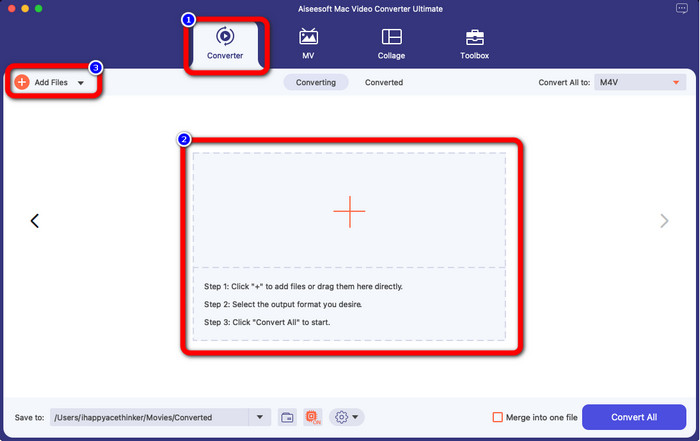
שלב 2: הפעל את היישום ובחר בלשונית Converter. לאחר מכן לחץ על סמל ה‑+ או על כפתור Add Files כדי להוסיף את קובץ הווידאו WMV שלך.
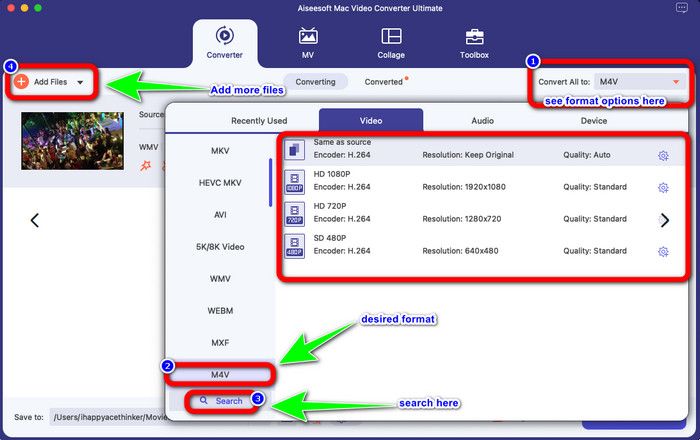
שלב 3: לאחר הוספת הווידאו, לחץ על כפתור Convert All to כדי להציג את אפשרויות הפורמט, ובחר בפורמט הקובץ M4V. באפשרותך גם לחפש את הפורמט הרצוי בתיבת החיפוש בחלק התחתון של הממשק. תוכל עדיין ללחוץ על כפתור Add Files כדי להוסיף עוד סרטונים לביצוע המרה באצווה.
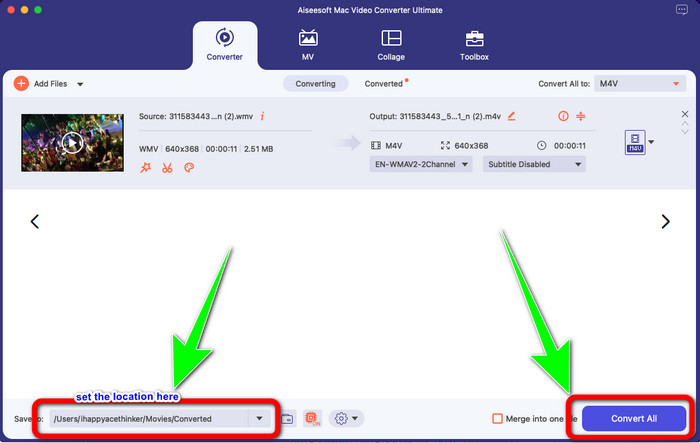
שלב 4: לאחר שבחרת את פורמט הקובץ הרצוי, M4V, באפשרותך כבר לבחור את המיקום שבו תרצה לשמור את הסרטון. לאחר מכן לחץ על כפתור Convert.
חלק 3: דרך חינם להמיר WMV ל-M4V
כדי להמיר WMV ל‑M4V בחינם, ניתן להשתמש ב‑Convertfiles. תוכנה מקוונת זו מסוגלת גם להמיר מספר קבצים. יש לה הוראות פשוטות וממשק נוח, המתאימים לכל המשתמשים. מעבר להמרת וידאו, תוכל גם להמיר תמונות, אודיו, מצגות ועוד. עם זאת, ישנם זמנים שבהם ממיר זה אינו פועל היטב. תהליך ההמרה איטי, והפרסומות מעצבנות.
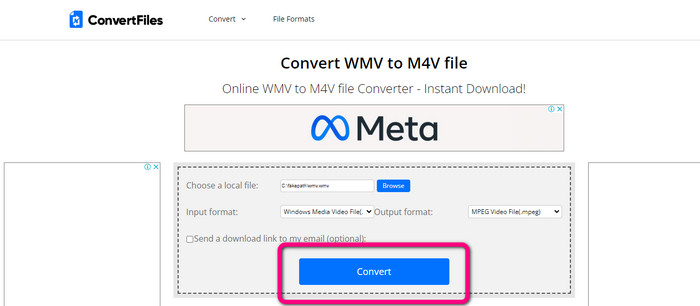
שלב 1: עבור לאתר האינטרנט של Convertfiles.
שלב 2: העלה את קובץ ה‑WMV שברצונך להמיר.
שלב 3: בשדה Output format, בחר בקובץ M4V. לאחר מכן לחץ על כפתור Convert.
חלק 4: שיטה מצוינת להמרת WMV ל-M4V באינטרנט
שיטה נוספת להמרת WMV ל‑M4V אונליין היא שימוש ב‑FVC Free Video Converter Online. בעזרת כלי מקוון זה, המרת WMV היא קלה. הוא גם ממיר פורמטים נוספים כמו AVI, MP4, FLV, MKV, VOB ועוד. נוסף על כך, למרות שמדובר בממיר מקוון חינמי, אין צורך לדאוג לגבי איכות הווידאו שלך. באפשרותך לשמור את הווידאו המומר באיכות המקורית. יתרה מזו, תוכל גם לשנות את קצב הסיביות, קצב הפריימים והרזולוציה של הסרטון.
תכונות
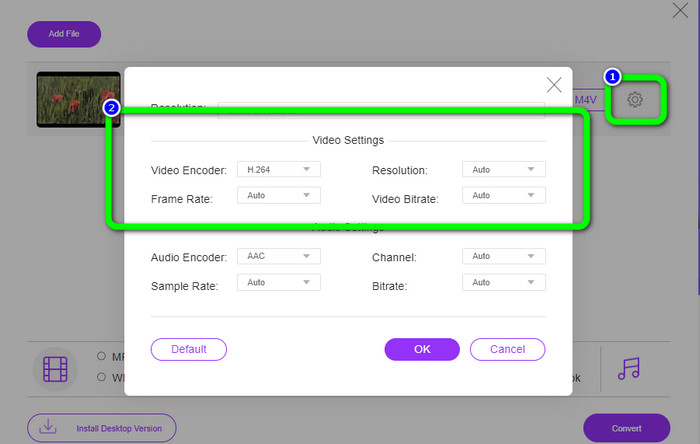
◆ מסוגל לשנות את קצב הסיביות, קצב הפריימים והרזולוציה של הסרטון.
◆ מציע המרה אצווה.
בצע את השלבים המפורטים להלן כדי להמיר WMV ל-M4V באמצעות FVC Free Video Converter Online.
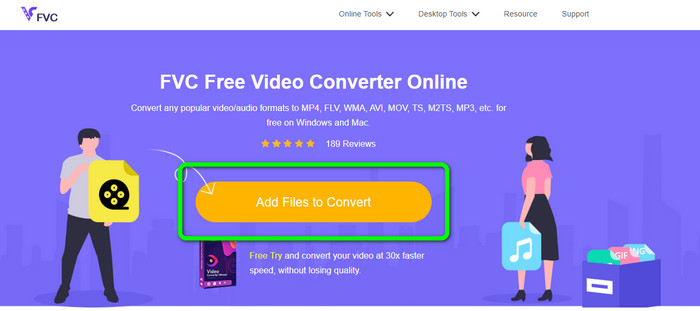
שלב 1: בקר באתר FVC Free Video Converter Online. לאחר מכן לחץ על כפתור Add Files to Convert.
שלב 2: אם ברצונך לשנות את קצב הסיביות, קצב הפריימים והרזולוציה של הווידאו, לחץ על סמל Settings. לאחר מכן לחץ על OK כשתסיים.
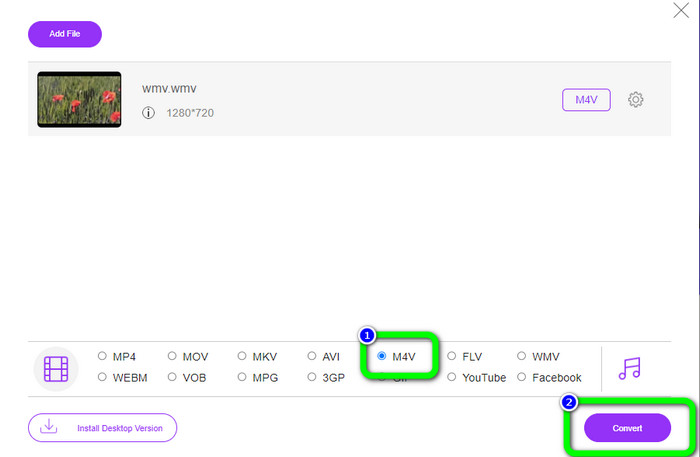
שלב 3: בחלק התחתון של הממשק תראה את אפשרויות הפורמט. בחר בקובץ M4V כפורמט הפלט הרצוי, ולחץ על כפתור Convert כדי להוריד את הסרטון.
חלק 5: שאלות נפוצות על המרת WMV ל-M4V
1. האם כל המכשירים יכולים לשחק M4V?
למרבה הצער, לא. הנגן המובנה במכשירי Android אינו תומך בקובצי M4V. באפשרותך להוריד נגן M4V של צד שלישי שתומך בפורמט M4V או להמיר אותו לפורמט נתמך.
2. האם יש את הממיר הטוב ביותר להמרת WMV ל-M4V?
אם אתה רוצה את ממיר ה‑WMV ל‑M4V הטוב ביותר, תוכל להשתמש ב‑FVC Free Video Converter Online. הוא יכול להמיר את הקבצים שלך ביעילות וללא מאמץ.
3. מה עדיף, M4V או MOV?
M4V עדיף. אם ברצונך לנגן את הקבצים שלך במכשיר נייד, כגון iPhone, iPod או iPad, מומלץ מאוד להשתמש ב‑M4V. אך בחלק מהמכשירים נתמך רק MOV. במקרה כזה תוכל להמיר M4V ל‑MOV.
סיכום
בעזרת כל המידע החיוני לעיל, באפשרותך כבר להמיר WMV ל‑M4V בקלות ובמהירות. אם אתה מעדיף ממיר בעל מהירות המרה גבוהה, תוכל להשתמש ב‑FVC Video Converter Ultimate. כמו כן, תוכל להשתמש ב‑FVC Free Video Converter Online אם אתה מעוניין בממיר מקוון חינמי.
-
 כיצד לדחוס קבצי M4V לגודל קטן יותר (חינם ומקוון)
 אם אתם מחפשים דרך פשוטה להקטין את גודל קובץ ה-M4V שלכם, כדאי לבוא ולקרוא מאמר זה. כאן נשתף איתך את הדרך הקלה ביותר לדחוס קבצי M4V
-
 מדריך קונקרטי להצטרפות קבצי M4V בחלונות ו- Mac בחינם
 אם אתם מחפשים פתרון לשילוב קבצי וידאו M4V לאחד, אל תפספסו את הקטע הזה. כאן נדבר על שתי השיטות הטובות ביותר לשילוב קבצי וידאו M4V
-
 טיפים מהירים וקלים להמרת WMV ל-MOV [מוכח]
 האם אתה רוצה לדעת מהם הממירים הטובים והקלים לשימוש הממירים WMV ל-MOV? המשך לקרוא מאמר זה כשהוא דן בכל האפשרויות האפשריות שאתה צריך לשקול להשתמש בהן
