


 ממיר וידאו אולטימטיבי
 מקליט מסך
 תיקון וידאו
מדריך מהיר להמרת WMV ל-MKV ב-Mac וב-Windows בקלות
אם אתה חובב סרטים, ורוצה פורמט קובץ שיכול להתמודד עם רצועות אודיו שונות עם כתוביות, ייתכן שתרצה להמיר את קובץ ה-WMV שלך לקובץ MKV. ואם אתה מתקשה לחפש ממיר WMV ל-MKV התואם ל-Windows ול-Mac, מצאנו את הממירים הטובים ביותר שתוכל להשתמש בהם באופן מקוון ולא מקוון. מאמר זה מציג לך את הממירים הטובים ביותר להמרת WMV ל-MKV ב-Mac וב-Windows.

חלק 1. למה להמיר WMV ל-MKV
WMV או Windows Media Video הוא פורמט קובץ שכמעט כל נגני המדיה תומכים בו באופן נרחב. זהו פורמט קובץ שיכול לאחסן קטעי וידאו, אנימציות, פרקי טלוויזיה וסרטים. בנוסף, זהו קובץ דחוס; לכן, יש לו גודל קובץ קטן. אז למה אתה צריך להמיר WMV ל-MKV? MKV או Matroska הוא מיכל קבצים שיכול לשלב רצועות אודיו, וידאו וכתוביות ללא הגבלה.
יתר על כן, פורמט קובץ זה עמיד לעתיד, מה שאומר שהוא לא יהיה מיושן בעתיד. זה יכול גם להתמודד עם זרמי כתוביות מרובים ורצועות שמע בשפות רבות. לכן, אם אתה חובב סרטים, ייתכן שתרצה להמיר את קובץ ה-WMV שלך לפורמט קובץ MKV.
חלק 2. המר WMV ל-MKV באמצעות הממיר הלא מקוון הטוב ביותר
This converter is proven to be the best offline converter available on the market. FVC Video Converter Ultimate is a free offline tool that could provide professional-like outputs without having a hard time. It also supports various file formats to convert your WMV file to MKV, AVI, MP4, MOV, FLV, and more. Still not pleased with what it can do? You can also edit your video using its advanced video editing features using this converter. Follow these simple steps below to know how to use this WMV to MKV converter for free.
Step 1. Download the application by clicking the Download button below. There are two options where you can choose to download it on Mac or Windows. Then open the application.
הורדה חינמיתל-Windows 7 ומעלההורדה מאובטחת
הורדה חינמיתל-MacOS 10.7 ומעלההורדה מאובטחת
Step 2. After you open the application, click the Add Files button or the + button to upload your file on the software's first interface. Then a new window will appear where you will select your WMV file.
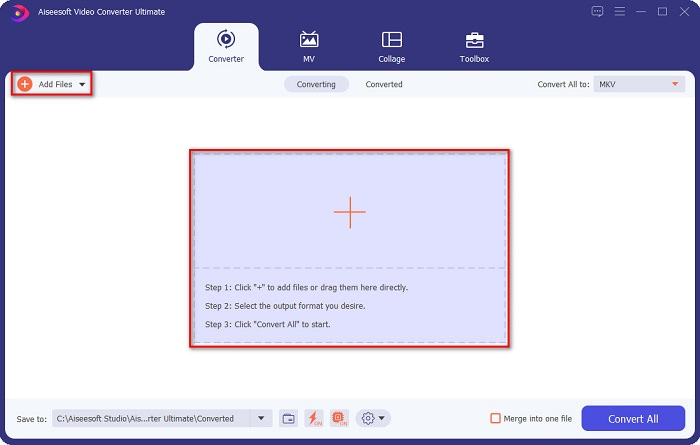
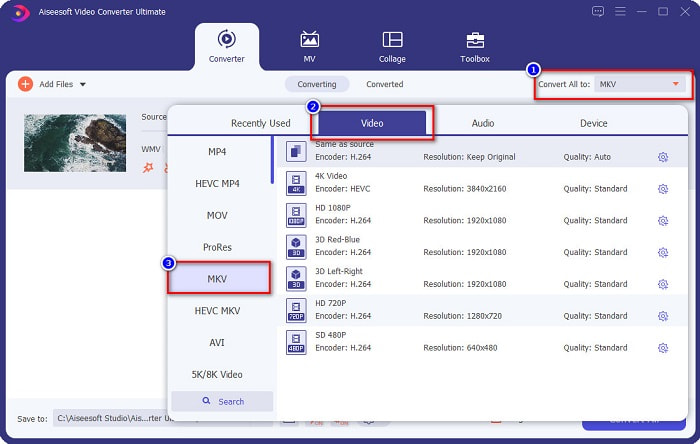
Step 3. Then click the Convert All to button to select your desired output format. In your case, choose the MKV format.
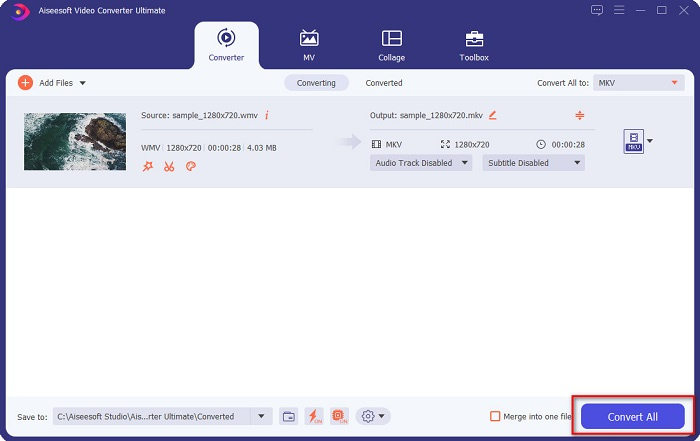
Step 4. Finally, click the Convert All button to convert your WMV to an MKV file. Then just wait for a few seconds. And that's it! By the way, you can also quickly convert WMV to MOV files by following these simple steps.
חלק 3. המר WMV ל-MKV באמצעות 3 הכלים המקוונים הטובים ביותר
אין ספק שהכלים המקוונים הם הטובים ביותר לנוחות מכיוון שלא תצטרכו להוריד שום דבר. חלק זה מציג את מיטב ממירי WMV ל-MKV הזמינים באינטרנט.
ממיר וידאו מקוון בחינם
FVC Free Online Video Converter is an online converter that has an easy-to-use interface. It supports various file formats and can convert WMV to MKV, AVI, MOV, MP4, MP3, TS, and more. However, this transcoder is internet-reliant, which means it depends on the internet on how fast your conversion will be. Nonetheless, it is undoubtedly one of the best online WMV to MKV converters.
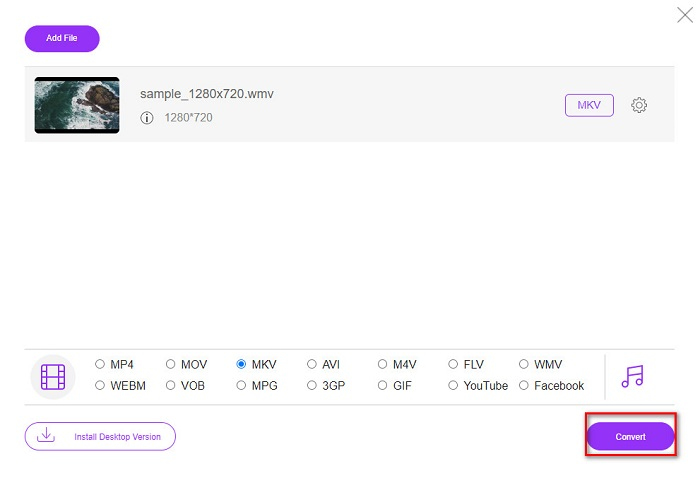
להלן השלבים להמרת WMV לקבצי MKV באמצעות FVC Free Online Video Converter:
Step 1. Go to their webpage by clicking this link, or search FVC Free Online Video Converter on your browser.
Step 2. For the next step, click the Add Files to Convert button, then launch the application. After the application has been launched, select your WMV file when your computer files appear.
הורד את גרסת הדסקטופ כדי להמיר קבצים במצב אצווה.
Step 3. And then, to select your desired output file format, click the MKV located below the software's second interface.
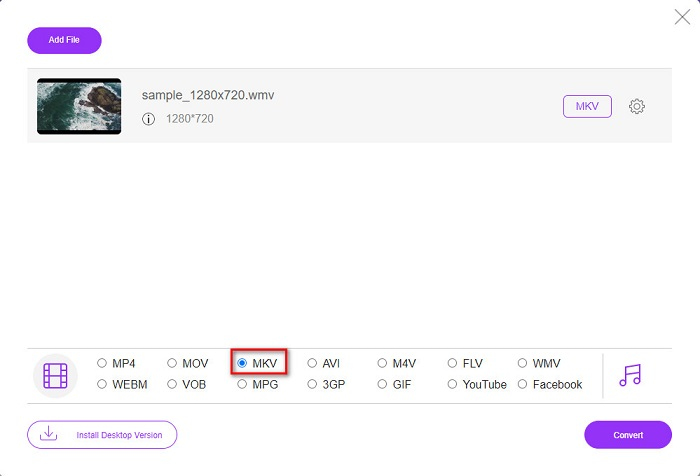
Step 4. To finish, click the Convert button, and your WMV to MKV file will start converting. Just wait for your conversion to finish, and that's it! By following these steps, you can easily convert WMV to MKV online.
המרה
Another online converter that trends in the web is Convertio. This free online converter is also easy to use. But despite that, this converter contains ads that might disturb you. But still, this converter is very convenient to use when converting your WMV file to MKV.
Step 1. In your browser, search Convertio. Then, click the Choose Files button in the software's main interface to select your WMV file.

Step 2. And then, click the drop-down button to select the MKV file as your output format.
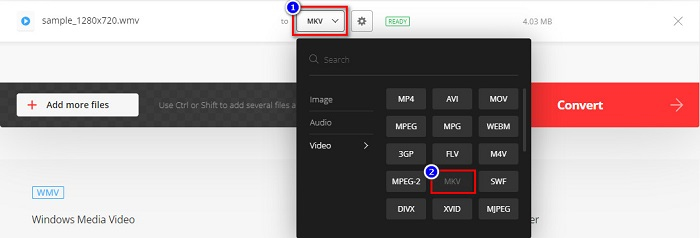
Step 3. For the last step, click the Convert button located at the bottom right corner of the software’s interface. And then, your file will start to convert.

MConverter
MConverter is an online WMV to MKV converter that supports various audio, video, and image files. It has simple steps to convert your WMV to an MKV file. However, there is a file size limit for using this converter. Nevertheless, it can effectively transform your WMV file to MKV with ease.
Step 1. Type MConverter on the browser you use, then you will be led to their web page.
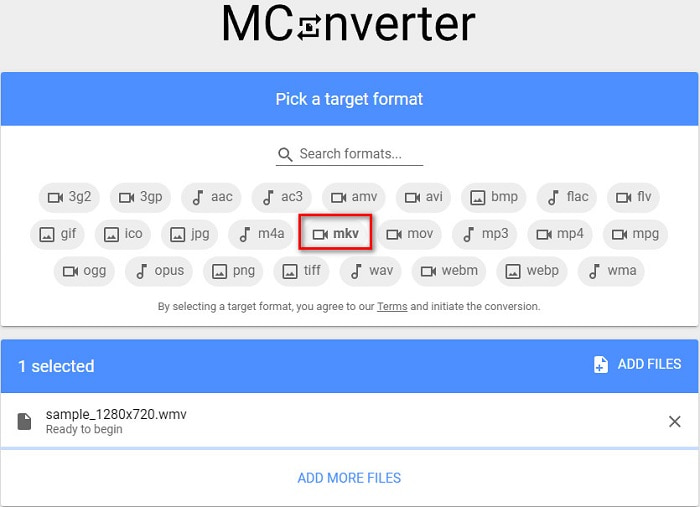
Step 2. And then, drop your WMV file on the rectangular box, or you can choose to click the browse word to select your WMV file.

Step 3. After selecting your WMV file, pick the MKV file as your output file format by clicking the MKV button. Right after you click MKV, your WMV to MKV conversion will begin. Then wait for your file to convert.
WMV לעומת MKV
הופק על ידי מיקרוסופט, WMV היה אחד מפורמטי הווידאו הנפוצים ביותר בשנות ה-2000. ניתן לראות אותו דרך האינטרנט ולהפעיל אותו על ידי נגני מדיה שונים ב-Windows. וזה גם פורמט ברירת המחדל של קובץ הווידאו של Windows Media Player. אבל זה השתלט על ידי פורמטים אחרים לאחרונה.
פורמט מיכל המולטימדיה Matroska, שיצא בשנת 2002, הוא פורמט קוד פתוח שיכול לכלול מספר רצועות וידאו, אודיו, תמונה וכתוביות. אז אתה יכול להשתמש בו כדי לאחסן קטעי וידאו קצרים, תוכניות טלוויזיה וסרטים בקלות. זה די פופולרי עבור אוהדי אנימה.
חלק 4. שאלות נפוצות לגבי המרת WMV ל-MKV
האם אתה יכול לשחק MKV ב-Mac?
No. MacOS does not support MKV file format. However, you can use a third-party player or convert your MKV file to a file format that Mac supports. MP4 is one of the most common file formats that Mac supports. To know more about converting MKV to MP4, click this link.
האם אתה יכול לדחוס את גודל הקובץ של קבצי MKV?
Yes. You can compress your files using a compressor. FVC Video Converter Ultimate also has a feature that can compress files.
האם Windows Media Player תומך בקבצי MKV?
Windows Media Player does not support MKV files. You may encounter only audio plays or playback problems when playing an MKV file in Windows Media Player. To play MKV files in Windows Media Player, you need to download and install MKV codec.
סיכום
ישנן דרכים רבות להמיר WMV ל-MKV ב-Mac וב-Windows לסיכום. הכלים המקוונים והלא מקוונים המוצגים לעיל מראים ביצועים מבטיחים בכל הנוגע להמרת קבצי WMV שלך ל-MKV. עם זאת, אם אתה רוצה ממיר המאפשר לך לקבל פורמט פלט מפואר, השתמש ב-FVC Video Converter Ultimate מכיוון שיש לו את כל התכונות המיוחדות שאתה צריך בעת המרת קבצים.
-
 WMV ל-MP3 - כיצד להמיר וידאו לאודיו בחינם [שולחן עבודה/מקוון]
 בזמן צפייה בסרטון WMV, אתה מוצא את חלק השמע מרתק. לפיכך, אתה רוצה לנגן אותו בנגן ה-MP3 שלך. אבל ברור שהנגן שלך לא תומך בפורמט WMV. זה גורם לך לתהות אם יש דרך להמיר WMV ל-MP3.
-
 2 הדרכים הקלות ביותר להמיר קבצי WMV ל- FLV במחשב / מק
 כיצד ניתן להמיר WMV ל- FLV? ראשית, עליך לקרוא את ההמלצה שלנו ולמצוא את השיטה המועדפת עליך, ולאחר מכן לעקוב אחר המדריך שלנו כדי לבצע את העבודה במהירות.
-
 [2 פתרונות] כיצד להמיר סרטוני WMV לקבצי GIF בחינם
 אם אתה רוצה לצלם את החלקים הנפלאים של קטעי הווידאו מסוג WMV ולהכין מהם קובצי GIF, תוכל ללמוד על 2 שיטות פשוטות להעברת קטעי וידאו ל- GIF במאמר זה.

