


 ממיר וידאו אולטימטיבי
 מקליט מסך
 תיקון וידאו
5 עורכי תגי הווידאו של AVI הנבחרים ביותר במערכת Windows ו-Mac [קלים לשימוש]
תגית ה-AVI יכולה לעזור לך לקבוע מה נמצא בתוך הקובץ על‑ידי בדיקתו. עם זאת, לא כל התגיות בקבצי ה‑AVI שלך נכונות, ולכן תצטרך כלי שיתקן אותן בעצמך. אבל השוק של עורכי תגיות רחב מדי ברשת, וזה די מעציב, נכון? אנחנו יודעים איך זה להרגיש כשמחפשים את הכלי המושלם לשימוש. למרבה המזל, בחרנו בשבילך את עורך המטא‑דאטה הטוב ביותר לשימוש לעריכה, הוספה או מחיקה של תגיות בקבצי ה‑AVI שלך. בדיון של היום נדאג שתיחשף לעורך ה‑AVI Video Tag Editor המושלם שתוכל להתקין על שולחן העבודה שלך.

חלק 1. 5 עורכי תגיות AVI המובילים הזמינים ב-Windows ו-Mac
Video Converter Ultimate [עורך המטא נתונים הטוב ביותר של AVI לשנת 2023]
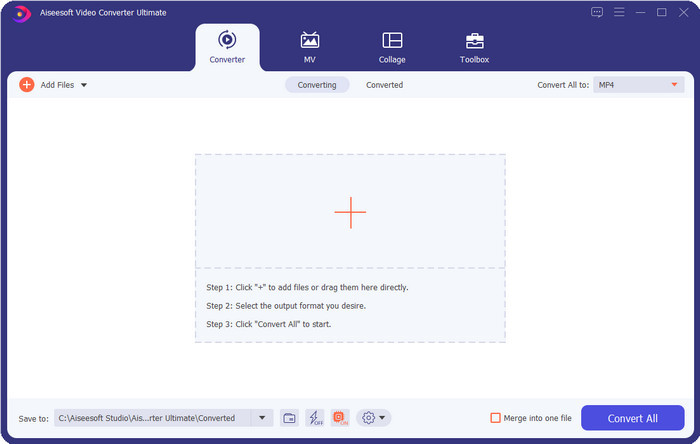
זהו עורך ה‑תגיות וידאו AVI הטוב ביותר שאתה יכול להשתמש בו כדי לשנות או להסיר את התגיות בקבצי ה‑AVI שלך בקלות. אם אתה רוצה תוכנה מתקדמת אך פשוטה, עם תכונות שיסקרנו אותך, אז Video Converter Ultimate היא הבחירה. בנוסף לכך, תוכל להשתמש כאן במגוון תכונות עריכת מטא‑דאטה כדי לסדר, לתקן או לעדכן את התגית שלך בצורה נכונה. לפני שאתה מוריד ומנסה עורכי שולחן עבודה אחרים, אנחנו ממליצים בחום על הכלי הזה, מפני שבעת ההורדה תקבל כלי הכול‑באחד. רוצה לדעת למה כדאי לך להשתמש בכלי הזה? למטה פירטנו 5 סיבות שתוכל לקרוא שיעזרו לך להחליט למה כדאי לך להוריד אותו.

ממיר וידיאו אולטימטיבי
5,689,200+ הורדות- זוהי התוכנה הטובה ביותר שתוכל להשתמש בה שתומכת במגוון פורמטים כגון MP4, MOV.
- עבור התהליך המהיר של עריכת מטא נתונים, הכלי הזה מצליח בצורה מושלמת.
- למד להוסיף את התגים החיוניים לקבצים שלך או להסיר אותם בכמה קליקים בלבד.
- זה תומך בכל פלטפורמות שולחן העבודה כמו Windows ו-Mac.
הורדה חינמיתל-Windows 7 ומעלההורדה מאובטחת
הורדה חינמיתל-MacOS 10.7 ומעלההורדה מאובטחת
AVI MetaEdit
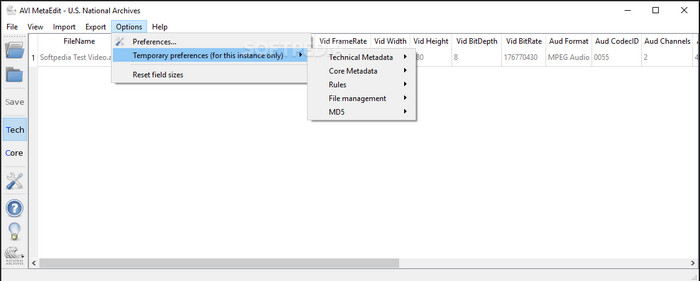
אם אתה מחפש עורך מטא‑דאטה ל‑AVI ב‑Mac וב‑Windows, אז AVI Meta Edit יכול להיות הכלי שלך. הכלי הזה מאפשר למשתמשים לערוך את התגיות או המידע שבתוך קובץ המדיה, ובעיקר קבצי AVI. בעזרת כלי זה תוכל לערוך בנפרד את המטא‑דאטה הטכני ואת המטא‑דאטה המרכזי (Core) של הקבצים שלך, שלכל אחד מהם סוגי מידע שונים על הקובץ. למרות שהכלי מספק לך תכונות עריכה מעמיקות, השימוש בו עדיין מבלבל בגלל קיצורי המושגים המשולבים בו.
Machete Video Editor Lite
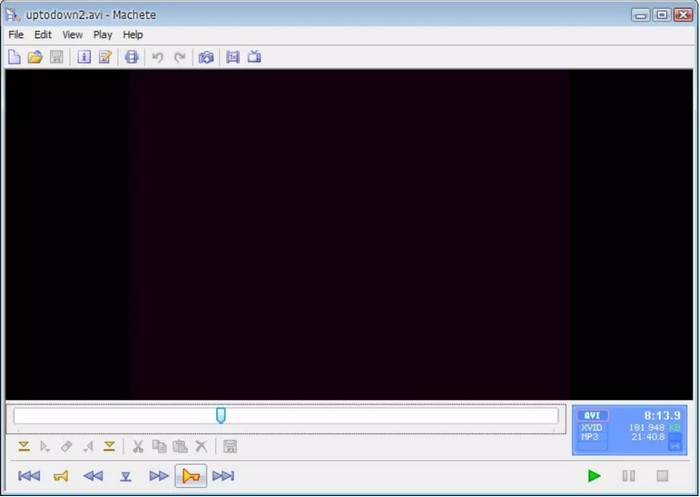
נניח שאתה רוצה לערוך מטא‑דאטה של AVI ב‑Windows 10, אז עליך לנסות להשתמש ב‑Machete Video Editor Lite. בעזרת כלי זה תוכל לערוך בקלות את התגיות בקבצי AVI ו‑WMV שלך. בנוסף, הוא מציע ממשק פשוט ומובנה כדי לעזור למשתמשים להבין אילו תכונות זמינות בכלי. בגלל הממשק הפשוט שלו, משתמשים מסוימים רואים בו אפשרות רק כאשר אין ברירה אחרת לעריכת המטא‑דאטה שלהם. נוסף על כך, המידע המטא‑דאטה שתוכל למלא בכלי זה מוגבל, וכך גם הפורמטים הנתמכים.
עורך תגיות abcAVI
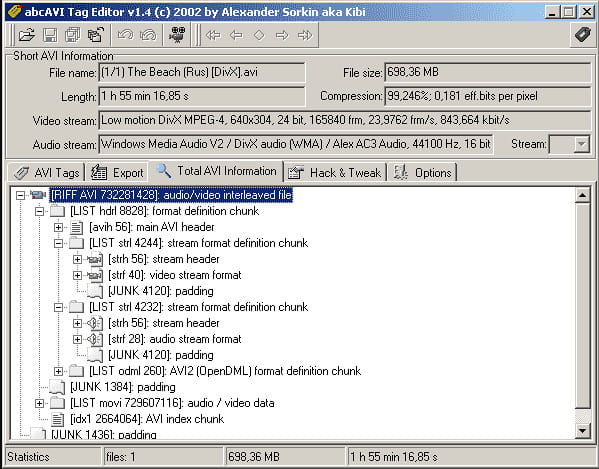
תוכל להוריד עורך תגיות AVI נוסף בקוד פתוח ל‑Windows, בשם abcAVI Tag Editor. בעזרת כלי זה תוכל להתאים בקלות את המטא‑דאטה בקובצי ה‑AVI שלך, אך הוא תומך בפורמט AVI בלבד. מעבר לכך, ניתן להוסיף או לעדכן את התגיות שאתה צריך בקובצי ה‑AVI שלך בכמה לחיצות בלבד. אף על פי שהכלי מתפקד היטב, אפשר לראות שממשק המשתמש (GUI) שלו גרוע למדי; הסידור שלו רחוק מאוד ממה שכלים אחרים מציעים. בנוסף, הוא אינו תומך בפורמטי קובץ להעלאה מלבד פורמט AVI בלבד.
FFmpeg
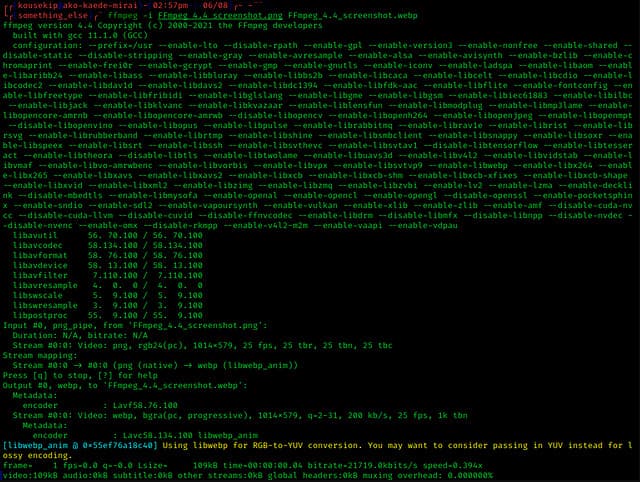
האחרון ברשימה הוא FFmpeg, תוכנה מבוססת פקודות שניתן להשתמש בה כדי לערוך מאפייני קבצי AVI ב‑Windows וב‑Mac. כלי זה מיועד להמרה, עריכה וצפייה בקובצי מדיה, אך כיום אפשר גם לערוך בעזרתו את המטא‑דאטה של כל קובץ מדיה. בניגוד לכלים אחרים, לכלי זה אין כפתורים לשימוש ולהפעלה, אלא הוא משתמש בשפת מחשב כדי לבצע את המשימות. כדי לתקשר עם הכלי, תצטרך לפתוח את שורת הפקודה ולהקליד קוד מסוים כדי להשלים את פעולת העריכה הנדרשת. הכלי קשה לשימוש, אך הוא כלי מקצועי שתוכל להוריד למחשב שלך.
קשור:
חלק 2. טבלת השוואה ב-5 המובילים בעורך המטא נתונים של AVI
| תכונות | Video Converter Ultimate [עורך המטא נתונים הטוב ביותר של AVI לשנת 2022] | AVI MetaEdit | Machete Video Editor Lite | עורך תגיות abcAVI | FFmpeg |
| ידידותי למשתמש |  | | | |  |
| בטוח לשימוש | | | | | |
| זמין בשתי מערכת ההפעלה | | | | | |
| ממשק אינטואיטיבי | | | | | |
| פורמטים נתמכים | מתחיל מ-AVI, MP4, MKV, FLV, MOV ושאר 1000 פורמטי הקבצים האחרים | אבי | AVI ו-WMV | אבי | AVI, MOV, MP4, FLV ועוד |
חלק 3. שאלות נפוצות על AVI Metadata Editor
האם זה בטוח להשתמש בעורך מטא נתונים של AVI באינטרנט?
נניח שאין לך מספיק מקום על שולחן העבודה שבו אתה משתמש כעת; אנו ממליצים להשתמש בכלי מקוון לביצוע המשימה. עם זאת, לא כל הכלים שאתה יכול לגשת אליהם בחינם באינטרנט הם אמינים או מהימנים. אבל אם אתה רוצה להשתמש בכלי מקוון, אתה צריך לשמור על שלושת ההנחיות שאנחנו תמיד מחפשים באתר שבו אנו מבקרים. בראש ובראשונה, אנו ממליצים בחום להסתכל בחלק העליון ליד שורת החיפוש שלך; יש סמל מנעול, מה שאומר שהוא בטוח לשימוש, כך שאם המנעול הזה נשבר, זה אומר שהחיבור שלך לא מוגן. בדוק את פעילות המודעות של המודעות; לפעמים, מודעות יכולות לשאת תוכנות זדוניות על שולחן העבודה שלך, מה שמוביל לשחיתות של הקבצים שלך בכונן שלך. אל תאפשר עוגיות; לפעמים קובצי Cookie הם דרך מצוינת לדעת כמה משתמשים מבקרים באתר, אבל המיקום שלך נראה לעתים קרובות עם קובצי Cookie. זכור זאת כדי להימנע מבחירה בעורך הלא נכון באינטרנט.
איזה כלי משיג את הביצועים הטובים ביותר בעריכת תגיות AVI?
על פי המחקר שלנו, אנו יכולים לראות שה-Video Converter Ultimate מתפקד טוב מאוד בכל ההיבטים מבלי להזיע בשימוש בו. אם אתה צריך מידע נוסף על העורך, אתה יכול לקרוא את המידע הבא למעלה כדי לדעת יותר ולהוריד אותו.
האם יש מגבלה כלשהי על הוספת מטא נתונים ב-AVI?
עד כה, לא נוכל לראות מגבלות על המידע שאתה יכול להוסיף לקבצי ה-AVI שלך או בקבצי מדיה כלשהם. עם זאת, עורכי מטא נתונים מסוימים אינם יכולים להכניס את המידע הדרוש לקובץ. להוספת מטא נתונים ב-AVI שלך אין מגבלות, אבל זה הכלי שמגביל את המידע שאתה יכול להוסיף לקובץ בודד.
סיכום
זה לא מדהים שיש לנו אפשרויות שונות לעריכת המטא‑דאטה של קובצי ה‑AVI שלנו? אכן, חמשת עורכי מטא‑דאטה ל‑AVI שהצגנו במאמר זה יכולים להיות הכלים המושלמים שתזדקק להם כדי לערוך את התגיות או המטא‑דאטה של קובצי ה‑AVI שלך. למרות שהצגנו חמש אפשרויות, אפשר לזהות בקלות איזה כלי בעל יתרון בעריכת המטא‑דאטה של קובצי ה‑AVI שלך, והוא Video Converter Ultimate. עם עורך זה תוכל לעשות הרבה יותר מאשר לערוך, להוסיף או להסיר מטא‑דאטה בקובצי ה‑AVI. רוצה לדעת אילו דברים נוספים תוכל לעשות כאן? אם כך, לחץ על כפתור ההורדה ותראה בעצמך.
-
 5 הדרכים הקלות ביותר להסיר מטא נתונים בכל קבצי מדיה
 כיצד להסיר מטא נתונים? האם זה קשה לעשות את זה? האם עלי לרכוש או להשתמש בכלי חינמי להסרת תגים? לכל השאלות הללו יש תשובות במאמר זה.
-
 חמשת מחלצי המטא נתונים המובילים הזמינים באינטרנט ובאופן לא מקוון [2025]
 אתה יכול למצוא מספר מחלצי מטא נתונים בשוק, אך כיום, אנו בוחרים רק את חמשת מחלצי התגים הנבחרים ביותר לפי הקהל.
-
 חמשת עורכי המטא-נתונים המובילים של וידאו לשנת 2025 [סקירה בלתי משוחדת]
 האם אתה רוצה להציג את המטא נתונים של הסרטון שלך? אם כן, קרא את הפרטים למטה כדי להבין את הנושא במלואו ולדעת איזה כלי מתאים לך ביותר.
