


 ממיר וידאו אולטימטיבי
 מקליט מסך
 תיקון וידאו
 הורדה מאובטחת
שנה במהירות מטא נתונים של וידאו באייפון כמו מקצוען בפחות מדקה
כיום, סידור הקבצים שלנו הפך חיוני עבור רבים, במיוחד משתמשי iPhone. בעזרת תגית מתאימה אנחנו יכולים לקבוע את מיקום הקובץ ולארגן את קובצי המדיה בספרייה או בתיקייה. במקרים מסוימים, משתמשי iOS חווים חוסר נוחות כשהם מחפשים קובץ ב‑iPhone עם נתוני מטא (Metadata) לא תקינים, מפני שקשה מאוד לאתר אותם. רוצים לדעת איך אפשר לתקן זאת? הפתרון המתאים לתיקון המטא־דטה ב‑iPhone הוא לשנות אותם בהתאם להגדרות שאתם בוחרים, כדי שיהיו גלויים ומאורגנים היטב. הרחיבו את הידע שלכם ולמדו כיצד לשנות מטאדטה של וידאו ב‑iPhone על‑ידי קריאת המאמר הזה.

חלק 1. 2 של האפליקציות הטובות ביותר לשינוי מטא נתונים של וידאו באייפון
Metapho - עורך תגיות וידאו ותמונות באייפון
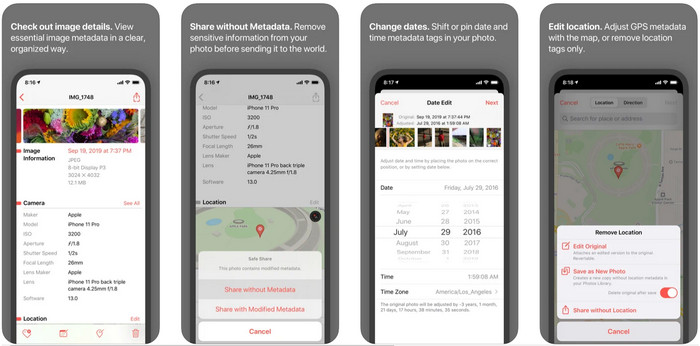
Metapho היא אחת מעורכות התגיות הטובות ביותר שאפשר להוריד ולהשתמש בה כדי לשנות מטאדטה של וידאו ב‑iPhone. האפליקציה היא עורך פשוט שמאפשר לכם לשנות את התאריך, שם הקובץ, הגודל, דגם המכשיר, מהירות התריס והמיקום. בעזרת האפליקציה הזו תוכלו גם לראות את המטאדטה של כל Live Photo שאתם מצלמים ולערוך אותה כראוי אם תרצו. למרות שהאפליקציה נראית מבטיחה, כדי לערוך את המטאדטה תצטרכו לרכוש אותה; אם לא תעשו זאת, תוכלו רק לראות את המטאדטה בחינם – ולא יותר. אבל אין צורך לדאוג, כי מדובר ברכישה חד‑פעמית, וברגע שתרכשו אותה תוכלו ליהנות מהאפליקציה במלואה.
שלב 1. פתחו את App Store והורידו את Metapho ל‑iPhone שלכם.
שלב 2. פתחו את האפליקציה, בחרו אחד מהקבצים שברצונכם לפתוח מתוך ״תמונות״ ולחצו עליו כדי להמשיך. לאחר מכן תופיע רשימת אפשרויות העריכה הזמינות לתגית; ערכו אותן בהתאם לצורך שלכם.
שלב 3. לחצו על כפתור Save כאשר סיימתם לערוך את התגיות.
Exif Metadata - עורך תגיות תמונות ותמונות חי באייפון
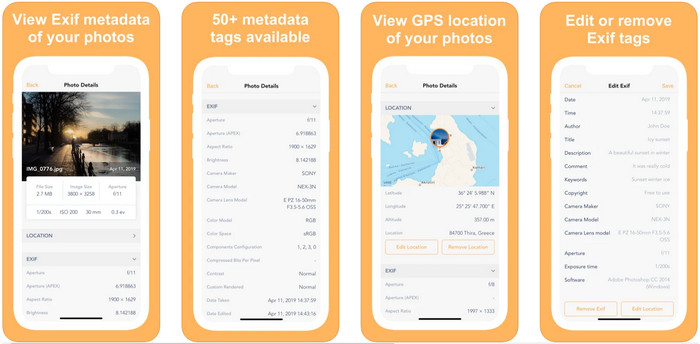
EXIF Metadata עושה את מה שעורך מטאדטה אמור לעשות כדי לעזור למשתמשי iPhone לערוך את התגיות שלהם. לכלי הזה יש ממשק משתמש (GUI) ייחודי והוא מושך יותר מ‑Metapho. בעזרת האפליקציה תוכלו לראות מידע מעמיק מאוד על התמונה שלכם – בחינם. אף על פי שהאפליקציה מציעה גרסת Pro, אפשרויות העריכה שתצטרכו כבר קיימות בגרסה החינמית, אך ניתן לשדרג ל‑Pro כדי להוסיף עוד מידע למטאדטה. אחד החסרונות של האפליקציה הוא שהיא תומכת רק בקובצי תמונה, כך ששינוי מטאדטה של וידאו אינו אפשרי. לכן, אם ברצונכם לשנות מטאדטה של תמונה ב‑iPhone, עקבו אחר השלבים הבאים.
שלב 1. הורידו והתקינו את האפליקציה ב‑iPhone שלכם.
שלב 2. פתחו את הכלי, הקישו על כפתור + ובחרו איזה תגית תמונה תרצו לשנות.
שלב 3. לחצו על Edit, הוסיפו את המידע הדרוש לכם ולחצו על Save.
חלק 2. עורך המטא נתונים הטוב ביותר עבור Windows ו-Mac – FVC Video Converter Ultimate
לא כל המידע שתרצו לשנות במטאדטה שלכם נתמך באפליקציות שהוזכרו לעיל. אם אתם רוצים להוסיף מידע מפורט יותר לתגית, אנו ממליצים לבחור בעורך התגיות הטוב ביותר ל‑Windows ול‑Mac – FVC Video Converter Ultimate. התוכנה יכולה לעזור לכם להוסיף עוד פרטי מטאדטה לקובץ המדיה בכמה לחיצות בלבד. בין אם אתם משתמשים מתקדמים ובין אם לא, הוספת מטאדטה לקובץ שלכם הופכת לבעיה פחותה בזכות התוכנה האולטימטיבית הזו.
אולי אתה דואג אם הקובץ שלך נתמך כאן. כלי זה תומך ביותר מ-1000 פורמטים, ואכן הפורמט שיש לך נתמך. כדי לתת לך התחלה ראשונית כיצד לשנות את המטא-נתונים של הווידאו של האייפון שלך, אנא קרא את המידע המפורט שאנו מגייסים להלן כדי לעקוב אחריהם בהתאם כי ההצלחה בדרך.
שלב 1. על‑ידי לחיצה על כפתור ההורדה שלמטה תוכלו לקבל את הכלי האולטימטיבי גם ל‑Windows וגם ל‑Mac. לחצו על הקובץ שהורדתם כדי להתקין את הכלי בכונן, ואז הפעילו אותו.
הורדה חינמיתל-Windows 7 ומעלההורדה מאובטחת
הורדה חינמיתל-MacOS 10.7 ומעלההורדה מאובטחת
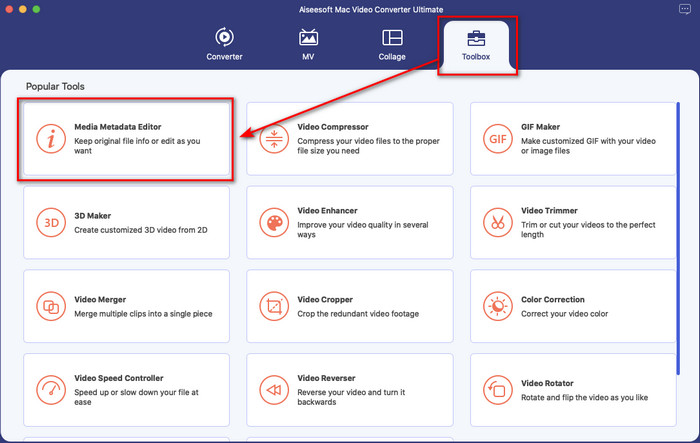
שלב 2. עברו אל החלק Toolbox, ומתחת לרשימת הפיצ'רים לחצו על Media Metadata Editor.
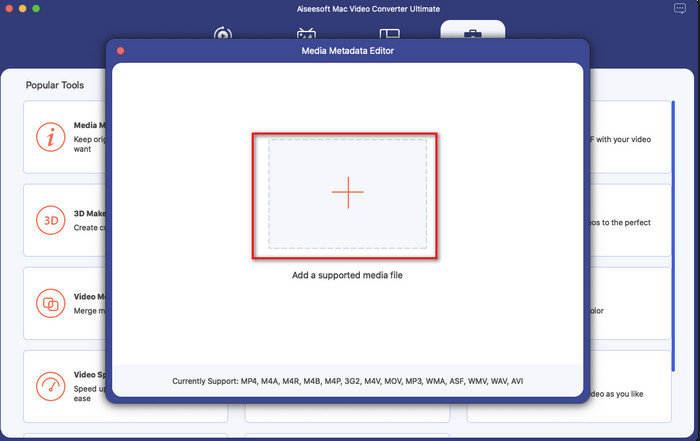
שלב 3. לחצו על כפתור +, ותיקיית קבצים תופיע על המסך. מצאו את הקובץ שאליו תרצו להוסיף מטאדטה, ולחצו על Open כדי להעלות אותו.
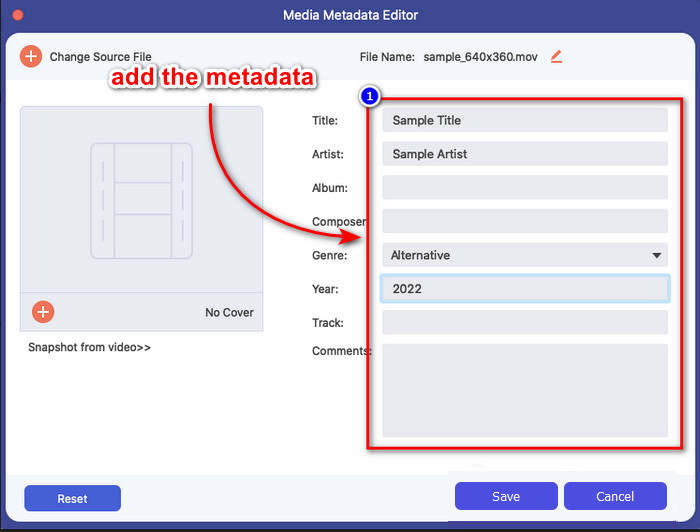
שלב 4. בחלון החדש תוכלו כעת לערוך או להסיר את המטאדטה מהקובץ. לחצו על כל תיבת טקסט והקלידו את המידע שתרצו להוסיף כמטאדטה. בנוסף, תוכלו גם להוסיף עטיפת אלבום לקובץ המדיה שלכם אם תרצו, על‑ידי לחיצה על כפתור ה‑+, מציאת תמונת האלבום בקובץ ולחיצה על Open כדי להכניס אותה.
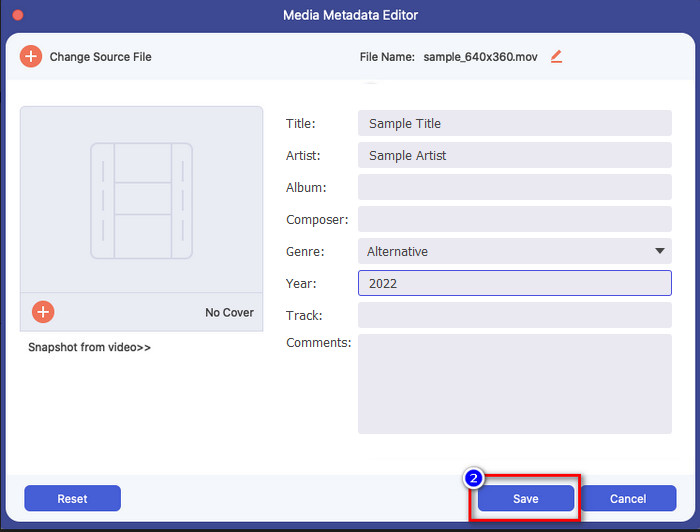
שלב 5. אם סיימתם את כל העריכות והשינויים בקובץ המדיה שלכם, תוכלו כעת ללחוץ על Save. בתוך רגעים אחדים שיניתם את המטאדטה של קובץ המדיה שלכם; בכמה לחיצות פשוטות ועם עזרת הכלי – הכול הפך לאפשרי.
חלק 3. שאלות נפוצות על עורך מטא נתונים של iPhone
האם אני יכול לערוך מטא נתונים באייפון?
כן, אתה יכול לערוך מטא נתונים באייפון שלך, אבל אתה רשאי רק לערוך את המיקום ולהציג את התגים הבסיסיים של הקובץ, אך לא לערוך אותם. אם ברצונך לשנות את המטא נתונים של הקובץ בפירוט, אנו מציעים לך להשתמש באפליקציה של צד שלישי שתספק את הצרכים שלך בבעיית המטא נתונים שלך.
למה אני צריך להסיר מטא נתונים?
אנחנו מסירים מטאדטה מטעמי פרטיות. יש אנשים שיכולים לקבל עלינו מידע מעמיק דרך המטאדטה; ואינכם מודעים לכך שמטאדטה יכולים לאחסן את המיקום המדויק שלכם, תאריך, שעה, קואורדינטות ואף מספרי טלפון. אם אינכם רוצים לחשוף מידע על עצמכם, אנו ממליצים להסיר את המטאדטה מהקובץ. רוצים לדעת איך? אם כן, המאמר הזה יעזור לכם להסיר מטאדטה מהקובץ שלכם בפחות מדקה.
האם קל לשנות מטא נתונים באייפון?
בהחלט, כן, קל לשנות מטא נתונים באייפון בעזרת עורך המטא נתונים הנכון. למרות שהמשימה נראית קצת קשה, היא עדיין ניתנת לניהול עבור כל משתמש. אם אתה רוצה לדעת את הכלי הטוב ביותר לביצוע משימה זו, עליך לקרוא את המידע על שני הכלים שסיפקנו לעיל. כדי לעזור לך לסיים לשנות את התג באייפון כמו מקצוען.
סיכום
כעת, כשהגעתם לסוף, למדנו ששינוי מטאדטה של וידאו ב‑iPhone הוא משימה קלה. בעזרת המאמר הזה והמחויבות שלכם – זה הפך לאפשרי. עכשיו עליכם לבחור באיזו דרך תעדיפו להשתמש. למרות ש‑FVC Video Converter Ultimate אינו זמין ב‑iPhone, הוא עדיין אחת מהתוכנות הטובות ביותר שניתן להתקין ב‑Mac או ב‑Windows כדי לערוך תגיות. הכלי הזה מאפשר להוסיף מידע מעמיק על קובץ המדיה שברשותכם, כדי לעזור לכם לארגן אותו ולהפוך אותו לגלוי וברור. רוצים לדעת מהם שאר הפיצ'רים והפונקציות של התוכנה? לחצו על כפתור ההורדה למעלה כדי להציץ במה שהיא מציעה.
-
 3 עורכי המטא נתונים המובילים של FLAC ב-Mac ו-Windows [עודכן 2022]
 האם ברצונך לשנות מטא נתונים של FLAC? במקרה זה, עליך לקרוא מאמר זה מכיוון שאנו מספקים ידע מספיק על עורך המטא נתונים העדכני ביותר של FLAC שניתן להשתמש בו.
-
 הדרכים הטובות ביותר לערוך מטא נתונים של MKV כמו מקצוען [קל]
 אין לך מושג איך לערוך מטא נתונים של MKV? חלק מהמשתמשים מתקשים לערוך את התגים ב-MKV, אם אתה אחד מהם אז קרא את המאמר הזה.
-
 הטכניקה הטובה ביותר כיצד לערוך מטא נתונים של WebM במהירות
 קרא את הפרטים המלאים שסיפקנו להלן בזמן שאנו מכניסים מדריך כיצד לערוך מטא נתונים של WebM. לחץ על קישור זה כדי לדעת יותר על זה.
