


 ממיר וידאו אולטימטיבי
 מקליט מסך
 תיקון וידאו
 הורדה מאובטחת
דחיסת קבצי AVI כדי לקבל גדלים גדולים יותר של קבצים מבלי לאבד איכות
לא משנה שתרצו לשלוח קבצי AVI לדוא"ל, או להעלות קבצי AVI לאתרים, באמת חשוב לדחוס את AVI. ישנם עורכי וידאו ומדחסים רבים שיכולים לכווץ קבצי AVI. ליתר דיוק, תוכלו להמיר פורמט וידאו, לגזור קטעי וידיאו לא רצויים או לאפס פרמטרים כדי להקטין את סרטון ה- AVI שלכם. אם ברצונך לשמור על פורמט וידיאו AVI, תוכל להשתמש במדחס וידאו כדי לאפס את הגדרות הווידאו. להלן 3 דרכים חינמיות לדחיסת קבצי AVI מבלי לאבד את האיכות. פשוט קרא ותעקוב.

חלק 1: כיצד לדחוס קבצי AVI באופן מקוון בחינם
ישנם כל כך הרבה מדחסי וידאו מקוונים בשוק, איזה מהם יכול להיות מדחס ה- AVI הטוב ביותר שלך באינטרנט? עבור רוב המשתמשים, יש כמה גורמים חשובים שאתה צריך לקחת בחשבון.
הורדה חינמיתל-Windows 7 ומעלההורדה מאובטחת
הורדה חינמיתל-MacOS 10.7 ומעלההורדה מאובטחת
1. חופשי לחלוטין ובטוח לשימוש.
2. אין מגבלת גודל קבצים מקסימלית.
3. קבצי AVI לדחוס אצווה.
4. דחיסת וידאו AVI גדול על גבי GB לגודל קובץ קטן באמת.
5. שנה פורמט וידאו, רזולוציה וקצב סיביות AVI כדי לכווץ את גודל הווידיאו.
למרבה המזל, תוכל לקבל את כל הפיצ'רים האלה ב־FVC Free Video Compressor. באפשרותך לדחוס קובצי AVI גדולים אונליין בחינם במחשב Windows או Mac שלך, ללא צורך במנוי או בהרשמה. מהירות הגבוהה פי 30 הופכת את דחיסת קובצי ה־AVI למהירה בהרבה מהמתחרים. כעת נראה כיצד לדחוס אונליין את גודל וידאו ה־AVI.
שלב 1: פתח את דוחס הווידאו החינמי הזה אונליין. לחץ על Add Files to Compress כדי להתקין את המשגר.
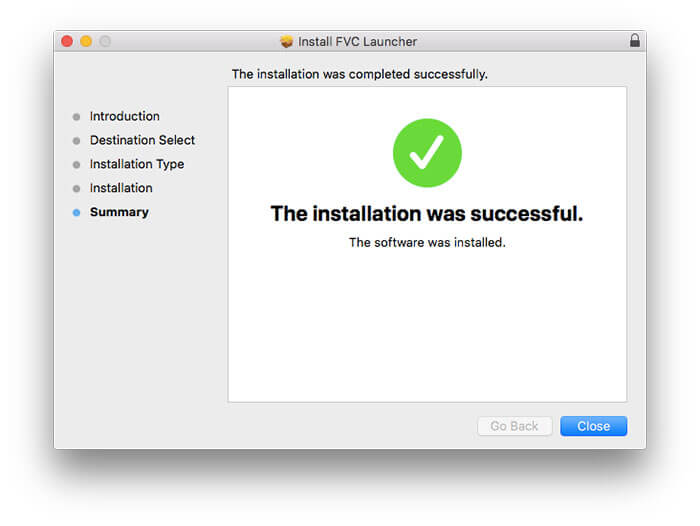
שלב 2: דפדף והוסף את סרטון ה־AVI שלך. תוכל לקבל ממשק פשוט ואינטואיטיבי להמשך דחיסת AVI.
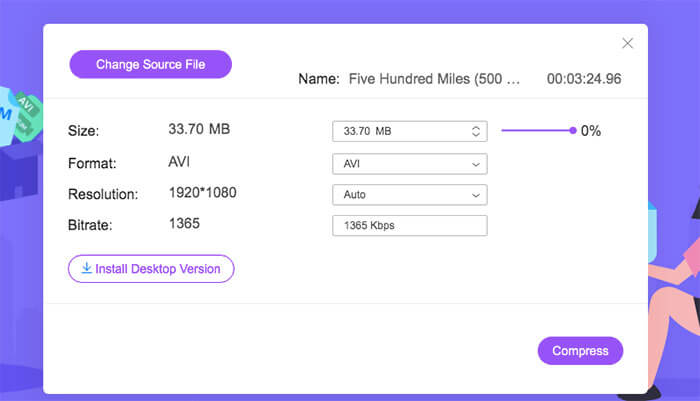
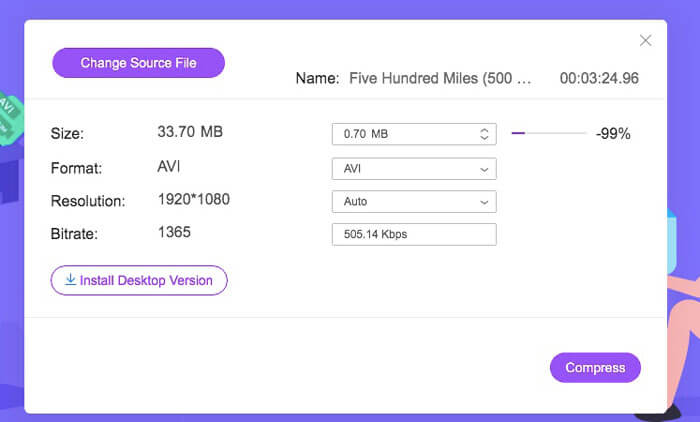
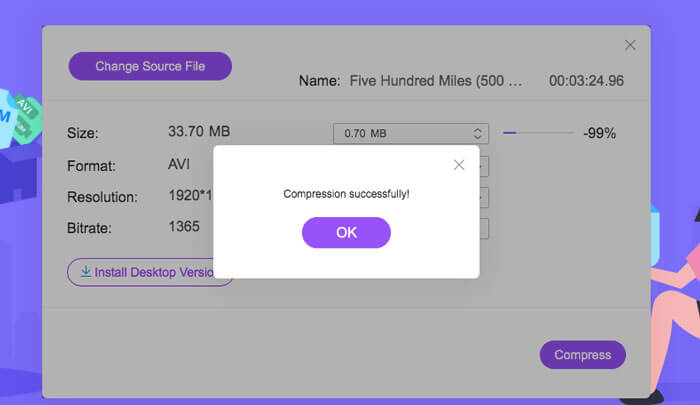
שלב 3: בסעיף Size ניתן להקטין את גודל וידאו ה־AVI באמצעות הזזת המחוון שלצידו. באפשרותך גם להגדיר את גודל קובץ ה־AVI הדחוס באמצעות החצים Upside ו־Downside.
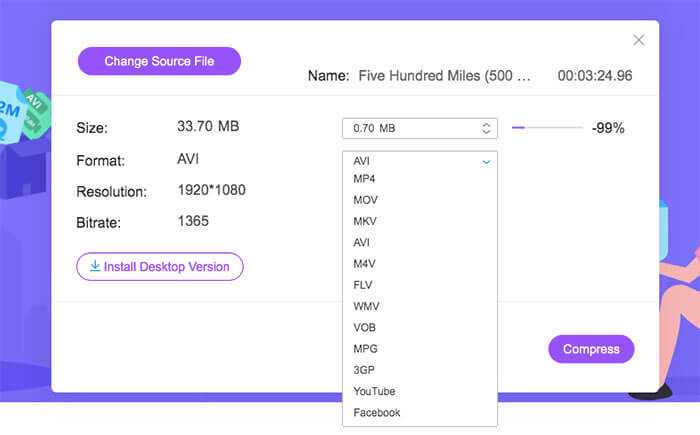
שלב 4: פרוס את רשימת Format. תוכל לדחוס AVI ל־MP4, MOV ואפילו לפורמטים של YouTube ו־Facebook. לאחר מכן בחר פרופיל אחד של Resolution כדי להקטין את גודל קובץ ה־AVI.
שלב 5: לחץ על Compress והגדר את תיקיית הפלט. לאחר שתופיע התראה Compression successfully, תוכל לקבל את סרטון ה־AVI הדחוס.
חלק 2: כיצד לדחוס סרטוני AVI בחלונות
כדי לדחוס וידאו AVI ב- Windows 10/8/7 בחינם, יש אפשרות אחרת שתוכל להשתמש בה. זה Windows Movie Maker שיכול לדחוס קובץ AVI בגרסאות Windows 10 ובגירסאות קודמות. פשוט עשו כפי שהפסקאות הבאות מראות.
שלב 1: פתח את Windows Movie Maker. לחץ על Import Video תחת Capture Video כדי להוסיף את סרטון ה־AVI שלך.
שלב 2: בחר את סרטון ה־AVI שיובא. לאחר מכן גרור ושחרר אותו אל ה־Timeline למטה.
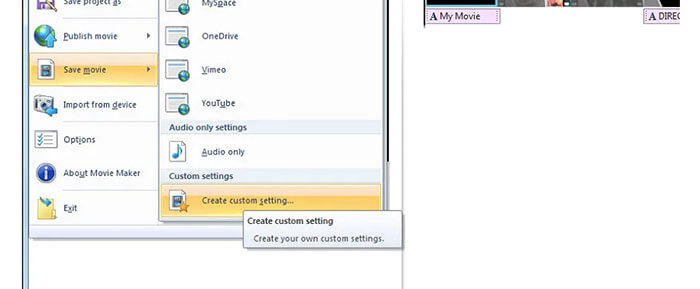
שלב 3: לחץ על Save Movie File ועל create custom settings מתוך רשימת File.
שלב 4: תחת Video settings תוכל להתאים רוחב וידאו, גובה, קצב סיביות (bitrate) וקצב פריימים כדי להקטין את סרטון ה־AVI הזה.
שלב 5: לחץ על Save כדי לכווץ את סרטון ה־AVI שלך ב־Windows לגודל קובץ קטן יותר.
חלק 3: כיצד לדחוס קבצי AVI ב- Mac
iMovie יכולה להיות גם תוכנת מדחס הווידיאו AVI החינמית שלך. אתה יכול להשתמש ב- iMovie כדי לדחוס קטעי וידאו .avi ב- Mac בחינם. יתר על כן, אתה יכול לחתוך קצוות שחורים וחלקים לא רצויים כדי להקטין את גודל הווידאו גם ב- iMovie. ישנם כלים שימושיים רבים לעריכת וידאו ולדחיסה ב- iMovie.
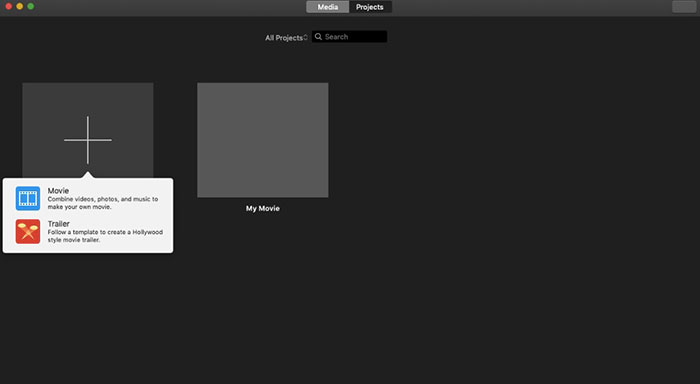
שלב 1: הפעל את iMovie. בחר New Movie מתפריט הנפתח File.
שלב 2: צור פרויקט חדש עבור קובץ הווידאו הדחוס בפורמט AVI שלך.
שלב 3: לחץ על Import בחלק העליון. בחר והוסף ל־iMovie סרטון AVI גדול מדי.
שלב 4: פרוס את רשימת File ובחר Share ולאחר מכן File…. לחץ על סמל Export בחלק העליון הימני ואז בחר File.
שלב 5: כדי להקטין את גודל וידאו ה־AVI, עליך להפחית את הרזולוציה ואיכות הווידאו. לחץ על Next ולאחר מכן על Save כדי לקבל את קובץ ה־AVI הדחוס שלך.
חלק 4: שאלות נפוצות על דחיסת AVI
מדוע AVI כל כך גדול?
אתה יכול למצוא שקבצים בפורמט AVI נוטים להיות גדולים יותר מקבצים אחרים. AVI משתמש בפחות דחיסה לאחסון נתוני וידאו ושמע. או שאתה יכול להתייחס ל- AVI כפורמט וידאו ללא הפסד. לכן, קבצי AVI הם תמיד בגדלי קבצים גדולים.
כיצד לדחוס AVI עם After Effects?
הוסף את סרטון ה־AVI שלך ל־After Effects. עבור לרשימת Composition. בחר Add to Adobe Media Encoder Queue. ב־Media Encoder מצא את קובץ הפרויקט שלך במנוע העיבוד. עבור ללשונית Video או Audio בלוח הימני. שנה את איכות הווידאו/אודיו, קצב הסיביות ופרטים אחרים. למעשה, תוכל לבדוק את גודל הקובץ המשוער בפינה הימנית התחתונה. לחץ על OK כדי לשמור את השינויים ולהקטין את גודל קובץ ה־AVI ב־After Effects מבלי לאבד איכות.
האם זה עובד לדחוס פורמט AVI ל MP4?
כן. אפשר להמיר ולדחוס AVI ל־MP4 כדי להקטין במידה רבה את גודל הווידאו. AVI הוא פורמט וידאו ללא אובדן איכות (lossless), בעוד ש־MP4 הוא פורמט וידאו עם אובדן איכות (lossy). בנוסף, באפשרותך להתאים את הגדרות הווידאו כדי להשלים את דחיסת קובץ ה־AVI.
אתה יכול להשתמש בכלים שלמעלה כדי לדחוס AVI באופן מקוון ומחוצה לה בחינם. אין אורך וידיאו או מגבלת גודל הקובץ. אתה יכול להקטין את גודל הווידאו ולדחוס את AVI לדוא"ל, טוויטר, פייסבוק ועוד באופן ישיר. אגב, אם אתה צריך אצווה לדחוס קבצי AVI, השימוש ב- FVC Free Video Compressor הוא הפתרון המהיר ביותר שלך. אתה יכול לדחוס קבצי AVI גדולים באופן מקוון באצווה בחינם במהירות גבוהה פי 30. זה 100% בחינם ובטוח לשימוש לכל המשתמשים.
-
 MKV לעומת MP4 - השוואה בין MKV ל- MP4
 כיצד לבחור בין MKV ל- MP4? איזה פורמט הוא פורמט טוב יותר לאיכות וידאו? במאמר זה, נערוך השוואה מפורטת של MKV לעומת MP4 כדי לעזור לך לבחור.
-
 כיצד לדחוס סרטון MP4 לגודל קטן יותר
 סרטון MP4 גדול מדי להעלאה? רוצים להקטין את גודל הווידיאו? להלן 3 דרכים יעילות לדחיסת קובץ MP4 לגודל קטן יותר ללא הגבלה.
-
 MP3 לעומת MP4: מה ההבדל בין MP3 ל MP4
 MP3 או MP4, מה עדיף? מה ההבדל בין MP3 ו- MP4? מאמר זה ישווה MP3 עם MP4 מכל ההיבטים שתוכלו לדמות.
