


 ממיר וידאו אולטימטיבי
 מקליט מסך
 תיקון וידאו
 הורדה מאובטחת
דחוס MPEG-4 | כיצד להפוך קבצי MPEG-4 לקטנים יותר מבלי לאבד איכות
האם ניסית אי פעם לשלוח קובץ MPEG-4 גדול לאחרים? ייתכן שהיית צריך להשתמש בדחיסת קבצים כדי להקטין את גודל הקבצים. אם אין לך ניסיון בדחיסת קבצים, ייתכן שתרצה לדעת איזה כלי לדחיסת וידאו מתאים ביותר לצרכים שלך. המשך לקרוא כדי ללמוד עוד על איך לדחוס קובצי MPEG-4 בלי לאבד איכות.

חלק 1. הדרך הטובה ביותר לדחוס קבצי MPEG-4 באופן מקוון בחינם
חשוב לדעת שיש מגבלות לגדלים של קבצי MPEG-4. אם הקבצים שלך גדולים מדי, קשה לשלוח אותם באמצעות דוא"ל ללא דחיסה. הקטנת גודל קובץ כזה לגודל מינימלי, מבלי להרוס בהכרח את איכותו, הופכת לחשובה יותר ויותר בחיי היומיום שלנו. למרבה המזל, ישנם חבורה של כלים מקוונים הזמינים לדחיסת פורמטים שונים של קבצי וידאו.
כאן אנו רוצים להמליץ על Free Video Compressor שיעזור לך להקטין קובצי MPEG-4 גדולים בלי לפגוע באיכות. זה כנראה הפתרון הקל והמהיר ביותר כיום לדחיסת קובצי MPEG-4. הכלי המקוון עובד בצורה מושלמת עם כל קובץ MPEG-4. המשתמשים יכולים גם לשמור את הקבצים הדחוסים בכל פורמט, כולל MOV, AVI, VOB ועוד. להלן 4 השלבים הפשוטים ליהנות מכלי דחיסת הווידאו הסופר מהיר הזה.
שלב 1. עבור לאתר דחיסת הווידאו המקוון
הקישור למטה יביא אותך למקום הנכון:
עבור לאתר דחיסת הווידאו המקוון
שלב 2. העלה את הקבצים שלך
לחץ על הכפתור Add Files to Compress. אם זו הפעם הראשונה שאתה משתמש בכלי זה, עליך להתקין תחילה את המשגר שלו. לאחר מכן, אתר את קובץ הווידאו מסוג MPEG-4 שלך ולחץ על Open בחלון שמופיע.

שלב 3. הגדר את מאפייני הדחיסה
כעת עליך להגדיר את הגדרות הדחיסה, כגון גודל, פורמט, רזולוציה וקצב סיביות. לדוגמה, תוכל להוריד את הרזולוציה של קבצי MPEG-4 שלך כדי להקטין את הקובץ.

שלב 4. לבסוף, לחץ על Compress כדי להתחיל בתהליך הדחיסה. לאחר סיומו, הקובץ המוקטן יורד אוטומטית למחשב שלך ללא סימן מים.

מלבד דחיסת קובצי MPEG-4, הכלי גם מאפשר לך לדחוס קובצי MXF, להקטין קובצי WebM ולצמצם בקלות קובצי וידאו נפוצים נוספים.
חלק 2. כיצד לצמצם קבצי MPEG-4 באמצעות MP4Compress
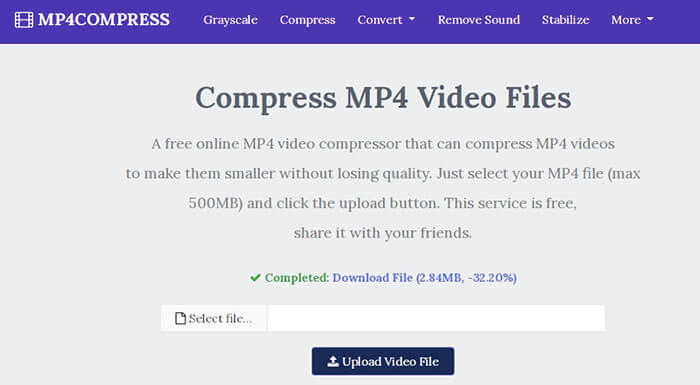
ניתן גם לבדוק את MP4Compress - כלי פשוט ויעיל לדחיסת קבצי MPEG-4. MP4Compress הוא כלי מקוון בחינם המאפשר לך לדחוס את קבצי MPEG-4 שלך ישירות מדפדפן האינטרנט שלך.
שלב 1. בקר באתר הרשמי שלו על ידי הקלדת https://www.mp4compress.com.
לחץ על הכפתור Select File... כדי לבחור את קובץ ה‑MPEG-4 ולאחר מכן לחץ על Upload Video File כדי להתחיל להעלות את הקובץ.
שלב 2. לאחר שהקובץ הועלה בהצלחה, כלי זה ידחוס את הקובץ. מהירות הדחיסה תלויה ברוחב הפס של חיבור האינטרנט שלך.
שלב 3. לאחר סיום הדחיסה, תופיע קישורית Download File ואז תוכל לשמור את הקובץ המוקטן במחשב שלך.
חלק 3. שאלות נפוצות על דחיסת קבצים MPEG-4
מהו קובץ MPEG-4?
MPEG-4 הוא פורמט מיכל מדיה דיגיטלית המוגדר על ידי קבוצת מומחי התנועה הנעה (MPEG). הוא תומך בכמה סוגים שונים של רכיבי Codec של וידאו ושמע ועשוי להכיל גם אובייקטים תלת-ממדיים, ספריטים, טקסט וסוגים אחרים של מדיה. עם התפתחות MPEG-4, הוא מחולק למספר חלקים (כל חלק מכסה היבט מסוים של כל המפרט) כולל MPEG-4 חלק 2 (לדוגמא קוד וידאו XviD), MPEG-4 חלק 3 (למשל קוד AAC שמע) , MPEG-4 חלק 10 (H.264 codec וידאו), MPEG-4 חלק 14 (מיכל מדיה MP4) ואחרים.
מהו מדחס וידאו?
מדחס וידאו הוא כלי שעוזר לך לכווץ את גודל קבצי הווידאו שלך. קצב הדחיסה תלוי בקודק הווידאו ובקצב הסיביות. מכיוון שפורמטי וידאו שונים עשויים להשתמש בקודקים שונים, אתה יכול לבחור לשנות את פורמט הקובץ כדי להקטין את גודל הקובץ.
כיצד לדחוס קובץ MPEG-4 ב- Mac?
השירותים המקוונים שתוארו לעיל עובדים על כל מערכת הפעלה, כך שתוכל להשתמש באחת מהן כדי להקטין את גודל הקובץ MPEG-4 ב- Mac שלך.
סיכום
מאמר זה כיסה שני כלים יעילים מקוונים יעילים שיעזרו לך לבצע את דחיסת MPEG-4. עכשיו אתה יודע כיצד לדחוס קובץ MPEG-4 לגודל קטן יותר באינטרנט בחינם. לכו ובדקו כלים בכדי למצוא את המתאים ביותר לצרכים שלכם.
-
 כיצד לדחוס קבצי וידאו AVCHD בחינם ב- Windows ו- Mac
 קרא וקבל 2 דרכים קלות לדחיסת קבצי וידאו AVCHD. אתה יכול להשתמש במדחסי וידאו מקוונים ולא מקוונים כדי להפחית את גודל הווידאו AVCHD בחינם במחשב שלך.
-
 2 דרכים מהירות לכווץ קבצי OGV גדולים [חינם ומקוון]
 לא ניתן לשלוח קבצי OGV גדולים לאחרים? ובכן, מאמר זה יציג בפניך שתי דרכים קלות לעזור לך לדחוס קבצי OGV בקלות.
-
 100% דרכים חופשיות לדחיסת גודל קובץ M4V מ- GB ל- MB
 אם אתה מחפש דרך פשוטה להקטין את גודל קובץ M4V שלך, עליך לבוא ולקרוא מאמר זה. כאן נשתף את הדרך הקלה ביותר לדחוס איתך קבצי M4V.
