


 ממיר וידאו אולטימטיבי
 מקליט מסך
 תיקון וידאו
2 הדרכים החינמיות הטובות ביותר לדחיסת קבצי MPV גדולים ב- Windows ו- Mac
כיצד לדחוס קבצי MPV? זה עתה הקלטת וידאו עם מקליט המסך שלך ב- Windows 10. כתוצאה מכך, ההקלטה הפיקה קובץ MPV גדול שלא תוכל לצפות בו או לערוך. מה יותר גרוע? MPV אינו מופיע ברשימת פורמטי הווידאו הפופולריים. ראה כיצד לדחוס קבצי וידאו גדולים של MPV במאמר זה.

חלק 1: כיצד לדחוס קטעי וידאו MPV גדולים באופן מקוון
הפתרון המהיר ביותר הוא להשתמש ב-FVC Free Video Compressor. בעזרת דחסן ה‑MPV הטוב ביותר הזה, צריך רק לבצע 3 שלבים פשוטים כדי להשלים את משימת דחיסת קובצי MPV גדולים אונליין.
תכונות עיקריות:
- 1. צמצמו קבצי וידאו מכל גודל תוך שמירה על איכות גבוהה.
- 2. התאם אישית את ההגדרות לכל פעם בפעם בעת דחיסת קובץ
- 3. ממשק קל לשימוש לכל רמות המשתמשים כולל למתחילים.
- 4. תמיכה בפורמטים TS, MOV, 3GP, MP4, WMV, RMVB, AVI ועוד
שלבים לדחיסת קובצי MPV אונליין
שלב 1: טען את דחסן ה‑MPV והיכנס לממשק.
טען את FVC Free Video Compressor ולחץ על הכפתור Add Files to Compress. בחר את קובץ ה‑MPV להעלאה ולדחיסה.

הערה: בשימוש הראשון בדחסן MPV זה, עליך להוריד ולהפעיל קובץ בשם fvc-launcher.exe. לאחר התקנת המשגר, פשוט לחץ שוב על הכפתור Add Files to Compress. חלון Open יקפוץ.
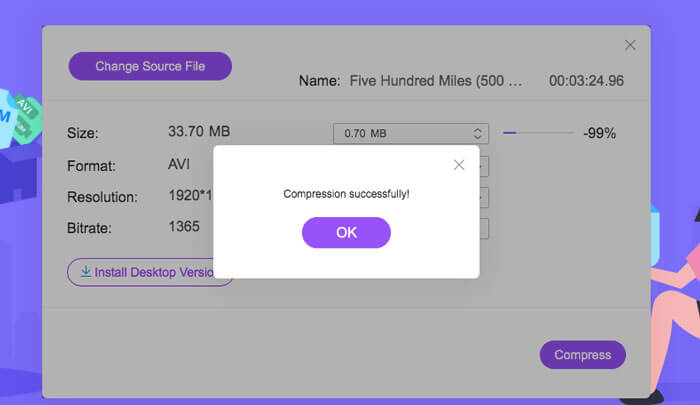
שלב 2: התאם אישית את ההגדרות עבור דחיסת ה‑MPV.
Size: גרור כדי לשנות את גודל הפלט. ככל שסרטון הפלט קטן יותר, כך תאבד יותר מאיכות התמונה.
Format: בחר את הפורמט הרצוי לך.
Resolution: באפשרותך להקטין את הרזולוציה או להשאיר אותה כרזולוציה המקורית.
Bitrate: קצב הסיביות הסופי תלוי בשילוב של הגודל והרזולוציה.

שלב 3: התחל לדחוס את קובץ ה‑MPV והמתן לקובץ הפלט.
לחץ על כפתור ה-Compress ובחר נתיב שבו תרצה לשמור את קובץ ה‑MPV הדחוס. במהלך תהליך דחיסת קובץ ה‑MPV, הימנע מסגירת הדפדפן או מכיבוי המחשב.
קריאה נוספת:
כיצד לדחוס קובץ WebM אונליין בעזרת 2 דוחסי וידאו חינמיים
2 דרכים קלות לדחוס MXF לגודל קובץ קטן יותר
חלק 2: כיצד לדחוס קטעי וידאו MPV גדולים על Windows ו- Mac
מעבר לדחיסה של וידאו MPV לגודל קטן יותר, ייתכן שתרצה גם לערוך את הווידאו. FVC Free Video Compressor אינו תומך בכך. לכן אתה צריך את Aiseesoft Video Converter Ultimate. זהו כלי מקיף להמרה, קריעה, עריכה ודחיסה של סרטוני MPV.
תכונות עיקריות:
- 1. דחיסת קבצי וידאו MPV עם אובדן האיכות הנמוך ביותר
- 2. תואם ל- Windows 10/8/7 ו- Mac OS X 10.7 ומעלה.
- 3. כלול את כל פורמטי הקידוד כגון H.264, VP8, H.265 / HEVC וכו '.
- 4. תמיכה בפורמטים של 1000+: AVI, WMV, MP3, MP4, FLAC, WMA, ועוד.
- 5. האצת חומרה ותוכנה מספקת מהירות אולטימטיבית.
- 6. החל אפקטים חזקים ומסננים מדהימים בלחיצה אחת בלבד.
הורדה חינמיתל-Windows 7 ומעלההורדה מאובטחת
הורדה חינמיתל-MacOS 10.7 ומעלההורדה מאובטחת
שלב 1: הורד, התקן והפעל את דחסן ה‑MPV האולטימטיבי במחשב Windows או Mac שלך. עבור ללשונית Toolbox.
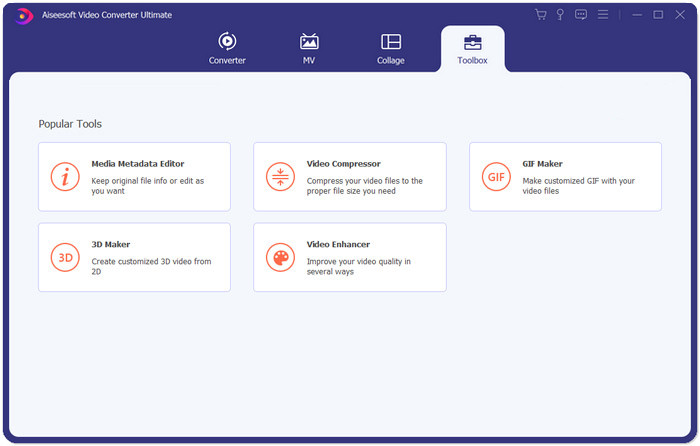
שלב 2: כדי לדחוס את קובץ ה‑MPV, עליך להשתמש ב-Video Compressor.
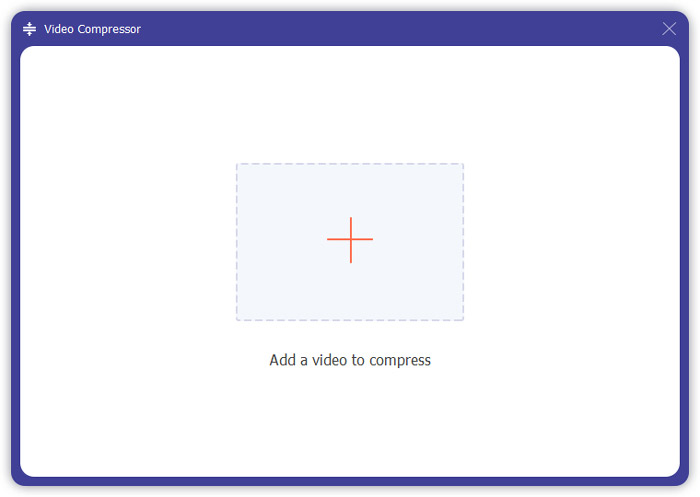
שלב 3: לחץ על כפתור “+” ובחר את קובץ ה‑MPV שברצונך לדחוס.
שלב 4: התאם את ההגדרות לפני התחלת דחיסת קובץ ה‑MPV. Size: באפשרותך לגרור את סרגל האחוזים כדי לכוונן את גודל הפלט או להקליד ישירות את גודל הפלט הרצוי.
Format: MPV אינו נמצא ברשימה. באפשרותך לבחור כל אחד מתוך 16 האפשרויות.
Resolution: עדיף לבחור באפשרות Auto. ניתן גם להקטין לרזולוציה נמוכה יותר.
Bitrate: קצב הסיביות יחושב באופן אוטומטי בהתאם לגודל הדחוס.
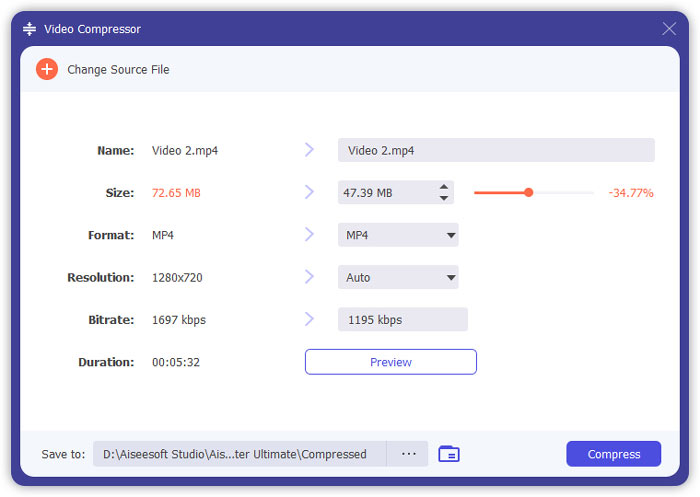
שלב 5: לחץ על כפתור ה-Compress בתחתית הימנית של ממשק ה-Video Compressor. לפני כן, באפשרותך לשנות את שם קובץ הפלט.
חלק 3: שאלות נפוצות על דחיסת MPV
מהו קובץ MPV?
MPV הוא סוג של קובץ וידיאו זרם אלמנטרי MPEG. הוא מכיל נתוני וידאו גולמיים ולא דחוסים.
האם עלי להמיר MPV ל MP4?
זה יהיה תלוי בנסיבות. לדוגמא, אם אתה הולך לקחת את הקובץ למחשב כיתתי ולהשמיע אותו בכיתה, מוטב שתמיר אותו ל MP4 לפני כן לצורך התאמה טובה יותר.
האם אוכל לפתוח קובץ MPV באמצעות Windows Media Player?
כן. נגן המדיה של Windows תומך בקבצי MPV.
האם אוכל לפתוח קובץ MPV באמצעות QuickTime?
לא. כדי לפתוח קובץ MPV ב‑Mac שלך, באפשרותך להוריד ולהתקין את נגן ה-Blu-ray.
סיכום
מאמר זה הציג שתי דרכים חינמיות לדחיסת קבצי MPV ענקיים ב- Windows ו- Mac. הדרך הפשוטה ביותר היא להשתמש במדחס וידאו חופשי FVC. לחוויה שלמה יותר, תוכלו להוריד את Video Converter Ultimate. זהו כלי All-in-One להמיר, לקצץ ולדחוס קבצי MPV.
-
 כיצד לדחוס וידאו לפייסבוק בחינם ובאינטרנט
 אם נאסר עליכם להעלות סרטון גדול לפייסבוק, אל דאגה. פשוט דחוס את גודל הווידאו הגדול מ- GB ל- MB עם מדחס הווידיאו החינמי.
-
 דחוס MPEG-4 | כיצד להפוך קבצי MPEG-4 לקטנים יותר מבלי לאבד איכות
 אין לך מספיק אחסון קבצים כדי לשמור על כל קבצי MPEG-4 שלך? להלן פתרונות תשחץ עבור הקטנת קבצי הווידאו שלך.
-
 דחיסת VOB: כיצד להפחית בקלות את גודל קבצי VOB באופן מקוון בחינם
 האם אתה מחפש שיטות לדחיסת קבצי VOB? למד את הדרך הטובה ביותר להקטין את גודל קבצי ה- VOB במאמר זה.
