


 ממיר וידאו אולטימטיבי
 מקליט מסך
 תיקון וידאו
 הורדה מאובטחת
2 דרכים מהירות לכווץ קבצי OGV גדולים [חינם ומקוון]
קובצי OGV משמשים לעיתים קרובות לניגון תוכן וידאו בדפי אינטרנט באמצעות תגית הווידאו HTML5

חלק 1. דרך מקוונת לדחיסת קבצי OGV עם מדחס OGV
Free Video Compressor הוא כלי מקוון פופולרי ושימושי לדחיסת קובצי OGV הזמין בחינם למשתמשים. בניגוד לכלים מקוונים חינמיים רבים אחרים, Free Video Compressor אינו מגביל לא את מספר הקבצים המועלים ולא את גודלם. חשוב מכך, לא יופיע סימן מים על קובצי הווידאו המיוצאים. בנוסף, הוא מאפשר לכם לדחוס קובצי MP4, AVI, WMV, MOV ועוד פורמטי וידאו נפוצים רבים אחרים מבלי להרוס את האיכות.
כיצד לדחוס קבצי OGV באמצעות מדחס וידאו בחינם
שלב 1. היכנסו לאתר דחיסת הווידאו המקוון לקובצי OGV על‑ידי הקלדת https://www.free-videoconverter.net/free-video-compressor/.
שלב 2. אתרו ולחצו על הכפתור Add Files to Compress, ולאחר מכן הורידו את המשגר (launcher) כדי להפעיל את השירות. בחלון שיקפוץ, מצאו את קובצי ה‑OGV שלכם ולחצו על Open כדי לאשר.

שלב 3. לאחר מכן עליכם להגדיר את הגדרות הדחיסה כדי להקטין את הקובץ. תוכלו להגדיר את גודל הווידאו, לשנות את הרזולוציה, לבחור את קצב הסיביות (bitrate) ועוד.

שלב 4. לחצו על הכפתור Compress כדי להתחיל בתהליך. לאחר סיומו, הקובץ יירד למחשב שלכם באופן אוטומטי.

חוץ מזה, מדחס הווידאו החינמי הזה יכול לעזור לכם לפתור בעיות דחיסת וידאו אחרות. פשוט בדוק את המאמרים הבאים:
כיצד לדחוס קובצי וידאו AVCHD בחינם ב‑Windows וב‑Mac
חלק 2. כיצד לדחוס ולייעל קובץ OGV באמצעות Clideo
Clideo הוא ערכת כלים הכוללת אחד בחינם. זה עובד עם כל הפורמטים הפופולריים ודוחס במהירות ולא דורש הורדה. זה מאפשר לך לדחוס קובץ OGV עד 500MB בחינם, אך אין לו מגבלת כמות. כעת תוכל לבצע את השלבים הבאים כדי להקטין את גודל קובץ ה- OGV שלך.
שלב 1. בקרו בכתובת https://clideo.com/compress-video ולאחר מכן לחצו על הכפתור Choose file.
שלב 2. העלו קובץ OGV שברצונכם לדחוס מהמחשב שלכם. תוכלו גם לבחור את הקובץ מ‑Dropbox או מ‑Google Drive על‑ידי לחיצה על החץ הכחול כלפי מטה.
שלב 3. כאשר הקובץ נטען, הכלי יתחיל לעבד את הווידאו. זמן העיבוד תלוי בגודל הווידאו.
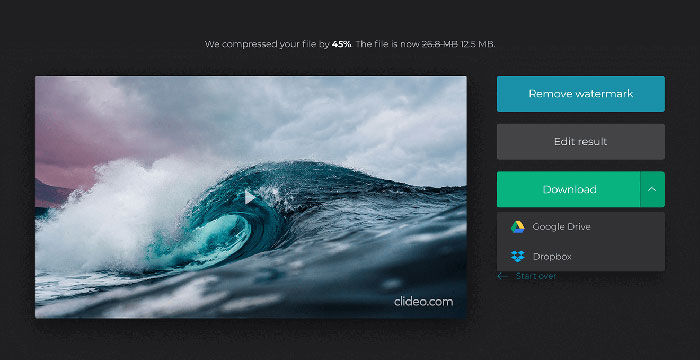
שלב 4. לאחר סיום הדחיסה תוכלו לראות את גודל הקובץ ההתחלתי ואת הקובץ הדחוס. כעת תוכלו להציג בתצוגה מקדימה את התוצאה כדי לוודא שהיא נראית טוב. אם אתם מרוצים ממנה, תוכלו ללחוץ על הכפתור Download כדי לשמור אותה למכשיר שלכם או לאחסון בענן.
חלק 3. שאלות נפוצות על דחיסת קבצי OGV
מהו קובץ OGV?
קובץ OGV הוא קובץ וידאו שנשמר בפורמט מיכל Ogg של קוד פתוח Xiph.Org. הוא מכיל זרמי וידיאו שעשויים להשתמש בקודקס אחד או יותר, כגון Theora, Dirac או Daala. ניתן להפעיל קבצי OGV באמצעות מגוון נגני מדיה.
כיצד פועלת דחיסת OGV?
כשמדובר בדחיסת קובץ OGV, מדובר בדחיסת אינטר-פריים שמובילה להפחתת גודל הקובץ על ידי הסרת הדמיון המתרחש בין מסגרות הווידאו.
כיצד ניתן לדחוס את פורמט MP4 ל- OGV?
אתה יכול להשתמש בכלי הנ"ל - מדחס וידאו חינם כדי לדחוס את קבצי ה- MP4 שלך ל- OGV. לחלופין, תוכל לבחור יישום ממיר וידאו שיעזור לך ליצור אותו.
סיכום
השיטות המקוונות לעיל יכולות לעזור לך לדחוס לכווץ סרטון OGV ביעילות. באיזה מהם העדפת להשתמש? תוכלו לשתף את המלצותיכם בתגובות למטה!
-
 מ 50MB ל 5MB - כיצד לדחוס קובץ MP4 בשניות
 סרטון MP4 גדול מדי להעלאה? רוצים להקטין את גודל הווידיאו? להלן 3 דרכים יעילות לדחיסת קובץ MP4 לגודל קטן יותר ללא הגבלה.
-
 הדרכה - 7 דרכים לדחיסת סרטונים בחינם מבלי לאבד איכות
 קרא וקבל 7 דרכים לדחוס קטעי וידאו בחינם במחשב או בטלפון. אתה יכול לצמצם קטעי וידאו גדולים לגדלי קבצים קטנים עבור דוא"ל, טוויטר, אינסטגרם, יוטיוב, וואטסאפ ועוד בקלות.
-
 כיצד לדחוס קבצי MOV ב- Windows, Mac, iPhone ו- Android
 מאמר זה מראה כיצד לדחוס קטעי וידאו QuickTime MOV בטלפון או במחשב שלך בפרטים. אם סרטון ה- MOV שלכם גדול מכדי לשלוח, לשתף או לשמור, תוכלו לקבל כאן 4 פתרונות מעשיים.
