


 ממיר וידאו אולטימטיבי
 מקליט מסך
 תיקון וידאו
 הורדה מאובטחת
בקר מהירות וידאו רב עוצמה - DaVinci Resolve Speed Editor
אם אתה רוצה להשתמש בעורך מהירות וידאו חזק, סביר שתרצה להשתמש בכלי הזה. DaVinci Resolve Speed Editor הוא כלי לשינוי מהירות וידאו המשתמש במקלדת USB. עורך מהירות זה מספק שליטה בחומרה מותאמת אישית, המאפשרת לך לערוך את מהירות הווידאו שלך בקלות. לכן, אם אתה תוהה מה עוד הכלי הזה יכול לעשות, קרא את המאמר הזה כדי לדעת יותר על DaVinci Resolve Speed Editor.

חלק 1. מידע בסיסי, תכונות, פונקציות ומחיר של DaVinci Resolve Speed Editor
רבים מעורכי הווידאו המקצועיים משתמשים ב-DaVinci Resolve Speed Editor כדי לשנות את מהירות הווידאו שלהם. ואם אתה חדש בשימוש ב-DaVinci Resolve Speed Editor, כנראה שתרצה להכיר את המידע, הפונקציות והמחיר של הכלי הזה. בחלק זה תכיר את המידע הבסיסי, הפונקציות והמחיר של עורך המהירות הזה.
מידע בסיסי
DaVinci Resolve היא מקלדת מסוג USB המאפשרת לך לערוך את הקובץ שלך. אם אתה רוצה כלי שיכול לשנות את מהירות הסרטון שלך, אז הכלי הזה הוא הטוב ביותר עבורך. DaVinci Resolve מספק דרך מהירה וקלה יותר לערוך סרטונים. זה יותר מסתם מקלדת מכיוון שיש לה תכונות עריכה רבות שבהן אתה יכול להשתמש, כולל עורך מהירות וידאו, בקרת חיוג חיפוש, הוספה/הסרה של אפקטים, בחירת סל מרובות מצלמות סינכרון ועוד. בנוסף לכך, לכלי עורך המהירות הזה יש גם גרסה אלחוטית.
כאשר אתה קונה מקלדת DaVinci Resolve, תראה כבל USB ומחוון מתח סוללה. לאחר שתסיר את כבל ה-USB מגב המכשיר, ה-Bluetooth ינסה לבצע התאמה אוטומטית במכשיר שלך.
יתרה מזאת, אם אתה מבקש את עורך המהירות של הכלי הזה, אתה יכול להשתמש בפקדי גלגל הריצה, בקרות ההשמעה ופקדי העריכה והחיתוך במקלדת שלך.
תכונות ופונקציות
אם אתה תוהה מהן התכונות והפונקציות של DaVinci Resolve, אנו מציגים להלן את התכונות והפונקציות הנפוצות ביותר של כלי זה.
Speed Editor
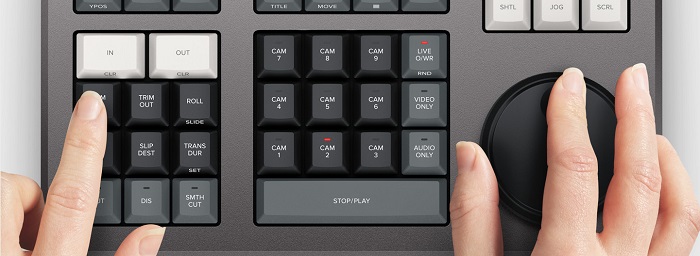
DaVinci Resolve Speed Editor מיועד לעורכים מקצועיים שרוצים לשפר את אפקטי המעבר בווידאו שלהם. בעזרת בקר מהירות וידאו זה, באפשרותך להאט או להאיץ את קצב הפריימים (fps) של הווידאו שלך, כדי להבליט את הסצנות הטובות ביותר בווידאו. יש דרכים רבות להשתמש ב-DaVinci Resolve כדי להאיץ קליפ.
◆ השתמש בנקודות In and Out על‑ידי גלילה בחוגת החיפוש והצבת נקודות ה-In וה-Out בציר הזמן של הווידאו, ואז עבור לפונקציות העריכה כדי לערוך את הווידאו שלך.
◆ השתמש בכפתורי Trim in and Trim out על‑ידי לחיצה והחזקה של כפתורי ה-Trim וסיבוב חוגת החיפוש. האינדיקטור החכם בציר הזמן מאפשר לך לראות איזה חלק אתה גוזר.
הוספה והסרה של אפקטים
בעזרת DaVinci Resolve Speed Editor ניתן גם להוסיף ולהסיר אפקטים מהווידאו שלך. האינדיקטור החכם בציר הזמן קובע באיזה נקודת עריכה אתה עובד. לחץ על מקש CUT כדי להסיר אפקט מנקודת העריכה. ואם אתה רוצה לבצע היעלמות (dissolve) לנקודת העריכה בציר הזמן, לחץ על מקש DIS (dissolve). בנוסף, אם אתה רוצה מעבר חיתוך חלק בנקודת העריכה, לחץ על SMTH CUT (smooth cut).



צבע
פונקציה זו מאפשרת לך לשנות את הניגודיות, הטמפרטורה, הגוון האמצעי, הרוויה ועוד. דף הצבע הוא אחת הפונקציות האהובות ביותר של DaVinci Resolve וניתן להשתמש בו בקלות על ידי מתחילים.
Sync Bin
ה-sync bin הוא פונקציה שבה ניתן למצוא סרטונים או שוטים שסונכרנו על ציר הזמן של העריכה. לאחר מכן אפשר להשתמש במקשי המצלמה כדי לבחור שוט חלופי ולערוך אותו בציר הזמן שלך.
רמת שמע וסימון
DaVinci Resolve יכול גם להתאים את השמע של הווידאו שלך. כדי להגדיר את רמות השמע בקליפ, החזק את המקש וכוון את רמת השמע באמצעות חוגת החיפוש. אם תלחץ פעמיים על מקש רמת השמע, יתווסף סמן (marker). ואם תלחץ פעמיים על המקש ותמשיך להחזיק, תוכל להגדיר את צבע הסמנים.
צפייה במסך מלא וסקירה
מקש זה מאפשר לך להפוך את הצופה למסך מלא. יש לו צבע אדום כך שתוכל למצוא אותו בקלות. אם תלחץ פעמיים על מקש זה, הוא יתפלל מהעריכה האחרונה שלך.
הוספת מעברים
שימוש במקש Transition יוסיף מעבר מותאם אישית לווידאו שלך. הוא דומה מאוד לכפתורי ה-CUT וה-smooth cut.
Snapper וצופה (Viewer)
לחיצה על מקש Snap מפעילה הצמדה (snapping) בציר הזמן שלך. ואם תלחץ ותשאיר את מקש ה-Snap לחוץ, זה יתאים את גודל חלון הצפייה (viewer).
מחיקה עם Ripple
מחיקת אדוות מאפשרת להסיר את הקליפ בנקודת ההשמעה; זה אדוות את ציר הזמן כדי להסיר את הפער בין שני הקליפים. מחיקת אדוות היא דרך טובה להפחית את משך ציר הזמן של הסרטון שלך.
מחיר
אתה יכול לקנות DaVinci Resolve Speed Editor עבור $395. ואם אתה מחפש גירסת תוכנה של הכלי הזה, אתה יכול להוריד אותה בחינם ב-Windows, Mac ולינוקס. עם זאת, גרסת התוכנה של כלי זה מורכבת לשימוש.
חלופה עבור DaVinci Resolve Video Speed Editor
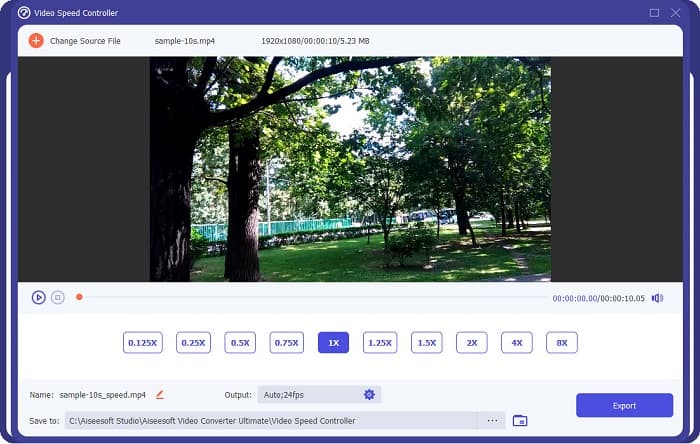
אם אתה רוצה דרך קלה יותר לערוך את מהירות הווידאו שלך, השתמש ב-FVC Video Converter Ultimate. תוכנת מחשב זו מאפשרת לך להאיץ או להאט את הווידאו שלך בקלות. עם תהליך פעולה מהיר, לא תבזבז זמן רב על עריכת מהירות הווידאו. נוסף על כך, ישנן הגדרות מהירות מוכנות רבות שתוכל לבחור עבור הווידאו שלך. ואם אתה תוהה מה עוד היא יכולה לעשות, לכלי זה יש פונקציות עריכה רבות, כולל דחיסת שמע, דחיסת וידאו, עורך מטא־דאטה לווידאו ועוד. הוא גם תומך במספר רב של פורמטים, כמו MP4, MKV, MOV, AVI, FLV, WMV ועוד יותר מ-1000 פורמטים. כדי לדעת יותר על תוכנה זו, קרא את התיאורים למטה.
יתרונות השימוש ב-FVC Video Converter Ultimate:
1. יש לו ממשק משתמש אינטואיטיבי.
2. זה מאפשר לך לשנות את מהירות הווידאו שלך מ-0.125x, 0.50x, 0.75x, 1.25x, 1.5x, 2x, 4x ו-8x מהירות מוגדרות מראש.
3. יש לו תכונות עריכה מתקדמות רבות לשימוש, כמו גוזם וידאו, מיזוג וידאו, יצרנית תלת מימד ועוד.
4. זמין בכל פלטפורמות המדיה, כולל Windows, Mac ולינוקס.
חלק 2. שאלות נפוצות על DaVinci Resolve Video Speed Editor
האם DaVinci Resolve Video Speed Editor שווה את זה?
עם המחיר שלו, כדאי להשתמש בכלי עורך מהירות הווידאו הזה מכיוון שהוא יכול להפיק פלטים באיכות מעולה ויש לו הרבה תכונות עריכה לשימוש.
האם DaVinci Video Speed Editor תואם לפורמטים כלשהם?
זה לא תומך בכל פורמטי הקבצים. עם זאת, זה יכול לתמוך בפורמטים רבים של קבצים, כולל MOV, MXF, DNG, DCP, ARI, MTS וכו'.
האם ל-DaVinci Resolve Video Speed Editor יש גרסה חינמית?
ל-DaVinci Resolve Video Speed Editor יש גרסת ניסיון בחינם לזמן מוגבל בלבד. כדי להשתמש בו לכל החיים, רכוש את הכלי עבור $395.
סיכום
כל השאלות שלך לגבי DaVinci Resolve Video Speed Editor כבר נענו. עם הכלי שיועד לעריכת מהירות וידאו, אתה יכול בקלות להאט או להאיץ את הווידאו שלך וליצור מעברים יפים בעזרת הכלי הזה. אבל אם אתה מחפש כלי נוח יותר וקל יותר לשימוש, נסה את FVC Video Converter Ultimate בחינם!
-
 כיצד להריץ סרטון קדימה באייפון - התאם את מהירות הווידאו
 איך אני יכול להריץ סרטון קדימה באייפון שלי? כיצד להריץ סרטון קדימה באייפון באמצעות iMovie? למד 3 דרכים להאיץ סרטון במכשירי iPhone ו-iPad.
-
 כיצד להאיץ את הווידאו ב-Premiere Pro ועם האלטרנטיבות שלו
 האם אתה רוצה לדעת איך להשתמש ב-Premiere Pro כדי להאיץ סרטון? אז אתה במאמר הנכון מכיוון שאנו מספקים שלבים וחלופות אחרות במחיר סביר.
-
 2 דרכים ללא מאמץ כיצד להאיץ סרטון ב-TikTok
 האם אתה רוצה לדעת את הסוד כיצד להאיץ וידאו ב- TikTok? לאחר מכן קרא את המאמר הזה כדי לקבל את הרעיון כיצד לעשות זאת ולדעת מהם 2 הכלים האחרים שיעזרו לך.
