


 ממיר וידאו אולטימטיבי
 מקליט מסך
 תיקון וידאו
4 שיטות לעריכה או תיקון מטא נתונים של MP3 ב-Windows ו-Mac
כולם הם Musicphile, מה שאומר שאנחנו אוהבים מוזיקה כי זה עוזר לנו להרגיש את הרגשות של הזמרים והכותבים למרות שאנחנו לא רואים אותם חזותית. באמצעות מוזיקה, כולם יכולים להישאר מחוברים, והיא יכולה לעזור לנו להפיג מתחים, לשפר את מנת המשכל שלנו ולהיות פרודוקטיביים בכל יום. רוב המוזיקה היא בפורמט של MP3 מכיוון שהיא מיכל האודיו הסטנדרטי עבורה. למרות שאתה יכול לנגן את ה-MP3 במכשיר שלך, לא תפעיל את הסידור הנכון אם המטא נתונים שגויים. אתה לא יכול להגדיר את מצב הרוח הנכון אם ספריית המוזיקה שלך בבלגן, אז מה עליך לעשות? למה שלא תנסה לתקן את התגים כדי לסדר אותם נכון? אם אתה רוצה לדעת כיצד לערוך מטא נתונים של MP3 ב-Windows וב-Mac, זה המאמר הנכון עבורך, מכיוון שאנו מציגים ארבע שיטות שונות בהן תוכל להשתמש.

חלק 1. השיטה הטובה ביותר לתיקון או עריכה של מטא נתונים של MP3 ב-Windows וב-macOS [מומלץ]
FVC Video Converter Ultimate כבר עשה צעד לקראת היותו אחד מהתוכנות הטובות ביותר לתיקון תגיות MP3 ב-Windows וב-Mac. הכלי הזה תומך בהעלאת MP3, WAV, WMA, AAC ועוד פורמטי שמע רבים נוספים כדי לפתור את אותה הבעיה של המטא-דטה. ניתן גם להסיר מטא-דטה מוסתר שאינך יכול לגשת אליו בעזרת עורכי תגיות אחרים.
לא רק זה, הוא יכול להמיר את ה-MP3 לפורמט שמע אחר אם תרצה, והוא גם מציע הרבה פונקציות ותכונות שנמצאות בתוך ארגז הכלים; אתה יכול לבדוק אותם אם אתה מוריד את זה. תוך דקות ספורות, תוכל לבקש מהתוכנית הזו לתקן את הבעיה מהר ככל האפשר. לא כל כך בטוח אם זה נכון? למרבה המזל, המדריך הכתוב למטה ילמד כיצד לערוך מטא נתונים של MP3 כדי להוכיח שאתה יכול לעשות זאת במהירות, כפי שאנו אומרים.
שלב 1. לחץ על כפתור ההורדה למטה, ובחר איזה משני מערכות ההפעלה אתה משתמש כרגע. התקן אותו במהירות לאחר ההורדה, פתח את הכלי והמשך לשלב הבא.
הורדה חינמיתל-Windows 7 ומעלההורדה מאובטחת
הורדה חינמיתל-MacOS 10.7 ומעלההורדה מאובטחת
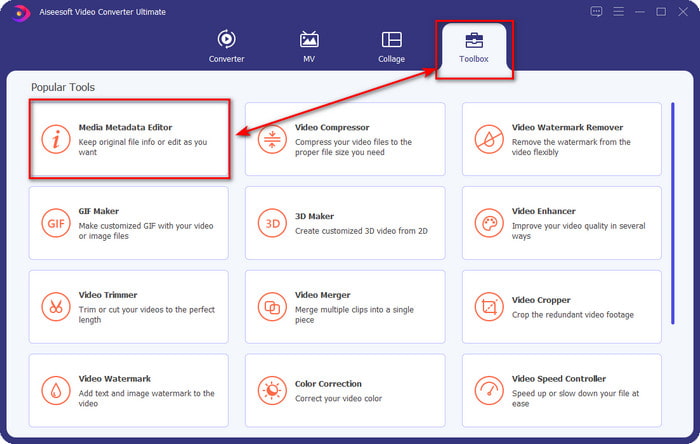
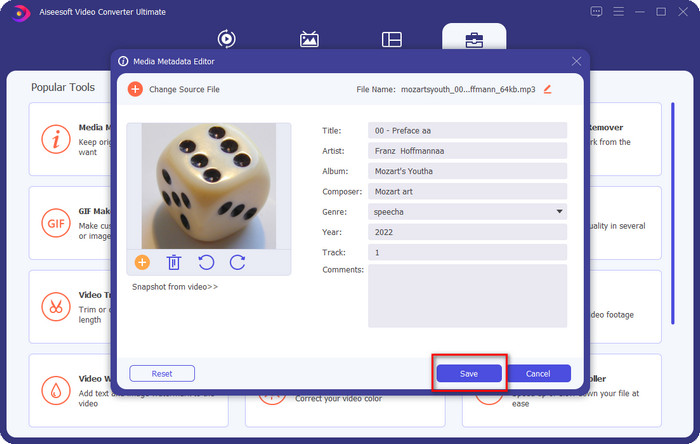
שלב 2. בחר Toolbox ומתחתיו לחץ על Media Metadata Editor. כפי שאמרנו בהקדמה, ישנן פונקציות רבות נוספות שתוכל להשתמש בהן שנמצאות ב-Toolbox שאינן מוצעות בעורך האחר.
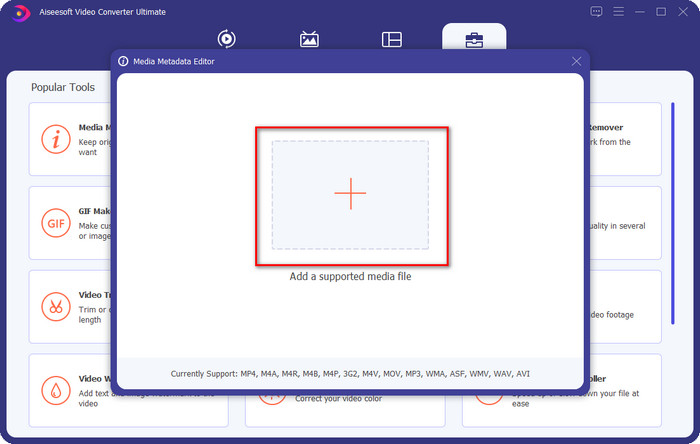
שלב 3. חלון קטן יופיע על המסך; לחץ על הסמל +. אתר את קובץ האודיו או קובץ ה-MP3 בתיקייה שתופיע על התצוגה, לחץ על הקובץ ולחץ על Open כדי להעלות אותו.
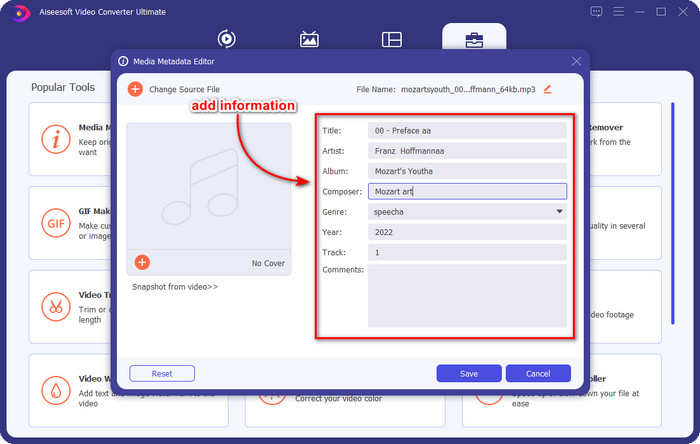
שלב 4. ערוך ותקן את המטא-דטה בהתאם לצרכים שלך; לחץ על כל תיבת טקסט כדי להוסיף מידע.
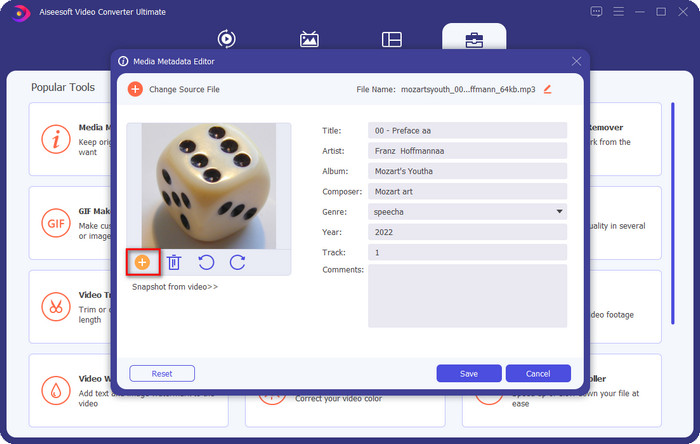
אופציונלי. עם הכלי הזה, תוכל גם להוסיף או לתקן מטא-דטה של עטיפת אלבום MP3 בקובץ ה-MP3 שלך על‑ידי לחיצה על הסמל +; בחר את התמונה שברצונך להשתמש בה כעטיפה בתיקייה, ולחץ על Open כדי להמשיך.
שלב 5. אם סיימת להוסיף ולתקן את המטא-דטה של קובץ ה-MP3 שלך, לחץ על כפתור Save כדי לשמור את השינויים שביצעת בקובץ האודיו. Voilà, כעת תיקנת את תגיות האודיו ללא מאמץ בעזרת הכלי האולטימטיבי.
חלק 2. 3 שיטות חינמיות לשינוי תגי MP3 בשולחן העבודה
iTunes
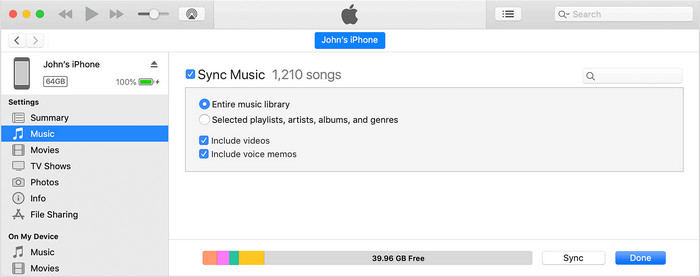
iTunes היא תוכנה מובנית שיכולה לעזור לך לערוך תגיות MP3 ב-macOS X. היא עושה את אותו הדבר כמו Groove Music בכל הקשור לעריכת המטא-דטה של קובץ האודיו שלך. אבל עם הכלי הזה, אתה יכול גם לקנות מוזיקה ולהשמיע אותה כאן במהירות האפשרית. בנוסף, למוזיקה שמגיעה מהאפליקציה הזו כבר יש תגיות, ואם למוזיקה שהורדת אין תגיות, תוכל להשתמש בזה כדי להוסיף אותן. עקוב אחר השלבים למטה כדי לדעת כיצד לעשות זאת.
שלב 1. פתח את iTunes ב-Mac שלך.
שלב 2. לחץ על קובץ האודיו ובחר Get Info.
שלב 3. תקן את התגיות ולחץ על OK כדי לשמור את השינויים.
MP3Tag
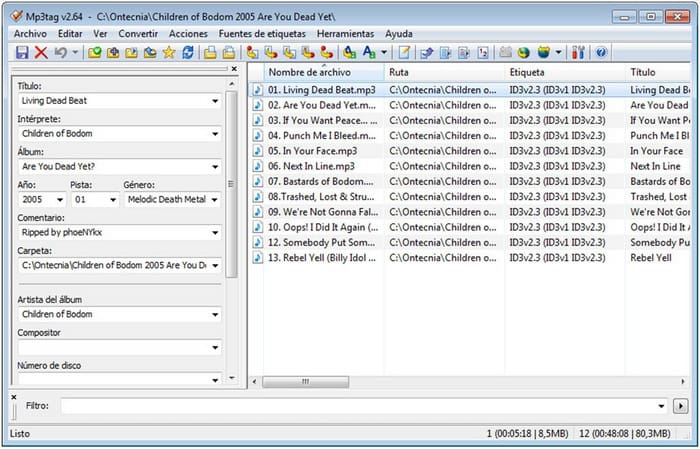
MP3 Tag היא תוכנה ייעודית ואחת הטובות ביותר לתיקון תגיות MP3 שניתן להוריד ל-Windows. עם הכלי הזה תוכל לגשת אוטומטית למסד נתוני המוזיקה כדי לקבל מטא-דטה נכון. למרות שהתוכנה אינה דומה לתוכנות המובנות האחרות, עדיין אפשר לראות שניתן להתאים את המטא-דטה בעזרתה עבור פורמטים נפוצים. אם ברצונך להוריד ולהשתמש בכלי הזה, עקוב אחר השלבים שלמטה.
שלב 1. הורד את התוכנה למחשב ופתח אותה.
שלב 2. גרור ושחרר את קובץ ה-MP3 למרכז, לחץ על קובץ האודיו, ובצד השמאלי תוכל לערוך את התגיות.
שלב 3. כדי לשמור את העריכות שביצעת, לחץ על סמל ה-save.
מוזיקת גרוב
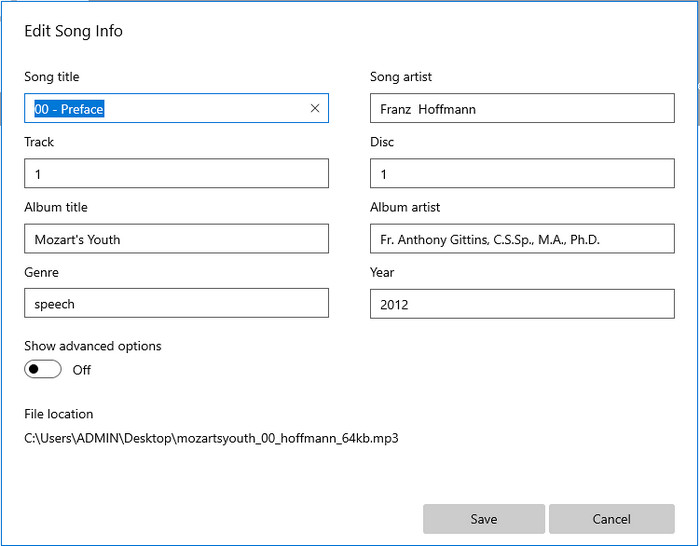
נניח שאין לך מספיק מקום בכונן. האם אפשר ללמוד איך לערוך תגיות MP3 ב-Windows 10? במקרה כזה Groove Music כאן כדי לעזור למשתמשי Windows לשנות את התגיות בקובצי האודיו שלהם. עם הכלי הזה תוכל להשמיע כמעט כל קובץ אודיו השמור בכונן שלך בקלות. אם אתה רוצה לדעת כיצד להשתמש באפליקציה המובנית הזו, עקוב אחר השלבים שלמטה.
שלב 1. לחץ על סמל ה-windows שעל המסך והקלד Groove Music כדי לפתוח אותו. לאחר הלחיצה על האפליקציה, הכלי יתחיל בהגדרה האוטומטית שלו.
שלב 2. לחץ לחיצה ימנית על קובץ האודיו ועבור אל Edit Info.
שלב 3. שנה את מטא-דטת Edit Song Info ולחץ על Save כשתסיים הכול.
חלק 3. שאלות נפוצות לגבי עריכת מטא נתונים ב-MP3
האם זה בטוח לערוך מטא נתונים MP3 באינטרנט?
ובכן, כן, אתה יכול לערוך את המטא נתונים ב-MP3 שלך באינטרנט אם אתה רוצה. אבל זכרו שיש אתרים עם רשת לא מאובטחת, אז כניסה היא החלטה גרועה שתקבלו. לכן, כדי להימנע מכך, עליך להשתמש בכלים שהצגנו למעלה כדי לתקן את המטא-נתונים של mp3 בבטחה.
האם מטא נתונים חשובים?
בהחלט שכן. מטא-דטה משחק תפקיד משמעותי בכל קובץ מדיה שיש לנו. בעזרתו ניתן לזהות בקלות מה יש בתוך קובץ, כמו מיקום, זמן, תאריך, מידע ועוד. יתרה מזו, המידע שהוספנו כאן הוא רק רעיונות פשוטים על מטא-דטה, ואם ברצונך לדעת עוד על מטא-דטה, עליך ללחוץ על קישור זה ולקרוא על מהו מטא-דטה.
האם אוכל להציג מטא נתונים ב-MP3 שלי?
בהחלט כן, אתה יכול, ואם אינך יודע איך לצפות במטא-דטה, תוכל לקרוא מאמר זה ולעקוב אחר השלבים המפורטים בו כדי לצפות בהם נכון.
סיכום
אכן, כל אחד מארבעת המתקנים הטובים ביותר לתגיות .mp3 נמצא כעת בהישג ידך, מה שאומר שאתה יכול לבחור את הכלי לפי הצרכים שלך. עם המידע העובדתי שסיפקנו במאמר זה, נוכל לערוך או לתקן בקלות את התגיות בקובצי ה-MP3 שלנו. למרות שהשיטות שסיפקנו הן מהטובות ביותר, אנחנו עדיין בוחרים ב-FVC Video Converter Ultimate על פני התוכנות המובנות או אפליקציות צד שלישי אחרות. זאת משום שהכלי הזה מציג את עריכת התגיות המתקדמת והחזקה ביותר שתצטרך בלי להשקיע מאמץ רב. לכן, אם אתה רוצה את הכלי, תוכל ללחוץ על כפתור ההורדה ולעקוב אחר השלבים שכתבנו למעלה.
-
 5 עורכי מטא נתונים MP4 המובילים ביותר [עודכן 2022]
 כיצד אוכל לשנות את המטא נתונים של MP4 שלי? הדרך הטובה ביותר לשנות את המטא נתונים של ה-MP4 שלך היא להשתמש בעורך תגים התומך בפורמט MP4 כמו הדוגמה שאנו מפרטים למטה.
-
 5 עורכי תגי הווידאו של AVI לבחירת המשתמשים לשנת 2022
 מהו עורך תגי ה-AVI הטוב ביותר שאני יכול להשתמש בו? שוק עורכי התגים עבור קבצי AVI רחב מדי. אז היום נציג את חמשת העורכים הנבחרים ביותר בשנת 2022.
-
 4 עורכי MKV Metadata יעילים עבור Windows ו-macOS
 אני לא יכול למצוא עורך מטא נתונים של MKV בשוק. במה עלי להשתמש? נתקלת באותה בעיה? אם כן, המשך לקרוא את הבלוג הזה כדי להכיר את הכלים לשימוש.
